
emilia-bot
v0.1.2
Published
Emilia-bot facilitate meeting on the slack.
Downloads
12

Maintainers
 shimotai5
Readme
emilia-bot
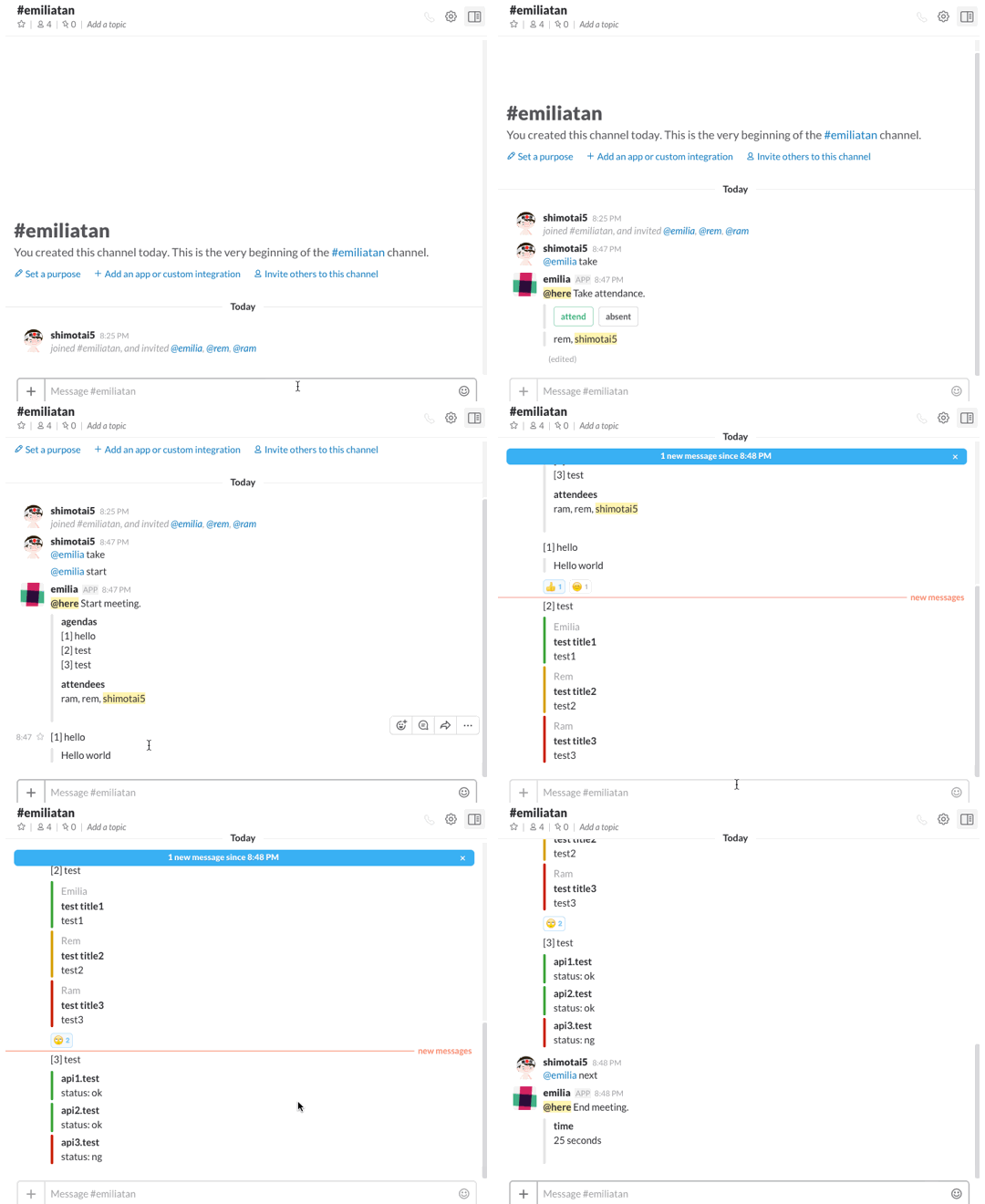
Emilia-bot facilitate meeting on slack.
Installation
npm install emilia-bot
Usage
- Get Client ID and Client Secret from slack api and setting.
- Install emilia-bot.
- Setup emilia-bot and serve.
- Authenticate slack api.
- Invite the bot to your team.
Minimum use:
'use strict'

const Emilia = require('emilia-bot')

let modules = [
  {
    agenda: 'hello',
    execute: function (success, failed) {
      success({
        text: 'hello world.'
      })
    }
  }
]

new Emilia(modules).start().catch((err) => {
  console.error(err)
})
See example...
Control
With default settings.
Messages | Description
----------------|----------------
@emilia take | Take attendance.
@emilia start | Start meeting.
@emilia next | Execute next module.
@emilia prev | Execute prev module.
@emilia goto 1| Execute specified module.
@emilia end | End meeting.
Module
Emilia-bot manages an agenda in a unit of module.
Module example:
{
  agenda: 'hello',
  execute: function (success, failed) {
    success({
      text: 'hello world.'
    })
  }
}
Execute function is converted to promise, where the parameters success and failed are compatible with resolve and reject. The parameter for success function is an contents object of attachment, and failed function parameter is a string.
Options
Variables | Type | Description | Required | Default
------------------------|---------|-------------------------------------------------------------------------------|:---------:|:--------------------------------------------
slackApiClientId | string | | | process.env.EMILIA_SLACK_API_CLIENT_ID
slackApiClientSecret | string | | | process.env.EMILIA_SLACK_API_CLIENT_ID
port | int | Authentication server port for the slack api. | | process.env.EMILIA_PORT
storage | object | Storage setting for botkit. | | { json_file_store: './simple_storage/' }
reactionRateToNextAgenda| int | 0.0 ~ 1.0. Reaction rate of atendees to execute next agenda. | | 0.8
Hears
The settings for the message emilia-bot responds. See botkit Hears Event for more details.
Variables | Type | Description | Required | Default
----------------|-----------------|-------------|-----------|---------------------
takeAttendance | string or array | | | ['take']
startMeeting | string or array | | | ['start']
nextAgenda | string or array | | | ['next']
prevAgenda | string or array | | | ['prev']
gotoAgenda | string or array | | | ['goto ([0-9]+)']
endMeeting | string or array | | | ['end']
Messages
The settings for the message posted by emilia-bot.
Variables | Type | Description | Required | Default
----------------------------|---------|-------------|-----------|--------------------------
takeAttendanceMsg | string | | | @here Take attendance.
takeAttendanceAttendBtnText | string | | | attend
takeAttendanceAbsentBtnText | string | | | absent
startMtgMsg | string | | | @here Start meeting
startMtgAgendasTitle | string | | | agendas
startMtgAttendeesTitle | string | | | attendees
endMtgMsg | string | | | @here End meeting.
Setting example
'use strict'

const Emilia = require('emilia-bot')

let modules = [
  {
    agenda: 'hello',
    execute: function (success, failed) {
      success({
        text: 'hello world.'
      })
    }
  }
]


let options = {
  reactionRateToNextAgenda: 0.5,
  hears: {
    takeAttendance: ['take'],
    startMeeting: ['start'],
    nextAgenda: ['next'],
    prevAgenda: ['prev'],
    gotoAgenda: ['goto ([0-9]+)'],
    endMeeting: ['end']
  },
  messages: {
    takeAttendanceMsg: '@here Take attendance.',
    takeAttendanceAttendBtnText: 'attend',
    takeAttendanceAbsentBtnText: 'absent',
    startMtgMsg: '@here Start meeting',
    startMtgAgendasTitle: 'agendas',
    startMtgAttendeesTitle: 'attendees',
    endMtgMsg: '@here End meeting.'
  }
}

new Emilia(modules, options).start().catch((err) => {
  console.error(err)
})
Contributing
Feel free to create. If the PR is an big changes let's discuss about it on github issue first.
ToDo
- [ ] Test! Test! Test!!!
- [ ] Write docs and comments on code.
- [ ] Implement meeting start by cron.
Reference
License
Unless otherwise noted, the source files are distributed under the MIT License found in the LICENSE file.