
emos-vault
v0.4.0
Published
Everyone's Markdown Organizer System — a role-aware, agent-friendly Markdown vault for engineering managers, ICs, PMs, and directors. Plain files you own; works with any editor and any AGENTS.md / Agent Skills harness. Scaffold and update via the CLI.

Maintainers
 trustmaster
Readme
🗂️ emOS — Everyone's Markdown Organizer System

A Markdown-based operating system for engineering managers, technical leads, directors, and individual contributors. It's just plain .md files, so it works with whatever you already use — any Markdown editor (Obsidian, VS Code, Cursor, Zed, …) for humans, and any agentic coding harness (Claude Code, Codex, OpenCode, Cursor, Kimi Code, …) for the AI side. Your team, projects, decisions, incidents, 1-on-1s, and weekly planning live as files you own, with an agent that knows the conventions and does the filing.
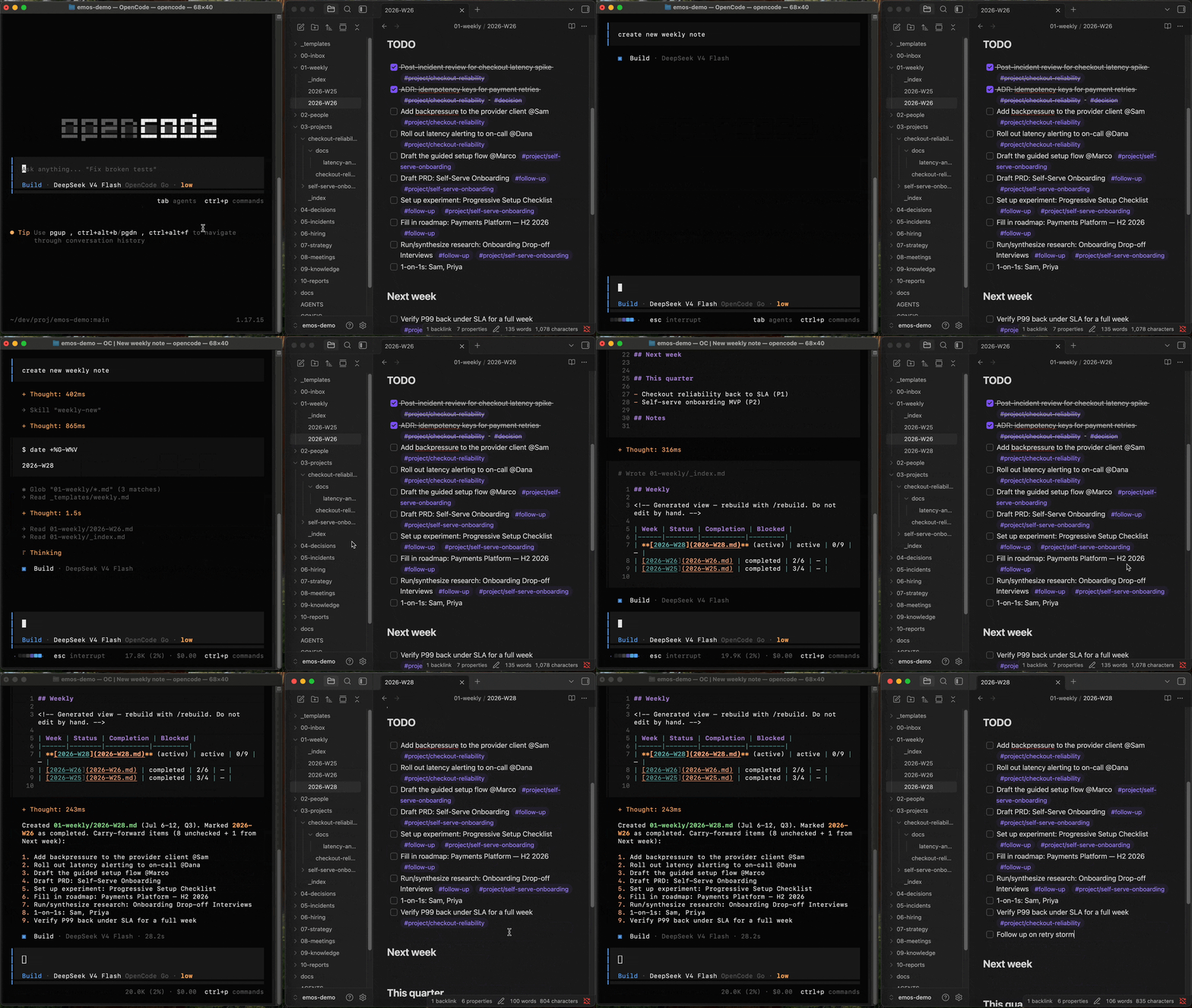
emOS combines powerful approaches:
- Structured knowledge base that you can grow day by day
- Turns any AI agent into your personal assistant
- Extensible via skills and tools
- Connects everything into an integrated operating system
No database, no SaaS, no lock-in. Just files on disk or in a git repo you control.
# Scaffold a fresh vault in an empty directory
npx emos-vault init
Then open it with your AI agent and ask it to configure the project.
Why
Engineering management generates a lot of connected context — a project pulls in people, meetings, decisions, incidents, and strategy. Most tools scatter that across apps. emOS keeps it in one traversable Markdown vault where:
- You own the data. Plain files, on your machine or in a git repo. Readable in any editor.
- An agent does the repetitive work. Skills for 1-on-1 prep, weekly planning, incident post-mortems, performance-review evidence, project context, and more.
- You make the decisions. By default, you are in the driver seat to make decisions and communicate them. No automatic AI-replies on your behalf: human interactions stay human.
- Projects are first-class. Any file links to a project via a
projects:key; each project hub shows an auto-generated rollup of everything related. - Tools are pluggable. Jira/Confluence/Slack/Google Workspace ship as defaults, but the workflows are tool-agnostic — swap in Linear, Notion, etc.
Quick start
- Scaffold an empty directory:
This lays down the framework, an empty content skeleton, themkdir my-vault && cd my-vault npx emos-vault init.claudesymlink for agent discovery, and starterconfig.yaml/CONFIG.md. - Configure — open the vault with your coding agent (Claude Code, OpenCode,
Codex, or any harness that reads
AGENTS.md) and ask it to configure the project (this runs theconfigureskill). It prompts for your name, team, people, and which tools you use — all optional — and writes the config for you. (Prefer manual? Edit.agents/config.yaml.) - Use it — capture into
00-inbox/, start a project with/project-new, prep a 1-on-1 with/1on1 <name>, plan your week with/weekly-new.
Want to see it populated first? Browse examples/ — a fictional
"Payments Platform" team with projects, incidents, decisions, and dashboards.
How it's organized
00-inbox/     Quick capture — unsorted
01-weekly/    Weekly planning + review
02-people/    Profiles, 1-on-1s, reviews, teams
03-projects/  One folder per project; each has a hub doc with a Related rollup
04-decisions/ ADRs
05-incidents/ Post-mortems
06-hiring/    Positions, interviews, rubrics
07-strategy/  OKRs, roadmaps
08-meetings/  Meeting notes
09-knowledge/ Reference material
10-reports/   Recurring reports
_templates/   File templates
docs/         Guides (this repo)
.agents/      Config, conventions, skills, integration adapters, role packs
.emos/        Updater machinery (you don't edit this)
Each section has a generated _index.md dashboard the agent rebuilds with
/rebuild.
Works for your role
emOS isn't just for engineering managers. One config field —
.agents/config.yaml → owner.role — selects a role pack that tunes
vocabulary, performance-review dimensions, the weekly status-report format, and
your default 1-on-1 framing. The folders are the same for everyone; only the
language and emphasis change.
| Role | What shifts |
|------|-------------|
| em (default) | Direct reports, team-health async, downward coaching 1-on-1s |
| ic | Self-review brag-doc, weekly snippets, upward 1-on-1s with your manager |
| pm | PRDs & launches, product-status update for stakeholders, roadmap/OKR focus |
| director | Portfolio of teams, program rollups, 1-on-1s with managers & skip-levels — covers the whole M2+ band (senior manager · head of · director · VP) |
Set it via /configure (or edit the field), and switch anytime. A person's
relation: (report/manager/peer/stakeholder) refines framing per person.
Add your own role in a few lines — see docs/roles.md.
Role is what things are called. Voice is how sentences are built. A separate optional
key, agent.voice, points at a writing-voice file so authored files sound like you
rather than like an agent — word choice, sentence shape, formatting habits, a ban list.
It styles the files emOS writes, never how it talks to you in chat. emOS ships the
template and the /voice skill but never a voice, because a shipped voice is a generic
voice. See docs/voice.md.
Typical workflows
You drive emOS by just talking to your agent in plain language. Each skill carries a description of when to use it, so the agent picks the right one from what you ask — no command syntax to memorize. The examples below are phrased the way you'd actually type them.
Every skill can be triggered three ways, and you can mix them freely:
- Natural language — "prep my 1-on-1 with Priya" (works in any harness)
- Slash command —
/1on1 Priya(where your harness supports them)- Just ask — describe the outcome and let the agent choose the skill
The names in the Skills & capabilities tables are the slash aliases; the plain-English trigger is always available.
Start the day
"What's on my plate today?"
A terse briefing — open TODOs, blockers, active incidents, upcoming deadlines, and today's 1-on-1s.
Run the week
"Start this week's plan." — opens the week's file, carrying open TODOs forward "Capture this: vendor renewal is due end of Q3." — timestamped note into today's inbox "Triage my inbox." — the agent classifies each item and proposes where it goes, then waits for your OK "Let's close out the week." — tallies completion, scans the week, writes the retro
Prep and run a 1-on-1
"Prep my 1-on-1 with Priya."
Builds a prep file from her profile, last session's carry-over, recent weekly mentions, and project context. Take notes live; next week the agent pulls the unresolved threads forward automatically.
Spin up and work a project
"Start a new project for GCP cost optimization." — folder + hub doc + a follow-up TODO this week "Pull everything about the GCP cost project into one place." — full context loaded into the session "Start meeting notes for the GCP planning sync." "Record a decision: we're adopting spot instances for batch workers." — writes the next ADR "Draft a design doc for the spot-instance migration." — an RFC in the project's
docs/, ready to circulate "Refresh the project's Related section." — regenerates the hub rollup after you've tagged content
Handle an incident
"We've got checkout 500s spiking in eu-west-1 — start a post-mortem."
Creates the incident file with an inferred severity and a follow-up TODO in the current week.
Report up and out
"Draft my weekly manager update." — synthesizes the week's 1-on-1s, projects, and incidents "Pull the current sprint into a report." — Jira sprint snapshot grouped by status "Help me prepare Priya's performance review." — gathers real evidence, invents no ratings "Log a win: cut checkout p99 latency 40% this sprint." — appends to your brag doc so review season writes itself
Lead through managers (for directors and other leaders of leaders)
"Register the Payments team — Priya runs it." — a team entity you can hang work, people, and health off "What's the state of the org?" — every team, work grouped by team, cross-team risks, open escalations "How healthy is Payments this quarter?" — a scorecard from incidents, 1-on-1s, hiring and delivery, logged to the team "Who am I overdue to skip with?" — coverage across the org, plus themes that contradict what managers report "Build the calibration pack for this cycle." — evidence grouped by manager, consistency checks, no invented ratings "I need a decision from my VP on the vendor switch." — a one-page brief with options, a recommendation, and the ask "Checkout is blocked on the platform team." — an escalation with impact, what's been tried, and the fallback
Teams are opt-in: a vault that never runs /team-new behaves exactly as before, and
every skill above degrades to project- and person-level grouping.
Pull in outside context (when the matching tool is enabled)
"Save this Slack thread: " — classified note into the inbox "Import this Confluence page: " — imported, classified, and routed "Publish this file to Confluence."
Skills & capabilities
Ask for any of these in plain language — the agent matches your request to the
right skill. The /<name> column is the slash alias where your harness supports
it. Provider skills (marked ⚙︎) only activate when the matching tool is enabled
in your config. Org-layer skills (marked 👥) are written for leaders of managers —
they stay invokable by any role, they're just de-emphasized when they don't fit yours.
Daily & weekly cadence
| Skill | What it does |
|-------|--------------|
| /morning | Terse briefing — TODOs, blockers, active incidents, upcoming deadlines, today's 1-on-1s |
| /weekly-new | Start the week's plan, carrying open TODOs and follow-ups forward |
| /weekly-review | Close out the week — completion tally + retrospective |
| /capture | Quick, no-analysis note into today's inbox |
| /inbox | Triage inbox items — classify and route, with confirmation before moving |
| /import-url <url> | Import any URL — Confluence, Google Doc, GitHub, or web page — classify and file it, then pull your action items into this week's plan (uses the matching tool when enabled, plain fetch otherwise) |
People
| Skill | What it does |
|-------|--------------|
| /1on1 <name> | Build a 1-on-1 prep file from profile, carry-over, recent mentions, and projects |
| /perf-review <name> | Draft a review narrative from real evidence — no invented ratings |
Projects, decisions & incidents
| Skill | What it does |
|-------|--------------|
| /project-new <title> | Create a project folder + hub doc + follow-up TODO |
| /project <slug> | Load a project's full context into one session |
| /project-sync [slug] | Regenerate the hub's auto Related rollup |
| /meeting-new <title> | Dated meeting note linked to a project |
| /decision <title> | New ADR with the next sequential number |
| /design-doc-new <title> | Technical design doc / RFC in a project's docs/ — the engineering how: design, alternatives, security/perf, rollout |
| /incident <desc> | Post-mortem file with inferred severity and a follow-up TODO |
Product
| Skill | What it does |
|-------|--------------|
| /prd-new <title> | PRD in a project's docs/ — problem, goals, requirements, metrics, rollout |
| /experiment-new <name> | A-B test brief — hypothesis, primary + guardrail metrics, variants, sizing, results log |
| /roadmap-new <horizon> | Now / Next / Later roadmap in 07-strategy/roadmaps/; links projects to roll up |
| /research-new <topic> | User-research / interview-synthesis note in 09-knowledge/research/ (PII-free) |
Leading through managers (👥 — written for director; invokable by any role, inert
until the vault has teams)
| Skill | What it does |
|-------|--------------|
| /team-new <name> 👥 | Register a team — an org unit you lead through its manager |
| /team-sync [slug] 👥 | Regenerate team hub rollups and the portfolio hub |
| /portfolio 👥 | The org-scale /project — every team, work by team, risks, escalations, blind spots |
| /team-health [slug] 👥 | Team scorecard: delivery, quality, morale, retention, hiring, tech health |
| /skip-level [name] 👥 | Prep a skip-level, or (no args) report coverage and themes across the org |
| /calibration <cycle> 👥 | Calibration evidence grouped by manager + cross-team consistency checks |
| /talent-map 👥 | Placement, promo candidates, key-person risk, succession cover |
| /promo-case <name> 👥 | Promotion packet — evidence at the target level, gaps, sponsor plan |
| /staff-meeting 👥 | Next note in the leadership-team series, carrying open actions forward |
| /exec-brief <topic> 👥 | One-page decision memo — ask, options, recommendation, risks |
| /escalation <topic> 👥 | Escalation with impact, what's been tried, the ask, and the fallback |
| /headcount [quarter] 👥 | Reqs by team, pipeline health, attrition themes, prioritisation order |
| /qbr [quarter] 👥 | Quarterly review — commitments vs. outcomes first, next quarter's bets |
| /reliability-review [period] 👥 | Aggregate incident trends, repeat causes, unclosed post-mortem actions |
Reporting
| Skill | What it does |
|-------|--------------|
| /manager-report | Weekly async status, synthesized from weeklies, 1-on-1s, projects, incidents |
| /brag-log [win] | Append to your evergreen impact log (brag doc), or harvest recent wins — feeds self-reviews and snippets |
| /jira-sync ⚙︎ | Pull the current sprint into a status-grouped report |
| /github-sync ⚙︎ | Snapshot a GitHub Projects board into a status-grouped report |
Integrations (capability-gated ⚙︎)
| Skill | Capability | What it does |
|-------|-----------|--------------|
| /create-jira-ticket | issue_tracker | Create a Jira ticket via MCP |
| /jira-sync | issue_tracker | Snapshot the active sprint into a report |
| /create-github-issue | issue_tracker | Create a GitHub issue (+ optional Project board) via gh |
| /github-sync | issue_tracker | Snapshot a GitHub Projects board into a status-grouped report |
| /pr-review | code_host | First-line PR review pass — summary, flags, architectural/dependency changes, escalations (chat only, never posts) |
| /github-browse | code_host | Read-only remote repo exploration via gh — for incident investigation & assignments |
| /confluence-load, /confluence-save | wiki | Import from / publish to Confluence |
| /slack-capture | chat | Save a Slack thread as a classified note |
| Google Workspace (gws-*) | docs | Gmail, Calendar, Drive, Docs, Sheets, Slides |
Vault maintenance
| Skill | What it does |
|-------|--------------|
| /configure | Interactive setup/update of owner, team, people, and tools (don't hand-edit YAML) |
| /voice | Set up your writing voice for authored files; pass a path or URL to add a writing sample |
| /doctor | Read-only health check — broken frontmatter, rotted project links, unmapped mentions, stale dashboards |
| /rebuild | Regenerate all _index.md dashboards |
| /emos-update | Check for and apply framework updates |
Projects as hubs
emOS is filed by type (meetings, decisions, people…) but work happens by
project. Any file can carry projects: [slug] in its frontmatter (or a
#project/{slug} tag in prose). Each project's hub doc has a generated rollup:
<!-- rollup:start — generated by project-sync, do not hand-edit -->
## Related
### Meetings · Decisions · Incidents · People · Strategy · Reports · Open TODOs
<!-- rollup:end -->
Run /project-sync to regenerate it, or /project <slug> to load a project's
full context into one session. See examples/ for a populated hub.
Teams work the same way, one level up. If you lead through managers, /team-new
registers a team at 02-people/teams/{slug}.md with the same kind of hub. Files link to
it with teams: [slug] (or #team/{slug} in prose), /team-sync regenerates the rollup,
and 07-strategy/portfolio.md aggregates every team. It's entirely optional — a vault
that never creates a team is unaffected, and no config change is required to start.
Tools & integrations
Tools are chosen by capability, not hardcoded:
tools:
  issue_tracker: jira        # jira | github | none
  code_host:     github       # github | none  (PR review + code browsing)
  wiki:          confluence   # confluence | none
  chat:          slack        # slack | none
  docs:          gws          # gws | none
Each provider has an adapter in .agents/integrations/ binding it to the skills
that implement it. One provider can fill several capabilities — github backs
both issue_tracker (issue creation) and code_host (PR review + code
browsing), so you can pair issue_tracker: jira with code_host: github. Adding
a tool (Linear, Notion, Mattermost, MS Office…) is a new skill + adapter + config
flip — you never edit the core workflows. See docs/integrations.md.
Staying up to date
emOS separates framework files (structure, templates, skills — safe to
update) from your content (never touched). The boundary is declared in
.emos/manifest. Keep your vault in your own git repo and pull improvements:
npx emos-vault update    # pull the latest published release into this vault

# or track a specific source (git ref, fork, or local clone):
./emos update --source <git-url-or-path>
Run either from inside your vault. Locally-edited framework files are preserved
as <file>.emos-new for you to merge, never clobbered.
Testing unreleased changes. To pull the GitHub repo's latest HEAD instead
of the published npm release — useful for developers validating changes before a
release:
npx emos-vault update-head            # update from the default branch HEAD
npx emos-vault update-head --ref dev  # or a specific branch
Windows note: agent discovery uses a
.claude → .agentssymlink. On Windows, enable Developer Mode orgit config core.symlinks true. If symlinks aren't available,emos initcopies.agentsto.claudeinstead — re-run after updates to keep them in sync.
Extending
- Add a tool: docs/integrations.md
- Change or add a role: docs/roles.md
- Set your writing voice: docs/voice.md
- Write a skill: docs/authoring-skills.md
- Conventions:
.agents/conventions.md - Agent entry point:
AGENTS.md
Requirements
- Node.js ≥ 18 (for the
emosCLI). No other runtime dependencies. - Any Markdown editor — Obsidian, VS Code, Cursor, Zed, or whatever you like —
and/or any agentic harness to drive it: Claude Code, Codex, OpenCode,
Cursor, Kimi Code, etc. Agents discover the vault via
AGENTS.mdand the Agent Skills (SKILL.md) format (with a.claude → .agentssymlink for Claude Code; Codex reads.agents/skills/natively). No tool is required, nothing is locked in.
Contributing
Contributions welcome — see CONTRIBUTING.md.
License
Apache-2.0 © 2026 Vladimir Sibirov