
engram-protocol
v0.1.5
Published
MCP server and CLI for the Engram AI memory protocol — persistent context across sessions, devices, and agents

Maintainers
 ecomxco
Readme
Engram
Give your AI a memory.





One script. A handful of markdown files. Your AI stops forgetting what you talked about yesterday.
The Problem
You're 12 sessions into a complex project with Claude, ChatGPT, or Gemini. You've made decisions, explored alternatives, rejected dead ends. Then you open a new chat:
"I'd be happy to help! What are you working on?"
Everything is gone. You re-explain. The AI re-suggests things you already tried. You waste an hour getting back up to speed.
Or you try to feed it a massive log of past conversations — and the AI loses its context window halfway through and forgets what it just read.
The Fix
Engram is a lightweight protocol that gives any AI persistent memory across sessions, devices, and platforms. A structured set of markdown files the AI reads at session start and updates as you work.
No database. No API. No plugins. Just markdown and a protocol.
The core insight: the AI doesn't need to read 50 pages of logs. It needs an index and a grep.
Quick Start
npx engram-protocol setup --name "My Project"That's it. One command creates everything:
- 8 markdown files (STATE.md, ENGRAM.md, CLAUDE.md, etc.)
- 13 workflow definitions in
.agents/workflows/ - Interactive VISUALIZER.html dashboard
- Dashboard scripts (update-visualizer.sh, engram-watch.sh)
.mcp.jsonfor automatic MCP server discovery
Open the folder in Claude Code or Cursor — engram activates automatically. No config editing.
To configure all AI clients at once (Claude Desktop + Antigravity):
npx engram-protocol setup --name "My Project" --allOr configure individually: --claude-desktop, --antigravity.
How It Works
your-project/
├── CLAUDE.md               ← Operating instructions the AI reads first
├── STATE.md                ← "Where we are right now" + sync thresholds
├── ENGRAM-LOG.md           ← Every session logged as structured YAML
├── ENGRAM-INDEX.md         ← Table of Contents (context window protection)
├── ENGRAM.md               ← Actionable summary: tasks, problems, decisions
├── DECISIONS.md            ← Why we chose X over Y (prevents re-litigating)
├── AGENTS.md               ← Multi-AI registry and handoff rules
├── HANDOFF.md              ← Dense resume doc for session/device switches
├── update-visualizer.sh    ← Regenerates VISUALIZER.html from live data
├── engram-watch.sh         ← Background watcher: auto-updates dashboard
├── VISUALIZER.html         ← Interactive browser-based project dashboard
└── .agents/workflows/      ← 13 workflow definitions the AI follows
The layered retrieval model:
| Layer | File | Purpose | When Read |
| --- | --- | --- | --- |
| Hot | STATE.md | Current position + priorities | Every session |
| Hot | ENGRAM.md | Open problems, tasks, decisions | Every session |
| Warm | HANDOFF.md | Dense resume for fast restart | Session start (if exists) |
| Cold | ENGRAM-INDEX.md | TOC → exact log timestamps | On-demand grep |
| Archive | ENGRAM-LOG.md | Verbatim source of truth | Reconcile only |
The AI never loads the full log at session start. It reads at most two files (~1-3K tokens). This scales to hundreds of sessions without hitting context limits.
Context Engineering
This is the core technical claim. Here's exactly how it works and how well it holds up.
Token Economics
| What you're loading | Approx. tokens | When |
| --- | --- | --- |
| STATE.md | 400–1,200 | Every session |
| ENGRAM.md | 600–1,800 | Every session |
| Session boot (2 files) | ~1,000–3,000 | Every session |
| ENGRAM-INDEX.md + targeted grep | 200–800 | On-demand |
| ENGRAM-LOG.md at 10 sessions | 15,000–40,000 | Reconcile only |
| ENGRAM-LOG.md at 50 sessions | 80,000–200,000 | Basically never |
The result: a session cold-start costs roughly 10–15× fewer tokens than loading a raw log of the same project history. The savings compound as the project grows.
How ENGRAM-INDEX.md Enables Targeted Retrieval
The index maps semantic tags to exact timestamps in the log. Instead of reading everything, the AI finds the tag and reads only the matching block:
# ENGRAM-INDEX.md excerpt
[database_choice]: 2026-01-22T14:32:00Z — Session 3, turn 7
[auth_model]:      2026-02-05T09:18:00Z — Session 6, turn 2
[rate_limiting]:   2026-02-18T11:44:00Z — Session 8, turn 5
To recall why a decision was made, the AI doesn't scan 40 pages. It:
- Looks up the tag in the index (200 tokens)
- Reads the specific YAML block by timestamp (300–500 tokens)
- Answers with full context intact
What's Guaranteed vs. Best-Effort
| Behavior | Guaranteed by | Reliability |
| --- | --- | --- |
| Session boot reads ≤2 files | new-session.md workflow definition | High — enforced by protocol |
| Log entries are structured YAML | autonomic-engram-logger.md workflow | High — AI follows the template |
| Verbatim prompt/response accuracy | Best-effort | ~80% in practice — AIs paraphrase under load |
| Index tags are correctly placed | Best-effort | Good — degrades if AI skips checkpoints |
| Reconcile catches drift | reconcile.md workflow | High — rebuilds from ground truth |
The honest answer: the session boot and checkpoint mechanics are protocol-enforced and work consistently. Verbatim log fidelity is the main variable — some AIs are more faithful than others, and all of them will paraphrase long responses. The reconcile workflow is specifically designed to correct index drift before it compounds.
Session 1 — You brainstorm. The AI logs the interaction as structured YAML with a confidence score, deliverables, and identified blindspots.
Session 5 — The sync counter in STATE.md hits its threshold. Without you asking, the AI reads recent logs, distills the open problems and tasks, and silently rebuilds ENGRAM.md before answering.
Session 10 — You can't remember why you chose a certain approach. The AI reads ENGRAM-INDEX.md, finds the [architecture_choice] tag, greps the exact 12-line YAML block from Session 3. Context preserved.
Session 15 — You bring in a second AI for a review. It reads the same files, logs its critique with model attribution, and you process its findings back into the decision log.
The Dashboard
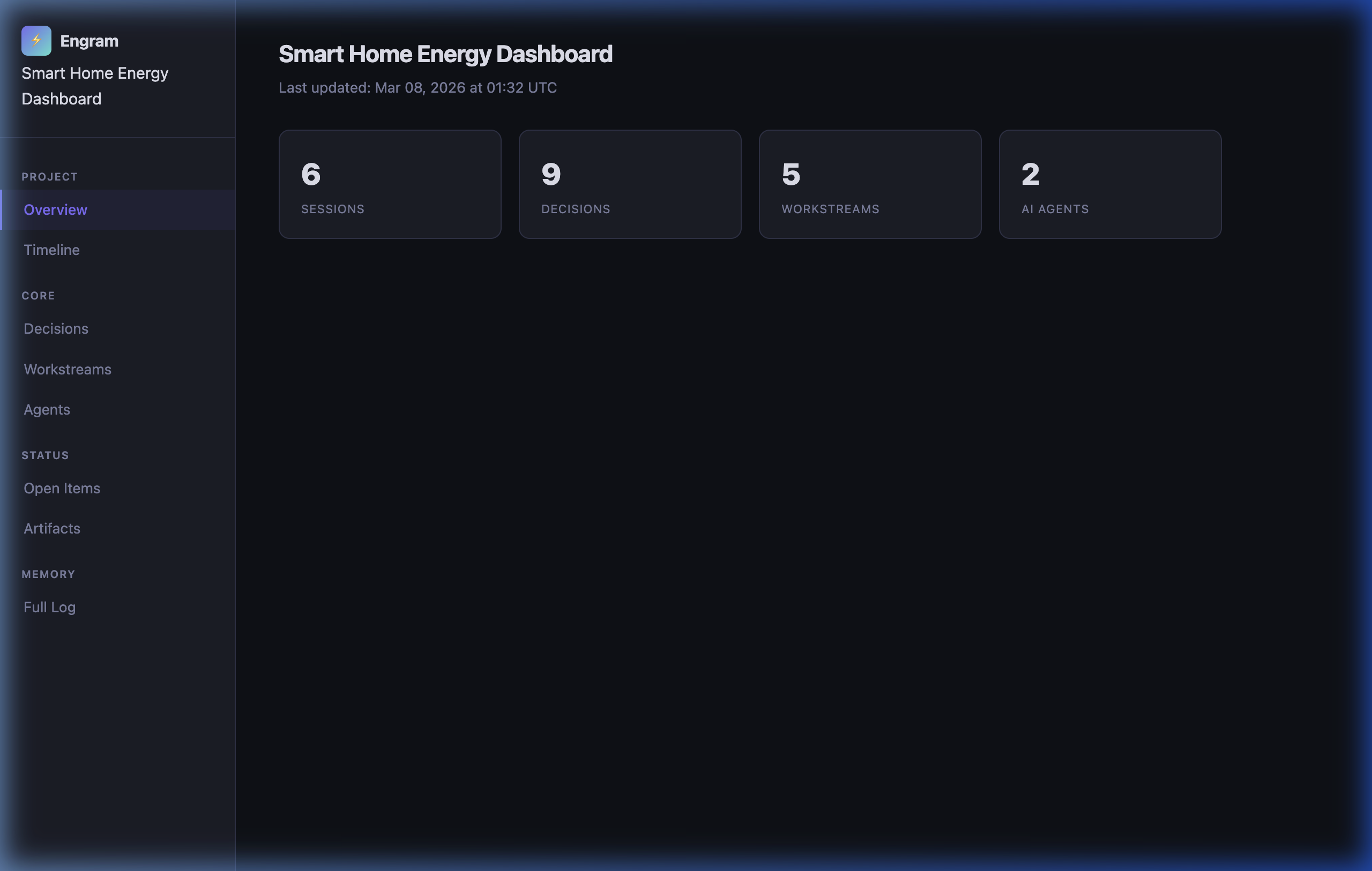
Run ./update-visualizer.sh once (or ./engram-watch.sh --daemon to keep it live) and open VISUALIZER.html in any browser. No server. No internet required.
Overview — sessions, decisions, workstreams, and agents at a glance:
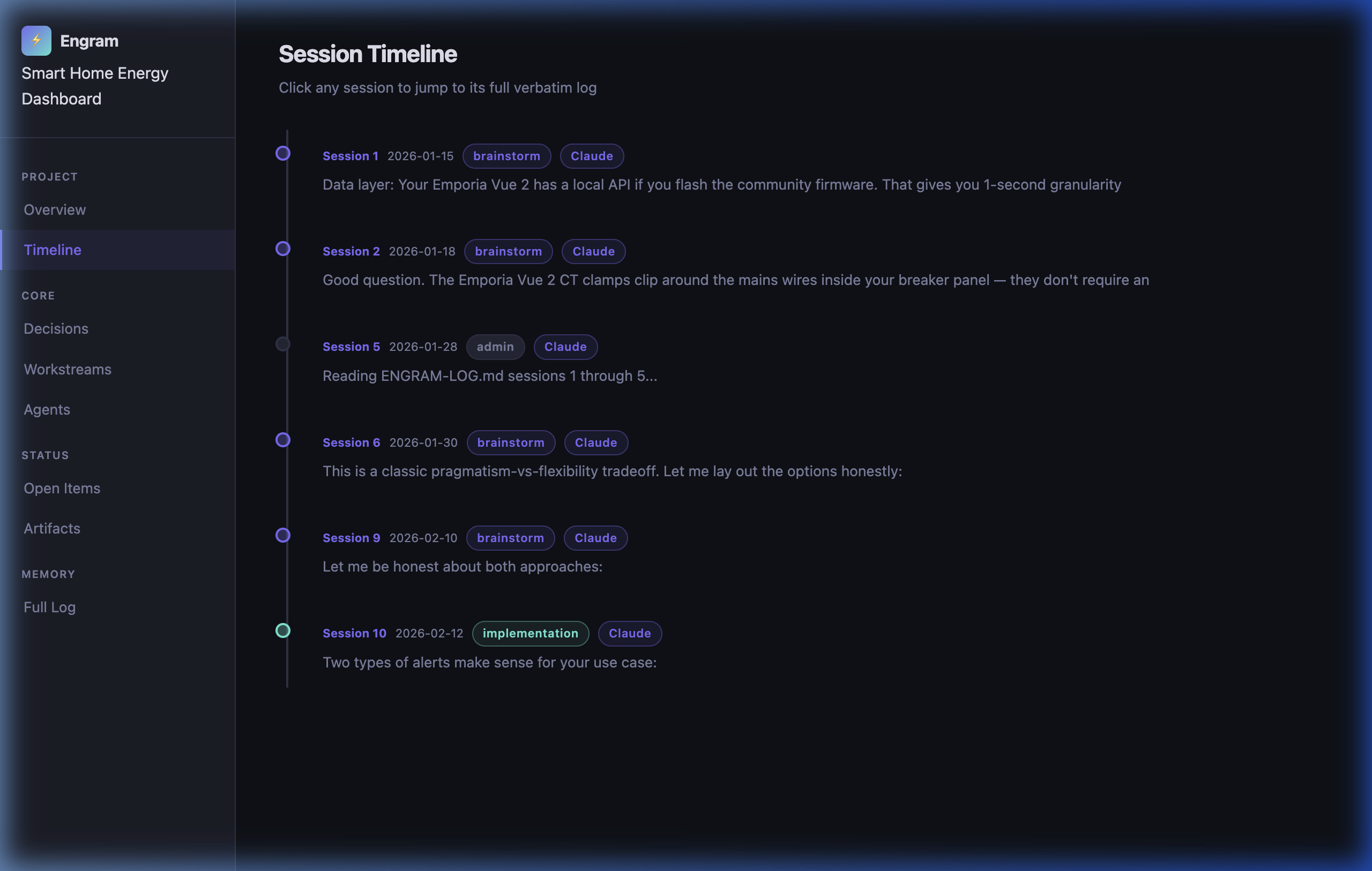
Session Timeline — every session dated, tagged by mode and agent, with a preview of the opening message. Click any session to jump to its verbatim log:
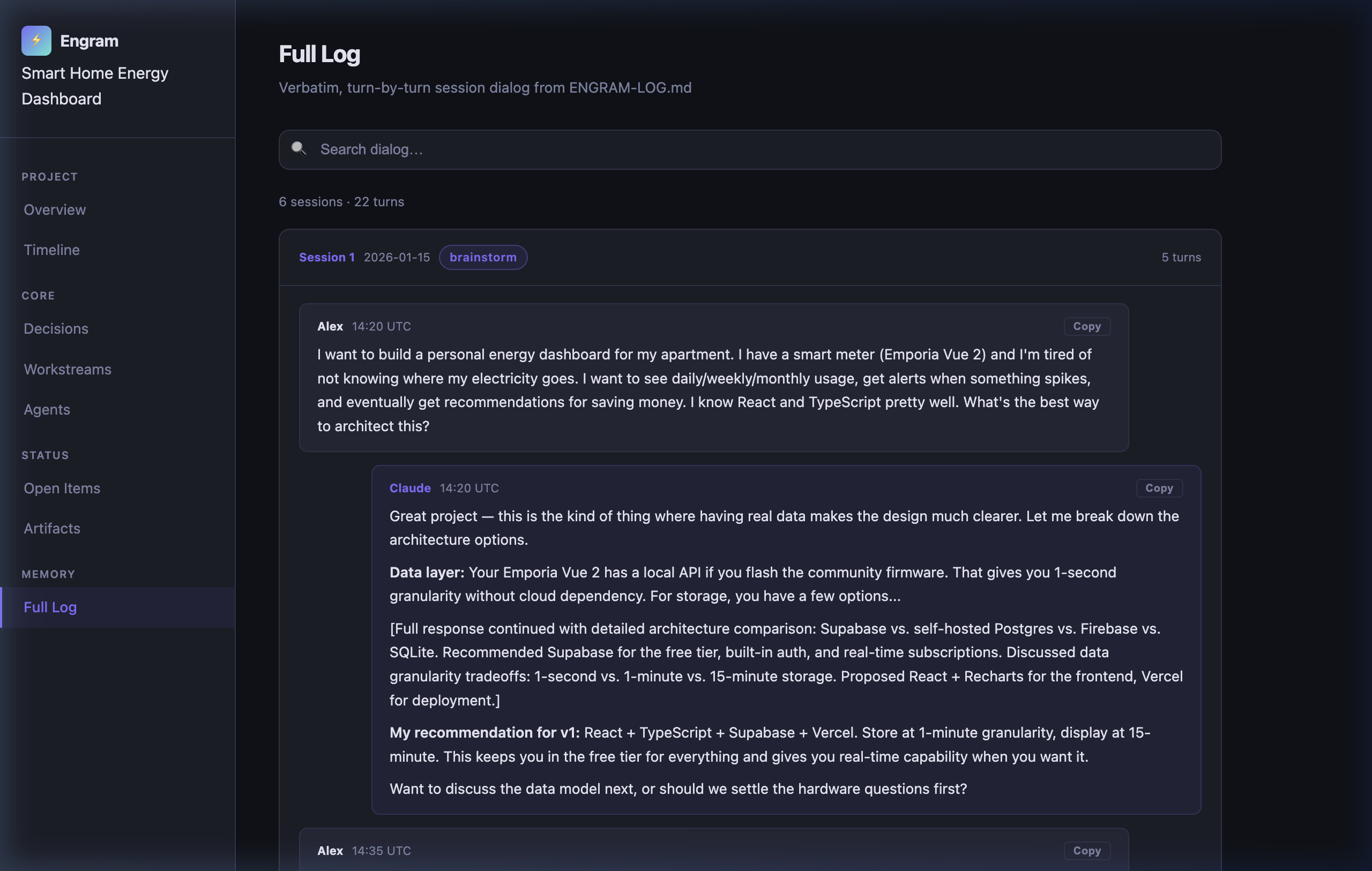
Full Log — searchable, verbatim turn-by-turn dialog from ENGRAM-LOG.md. Click any bubble to copy the exact text to your clipboard:
Quick Commands
Say these in any session:
| Command | What Happens |
| --- | --- |
| checkpoint | Syncs log, summary, and state |
| status | 4-8 line summary from STATE.md only |
| reconcile now | Full rebuild of ENGRAM.md from the raw log |
| handoff | Writes HANDOFF.md for fast context restore |
| rotate log | Archives ENGRAM-LOG.md, starts fresh |
| log this decision | Logs a single decision mid-session |
| agent review | Cross-platform review protocol with second AI |
| context pressure | Full handoff ceremony when context window is tight |
| git commit | Atomic snapshot of engram files to git |
The State Manifest counter in
STATE.mdtriggers checkpoints automatically in the background. These commands force an immediate sync.
Session Visualizer
Engram ships with an interactive project dashboard:
- Session Timeline — every session as a clickable node, color-coded by mode
- Decision Log — searchable cards with alternatives considered and rationale
- Workstream Dashboard — progress tracking and blockers
- Agent Activity — which AI models participated across sessions
- Open Items — P0/P1/P2 problems, tasks, and open questions
To update with live data from your project:
./update-visualizer.sh                     # current directory
./update-visualizer.sh --dir ~/my-project  # any project
To keep the dashboard always current ("install and forget"):
./engram-watch.sh --daemon   # starts a background watcher
open VISUALIZER.html          # open once — it auto-refreshes every 30s
The watcher monitors ENGRAM-LOG.md, ENGRAM.md, STATE.md, DECISIONS.md, and AGENTS.md. Any change triggers a re-generation automatically. Stop it with ./engram-watch.sh stop.
No server. No build step. Open the HTML file directly.
Works With Any AI
Every log entry is attributed to the model that generated it. Engram works across:
| Agent | Setup | How It Works |
| --- | --- | --- |
| Claude Code | engram setup | Auto-configured via .mcp.json — zero manual steps |
| Cursor | engram setup | Auto-configured via .mcp.json — zero manual steps |
| Claude Desktop | engram setup --claude-desktop | Patches global config automatically |
| Antigravity | engram setup --antigravity | Patches global config automatically |
| ChatGPT | Manual | Paste or upload STATE.md + ENGRAM.md at session start |
| Gemini | Manual | Upload files or paste into the context window |
| Grok | Manual | Paste STATE.md + ENGRAM.md |
| Any local model | Manual | File-based context injection |
Multi-AI workflows are a first-class use case. The AGENTS.md registry tracks every model that participates, with session attribution, role assignment (primary / reviewer), and the handoff protocol.
Before and After
Before (session 12, no Engram):
You: "Last time we discussed the caching strategy—" AI: "I don't have context from previous conversations. Could you summarize?"
After (session 12, with Engram):
AI: "Reading STATE.md... Session 12. Last session we finalized the Redis caching approach (Decision 7 in DECISIONS.md) and opened a thread on rate limiting — two open questions: token bucket vs. sliding window, and what the default rate should be. Pick up there?"
See examples/after-10-sessions/ for what a real project looks like.
Installation
npx (recommended)
npx engram-protocol setup --name "My Project" --author "Jane" --template researchNo global install needed. Choose a template: default, research, software, writing, or startup.
Setup Options
npx engram-protocol setup [OPTIONS]

  -n, --name NAME         Project name (default: "My Project")
  -a, --author NAME       Author name (default: "Author")
  -t, --template TYPE     Template type (default: "default")
  -d, --dir DIR           Target directory (default: current dir)
  --claude-desktop        Also configure Claude Desktop app
  --antigravity           Also configure Antigravity IDE
  --all                   Configure all supported AI clients
Global Install
npm install -g engram-protocol
engram setup --name "My Project"
Alternative: Bash Installer
For environments without Node.js:
curl -O https://raw.githubusercontent.com/ecomxco/engram/main/init-engram.sh
chmod +x init-engram.sh
./init-engram.sh --name "My Project"
The bash installer supports --dry-run, --force, --skip-existing, and --uninstall.
Design Principles
- Preserve everything. The log is append-only. Nothing from any session is lost.
- Separate raw from processed. The verbatim log is the source of truth. The summary is a convenience layer rebuilt periodically.
- State is portable. Works across devices, AI platforms, and internet outages. It's just files.
- Context engineering over brute force. The AI reads two small files instead of the full history.
- Be honest about AI limitations. Verbatim logging is best-effort (~80% fidelity). The checkpoint system catches the rest.
- Minimize maintenance burden. The AI does the bookkeeping. You just say "checkpoint."
FAQ
Does this work with the free tier? Yes. Plain markdown — any AI that can read text can use this.
How large do the files get?
The log grows with usage. At ~50KB or 15-20 sessions, rotate log archives it and starts fresh. Summary and state files stay small by design.
Can I use this for a team?
Designed for solo or small-team use with one active device. Git works for version control, but expect merge conflicts in STATE.md if multiple people edit simultaneously.
What if I switch AI models mid-project?
First-class use case. Every log entry is tagged with the model that generated it. The AGENTS.md handoff protocol ensures any model can pick up the thread.
Is this overkill for a quick project? If your work wraps up in one session, yes. Engram is for projects that span days, weeks, or months — where the cost of lost context is real.
MCP Server + CLI
The npm package includes a Model Context Protocol (MCP) server that gives AI tools direct read/write access to your engram files via structured tool calls.
Setup auto-configures the MCP server for your AI client. Use --all to configure everything at once, or pick individual flags:
| Client | Config Method | Flag |
|--------|--------------|------|
| Claude Code | .mcp.json in project root | Automatic (always created) |
| Cursor | .mcp.json in project root | Automatic (always created) |
| Claude Desktop | Global config patched | --claude-desktop |
| Antigravity | Global config patched | --antigravity |
| All of the above | Everything at once | --all |
Manual config (if needed): add this to your client's MCP config file:
{
  "mcpServers": {
    "engram": {
      "command": "npx",
      "args": ["-y", "engram-protocol", "serve"],
      "env": { "ENGRAM_PROJECT_DIR": "/path/to/your/project" }
    }
  }
}
| Client | Config file location |
|--------|---------------------|
| Claude Desktop (macOS) | ~/Library/Application Support/Claude/claude_desktop_config.json |
| Claude Desktop (Windows) | %APPDATA%\Claude\claude_desktop_config.json |
| Antigravity | ~/.gemini/antigravity/mcp_config.json |
The server exposes 11 tools (engram_status, engram_log_exchange, engram_checkpoint, etc.) and 4 resources (engram://state, engram://summary, engram://decisions, engram://agents).
CLI Commands
engram setup [--template TYPE]  # Scaffold a complete project with MCP config
engram serve                    # Start the MCP server (stdio transport)
engram status                   # Print a summary of current project state
engram checkpoint               # Sync all files: log, summary, state, index
engram search "query"           # Search across all engram files
engram decisions [--filter X]   # List decisions
engram reconcile                # Rebuild ENGRAM.md from the full log
engram handoff                  # Generate HANDOFF.md for fast context restore
engram rotate                   # Archive and rotate the log
Templates
Five project templates with domain-specific workstreams:
| Template | Workstreams |
|----------|-------------|
| default | General purpose |
| research | Literature Review, Methodology, Analysis, Writing |
| software | Architecture, Implementation, Testing, DevOps |
| writing | Concept, Drafting, Revision, Publication |
| startup | Discovery, Product, Business Model, Go-to-Market |
Multi-Device Usage
See server/docs/multi-device.md for git sync, advisory locking, and team workflows.
Roadmap
The MCP server and CLI close most items from the original roadmap. Remaining: cross-project memory, automated log rotation policies, and plugin ecosystem.
Contributing
Issues and PRs welcome. If you've adapted Engram for a specific workflow (academic research, architecture, creative writing, autonomous agents), open an issue — contributions are incorporated into the example library.
License
MIT — see LICENSE.
Origin
Built after losing context across dozens of sessions and re-explaining the same decisions to different AI models. Four different AI models reviewed and stress-tested it across two major versions.
The result is the most practical answer I've found to the AI memory problem.
— Jim · eCom XP LLC · [email protected]