
envark
v0.1.2
Published
Envark - Production-quality MCP server that maps, analyzes, and guards environment variables across your entire codebase

Maintainers
 kstij
kstijReadme
Envark 🛡️
A production-quality MCP server and interactive TUI that maps, analyzes, and guards environment variables across your entire codebase.


Features • Installation • TUI Mode • MCP Tools • Languages
The Problem
Environment variables are the silent killers of production deployments:
- 💥 Runtime crashes from undefined variables with no defaults
- 🔓 Security leaks from secrets committed in the wrong files
- 📉 Configuration drift when .env files diverge across environments
- 😤 Onboarding friction when new devs don't know which vars to set
- 🗑️ Dead code from variables defined but never used
Envark catches these issues before they hit production.
Features
| Feature | Description | |---------|-------------| | 🔍 Multi-language parsing | JavaScript, TypeScript, Python, Go, Rust, Shell, Docker | | 🎯 Risk scoring | Critical, High, Medium, Low, Info classifications | | 📊 Dependency graphs | Understand which vars cluster together | | ✅ Validation | Check .env files against actual code requirements | | 📝 Template generation | Auto-generate .env.example from your codebase | | ⚡ Fast | Caches results, targets < 2s for 500-file projects | | 🔒 Private | Pure static analysis, no data leaves your machine | | 🖥️ Interactive TUI | Beautiful terminal interface with dropdown menus | | 🤖 MCP Server | Integrates with Claude, Cursor, VS Code, Windsurf | | 🧠 AI Assistant | OpenAI, Anthropic, Ollama for smart analysis & recommendations |
Interactive TUI
Envark includes a beautiful interactive terminal interface inspired by modern security tools.
Launch
npm install -g envark
# or
npx envark
Command Menu
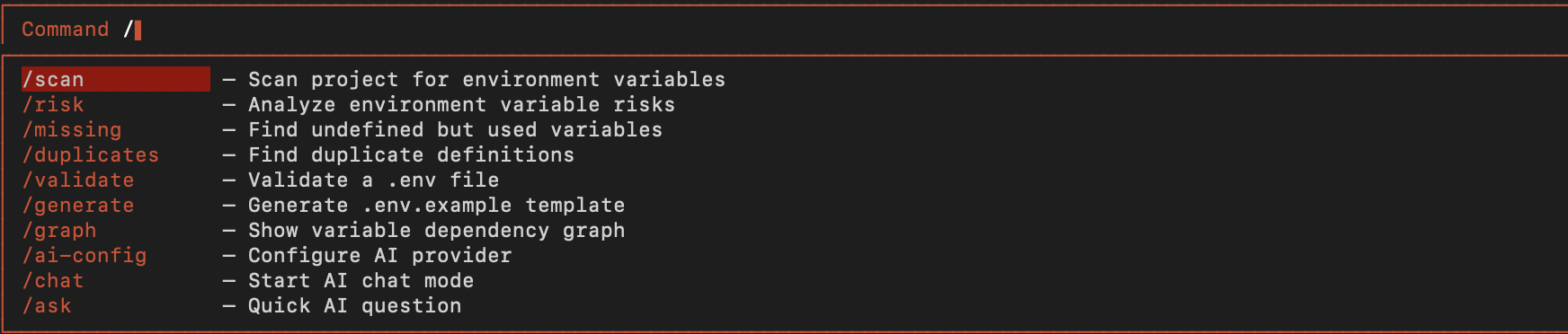
Type / to open the command dropdown with all available commands:
Scan Results
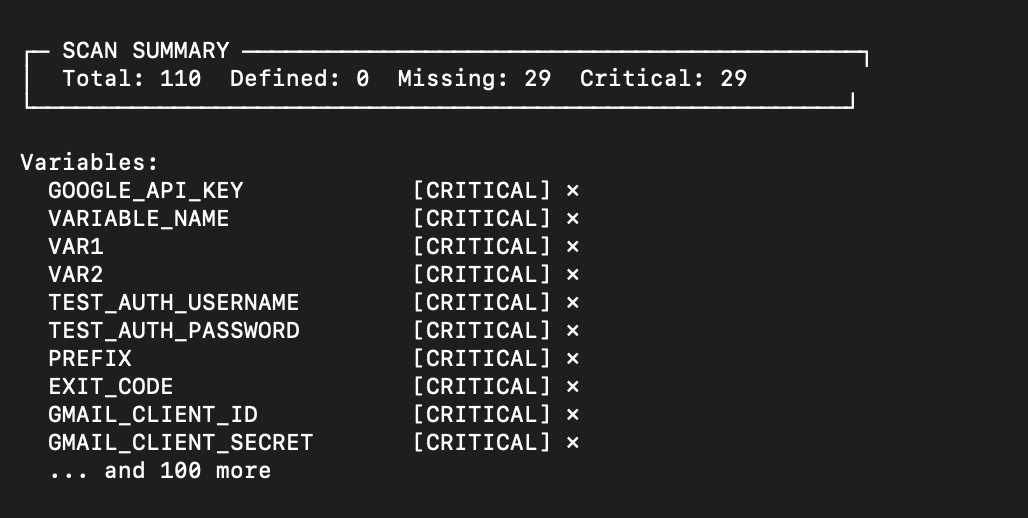
Run /scan to analyze your project's environment variables:
Available Commands
| Command | Shortcut | Description |
|---------|----------|-------------|
| /scan | s | Scan project for environment variables |
| /risk | r | Analyze environment variable risks |
| /missing | m | Find undefined but used variables |
| /duplicates | d | Find duplicate definitions |
| /validate | v | Validate a .env file |
| /generate | g | Generate .env.example template |
| /graph | gr | Show variable dependency graph |
| /help | h | Show help dialog |
| /clear | c | Clear the output |
| /exit | q | Exit Envark |
AI Commands
Envark includes a powerful AI assistant that can analyze, explain, and generate environment configurations.
| Command | Shortcut | Description |
|---------|----------|-------------|
| /ask | a | Ask AI about environment variables |
| /analyze | an | AI security analysis of your project |
| /suggest | su | Get AI suggestions for a variable |
| /explain | ex | AI explains a variable's purpose |
| /template | tpl | AI generates .env for project type |
| /config | cfg | Configure AI provider |
| /history | hist | Show AI conversation history |
AI Configuration
Configure your preferred AI provider:
# OpenAI (recommended)
/config openai sk-your-api-key gpt-4o

# Anthropic Claude
/config anthropic sk-ant-your-api-key claude-sonnet-4-20250514

# Google Gemini
/config gemini your-api-key gemini-1.5-pro

# Ollama (local, free)
/config ollama llama3.2
Or set environment variables:
export OPENAI_API_KEY="sk-..."        # OpenAI
export ANTHROPIC_API_KEY="sk-ant-..." # Anthropic
export GEMINI_API_KEY="..."           # Google Gemini
export OLLAMA_MODEL="llama3.2"        # Ollama model
Navigation
- Type
/— Open command menu - Arrow ↓↑ — Navigate dropdown
- Tab — Autocomplete selected command
- Enter — Execute command
- Ctrl+C — Clear output or exit
Installation
Quick Start (No Installation)
# Interactive TUI
npx envark

# Or with bun
bunx envark
Global Installation
npm install -g envark
envark
From Source
git clone https://github.com/yourusername/envark.git
cd envark
npm install
npm run build
npm start
MCP Integration
Envark works as an MCP (Model Context Protocol) server, giving AI assistants deep visibility into your environment configuration.
VS Code
Create .vscode/mcp.json:
{
  "servers": {
    "envark": {
      "type": "stdio",
      "command": "npx",
      "args": ["-y", "envark"]
    }
  }
}
Claude Code / Cursor / Windsurf
Add to your MCP configuration:
{
  "mcpServers": {
    "envark": {
      "command": "npx",
      "args": ["-y", "envark"]
    }
  }
}
Auto-Configure
envark init vscode    # VS Code
envark init claude    # Claude Code
envark init cursor    # Cursor
envark init windsurf  # Windsurf
MCP Tools
When used as an MCP server, Envark exposes these tools to AI assistants:
get_env_map
Returns the complete environment variable map for your project.
{
  "summary": {
    "totalEnvVars": 24,
    "defined": 20,
    "missing": 3,
    "critical": 2
  },
  "variables": [...]
}
get_env_risk
Analyzes all variables and returns risk assessments:
{
  "summary": { "critical": 2, "high": 1, "medium": 5 },
  "riskReport": [
    {
      "name": "STRIPE_SECRET_KEY",
      "riskLevel": "critical",
      "issues": [{ "message": "Used but not defined" }]
    }
  ]
}
get_missing_envs
Find variables that will cause runtime crashes:
{
  "missing": [
    { "name": "API_SECRET", "usageCount": 3, "dangerLevel": "critical" }
  ],
  "willCauseRuntimeCrash": 2
}
validate_env_file
Validate a .env file against code requirements:
{
  "valid": false,
  "results": {
    "passed": [{ "variable": "PORT" }],
    "failed": [{ "variable": "JWT_SECRET", "issue": "Missing" }]
  }
}
generate_env_template
Auto-generate .env.example from your codebase:
{
  "content": "# Database\nDATABASE_URL=your-secret-here\n...",
  "variableCount": 18,
  "requiredCount": 5
}
Additional tools: get_duplicates, get_undocumented, get_env_usage, get_env_graph
Supported Languages
| Language | Extensions | Env Access Patterns |
|----------|------------|---------------------|
| JavaScript | .js, .jsx, .mjs | process.env.VAR, import.meta.env.VAR |
| TypeScript | .ts, .tsx, .mts | process.env.VAR, import.meta.env.VAR |
| Python | .py | os.environ['VAR'], os.getenv('VAR') |
| Go | .go | os.Getenv("VAR"), os.LookupEnv("VAR") |
| Rust | .rs | env::var("VAR"), std::env::var("VAR") |
| Shell | .sh, .bash, .zsh | $VAR, ${VAR}, ${VAR:-default} |
| Docker | Dockerfile | ENV VAR=value, ARG VAR |
| Env Files | .env* | KEY=VALUE |
How It Works
1. Scanning
Recursively walks your project with intelligent filtering (respects .gitignore, skips node_modules).
2. Parsing
Extracts environment variable usages using language-specific patterns.
3. Resolution
Links definitions (.env files) with usages (code) and documentation (.env.example).
4. Risk Analysis
Assigns risk scores based on:
- Critical — Used but never defined, no default
- High — Secret-like name in committed file
- Medium — Multiple usages, no default
- Low — Undocumented or unused
- Info — Fully configured
5. Caching
Results cached to .envark/cache.json with smart invalidation.
CLI Reference
envark                     # Launch interactive TUI
envark scan                # Scan and show results
envark risk                # Show risk analysis
envark missing             # Show missing variables
envark validate .env       # Validate env file
envark generate            # Generate .env.example
envark init <ide>          # Configure for IDE
envark help                # Show help
envark --version           # Show version
Contributing
Contributions welcome! Please read our contributing guidelines.
git clone https://github.com/yourusername/envark.git
cd envark
npm install
npm run build
npm test
License
MIT License - see LICENSE for details.
Built with ❤️ for developers who are tired of production env var bugs.