
ep_pdf_export_print
v1.0.7
Published
One-click PDF export for Etherpad. Adds a "PDF (print)" entry to the Import/Export menu that renders the pad's clean HTML export through the user's OWN browser print engine (Save as PDF). No server setup, no Chromium, no dependencies — install from the ad

Maintainers
 forkivan
Readme
ep_pdf_export_print
One-click, high-quality PDF export for Etherpad — no server setup required.
Etherpad's built-in PDF export uses a hand-rolled pdfkit renderer that
overlaps text, drops text colours and ignores images that aren't inline base64.
This plugin sidesteps the server completely. It adds a “PDF (print)” entry to the Import/Export menu that loads the pad's clean HTML export into a hidden iframe and triggers your own browser's print engine. You then pick “Save as PDF”. Because a real browser does the rendering, images, colours and alignment all come out correct.
Why you probably want this one
| | ep_pdf_export_print (this) | ep_pdf_export_chromium | |---|---|---| | Install from admin panel | ✅ just works | ❌ also needs Chromium in the image | | Server dependencies | none | a system Chromium (~300 MB) | | Rendering engine | the user's own browser | headless Chromium on the server | | Output | browser "Save as PDF" dialog | direct file download / automatable |
If you can't (or don't want to) modify your Docker image, this is the plugin
to use. Choose ep_pdf_export_chromium only when you need fully automated,
server-side PDF generation and you control the image.
Usage
Open a pad, then choose Import/Export → PDF (print). Your browser's own print dialog opens with the pad already rendered:
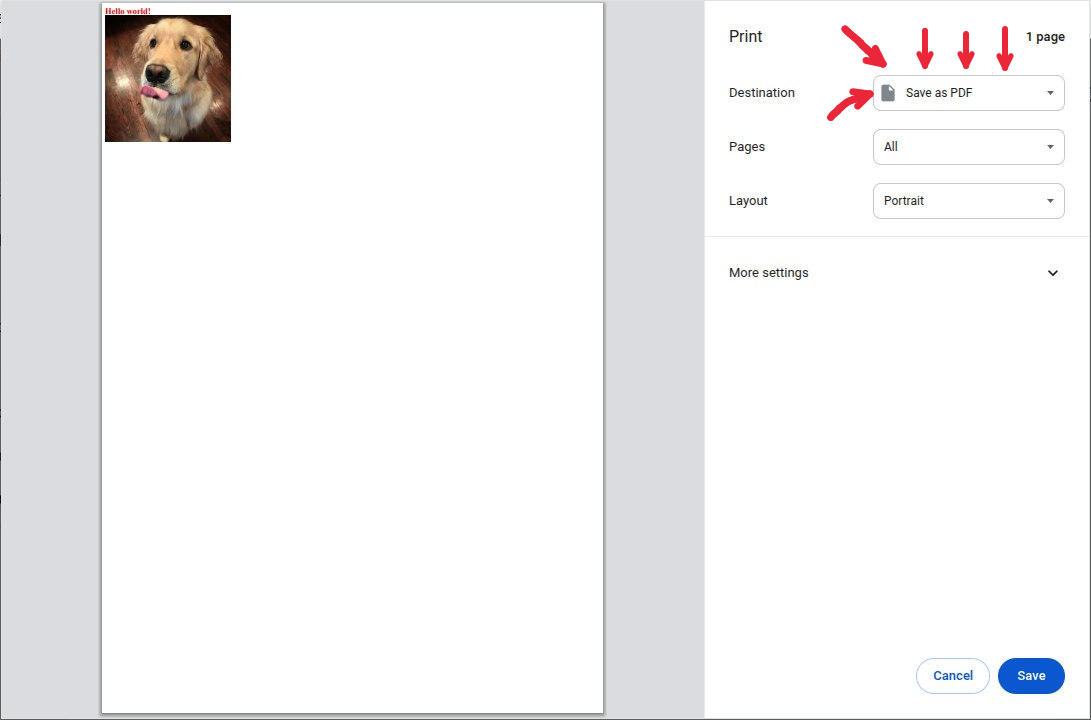
From here you can either print it on a real printer, or set the Destination to “Save as PDF” and click Save to download a PDF file.
Install
From the Etherpad admin panel: Plugins → search ep_pdf_export_print →
Install. That's it. A PDF (print) entry appears in the Import/Export menu.
Or from the command line:
pnpm run plugins i ep_pdf_export_printYou must also install these companion plugins — this plugin does not render images or tables by itself, so without them those parts of your pads come out broken in the PDF:
- Images → ep_images_extended_v2
- Tables → ep_data_tables + ep_table_export
(Plain text, colours and alignment work without them.) See Requirements & dependencies below for the why.
Requirements & dependencies
- Etherpad (peer dependency
ep_etherpad-lite). Nothing else is needed for the export itself to run — but images and tables need the companion plugins below to actually appear in the PDF. - No server-side dependencies. Nothing to install in your Docker image, no Chromium, no LibreOffice. Pure client-side.
- A modern browser (uses
fetch, an iframesrcdoc, and the print API — every current browser qualifies). - Works with or without a menu-bar plugin: it auto-detects
ep_file_menu_toolbar/ep_aa_file_menu_toolbarand otherwise falls back to the stock Import/Export popup. Neither is required.
Companion plugins for images & tables — install these, or your PDFs will look broken
The PDF is built from Etherpad's HTML export. Core Etherpad cannot export images or rich tables on its own, so if your pads contain images or tables and these plugins are not installed, those elements will be missing or mangled in the PDF. This is not optional polish — without them the output looks broken. If your pads use images or tables, you should install:
- Images → ep_images_extended_v2
— use this one. It's the fork with the HTML/DOCX export bugs fixed; the
original
ep_images_extendedhas broken export and will leave images out of the PDF. - Tables → ep_data_tables
for the table feature plus
ep_table_export — without
ep_table_exportyour tables will not render in the export at all.
The plugin still runs without them, but anyone exporting a pad that has images or tables will get a broken-looking PDF — so install them.
How it works
- Reuses the URL of Etherpad's built-in Export as HTML link (so read-only ids and base paths are handled for free).
- Fetches that HTML (the export route serves it as a download, so it is
fetched and re-rendered rather than navigated to) and writes it into an
off-screen iframe via
srcdoc, with a<base href>so relative images resolve and a clean<title>so the saved file is named after the pad. - Calls
iframe.contentWindow.print()so only the pad content prints, not the Etherpad UI.
No data leaves the user's browser beyond the normal same-origin HTML export request.
License
Apache-2.0 © Ivan Forkaliuk