
epd2in13
v1.0.5
Published
Nodejs driver for the Waveshare 2.13inch (B) e-Paper Hat
Downloads
23


Readme
epd2in13
This is a port of the epd2in13bc Python driver from Waveshare.
Key features of this library:
- Fast, uses native GPIO and SPI libraries
- Supports Red Color
- Remappable Pins
- Promises based
- Can render from a Canvas or an Image
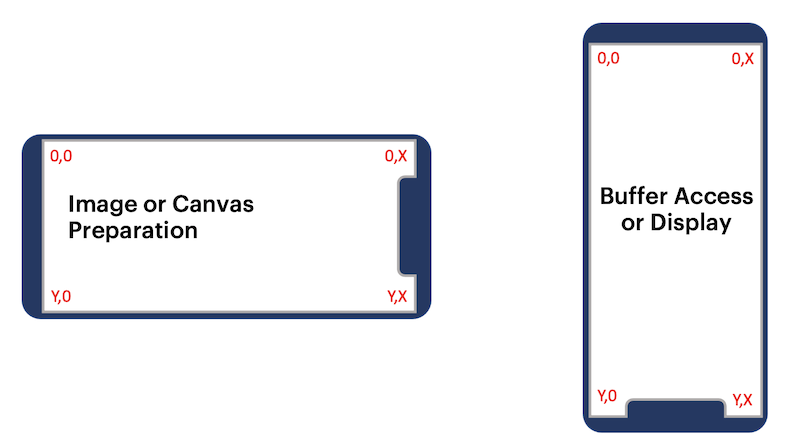
Since this device is only capble of single tone (black or white, or red), it uses a frame buffer of 1 bit per pixel.
Although this device natively uses a portrait layout per the diagram below, it is mapped to a landscape layout instead for practical rendering of images or canvas.
Hence, Width > Height for prepareImageFile or prepareCanvas function calls.
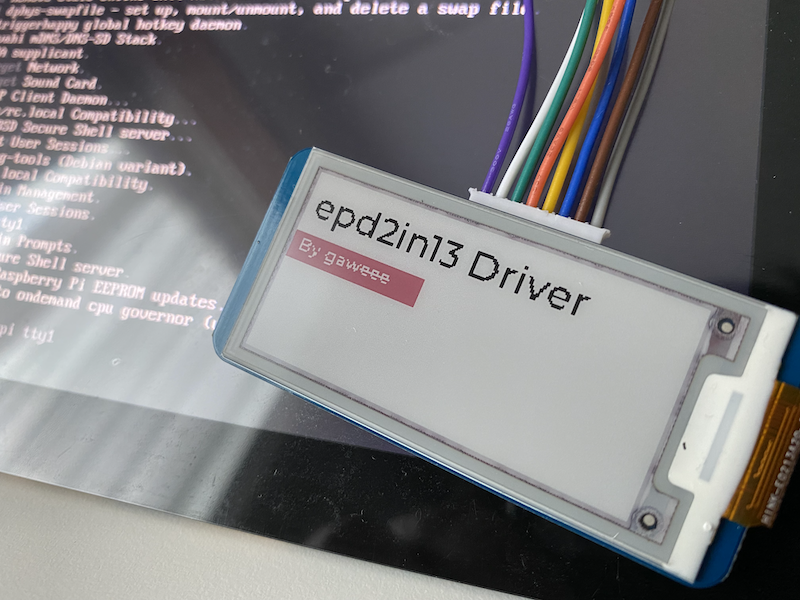
In-Action Shot
Dependencies
- GPIO
- SPI-Devicve
- ImageJS for buffer rendering
Getting Started
npm install epd2in13Example Code
    const epd2in13 = require('epd2in13');
    const { createCanvas, registerFont } = require('canvas');

    const display = new epd2in13(); // Or potentially call new epd2in13({ RST_PIN: 10, BUSY_PIN: 11 }) if the pins are remapped for any reason

    // Setup the canvases and context here
    registerFont('./fonts/Montserrat-Medium.ttf', { family: 'Montserrat' });
    const black = createCanvas(display.width, display.height);
    const bctx = black.getContext('2d');
    const red = createCanvas(display.width, display.height);
    const rctx = red.getContext('2d');

    // Black context here
    bctx.fillStyle = 'white';
    bctx.fillRect(0, 0, display.width, display.height);
    bctx.font = '20px Montserrat';
    bctx.textBaseline = 'top';
    bctx.fillStyle = 'black';
    bctx.fillText('epd2in13 Driver', 5, 5);

    // Red context here
    rctx.fillStyle = 'white';
    rctx.fillRect(0, 0, display.width, display.height);
    rctx.fillStyle = 'black';
    rctx.fillRect(0, 35, 80, 16);
    rctx.font = '10px Montserrat';
    rctx.fillStyle = 'white';
    rctx.fillText('By gaweee', 5, 45);


    display.init()
        .then(() => display.clear())
        .then(() => Promise.all([display.prepareCanvas(black), display.prepareCanvas(red)]))
        .then(([blackBuffer, redBuffer]) => display.display(blackBuffer, redBuffer))
        .then((buffer) => display.wait())
        .then(() => display.clear())
        .then(() => display.prepareImageFile('./test.png'))
        .then((buffer) => display.display(buffer))
        .then((buffer) => display.wait())
        .then(() => display.clear())
        .then(() => display.sleep())
Functions Calls
epd2in13.init()
Runs the initialization sequence (Required).
epd2in13.reset()
Resets the display, runs already as part of the initialization sequence.
epd2in13.display(black=[], red=[])
Renders a combination of black and red optional buffers that follows a portrait layout.
Refer to layout diagram above.
epd2in13.prepareCanvas
Translates the canvas into an image and sends to prepareImageBuffer call below.
epd2in13.prepareImageFile
Loads an image by fileaname and sends to prepareImageBuffer call below.
epd2in13.prepareImageBuffer
Takes in the image buffer and prepares it (pixel by pixel) for display, in the process maps the output from landscape to portrait layout.
epd2in13.clear(0xFF)
Flushes the screen to white, optionally send 0x00 for black.
epd2in13.wait()
GPIO delay before the next event.
epd2in13.sleep()
Power down (retains ink on screen) the hat and stop listening to events.
TODO
- Abstract the driver to support multiple other displays in the future
- Optional rotation