
er-canvas
v0.1.1
Published
一个无第三方依赖,使用canvas实现的简单数据库表关系图绘制工具


Readme
er-canvas
一个无第三方依赖,使用canvas实现的简单数据库表关系图绘制工具
预览
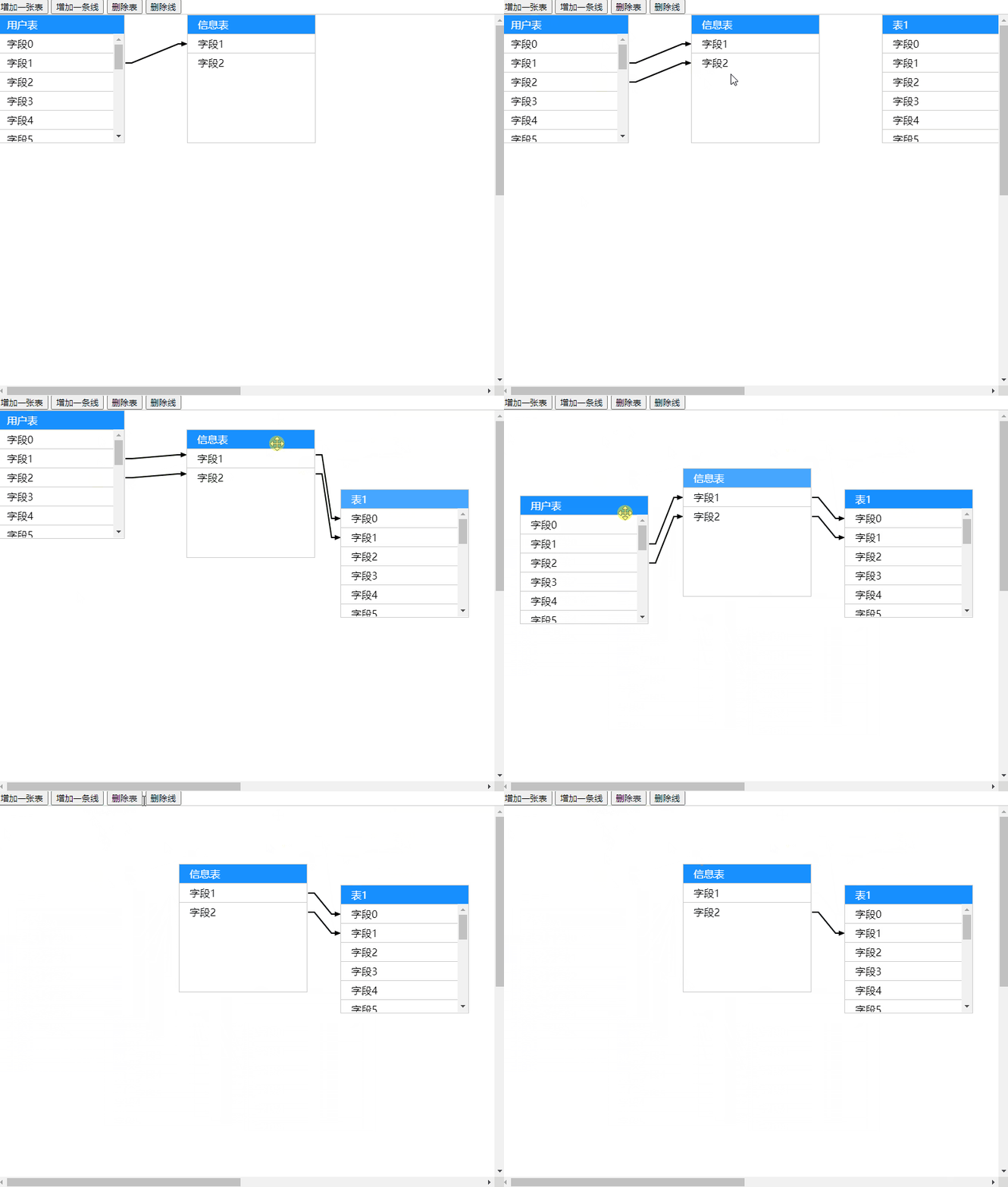
安装
npm i -d er-canvas使用
webpack
import 'er-canvas/dist/index.css';
import ErCanvas from 'er-canvas';

let er = new ErCanvas(document.querySelector('#app'), {
  width: 1600,
  height: 1200,
  onContextmenu(e, target) {
    console.log(target);
  },
  onSelectLine(line) {
    console.log(line)
  },
  onSelectTable(table) {
    console.log(table)
  },
  tables: [{
    id: 'frb',
    name: '用户表',
    fields: Array(20).fill(1).map((t, i) => {
      return {
        id: 'frbfield' + i,
        name: '字段' + i,
      };
    }),
    top: 0,
    left: 0,
    width: 100,
    height: 100,
  }, {
    id: 'cyb',
    name: '信息表',
    fields: [
      {
        id: 'cybfield1',
        name: '字段1',
      },
      {
        id: 'cybfield2',
        name: '字段2',
      },
    ],
    top: 0,
    left: 300,
    width: 100,
    height: 100,
  }],
  lines: [{
    form: 'frbfield1',
    to: 'cybfield1',
  }],
})
浏览器
<!DOCTYPE html>
<html lang="">
<head>
  <meta charset="utf-8">
  <meta http-equiv="X-UA-Compatible" content="IE=edge">
  <meta name="viewport" content="width=device-width,initial-scale=1.0">
  <link rel="stylesheet" href="./index.css">
</head>
<style>
  html, body {
    margin: 0;
    padding: 0;
  }
</style>
<body>
<button onclick="addTable()">增加一张表</button>
<button onclick="addLine()">增加一条线</button>
<button onclick="removeTable()">删除表</button>
<button onclick="removeLine()">删除线</button>

<div id="app" class="er" style="width: 800px;height:600px" tabindex="999"></div>
<div id="message"></div>
<script src="./index.js"></script>
<script>
  window.er = new ErCanvas(document.querySelector('#app'), {
    width: 1600,
    height: 1200,
    onContextmenu(e, target) {
      console.log(target);
    },
    onSelectLine(line) {
      if (line) {
        document.querySelector('#message').innerText = '当前选中的线:' + line.form.options.name + '->' + line.to.options.name;
      }
//    alert(line.form.id);
    },
    onSelectTable(table) {
      if (table) {
        document.querySelector('#message').innerText = '当前选中的表:' + table.options.name;
      }
//    alert(line.form.id);
    },
    tables: [{
      id: 'frb',
      name: '用户表',
      fields: Array(20).fill(1).map((t, i) => {
        return {
          id: 'frbfield' + i,
          name: '字段' + i,
        };
      }),
      top: 0,
      left: 0,
      width: 100,
      height: 100,
    }, {
      id: 'cyb',
      name: '信息表',
      fields: [
        {
          id: 'cybfield1',
          name: '字段1',
        },
        {
          id: 'cybfield2',
          name: '字段2',
        },
      ],
      top: 0,
      left: 300,
      width: 100,
      height: 100,
    }],
    lines: [{
      form: 'frbfield1',
      to: 'cybfield1',
    }],
  });

  var i = 0;

  function addTable() {
    i++;
    er.addTable({
      id: 'table' + i,
      name: '表' + i,
      fields: Array(20).fill(1).map((t, fieldInde) => {
        return {
          id: 'table' + i + 'field' + fieldInde,
          name: '字段' + fieldInde,
        };
      }),
      top: 0,
      left: 300 * ( er.tables.length ),
      width: 100,
      height: 100,
    });
  }

  function addLine() {
    er.addLine({
      form: er.tables[0].fields[0].id,
      to: er.tables[1].fields[0].id,
    });
  }

  function removeTable() {
    er.removeTable(er.tables[0].id);
  }

  function removeLine() {
    er.removeLine(er.lines[0]);
  }

</script>
</body>
</html>