
erd-schema-gen
v1.0.3
Published
A TypeScript CLI starter for SchemaGen.


Readme
SchemaGen
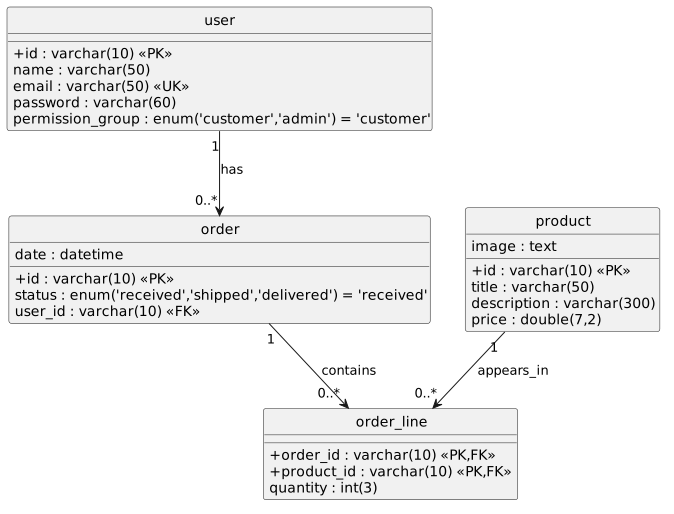
SchemaGen is a TypeScript CLI that turns schema source files into a diagram using OpenAI and PlantUML.
It is aimed at database-schema-heavy codebases. The CLI scans a target directory, finds the files that actually define the schema, generates valid PlantUML, and then either:
- saves a rendered
svgorpng - opens the generated diagram in the PlantUML web editor
Installation
Install the package via npm:
npm install erd-schema-genRun the generator using:
node node_modules/.bin/schemagenFeatures
- Automatically discovers schema-defining files instead of requiring a manual file list
- Works well with the Prisma and Drizzle examples included in this repo
- Generates PlantUML using the local docs in
docs/as a syntax reference - Supports
svgandpngoutput - Can open either the rendered file or the PlantUML editor automatically
Requirements
- Node.js 18 or newer
- An OpenAI API key
- Internet access to OpenAI
- Internet access to
www.plantuml.comfor rendered image output - A desktop environment if you want the CLI to auto-open the result
Configuration
SchemaGen reads the API key from either:
--open-ai-key <string>OPEN_AI_KEYin a local.envfile
Example:
OPEN_AI_KEY=sk-...Options
| Option | Description |
| --- | --- |
| --open-ai-key <string> | OpenAI API key. If omitted, SchemaGen reads OPEN_AI_KEY from .env. |
| --dir <string> | Directory to scan. Defaults to the current working directory. |
| --output <string> | Output directory or exact file path. Defaults to the current working directory. |
| --type <string> | Output format: svg or png. Defaults to svg. |
| --editor | Open the generated PlantUML in the PlantUML web editor instead of saving a local file. |
Output behavior
- If
--outputpoints to a directory, SchemaGen writesERD_diagram.<type>into that directory. - If
--outputends with.svgor.png, SchemaGen writes to that exact file path. - Use relative paths for
--dirand--output. The current implementation resolves both relative to the current working directory.
Examples
Generate an SVG from the Prisma example:
node node_modules/.bin/schemagen --dir examples/prismaGenerate a PNG into a custom directory:
node node_modules/.bin/schemagen --dir examples/drizzle-orm --output diagrams --type pngWrite to an explicit file path:
node node_modules/.bin/schemagen --dir examples/drizzle-orm --output diagrams/schema.svgOpen the PlantUML editor instead of downloading a file:
node node_modules/.bin/schemagen --dir examples/drizzle-orm --editorHow It Works
- Builds a simplified tree of the target directory and skips noisy folders such as
node_modules,.git,.idea,.vscode,dist,build,out, andlogs. - Uses
gpt-5.4-nanoto identify which files directly define the schema. - Reads those files and asks
gpt-5.4-nanoto produce valid PlantUML. - Uses the markdown docs in
docs/to verify PlantUML syntax before generating the diagram. - Either opens the PlantUML editor or renders the final diagram through PlantUML and saves it locally.
What It Works Well With
- Prisma schema files such as
schema.prisma - Drizzle table definitions and relation files
- Other ORM or entity files that directly declare persisted models and relationships
Limitations
- File discovery is AI-assisted, so accuracy depends on how clearly the schema is expressed in the codebase.
- Rendering a local image requires network access to PlantUML.
- The CLI opens the editor or the generated file automatically.
- The primary use case is schema and ERD generation. The PlantUML generation step can choose a class diagram when the input fits better, but the tool is optimized around database structure.
Development
Useful commands:
pnpm dev
pnpm build
pnpm start -- --dir examples/prisma
Notes:
pnpm devcompiles the project and runs the CLI againstexamples/drizzle-ormwith--editor.- The PlantUML reference material used by the generator lives in
docs/.
Publish to npm
npm login
npm publish --access public
License
MIT