
es-validator
v1.0.6
Published
Form value Validator

Maintainers
 syaku
syakuReadme
Validator
자바스크립트 폼 데이터 유효성 검증기.
이미 개발된 검증기는 실제로 사용하기에는 문제가 있었습니다. 기존 디자인 소스를 사용하지 못하거나, 복잡한 소스코드를 사용해야 했습니다. 그래서 직접 개발하였습니다.
그리고 시간적인 문제로 규칙을 검증하는 것은 오픈 소스를 사용하였습니다. 추후 변경하도록 하겠습니다.
크롬, 파이어폭스, 사파리 그리고 IE 11 이상에서 테스트되었습니다.
사용된 유효성 규칙 검증기
https://github.com/chriso/validator.js
https://github.com/skaterdav85/validatorjs
https://momentjs.com/
감사합니다.
- HTML DOM input value 를 직접 검증하지 않고 JSON 데이터를 검증합니다.
- 검증된 결과를 데이터로 얻어 검증 메세지를 출력하거나 다음 작업을 진행할 수 있습니다.
- 함수를 직접 만들어 검증할 수 있습니다.
- 검증 규칙은 직접 개발하여 삽입할 수 있습니다.
- 검증 메세지 또한 국제화할 수 있게 직접 개발하여 삽입할 수 있습니다.
- 자바스크립트 es 2015+ 와 React 를 모두 지원합니다. React 환경이 아닌 곳에서도 사용할 수 있습니다.
- 일반적인 React Validator 는 기존 HTML 을 사용할 수 없거나 제약조건이 많습니다. 하지만 es-validator 는 HTML 소스를 그대로 변형하지 않고 사용할 수 있습니다.
지원하는 유효성 검증 규칙들
_json : string json type
_url : string url
_email : string email
_ip : string ip v4 or v6
_alpha : string A-Za-z
_alphaNumber: string 0-9A-Za-z
_afterDate : string after date : YYYYMMDD or YYYY-MM-DD
_date : string date type
_beforeDate : string after date : YYYYMMDD or YYYY-MM-DD
_hasText : string value notEmpty
_equals : string equals value
_check : array length [ 1, 2, 3 ]
_rangeCheck : array range length
_maxCheck : checked max length
_minCheck : checked min length
_int : 0-9
_rangeInt : number ragne
_length : string length
_minLength : string min length
_maxLength : string max length
_checked : boolean only true
_selected : string value notEmpty
_makeFunc : custom function
추후 Regx 도 지원합니다.
install
// required
$ npm install react react-dom moment validate.js validator

$ npm install es-validator

or

$ yarn add es-validator
npm run
// build
$ npm run build:prod

// demo
$ npm run serv:demo

// test
$ npm run test
http://localhost:8088
test source : ./__tests__/Assert.test.js
setting
직접 소스를 보시고 판단하세요.
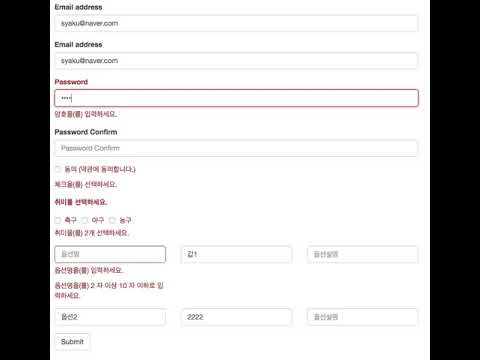
아래 소스는 ./src/demo/FormValidContainer.js 데모로 확인할 수 있습니다.
class FormValidContainer extends Component {
  constructor(props) {
    super(props);

    this.errorPrint = v => <p key={v.key} className="help-block">{v.message}</p>;

    this.onSubmit = this.onSubmit.bind(this);

    // 유효성 검증을 위한 규칙 셋팅
    this.validator = new Validator({
      email: {
        _name: '이메일',
        _hasText: {
          message: '아무값도 없다...',
        },
        _minLength: {
          min: 2,
        },
        _maxLength: {
          max: 20,
        },
        _email: {},
      },
      password: {
        _name: '암호',
        _hasText: {},
        _makeFunc: {
          func: (value, state) => value === state.password2,
          message: '암호가 일치하지 않습니다.',
        },
      },
      isCheck: {
        _name: '체크',
        _checked: {},
      },
      hobby: {
        _name: '취미',
        _check: { length: 2 },
      },
      options: {
        // 배열인 경우 모든 배열에 아래의 규칙이 적용된다.
        _manyType: true,
        name: {
          _name: '옵션명',
          _hasText: {},
          _length: {
            min: 2,
            max: 10,
          },
        },
        value: {
          _name: '옵션값',
          _maxLength: {
            max: 10,
          },
        },
      },
    });

    // validator 규칙과 state 는 object key 와 1:1 매칭된다.
    const state = {
      email: '',
      password: '',
      password2: '',
      isCheck: false,
      hobby: [],
      options: [
        {
          name: '',
          value: '값1',
          comment: '',
        },
        {
          name: '옵션2',
          value: '2222',
          comment: '',
        },
      ],
    };

    this.state = {
      ...state,
      // 유효성 검증 결과를 react state 업데이트한다.
      v: this.validator.prepare(state),
    };
  }

  ... skip ...

  onSubmit() {
    const { v, ...state } = this.state;
    // 유효성 검증 결과를 react state 업데이트한다.
    this.setState({ v: this.validator.submit(state) });
    if (!this.validator.getError()) {
      Toastr.success('저장되었습니다.');
    }
  }

  render() {
    const { v, ...state } = this.state;
    const { email, isCheck, hobby, options } = v;
    return (
      <div className="container">
        <h1>Form Value Validator</h1>
        <form>
          <Validation isValid={email.error}>
            <label className="control-label" htmlFor="exampleInputEmail1">Email address</label>
            <input
              type="email"
              className="form-control"
              placeholder="Email"
              onChange={this.onInputTextChange}
              id="email"
              value={this.state.email}
            />
            <Message once valid={email} render={this.errorPrint} />
          </Validation>
          <div className={classNames('form-group', { 'has-error': email.error, 'has-feedback': email.error })}>
            <label className="control-label" htmlFor="exampleInputEmail1">Email address</label>
            <input
              type="email"
              className="form-control"
              placeholder="Email"
              onChange={this.onInputTextChange}
              id="email"
              value={this.state.email}
            />
            {
              email.error ? [
                <span className="sr-only">(success)</span>,
                <span className="glyphicon glyphicon-remove form-control-feedback" aria-hidden="true" />,
              ] : null
            }
            <Message once valid={email} render={this.errorPrint} />
          </div>
          <Validation isValid={this.state.v.password.error}>
            <label className="control-label" htmlFor="exampleInputPassword1">Password</label>
            <input
              type="password"
              className="form-control"
              placeholder="Password"
              onChange={this.onInputTextChange}
              id="password"
              value={this.state.password}
            />
            <Message once valid={this.state.v.password} render={this.errorPrint} />
          </Validation>
          <div className="form-group">
            <label className="control-label" htmlFor="exampleInputPassword1">Password Confirm</label>
            <input
              type="password"
              className="form-control"
              placeholder="Password Confirm"
              onChange={this.onInputTextChange}
              id="password2"
              value={this.state.password2}
            />
          </div>
          <Validation isValid={isCheck.error}>
            <div className="checkbox">
              <label className="control-label" htmlFor>
                <input
                  type="checkbox"
                  id="isCheck"
                  onChange={this.onChangeCheckedToBoolean}
                  checked={this.state.isCheck}
                /> 동의 (약관에 동의합니다.)
              </label>
            </div>
            <Message valid={isCheck} render={this.errorPrint} />
          </Validation>
          <Validation isValid={hobby.error}>
            <label className="control-label" htmlFor>취미를 선택하세요.</label>
            <div className="checkbox">
              <label className="checkbox-inline" htmlFor>
                <input
                  type="checkbox"
                  value="축구"
                  name="hobby"
                  onChange={this.onChangeCheckedToArray}
                  checked={this.state.hobby.includes('축구')}
                /> 축구
              </label>
              <label className="checkbox-inline" htmlFor>
                <input
                  type="checkbox"
                  value="야구"
                  name="hobby"
                  onChange={this.onChangeCheckedToArray}
                  checked={this.state.hobby.includes('야구')}
                /> 야구
              </label>
              <label className="checkbox-inline" htmlFor>
                <input
                  type="checkbox"
                  value="농구"
                  name="hobby"
                  onChange={this.onChangeCheckedToArray}
                  checked={this.state.hobby.includes('농구')}
                /> 농구
              </label>
              <Message valid={hobby} render={this.errorPrint} />
            </div>
          </Validation>
          <div className="row">
            <div className="col-sm-4">
              <Validation isValid={options[0].name.error}>
                <input
                  type="text"
                  className="form-control"
                  placeholder="옵션명"
                  value={this.state.options[0].name}
                  name="name"
                  onChange={e => this.onOptionsChange(e, 0)}
                />
                <Message valid={options[0].name} render={this.errorPrint} />
              </Validation>
            </div>
            <div className="col-sm-4">
              <Validation isValid={options[0].value.error}>
                <input
                  type="text"
                  className="form-control"
                  placeholder="옵션값"
                  value={this.state.options[0].value}
                  name="value"
                  onChange={e => this.onOptionsChange(e, 0)}
                />
              </Validation>
            </div>
            <div className="col-sm-4">
              <div className="form-group">
                <input
                  type="text"
                  className="form-control"
                  placeholder="옵션설명"
                  value={this.state.options[0].comment}
                  name="comment"
                  onChange={e => this.onOptionsChange(e, 0)}
                />
              </div>
            </div>
          </div>
          <div className="row">
            <div className="col-sm-4">
              <Validation isValid={options[1].name.error}>
                <input
                  type="text"
                  className="form-control"
                  placeholder="옵션명"
                  value={this.state.options[1].name}
                  name="name"
                  onChange={e => this.onOptionsChange(e, 1)}
                />
                <Message valid={options[1].name} render={this.errorPrint} />
              </Validation>
            </div>
            <div className="col-sm-4">
              <Validation isValid={options[1].value.error}>
                <input
                  type="text"
                  className="form-control"
                  placeholder="옵션값"
                  value={this.state.options[1].value}
                  name="value"
                  onChange={e => this.onOptionsChange(e, 1)}
                />
              </Validation>
            </div>
            <div className="col-sm-4">
              <div className="form-group">
                <input
                  type="text"
                  className="form-control"
                  placeholder="옵션설명"
                  value={this.state.options[1].comment}
                  name="comment"
                  onChange={e => this.onOptionsChange(e, 1)}
                />
              </div>
            </div>
          </div>
          <button type="button" className="btn btn-default" onClick={this.onSubmit}>Submit</button>
        </form>
      </div>
    );
  }
}