
eslint-config-chervon
v1.0.1
Published
ChervonTeam ESLint 规则

Maintainers
 yammyxing
Readme
[eslint-config-chervon]
此 repo fork 自 eslint-config-alloy。
ChervonTeam ESLint 规则不仅是一套先进的适用于 React/Vue/Typescript 项目的 ESLint 配置规范,而且也是你配置个性化 ESLint 规则的最佳参考。
快速开始
请根据你的项目使用的技术栈选择以下配置:
设计理念
样式相关的规则交给 Prettier 管理
Prettier 是一个代码格式化工具,相比于 ESLint 中的代码格式规则,它提供了更少的选项,但是却更加专业。
如今 Prettier 已经成为前端项目中的必备工具,eslint-config-chervon 也没有必要再去维护 ESLint 中的代码格式相关的规则了,所以我们在 v3 版本中彻底去掉了所有 Prettier 相关的规则,用 ESLint 来检查它更擅长的逻辑错误。
至于缩进要两个空格还是四个空格,末尾要不要分号,可以在项目的 .prettierrc.js 中去配置,当然我们也提供了一份推荐的 Prettier 配置供大家参考。
传承 ESLint 的理念,帮助大家建立自己的规则
大家还记得 ESLint 是怎么打败 JSHint 成为最受欢迎的 js 代码检查工具吗?就是因为 ESLint 推崇的插件化、配置化,满足了不同团队不同技术栈的个性的需求。
高度的自动化:先进的规则管理,测试即文档即网站
无情的推动自动化
eslint-config-chervon 通过高度的自动化,将一切能自动化管理的过程都交给脚本处理,其中包括了:
- 通过 GitHub Actions,自动每周检查 ESLint 及相关插件是否有新版本,新版本中是否有新规则需要我们添加
- 自动检查我们的规则是否包含了 Prettier 的规则
- 自动检查我们的规则是否包含了已废弃(deprecated)的规则
除此之外,通过自动化的脚本,我们甚至可以将成百上千个 ESLint 配置文件分而治之,每个规则在一个单独的目录下管理:
- 通过脚本将单个的配置整合成最终的一个配置
- 通过脚本将单个配置中的 description 和 reason 构建成文档网站,方便大家查看
- 通过脚本将单个配置中的
bad.js和good.js输出到网站中,甚至可以直接在网站中看到bad.js的(真实运行 ESLint 脚本后的)报错信息
这样的好处是显而易见的,测试即文档即网站,我们可以只在一个地方维护规则和测试,其他工作都交给自动化脚本,极大的降低了维护的成本。简单来说,当我们有个新规则需要添加时,只需要写三个文件 test/index/another-rule/.eslintrc.js, test/index/another-rule/bad.js, test/index/another-rule/good.js 即可。
与时俱进,第一时间跟进最新的规则
ESLint 的更新很快,几乎每周都有一个新版本,有时有新规则,有时会废弃已有规则,而且相关插件(React/Vue/TypeScript)也会时而更新,没有自动化工具的话,实在是难以跟进。
而 eslint-config-chervon 通过上述的自动化工具,可以在第一时间就收到 GitHub Actions 的通知,告诉我们哪些规则需要添加:
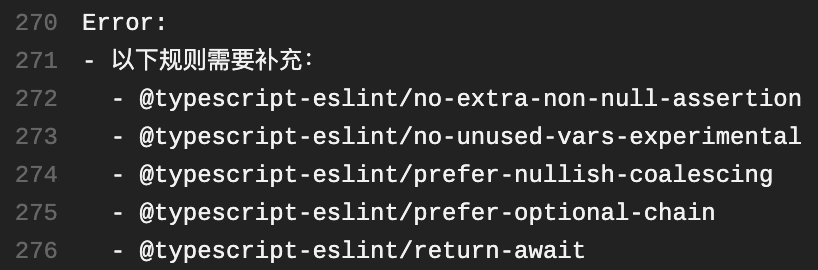
这样就实现了,在前端社区快速更迭的时候能够及时跟进最新的规则,永远保持 eslint-config-chervon 的活力和先进。
使用方法
内置规则
npm install --save-dev eslint @babel/eslint-parser eslint-config-chervon在你的项目的根目录下创建一个 .eslintrc.js 文件,并将以下内容复制进去:
module.exports = {
  extends: [
    'chervon',
  ],
  env: {
    // 你的环境变量(包含多个预定义的全局变量)
    //
    // browser: true,
    // node: true,
    // mocha: true,
    // jest: true,
    // jquery: true
  },
  globals: {
    // 你的全局变量(设置为 false 表示它不允许被重新赋值)
    //
    // myGlobal: false
  },
  rules: {
    // 自定义你的规则
  },
};
React
npm install --save-dev eslint @babel/eslint-parser @babel/preset-react@latest eslint-plugin-react eslint-config-chervon在你的项目的根目录下创建一个 .eslintrc.js 文件,并将以下内容复制进去:
module.exports = {
  extends: [
    'chervon',
    'chervon/react',
  ],
  env: {
    // 你的环境变量(包含多个预定义的全局变量)
    //
    // browser: true,
    // node: true,
    // mocha: true,
    // jest: true,
    // jquery: true
  },
  globals: {
    // 你的全局变量(设置为 false 表示它不允许被重新赋值)
    //
    // myGlobal: false
  },
  rules: {
    // 自定义你的规则
  },
};
Vue
npm install --save-dev eslint @babel/eslint-parser vue-eslint-parser eslint-plugin-vue eslint-config-chervon在你的项目的根目录下创建一个 .eslintrc.js 文件,并将以下内容复制进去:
module.exports = {
  extends: [
    'chervon',
    'chervon/vue',
  ],
  env: {
    // 你的环境变量(包含多个预定义的全局变量)
    //
    // browser: true,
    // node: true,
    // mocha: true,
    // jest: true,
    // jquery: true
  },
  globals: {
    // 你的全局变量(设置为 false 表示它不允许被重新赋值)
    //
    // myGlobal: false
  },
  rules: {
    // 自定义你的规则
  },
};
TypeScript
npm install --save-dev eslint typescript @typescript-eslint/parser @typescript-eslint/eslint-plugin eslint-config-chervon在你的项目的根目录下创建一个 .eslintrc.js 文件,并将以下内容复制进去:
module.exports = {
  extends: [
    'chervon',
    'chervon/typescript',
  ],
  env: {
    // 你的环境变量(包含多个预定义的全局变量)
    //
    // browser: true,
    // node: true,
    // mocha: true,
    // jest: true,
    // jquery: true
  },
  globals: {
    // 你的全局变量(设置为 false 表示它不允许被重新赋值)
    //
    // myGlobal: false
  },
  rules: {
    // 自定义你的规则
  },
};
TypeScript React
npm install --save-dev eslint typescript @typescript-eslint/parser @typescript-eslint/eslint-plugin eslint-plugin-react eslint-config-chervon在你的项目的根目录下创建一个 .eslintrc.js 文件,并将以下内容复制进去:
module.exports = {
  extends: [
    'chervon',
    'chervon/react',
    'chervon/typescript',
  ],
  env: {
    // 你的环境变量(包含多个预定义的全局变量)
    //
    // browser: true,
    // node: true,
    // mocha: true,
    // jest: true,
    // jquery: true
  },
  globals: {
    // 你的全局变量(设置为 false 表示它不允许被重新赋值)
    //
    // myGlobal: false
  },
  rules: {
    // 自定义你的规则
  },
};
常见问题
在 VSCode 中使用
在 VSCode 中,默认 ESLint 并不能识别 .vue、.ts 或 .tsx 文件,需要在「文件 => 首选项 => 设置」里做如下配置:
{
  "eslint.validate": [
    "javascript",
    "javascriptreact",
    "vue",
    "typescript",
    "typescriptreact"
  ]
}
保存时自动修复 ESLint 错误
如果想要开启「保存时自动修复」的功能,你需要配置 .vscode/settings.json:
{
  "eslint.validate": ["javascript", "javascriptreact", "vue", "typescript", "typescriptreact"],
  "editor.codeActionsOnSave": {
    "source.fixAll.eslint": true
  },
}
VSCode 中的 autoFixOnSave 没有效果
如果需要针对 .vue、.ts 和 .tsx 文件开启 ESLint 的 autoFix,则需要配置成:
{
  "editor.codeActionsOnSave": {
    "source.fixAll.eslint": true
  },
  "eslint.validate": [
    "javascript",
    "javascriptreact",
    {
      "language": "vue",
      "autoFix": true
    },
    {
      "language": "typescript",
      "autoFix": true
    },
    {
      "language": "typescriptreact",
      "autoFix": true
    }
  ]
}
如何结合 Prettier 使用
eslint-config-chervon 不包含所有样式相关的规则了,不需要引入 eslint-config-prettier。只需要安装 prettier 及相关 VSCode 插件即可。
下面给出一个 ChervonTeam 使用的 .prettierrc.js 配置,仅供参考:
// .prettierrc.js
module.exports = {
  // 一行最多 120 字符
  printWidth: 120,
  // 使用 2 个空格缩进
  tabWidth: 2,
  // 不使用缩进符,而使用空格
  useTabs: false,
  // 行尾需要有分号
  semi: true,
  // 使用单引号
  singleQuote: true,
  // 对象的 key 仅在必要时用引号
  quoteProps: 'as-needed',
  // jsx 不使用单引号,而使用双引号
  jsxSingleQuote: false,
  // 末尾需要有逗号
  trailingComma: 'all',
  // 大括号内的首尾需要空格
  bracketSpacing: true,
  // jsx 标签的反尖括号需要换行
  bracketSameLine: false,
  // 箭头函数,只有一个参数的时候,也需要括号
  arrowParens: 'always',
  // 每个文件格式化的范围是文件的全部内容
  rangeStart: 0,
  rangeEnd: Infinity,
  // 不需要写文件开头的 @prettier
  requirePragma: false,
  // 不需要自动在文件开头插入 @prettier
  insertPragma: false,
  // 使用默认的折行标准
  proseWrap: 'preserve',
  // 根据显示样式决定 html 要不要折行
  htmlWhitespaceSensitivity: 'css',
  // vue 文件中的 script 和 style 内不用缩进
  vueIndentScriptAndStyle: false,
  // 换行符使用 lf
  endOfLine: 'lf',
  // 格式化内嵌代码
  embeddedLanguageFormatting: 'auto',
};
VSCode 的一个最佳实践就是通过配置 .vscode/settings.json 来支持自动修复 Prettier 和 ESLint 错误:
{
  "files.eol": "\n",
  "editor.tabSize": 2,
  "editor.defaultFormatter": "esbenp.prettier-vscode",
  "eslint.validate": ["javascript", "javascriptreact", "vue", "typescript", "typescriptreact"],
  "editor.codeActionsOnSave": {
    "source.fixAll.eslint": true
  }
}
常用命令
# 安装依赖
npm i
# 构建 index.js react.js 等 eslintrc 配置
npm run build
# 执行测试
npm test
# 自动修复格式错误
npm run prettier:fix
# 检查是否覆盖了所有的规则
npm run rulesCoverage
# 发布新版本
npm version <major|minor|patch>
git push --follow-tags
npm publish