
eslint-plugin-llm-core
v0.36.0
Published
ESLint rules that catch the patterns LLM agents get wrong — and teach them to self-correct

Maintainers
 pertrai1
Readme
eslint-plugin-llm-core
ESLint rules that catch the patterns LLM agents get wrong — and teach them to self-correct through structured error messages. DeepWiki
LLMs generate code that works but drifts: arrow functions everywhere, magic numbers, deep nesting, string-interpolated logs, oversized files. These aren't style nitpicks — they compound into codebases that are harder to debug, review, and maintain.
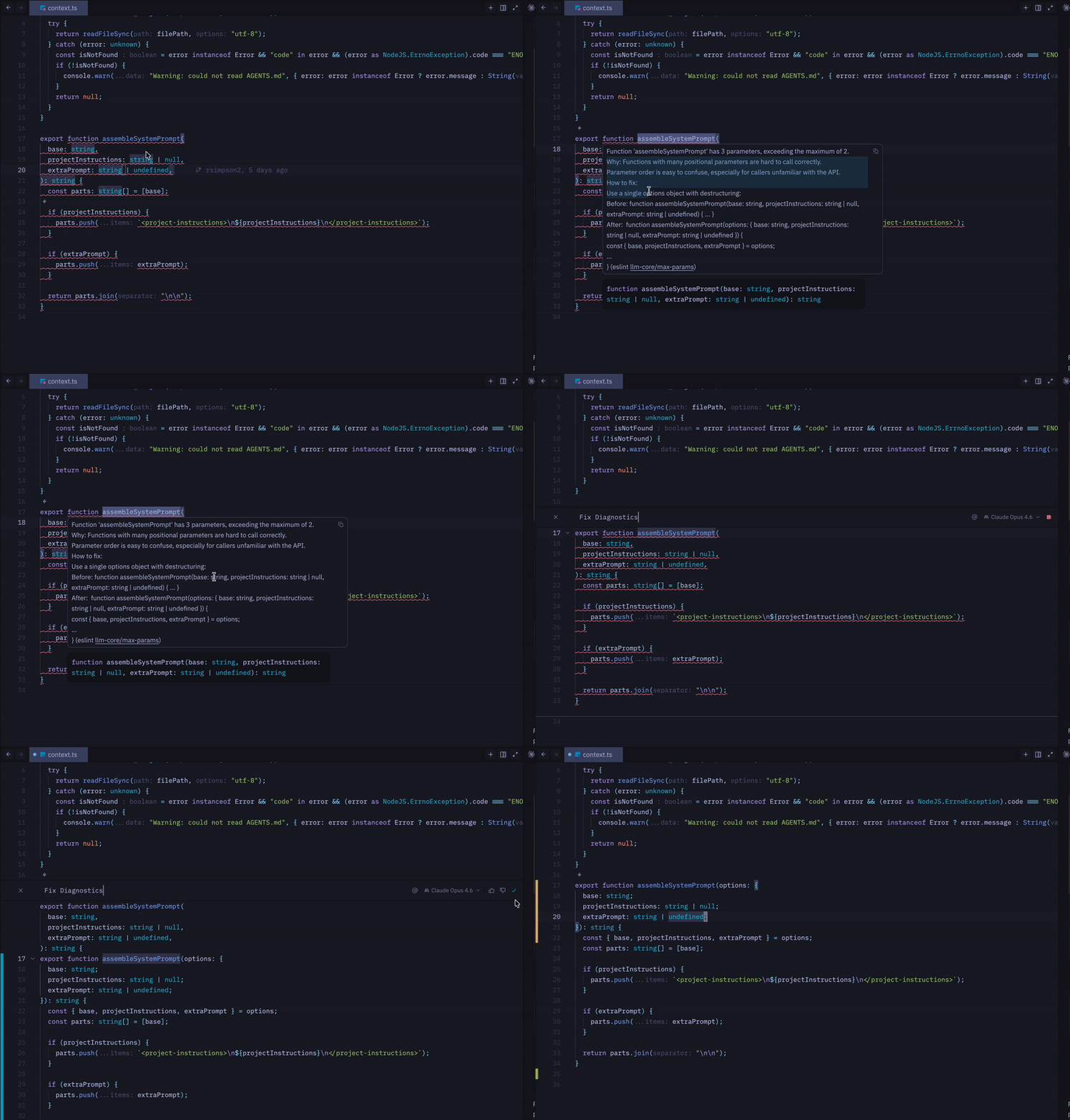
This plugin catches those patterns at lint time and provides error messages designed for LLM comprehension: what's wrong, why it matters, and a concrete fix. The result is AI-generated code that reads like it was written by a senior engineer.
Why this plugin?
- Targeted rules — Every rule addresses a real pattern LLMs consistently get wrong, from
export const fn = () => {}tologger.error(\Failed for ${userId}`)` - Teaching error messages — Structured feedback that LLMs parse and apply correctly on the first attempt
- Works for humans too — These are solid code quality rules regardless of who wrote the code
- Zero config — The
recommendedpreset is ready out of the box - Suggestions, not auto-fixes — Transformations that could change semantics are offered as suggestions, keeping you in control
How It Works
This plugin is designed around three principles that make it effective for LLM-assisted development:
Deterministic Feedback
Every rule produces the exact same error message for the same mistake, every time. There is no randomness, no varying phrasing, no context-dependent rewording. This consistency means LLMs receive unambiguous signals about what to fix and how.
Instructional Error Messages
Every error message follows a structured teaching format:
- What's wrong — the specific violation
- Why it matters — the rationale behind the rule
- How to fix — a concrete, copy-pasteable transformation using the actual code context (function names, parameter lists, etc.)
Exported function 'fetchData' must use a function declaration, not a function expression or arrow function.

Why: Function declarations are hoisted, produce better stack traces, and signal clear intent.
Arrow functions are best reserved for callbacks and inline expressions, not top-level exports.

How to fix:
  Replace: export const fetchData = async () => { ... }
  With:    export async function fetchData() { ... }
This structure gives LLMs everything they need in one pass — the violation, the reasoning, and a concrete transformation. In practice, this reduces the back-and-forth iterations needed to resolve violations compared to standard ESLint messages.
For the per-rule decision record explaining why each rule belongs in this plugin, see Rule Rationale.
Strict Mode by Default
Both the recommended and all configs set every rule to error, not warn. Warnings are easy to ignore — for both humans and LLMs. Errors force the issue to be resolved before the code is accepted. Combined with the no-inline-disable rule (which prevents // eslint-disable escape hatches), this creates a feedback loop where the LLM must fix violations rather than suppress them.
Installation
npm install eslint-plugin-llm-core --save-devQuick Start
Option 1: Recommended (All-in-one)
All recommended rules are active and ready out of the box.
// eslint.config.mjs
import llmCore from "eslint-plugin-llm-core";

export default [...llmCore.configs.recommended];
Option 2: Mix & Match
Select only the specific categories that fit your project.
// eslint.config.mjs
import llmCore from "eslint-plugin-llm-core";

export default [
  ...llmCore.configs.complexity,
  ...llmCore.configs.typescript,
  ...llmCore.configs.hygiene,
];
Available Configs
| Config | Description |
| ---------------- | ------------------------------------------------------------------------------------------------------------------------------------- |
| recommended | Safe defaults — rules most codebases should use |
| all | Every rule at error — for strict codebases |
| complexity | Enforce structural limits to prevent oversized files and functions |
| typescript | Rules focused on type safety and clarity to avoid common 'any' traps (TS/TSX files only) |
| best-practices | Core logic and reliability rules that catch common bugs and anti-patterns (also available as bestPractices for dot-notation access) |
| style | Focuses on consistent naming and structure for predictability |
| hygiene | Rules addressing development 'litter' and shortcuts like LLM artifacts and inline disables |
Manual Rule Configuration
// eslint.config.mjs
import llmCore from "eslint-plugin-llm-core";

export default [
  {
    plugins: {
      "llm-core": llmCore,
    },
    rules: {
      "llm-core/no-exported-function-expressions": "error",
      "llm-core/structured-logging": "error",
    },
  },
];
Rules
The rule table is generated from the source rules and links to the per-rule docs
in this package directory. If you are reading this README outside the repository,
the same docs are available in
packages/eslint-plugin/docs/rules.
💼 Configurations enabled in.
🌐 Set in the all configuration.
🏆 Set in the best-practices configuration.
🧮 Set in the complexity configuration.
🧹 Set in the hygiene configuration.
✅ Set in the recommended configuration.
🎨 Set in the style configuration.
⌨️ Set in the typescript configuration.
🔧 Automatically fixable by the --fix CLI option.
💡 Manually fixable by editor suggestions.
| Name | Description | 💼 | 🔧 | 💡 |
| :--------------------------------------------------------------------------------- | :------------------------------------------------------------------------------------------------------------------------------ | :------- | :-- | :-- |
| bad-comparison-sequence | Disallow chained equality and comparison expressions that compare an intermediate boolean result | 🌐 🏆 ✅ | | |
| bad-min-max-func | Disallow inverted nested Math.min/Math.max clamps that always return a constant bound | 🌐 🏆 ✅ | | |
| consistent-catch-param-name | Enforce consistent naming for catch clause parameters across the codebase | 🌐 ✅ 🎨 | | 💡 |
| explicit-export-types | Require explicit parameter and return type annotations on exported functions | 🌐 ✅ ⌨️ | | |
| filename-match-export | Enforce that filenames match their single exported function, class, or component name | 🌐 ✅ 🎨 | | |
| max-complexity | Enforce a maximum cyclomatic complexity per function to encourage decomposition | 🌐 🧮 ✅ | | |
| max-file-length | Enforce a maximum number of lines per file to encourage proper module separation | 🌐 🧮 ✅ | | |
| max-function-length | Enforce a maximum number of lines per function to encourage decomposition | 🌐 🧮 ✅ | | |
| max-nesting-depth | Enforce a maximum nesting depth for control flow statements to reduce cognitive complexity | 🌐 🧮 ✅ | | |
| max-params | Enforce a maximum number of function parameters to encourage object parameter patterns | 🌐 🧮 ✅ | | |
| missing-throw | Disallow standalone new Error expressions that likely forgot the throw keyword | 🌐 🏆 ✅ | 🔧 | |
| naming-conventions | Enforce naming conventions: Base prefix for abstract classes, Error suffix for error classes | 🌐 ✅ 🎨 | | |
| no-any-in-generic | Disallow any as a generic type argument in type references, arrays, and other parameterized types | 🌐 ✅ ⌨️ | | |
| no-async-array-callbacks | Disallow async callbacks passed to array methods where Promises are silently discarded or misused | 🌐 🏆 ✅ | | |
| no-async-promise-executor | Disallow async Promise executor functions because thrown errors are not captured by the outer Promise | 🌐 🏆 ✅ | | |
| no-commented-out-code | Disallow commented-out code to keep the codebase clean and reduce noise | 🌐 🧹 ✅ | | |
| no-debug-scaffolding | Disallow temporary debugger statements and console debug scaffolding left behind during development | 🌐 🧹 ✅ | | |
| no-dynamic-code-execution | Disallow dynamic code execution through eval, Function constructors, and string-based timers | 🌐 🏆 ✅ | | |
| no-empty-catch | Disallow catch blocks with no meaningful error handling (empty or comment-only blocks) | 🌐 🏆 ✅ | | |
| no-exported-function-expressions | Enforce that exported functions use function declarations instead of function expressions or arrow functions | 🌐 ✅ 🎨 | | 💡 |
| no-floating-promise | Disallow calling async functions or Promise-returning expressions without awaiting, returning, or explicitly voiding the result | 🌐 🏆 ✅ | | |
| no-hallucinated-local-imports | Disallow static relative imports and re-exports that reference missing local modules or named exports | 🌐 | | |
| no-hallucinated-package-imports | Disallow package imports and re-exports whose package root is not declared in the relevant package manifest | 🌐 | | |
| no-incorrect-sort | Disallow .sort() without a compare function, which coerces elements to strings and produces incorrect numeric ordering | 🌐 | | |
| no-inline-disable | Disallow eslint-disable comments that suppress lint errors instead of fixing them | 🌐 🧹 ✅ | | |
| no-llm-artifacts | Disallow common LLM placeholder comments and incomplete code markers that indicate skipped implementation | 🌐 🧹 ✅ | | |
| no-magic-numbers | Disallow magic numbers and enforce named constants for clarity | 🌐 🏆 ✅ | | |
| no-redundant-comments | Disallow comments that merely narrate the next line of code without adding intent | 🌐 🧹 ✅ | | |
| no-redundant-logic | Disallow redundant boolean logic and unnecessary control flow patterns | 🌐 ✅ 🎨 | | 💡 |
| no-swallowed-errors | Disallow catch blocks that only log to console and swallow the error | 🌐 🏆 ✅ | | |
| no-type-assertion-any | Disallow type assertions to any that bypass TypeScript's type safety | 🌐 ✅ ⌨️ | | |
| no-type-system-bypass | Disallow broad TypeScript escape hatches that hide type errors instead of fixing them | 🌐 ✅ ⌨️ | | |
| no-unbounded-promise-all | Disallow Promise.all fan-out over arbitrary collections without an explicit concurrency bound | 🌐 | | |
| no-unsafe-array-access | Require a non-empty array guard before reading the first or last element | 🌐 🏆 ✅ | | |
| no-weak-randomness-for-secrets | Disallow weak or predictable randomness when creating security-sensitive values | 🌐 🏆 ✅ | | |
| no-widen-then-assert | Disallow declaring a variable's type wider than its value, then asserting it back to the narrow type | 🌐 ✅ ⌨️ | | |
| prefer-early-return | Enforce guard clauses (early returns) instead of wrapping function bodies in a single if statement | 🌐 ✅ 🎨 | | |
| prefer-nullish-coalescing | Prefer nullish coalescing over logical OR when providing default values | 🌐 ✅ 🎨 | | 💡 |
| prefer-unknown-in-catch | Disallow any type annotation on catch clause parameters; prefer unknown | 🌐 ✅ ⌨️ | | |
| structured-logging | Enforce structured logging with static messages and dynamic values as separate metadata | 🌐 🏆 ✅ | | |
| throw-error-objects | Disallow throwing non-Error values such as strings, template literals, plain objects, or arrays | 🌐 🏆 ✅ | | |
| uninvoked-array-callback | Disallow callbacks on sparse arrays created with Array(length) because holes skip callback invocation | 🌐 🏆 ✅ | | |
Complementary ESLint Rules
These ESLint core rules address common LLM patterns and pair well with this plugin:
llm-core/max-complexityreplaces ESLint's corecomplexityrule with the same classic counting semantics but a teaching-oriented message tuned for decomposition.
| Rule | What it catches | ESLint version |
| ------------------------------------------------------------------------------------- | -------------------------------------------------------------------------- | -------------- |
| no-nested-ternary | LLMs nest ternaries for "conciseness" — enforce if/else instead | All |
| preserve-caught-error | LLMs discard original errors when re-throwing — require { cause: error } | 9.35+ |
| no-useless-assignment | LLMs create redundant intermediate variables — catch dead stores | 9.0+ |
Add these to your config alongside llm-core:
// eslint.config.mjs
import llmCore from "eslint-plugin-llm-core";

export default [
  ...llmCore.configs.recommended,
  {
    rules: {
      "no-nested-ternary": "error",
      "preserve-caught-error": "error",
      "no-useless-assignment": "error",
    },
  },
];
Typescript Compiler Guardrails
These are not ESLint rules, but they catch classes of LLM-generated TypeScript mistakes before runtime:
| Guardrail | Why it helps |
| ---------------------------------- | ----------------------------------------------------------- |
| strict: true | Enables the baseline TypeScript safety checks. |
| noUncheckedIndexedAccess: true | Prevents agents from assuming indexed lookups always exist. |
| exactOptionalPropertyTypes: true | Prevents sloppy optional-property handling. |
| noImplicitOverride: true | Prevents accidental method shadowing in classes. |
| noImplicitReturns: true | Catches branches where the agent forgot to return. |
| noFallthroughCasesInSwitch: true | Catches accidental switch fallthrough. |
{
  "compilerOptions": {
    "strict": true,
    "noUncheckedIndexedAccess": true,
    "exactOptionalPropertyTypes": true,
    "noImplicitOverride": true,
    "noImplicitReturns": true,
    "noFallthroughCasesInSwitch": true
  }
}
Research & Evidence
The rules in this plugin are grounded in empirical research on LLM coding errors and code quality. Key papers:
Bug Patterns & Taxonomies:
- Bugs in LLM Generated Code — 333 bugs across 10 distinctive patterns
- Engineering Pitfalls in AI Coding Tools — 3,864 bugs from Claude Code, Codex, and Gemini CLI
- LLM Code Generation Mistakes: What and Why? — 216 non-syntactic mistakes analyzed
- Characteristics of Code Generation Errors — 557 bugs across 6 LLMs
Code Quality Beyond Correctness:
- A Taxonomy of Inefficiencies in LLM-Generated Code — 19 subcategories of performance, readability, and maintainability issues
- Quality Assurance of LLM-Generated Code — practitioners warn LLM code accelerates technical debt; maintainability prioritized over security
- No Correlation Between Functional Correctness and Code Quality — passing tests ≠ production-quality code
Security & Reliability:
- Security of GitHub Copilot's Code — security vulnerabilities in AI-generated contributions
- How Secure is AI-Generated Code? — 51% of 112K generated programs contained vulnerabilities
- Package Hallucinations by Code-Generating LLMs — fabricated dependency analysis
Architectural Erosion:
- Technical Debt in LLM Architectures — 80% architectural violation rate in open-weights models; "Implementation Laziness" omits complex logic
Generated Instructions
Lint rules are reactive — they fire after code is written. Generated instructions are proactive — they encode the same rule knowledge as imperative behavioral guidelines that shape LLM output before violations occur.
Unlike static instruction files, generated instructions are:
- Personalized — derived from your actual rule config and option values
- In sync — regenerated when config changes, no drift between rules and instructions
- File-type-aware — TypeScript-only rules appear in a separate section
Usage
npx llm-core-instructionsThis reads your eslint.config.*, resolves active llm-core rules, and generates .agents/linting-rules.md with behavioral guidelines for AI coding tools. It also appends a reference to the generated file into any existing agent instruction files (AGENTS.md, CLAUDE.md, .github/copilot-instructions.md) so agent tools discover it automatically. Re-running replaces the reference in-place — no duplicates.
Flags:
| Flag | Description |
| ----------------- | ---------------------------------------------------------------------------------------- |
| --config <path> | Specify ESLint config file path (default: auto-detect) |
| --dry-run | Print generated content to stdout; skips file generation and injection |
| --no-inject | Generate .agents/linting-rules.md only, skip appending references to instruction files |
Example output:
# Coding Guidelines

Generated from eslint-plugin-llm-core configuration.

## All Files

- Keep functions under 50 lines — extract helpers when they grow
- Keep cyclomatic complexity under 10 — decompose when functions get complex
- Never leave catch blocks empty — handle, rethrow, or log the error
- Use structured logging with static message strings; pass dynamic values as separate metadata

## TypeScript Files Only

- Add explicit parameter and return type annotations on all exported functions
- Never use 'any' as a generic type argument
- Use 'unknown' for catch parameter types, not 'any'
Programmatic API
import { generateInstructions } from "eslint-plugin-llm-core/instructions";

const result = await generateInstructions({
  configPath: "eslint.config.mjs",
});

result.content; // The generated markdown string
result.activeRules; // Resolved rules with options and derived scope
result.allFilesRules; // Rules applying to all files
result.javascriptRules; // JavaScript-only rules
result.typescriptRules; // TypeScript-only rules
MCP Server
eslint-plugin-llm-core-mcp serves the same guidance over MCP stdio so agents
can request rule guidance only when they need it.
Register it with an MCP-capable client:
{
  "mcpServers": {
    "llm-core": {
      "command": "npx",
      "args": ["-y", "eslint-plugin-llm-core-mcp"]
    }
  }
}
The server exposes lint_file, get_active_instructions,
llm-core://rules, and llm-core://rules/{ruleName}. lint_file first uses
the target project's discovered ESLint flat config and labels those findings
with source: "project-config".
Repos without an ESLint config can opt in to a transient zero-config fallback by
setting LLM_CORE_MCP_ENABLE_FALLBACK=1 in the MCP server environment:
{
  "mcpServers": {
    "llm-core": {
      "command": "npx",
      "args": ["-y", "eslint-plugin-llm-core-mcp"],
      "env": {
        "LLM_CORE_MCP_ENABLE_FALLBACK": "1"
      }
    }
  }
}
Fallback mode only runs when no project config is discoverable. It uses the
bundled recommended llm-core rules and TypeScript parser, labels findings with
source: "fallback", and remains read-only: no file edits, generated config, or
ESLint cache. Fallback findings may include rules the project has not opted into;
configure the plugin in the project when results must match CI/editor lint.
Manual smoke check after build:
npm --workspace eslint-plugin-llm-core-mcp run build
npx -y eslint-plugin-llm-core-mcp
The MCP package has its own package version and depends on a compatible
eslint-plugin-llm-core version through the existing Changesets release flow.
Repository Agent Skills
Beyond ESLint rules, this repository includes agent skills — markdown instruction files that LLM agents can load when performing specific tasks. Skills complement the lint rules by catching patterns that require judgment rather than pattern matching.
Available Skills
| Skill | Description | | ----------------------------------------------------------------------------------------------------- | ------------------------------------------------------------------------------------------------------------------------------ | | test-reviewer | Detects tests that duplicate production logic, use shallow assertions, skip edge cases, or assert on mocks instead of behavior |
Usage
Copy the skill file from the repository into your agent's skill directory:
# Claude Code
cp skills/test-reviewer.md .claude/skills/

# Cursor
cp skills/test-reviewer.md .cursor/skills/

# Or wherever your agent tool looks for skills
The skill is a standalone markdown file with no dependencies. Adapt it to your project's testing conventions as needed.
Contributing
npm ci
npm run build
npm run test
npm run lint
Run these commands from the repository root. See AGENTS.md for architecture details and how to add new rules.
Roadmap
This plugin evolves as I learn more about how LLM agents behave in real codebases. The current ruleset is based on observed patterns — code that compiles and runs but drifts from production standards.
What I'm watching:
- Which rules catch the most violations in practice
- Whether structured messages reduce fix iterations (I believe they do, but want data)
- New patterns that emerge as LLM capabilities change
- Edge cases where rules create more noise than value
How you can help:
If you're using this plugin with LLM agents, I'd love to hear what's working and what isn't. Open an issue with:
- Rules that catch real problems in your codebase
- Rules that generate false positives or friction
- Patterns your LLM consistently gets wrong that aren't covered
The goal is a tight, high-signal ruleset — not comprehensive coverage. Every rule should earn its place.
License
MIT