
eslint-plugin-no-profanity-comments
v1.2.1
Published
ESLint plugin – detects profanity, threats, and code-critique remarks in code comments (EN, HU, DE, RO, IT, extendable)
Downloads
671

Maintainers
 lkovari
Readme
eslint-plugin-no-profanity-comments
An ESLint plugin that detects profanity, offensive language, threats, and developer code-critique remarks in TypeScript/JavaScript code comments using the ESLint AST. It ships with English, Hungarian, German, Romanian, and Italian word lists and supports adding new languages and words through a simple file-based registry, without touching any core logic.
The rule scans every comment in a file (line and block comments) and reports a
warning or error for each match. Patterns support basic leet-speak substitutions
(for example [a@], [s$], [i1!], [e3], [o0]) and are matched
case-insensitively.
Contents
- Installation
- Quick start (step by step)
- Usage
- How it works
- Rule options
- Categories and severities
- Building
- Testing
- Test physical result
- Constructing a pattern from a word
- Adding words to an existing language
- Adding a new language
- CI integration (GitHub Actions)
- License
Installation
npm install --save-dev eslint-plugin-no-profanity-commentsThis plugin has the following peer dependencies, which you most likely already have in a TypeScript ESLint setup:
eslint>= 8@typescript-eslint/parser>= 6
Quick start (step by step)
This walkthrough takes you from nothing to a working lint run. If you already have an ESLint setup, skip to step 4.
Step 1 — Check prerequisites
You need Node.js 16 or newer and ESLint 8 or 9. Check what you have:
node --version          # v16+ recommended
npx eslint --version    # tells you whether you are on ESLint v8.x or v9.x
The ESLint major version decides which config format you use later:
- ESLint v9 → flat config (
eslint.config.js/.mjs). - ESLint v8 → legacy config (
.eslintrc.js/.eslintrc.json).
Step 2 — Install the plugin and its peers
Install the plugin as a dev dependency:
npm install --save-dev eslint-plugin-no-profanity-commentsIf you do not already have ESLint and the TypeScript parser, install them too:
npm install --save-dev eslint @typescript-eslint/parserStep 3 — Decide warn vs. error
Pick how violations should affect your build:
"warn"— prints a warning but does not fail the command (good for adoption)."error"— exits non-zero, failing CI / pre-commit (good for enforcement).
You can set this per rule, or use a bundled config: recommended warns,
strict errors. You can change this any time.
Step 4 — Register the plugin in your ESLint config
ESLint only runs rules that are registered in a configuration file. ESLint discovers this file automatically by name and location, so the filename and where you put it both matter. Follow the part below that matches your ESLint version from step 1.
4a. Where the file goes and what to name it
- Create the config file in the root of your project — the same folder that
contains your
package.json. ESLint searches upward from the files being linted and uses the nearest config, so the project root makes it apply to your whole codebase. - The name depends on your ESLint version:
- ESLint v9:
eslint.config.js(oreslint.config.mjsfor ESM). This is the "flat config" format. - ESLint v8:
.eslintrc.js(or.eslintrc.json/.eslintrc.cjs). This is the "legacy" format.
- ESLint v9:
- If a config file already exists, edit it instead of creating a second one —
do not have both an
eslint.config.jsand an.eslintrc.*for the same project, as that is ambiguous.
4b. ESLint v9 — create eslint.config.js
Create a file named eslint.config.js in your project root with this content:
const noProfanity = require("eslint-plugin-no-profanity-comments");
const tsParser = require("@typescript-eslint/parser");

module.exports = [
  {
    files: ["**/*.ts", "**/*.tsx", "**/*.js"],
    languageOptions: { parser: tsParser },
    plugins: { "no-profanity-comments": noProfanity },
    rules: {
      "no-profanity-comments/no-profanity-in-comments": ["warn", { minSeverity: "mild" }],
    },
  },
];
What each part does and why it is needed:
const noProfanity = require(...)— loads this plugin so the config can reference its rule. Without importing it, ESLint has no idea the rule exists.const tsParser = require("@typescript-eslint/parser")— the default ESLint parser does not understand TypeScript syntax. The rule reads comments, but ESLint must first parse the file into an AST; on.ts/.tsxfiles that requires the TypeScript parser, or ESLint will error on the syntax before the rule ever runs.module.exports = [ ... ]— flat config is an array of config objects. ESLint merges them top to bottom; each object can target different files.files: ["**/*.ts", "**/*.tsx", "**/*.js"]— the glob of files this block applies to. Add or remove extensions to match your project (for example add"**/*.jsx"or"**/*.vue"if relevant). If a file is not matched here, it is not scanned.languageOptions: { parser: tsParser }— tells ESLint to parse the matched files with the TypeScript parser (see above).plugins: { "no-profanity-comments": noProfanity }— registers the plugin under a name. In flat config this must be an object (key → plugin), not a string array. The key you choose here becomes the prefix you use inrules.rules: { "no-profanity-comments/no-profanity-in-comments": [...] }— turns the rule on. The rule id is always<plugin key>/<rule name>, so the prefix before the slash must exactly match the key you used inplugins. The value is[severity, options]:"warn"(or"error") and the rule options object (here{ minSeverity: "mild" }).
If your project is ESM (package.json has "type": "module", or you name the
file eslint.config.mjs), use import / export default instead of
require / module.exports:
import noProfanity from "eslint-plugin-no-profanity-comments";
import tsParser from "@typescript-eslint/parser";

export default [
  {
    files: ["**/*.ts", "**/*.tsx", "**/*.js"],
    languageOptions: { parser: tsParser },
    plugins: { "no-profanity-comments": noProfanity },
    rules: {
      "no-profanity-comments/no-profanity-in-comments": ["warn", { minSeverity: "mild" }],
    },
  },
];
Or, the shortest form, spread one of the bundled flat configs. This registers the
plugin and enables the rule for you, so you do not write the plugins/rules
keys yourself:
const noProfanity = require("eslint-plugin-no-profanity-comments");

module.exports = [
  noProfanity.configs["flat/recommended"], // warns; use "flat/strict" to error
];
Note the bundled configs do not set a parser, so if you lint TypeScript files
add a second block that sets languageOptions.parser, or keep the explicit form
above. The order matters: later array entries override earlier ones, so place
your own overrides (for example a project-wide allowList) after the spread
config:
const noProfanity = require("eslint-plugin-no-profanity-comments");
const tsParser = require("@typescript-eslint/parser");

module.exports = [
  noProfanity.configs["flat/recommended"],
  {
    files: ["**/*.ts", "**/*.tsx"],
    languageOptions: { parser: tsParser },
    rules: {
      "no-profanity-comments/no-profanity-in-comments": ["warn", { allowList: ["hack"] }],
    },
  },
];
4c. ESLint v8 — create .eslintrc.js
Create a file named .eslintrc.js in your project root:
module.exports = {
  parser: "@typescript-eslint/parser",
  plugins: ["no-profanity-comments"],
  rules: {
    "no-profanity-comments/no-profanity-in-comments": ["warn", { minSeverity: "mild" }],
  },
};
Differences from flat config, and why:
module.exports = { ... }— legacy config is a single object, not an array.parser: "@typescript-eslint/parser"— given as a string name; ESLint v8 resolves the parser package itself (you do notrequireit here).plugins: ["no-profanity-comments"]— in legacy configpluginsis a string array. ESLint derives the package name by prefixingeslint-plugin-, so"no-profanity-comments"loadseslint-plugin-no-profanity-comments. The string you list here is also the prefix used inrules.rules— same id format as flat config:<plugin name>/<rule name>.
To use a bundled config in v8 instead, extend it:
module.exports = {
  parser: "@typescript-eslint/parser",
  extends: ["plugin:no-profanity-comments/recommended"], // or .../strict
};
Step 5 — Add a lint script
Add a script to your package.json so the command is easy to remember and reuse
in CI:
{
  "scripts": {
    "lint": "eslint ."
  }
}
Step 6 — Run the linter
npm run lint
# or, without a script:
npx eslint .
Step 7 — Verify it actually catches something
Temporarily add a comment that should trip the rule to any linted file:
// this is crap
export const demo = 1;
Run the linter again — you should see a message like:
[no-profanity-in-comments] "this is crap" (en, severity: moderate) found in comment.Delete the test comment afterward. If you do not see a message, jump to step 9 troubleshooting.
Step 8 — Tune the behavior (optional)
Adjust the rule options to fit your team. The most common ones:
"no-profanity-comments/no-profanity-in-comments": ["error", {
  minSeverity: "moderate",        // ignore "mild" entries
  languages: ["en", "hu"],        // only scan English + Hungarian
  allowList: ["hack"],            // never flag these exact words
}]
See Rule options for the full list, including extraPatterns
for your own custom words.
Step 9 — Troubleshooting
| Symptom | Likely cause and fix |
| ------- | -------------------- |
| Definition for rule 'no-profanity-comments/...' was not found | The plugin is not registered. Check the plugins key name matches the rule prefix exactly (no-profanity-comments). |
| ESLint v9 throws about plugins needing to be an object | You used a legacy-style config (string array) in flat config. Use the v9 block above, or configs["flat/recommended"]. |
| require is not defined in your config | Your config is ESM. Use the import / export default variant in step 4. |
| No messages even with a swear word | The file is not matched (files glob), the parser is not set, or minSeverity is too high. Confirm the file extension is covered and lower minSeverity to "mild". |
| A legitimate term keeps getting flagged | Add it to allowList, e.g. allowList: ["hack"]. |
Usage
The single rule exposed by this plugin is
no-profanity-comments/no-profanity-in-comments.
ESLint v9 (flat config: eslint.config.js)
const noProfanity = require("eslint-plugin-no-profanity-comments");
const tsParser = require("@typescript-eslint/parser");

module.exports = [
  {
    files: ["**/*.ts", "**/*.tsx", "**/*.js"],
    languageOptions: {
      parser: tsParser,
    },
    plugins: {
      "no-profanity-comments": noProfanity,
    },
    rules: {
      "no-profanity-comments/no-profanity-in-comments": [
        "warn",
        { minSeverity: "mild" },
      ],
    },
  },
];
You can also reuse the bundled shared configs:
const noProfanity = require("eslint-plugin-no-profanity-comments");

module.exports = [
  noProfanity.configs["flat/recommended"],
  // or, to fail the build instead of warning:
  // noProfanity.configs["flat/strict"],
];
ESLint v8 (legacy config: .eslintrc.js)
module.exports = {
  parser: "@typescript-eslint/parser",
  plugins: ["no-profanity-comments"],
  rules: {
    "no-profanity-comments/no-profanity-in-comments": [
      "warn",
      { minSeverity: "mild" },
    ],
  },
};
Or extend a shared config:
module.exports = {
  extends: ["plugin:no-profanity-comments/recommended"],
};
Running the linter
Once configured, run ESLint as usual:
npx eslint .Each offending comment produces a message like:
[no-profanity-in-comments] "schifo" (it, severity: moderate) found in comment.The message includes the matched text, the language code that matched, and the severity of the entry.
How it works
The detection pipeline has three layers: word lists, a compiled registry, and the rule itself.
flowchart LR
  subgraph words [Word lists - src/languages]
    en[en.ts]
    hu[hu.ts]
    de[de.ts]
    ro[ro.ts]
    it[it.ts]
    critique[critique.ts]
  end
  registry[registry.ts<br/>compiles patterns]
  rule[rule.ts<br/>scans comments]
  eslint[ESLint report]

  critique --> en
  critique --> hu
  critique --> de
  critique --> ro
  critique --> it
  en --> registry
  hu --> registry
  de --> registry
  ro --> registry
  it --> registry
  registry --> rule
rule --> eslint- Each language file in
src/languagesexports aLanguageDefinitionwith acode, aname, and anentriesarray ofProfanityEntryobjects:
interface ProfanityEntry {
  word: string;      // human-readable label, also shown to allowList comparisons
  pattern: string;   // RegExp source string (no slashes, no flags)
  severity: Severity;       // "mild" | "moderate" | "severe"
  category?: Category;      // "profanity" | "threat" | "slur" | "poor_code" | "bad_practice" | "confusion"
}src/registry.tsassembles every language'sentriesinto two precompiled sets. The publicCOMPILED_PATTERNS(andgetPatternsForLanguages(codes)) compile eachpatternwith theiflag, making them safe to call.test()/.exec()on:
new RegExp(entry.pattern, "i")For the rule engine it also builds ENGINE_PATTERNS (and
getEnginePatternsForLanguages(codes)) with the gi flag, which the rule
uses with String.matchAll to report every occurrence in a comment. It also
exposes REGISTERED_LANGUAGES.
src/rule.tsruns onProgram, collects all comments via the source code'sgetAllComments(), and scans each comment's text against the engine patterns withmatchAll. It reports oneprofanityFoundmessage per match — so the same banned word appearing twice in a single comment produces two reports — after applying:minSeverityfiltering (entries below the threshold are skipped),- the
languagesfilter (selects the active pattern set viagetEnginePatternsForLanguages), - the
allowList(drops a match if the matched text equals an allowed word), - and any
extraPatternssupplied inline.
Because the rule only ever reads from the registry, adding words or languages never requires changing the rule logic.
Programmatic access (the wordlist subpath)
If you want the raw word lists or compiled patterns in your own tooling (for
example to build a custom report), import the public wordlist subpath:
const {
  COMPILED_PATTERNS,        // CompiledPattern[] — { entry, regex, lang }, regex has the `i` flag
  REGISTERED_LANGUAGES,     // string[] — e.g. ["en", "hu", "de", "ro", "it"]
  getPatternsForLanguages,  // (codes: string[]) => CompiledPattern[]
} = require("eslint-plugin-no-profanity-comments/wordlist");
The TypeScript types (ProfanityEntry, LanguageDefinition, Severity,
Category) are exported from the same subpath. Only the package root (.) and
./wordlist are public entry points; the internal registry (and its
gi-compiled ENGINE_PATTERNS, which are stateful with .test()/.exec()) is
intentionally not importable.
Rule options
The rule accepts a single options object with the following properties. All are optional.
| Option | Type | Default | Description |
| --------------- | -------------------------------------------------------------- | ------------------ | ------------------------------------------------------------------------------------------- |
| minSeverity | "mild" \| "moderate" \| "severe" | "mild" | Minimum severity to report. Entries below this level are ignored. |
| languages | string[] | all registered | Restrict matching to specific language codes (for example ["en", "hu"]). |
| allowList | string[] | [] | Exact matched strings (case-insensitive) to exclude from reporting. |
| extraPatterns | Array<{ word: string; pattern: string; severity: Severity }> | [] | Additional custom patterns. pattern is a RegExp source string compiled with the gi flags, so every occurrence in a comment is reported. |
Example with all options
"no-profanity-comments/no-profanity-in-comments": [
  "error",
  {
    minSeverity: "moderate",
    languages: ["en", "hu"],
    allowList: ["hack"],
    extraPatterns: [
      { word: "yikes", pattern: "\\byikes\\b", severity: "mild" }
    ]
  }
]
Available language codes out of the box: en, hu, de, ro, it.
Categories and severities
Every entry is tagged with a severity and an optional category. The category
is informational (it is not currently a filter option), while severity drives
the minSeverity option.
Severities:
mild— general negative remark.moderate— clear, pointed criticism or moderate profanity.severe— aggressive, destructive, or strongly offensive content.
Categories:
| Category | Meaning |
| -------------- | -------------------------------------------------------- |
| profanity | Swearing and offensive language. |
| threat | Threats of violence toward people. |
| slur | Slurs. |
| poor_code | Code-quality insults ("garbage", "schifo"). |
| bad_practice | Antipatterns and bad-practice callouts ("copy-paste"). |
| confusion | Confusion / despair ("no idea why this works"). |
Language coverage
All five bundled languages provide entries across every category, including profanity, threats, and slurs:
| Language | profanity | threat | slur | poor_code | bad_practice | confusion |
| ---------------- | ----------- | -------- | ------ | ----------- | -------------- | ----------- |
| English (en) | ✓ | ✓ | ✓ | ✓ | ✓ | ✓ |
| Hungarian (hu) | ✓ | ✓ | ✓ | ✓ | ✓ | ✓ |
| German (de) | ✓ | ✓ | ✓ | ✓ | ✓ | ✓ |
| Romanian (ro) | ✓ | ✓ | ✓ | ✓ | ✓ | ✓ |
| Italian (it) | ✓ | ✓ | ✓ | ✓ | ✓ | ✓ |
The poor_code, bad_practice, and confusion entries (the "code-critique"
lists) live in a single shared file, src/languages/critique.ts,
which exports per-language, per-category arrays (for example en_poor_code,
hu_confusion, it_bad_practice) plus a combined ALL_CODE_CRITIQUE export.
Each language file imports the arrays it needs and spreads them into its
entries.
In addition, each language file defines a local insults array — an extended set
of single-word insults and code-quality remarks (personal insults tagged
profanity, code descriptors tagged poor_code, and quick-fix / botch terms
tagged bad_practice). These are spread into the same entries array, so they
participate in detection like every other entry. When a single-word insult would
overlap a multi-word phrase elsewhere in the same language (for example schifo
vs fa schifo), the multi-word phrase is omitted and the single word is kept so
each comment triggers at most one report per overlapping term. Current sizes:
English 85, Hungarian 86, German 88, Romanian 87, Italian 89 (435 entries total).
Building
The project is written in TypeScript and compiled to dist/ with tsc.
npm install      # install dev/peer dependencies
npm run build    # type-check and emit dist/ (runs `tsc`)
npm run build reads tsconfig.json, compiles everything under
src/ into dist/, and emits declaration files. The build also runs
automatically before publishing via the prepublishOnly script. Never edit files
in dist/ directly; they are always regenerated from src/.
Testing
Unit tests live in tests/ and use @typescript-eslint/rule-tester
with Vitest. There is one test file per language
(en, hu, de, ro, it), a dedicated critique test file, and an
insults test file covering the extended per-language insult lists. Together
they cover clean comments, the minSeverity, languages, allowList, and
extraPatterns options, and language-specific profanity, threat, slur,
code-critique, and insult matches.
npm test           # run once
npm run test:watch # watch mode
The tests run directly against the TypeScript sources, so you do not need to
build first. Many code-critique test cases use the languages option to scope a
comment to a single language, keeping the expected error counts deterministic
(some phrases such as "copy-paste" appear in several languages).
Test physical result
The screenshot below is a real pnpm lint run against an Angular project that
contained deliberately profane comments. Each offending comment is reported with
the matched text, the language code that matched (en, hu, de, ro), and the
entry's severity — exactly the message format described in
Running the linter:
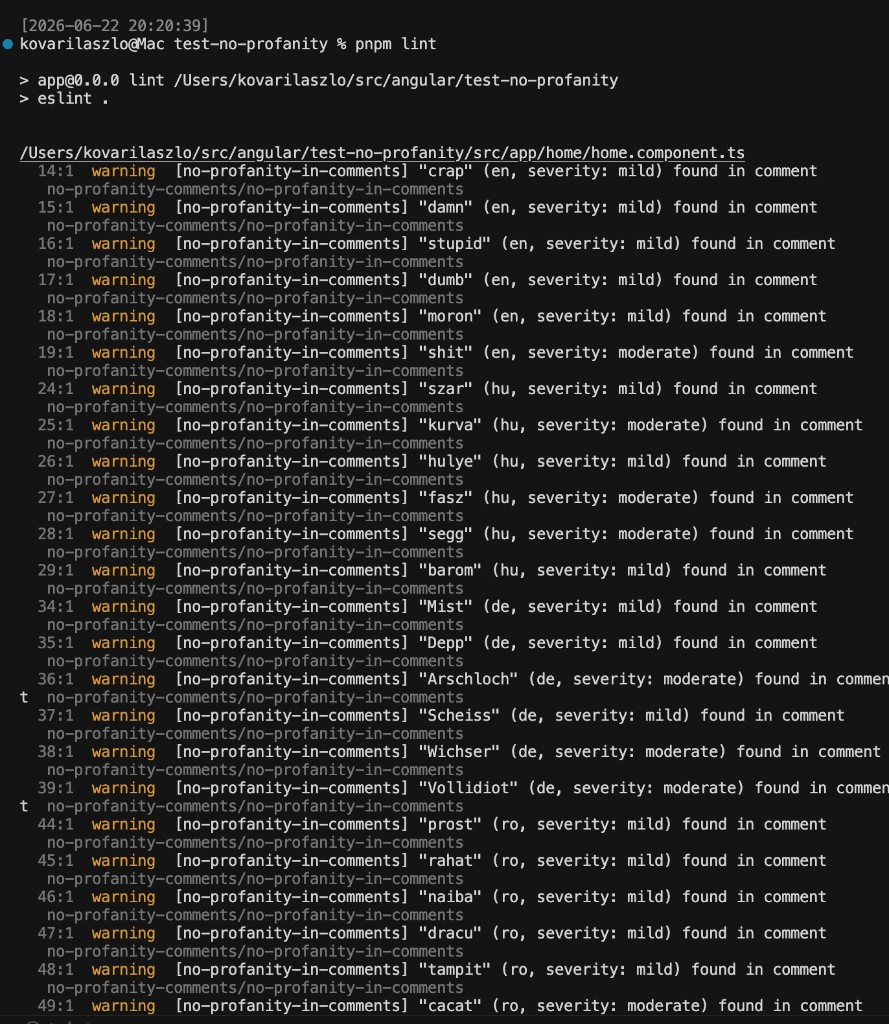
The image lives in docs/lint-output.png; it is loaded
from the repository's main branch via an absolute URL so it also renders on the
npm package page. Commit and push docs/lint-output.png for the image to appear.
Constructing a pattern from a word
Every entry's pattern is a RegExp source string (no surrounding slashes, no
flags). The registry compiles it case-insensitively, and the rule engine matches
every occurrence in a comment. The steps below are language-independent — they
work the same for English, Hungarian, German, Romanian, Italian, or any new
language you add.
Step-by-step recipe
Start from the literal word, in lowercase. Matching is case-insensitive, so
basszaalready coversBASSZA,Bassza, etc. — never add upper-case variants by hand.Add word boundaries with
\bat the start and end so the word is not matched inside unrelated words (e.g. soassdoes not fire insideclass). In a TypeScript string a backslash must be escaped, so you type\\b, which becomes a literal\bin the compiled regex.Add leet-speak character classes for letters people commonly substitute. A character class
[ ... ]matches any one of the characters inside it. The conventional substitutions used throughout this project are:| Letter | Class | Matches | | ------ | ---------- | ------------------ | |
a|[a@]|aor@| |e|[e3]|eor3| |i|[i1!]|i,1, or!| |o|[o0]|oor0| |s|[s$]|sor$|Only substitute letters that are realistically obfuscated; leave the rest literal to keep the pattern readable and reduce false positives.
Handle accented letters (important for non-English languages). JavaScript's
\bis ASCII-only and behaves oddly directly next to accented characters such asá é í ó ő ű â ț ș ü ß. Two rules of thumb:- For a base/accent pair, use a class:
a/á→[aá],o/ó→[oó]. - If an accented letter sits at the very start or end of the word, prefer a
looser boundary or drop the adjacent
\brather than fighting\b. For example Romanianîngrozitoris written\\b[îi]ngrozitor\\band GermanMüllasM[uü]ll(no leading\bneeded because it is mid-phrase).
- For a base/accent pair, use a class:
Join multiple words with
\s+(one or more whitespace characters), which also tolerates extra spaces or line breaks:bassza meg→b[a@]ssz[a@]\\s+meg.Allow optional endings / variants with
?(optional) or|(alternation):- optional trailing letter:
f[u*][c(][k*]in[g]?matchesfuckinandfucking. - alternation of forms:
(them|him|her|you). - optional suffix group:
hardcod(e|olva|ólt)matches several inflections.
- optional trailing letter:
Worked example: the Hungarian word bassza
| Step | Result |
| -------------------------------------- | ----------------------- |
| Literal word (lowercase) | bassza |
| Substitute leet letters (a → [a@]) | b[a@]ssz[a@] |
| Add word boundaries | \bb[a@]ssz[a@]\b |
| Escape backslashes for the TS string | "\\bb[a@]ssz[a@]\\b" |
The finished entry, added to the profanity array in
src/languages/hu.ts:
{ word: "bassza", pattern: "\\bb[a@]ssz[a@]\\b", severity: "severe", category: "profanity" },The word field is just the human-readable label shown in the lint message and
compared (case-insensitively) against allowList; the actual detection is driven
entirely by pattern.
Verify the pattern before committing
Test the raw regex in a Node REPL (note the extra escaping required on the shell command line):
# true — matches the word inside a sentence
node -e "console.log(new RegExp('\\\\bb[a@]ssz[a@]\\\\b', 'i').test('na ezt bassza el'))"
# false — boundaries prevent matching inside a longer token
node -e "console.log(new RegExp('\\\\bb[a@]ssz[a@]\\\\b', 'i').test('xbasszax'))"
Then add a valid (clean) and an invalid case to the language's test file and
run npm test. See Adding words to an existing language
for where the entry goes.
Adding words to an existing language
- Open the relevant language file in
src/languages(for exampleen.ts). - Add a new
ProfanityEntryto the appropriate array (profanity,threats,slurs, etc.). Patterns are RegExp source strings without slashes or flags; they are compiled case-insensitively, so write lowercase and use leet-speak character classes where helpful:
{ word: "useless", pattern: "\\bus[e3]l[e3]ss\\b", severity: "mild", category: "poor_code" },- For code-critique words (
poor_code,bad_practice,confusion), add the entry to the matching array insrc/languages/critique.tsinstead (for exampleen_poor_code). It is automatically picked up by the language file that already imports that array. - Run
npm testto confirm the new word is detected, thennpm run build.
Adding a new language
Word lists live in src/languages/*.ts. Adding a language never requires
changing the rule logic.
- Copy an existing language file, for example
src/languages/de.ts, to a new file such assrc/languages/fr.ts. - Edit the
code,name, andentriesarrays for the new language. - (Optional) Add
fr_poor_code/fr_bad_practice/fr_confusionarrays tosrc/languages/critique.tsand spread them into the new file'sentries, the wayit.tsdoes. - Register it in
src/registry.ts:
import fr from "./languages/fr";

const languages: LanguageDefinition[] = [
  en,
  hu,
  de,
  ro,
  it,
  fr,
];- Add a
tests/fr.test.tsby copying an existing test file and adjusting the sample comments.
Then run npm run build. The new language is automatically compiled into the
pattern set and becomes selectable via the languages option.
CI integration (GitHub Actions)
name: lint

on:
  push:
  pull_request:

jobs:
  eslint:
    runs-on: ubuntu-latest
    steps:
      - uses: actions/checkout@v4
      - uses: actions/setup-node@v4
        with:
          node-version: 20
      - run: npm ci
      - run: npx eslint .
Use noProfanity.configs.strict (or set the rule to "error") so that any
profanity, threat, or code-critique remark in comments fails the CI run.
License
MIT