
eventum
v0.1.0-alpha.8
Published
Ultra-fast, low-overhead logger for Node.js powered by Rust and napi-rs

Maintainers
 dmytrobot
Readme

Eventum




⚠️ Eventum is currently in alpha.
APIs may change, and platform support is still evolving.
If you encounter build issues, please open an issue.
Infrastructure-grade, security-first logging for Node.js powered by Rust.
Eventum comes from the Latin eventus — “that which has happened”.
In distributed systems, logs are not messages — they are recorded events with consequences.
Eventum is a high-performance logger built to capture those events with minimal overhead.
Why Eventum?
- Minimal overhead — Rust handles all heavy lifting with almost no impact on the event loop.
- Threaded batching — efficient log batching in background threads.
- Compact — no outdated JS dependencies.
- Text and JSON output formats.
- Smart batching — log millions of messages with ease.
- Colorized output (great for CLI debugging).
- Log rotation: daily, by size, with backups.
- Sensitive data masking — protect passwords, tokens, and PII.
- NODE_ENV aware — separate config for dev and prod.
Installation
npm install eventum
# or
yarn add eventum
Windows support
Prebuilt binaries for Windows are temporarily unavailable due to npm publishing restrictions.
Windows users can build from source using:
- Rust (stable toolchain)
- Node.js >= 18
- Visual Studio Build Tools
Run:
npm installQuick Start
import * as logger from 'eventum';

// Configure the logger
logger.setConfig({
  prod: {
    output: {
      color: true,
      format: logger.OutputFormat.Json,
      target: logger.OutputTarget.Stderr,
      filePath: './logs/app.log'
    },
    fields: {
      time: true,
      pid: true,
      msg: true,
      level: true
    }
  }
});

// Log at different levels
logger.trace('Detailed trace information');
logger.debug({ userId: '123', action: 'login' });
logger.info('User session started');
logger.warn('Rate limit approaching threshold');
logger.error({ error: 'Connection timeout', retries: 3 });
logger.fatal('Critical system failure');

// Gracefully flush logs before exit
process.on('SIGINT', () => {
  logger.shutdown();
  process.exit(0);
});
Colorized Output
Eventum supports colorized output for better readability during development. Each log level is automatically colored:
logger.setConfig({
  dev: {
    output: {
      format: logger.OutputFormat.Text,
      target: logger.OutputTarget.Stdout,
      color: true  // Enable colorization
    }
  }
});

logger.trace('Trace message');    // Bright black
logger.debug('Debug message');    // Cyan
logger.info('Info message');      // Green
logger.warn('Warning message');   // Yellow
logger.error('Error message');    // Red
logger.fatal('Fatal message');    // Bold red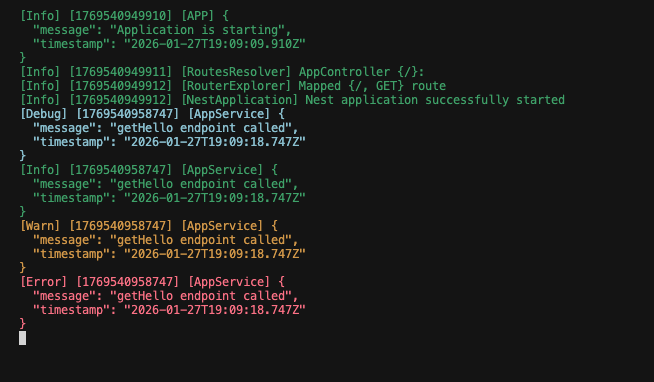
Tip: Colors are automatically disabled when
color: falseor when output is piped to a file.
Benchmark (1 million logs)
Benchmarks were executed locally on a development machine. Results may vary depending on hardware and environment.
| Format | Target | CPU ms | Elapsed ms | CPU % | Memory MB | Logs/sec | |--------|---------|----------|------------|---------|-----------|-----------| | Text | Stdout | 3842.29 | 3871 | 99.26% | 43.20 | 516,662 | | Text | Stderr | 4314.89 | 4330 | 99.65% | 0.02 | 461,893 | | Text | File | 64694.64 | 64788 | 99.86% | 0.31 | 30,869 | | Text | Null | 1488.89 | 1489 | 99.99% | -0.02 | 1,343,183 | | JSON | Stdout | 2656.76 | 2660 | 99.88% | 0.02 | 751,879 | | JSON | Stderr | 3702.20 | 3709 | 99.82% | 0.00 | 539,228 | | JSON | File | 62866.59 | 62946 | 99.87% | -0.02 | 31,773 | | JSON | Null | 1108.02 | 1109 | 99.91% | -0.03 | 1,803,426 |
⚠️ Note: Even with file writing, the logger maintains extremely low overhead.
Sensitive Data Masking
Protect sensitive information in your logs with built-in masking:
import * as logger from 'eventum';

logger.setConfig({
  prod: {
    output: {
      format: logger.OutputFormat.Json,
      target: logger.OutputTarget.File,
      filePath: './logs/app.log',
      masking: {
        keyword: '***',                              // Replacement text
        exact: ['password', 'token', 'apiKey'],      // Mask these field names
        partial: ['email', 'creditCard'],            // Matches substrings in field names
        regex: ['(?i)bearer\\s+[a-z0-9\\._\\-]+']   // Regex patterns
      }
    }
  }
});

// Sensitive data will be automatically masked
logger.info({
  username: 'alice',
  password: 'secret123',           // Will be masked
  token: 'Bearer abc.def.ghi',     // Will be masked
  email: '[email protected]',      // Will be masked (contains 'email')
  userEmail: '[email protected]'      // Will be masked (contains 'email')
});

// Output: { username: 'alice', password: '***', token: '***', email: '***', userEmail: '***' }
Masking Options
exact— masks values of fields with an exact name match
(e.g.password,token)partial— masks values of fields whose names contain any of the given substrings
(e.g.user_email,billingEmail,creditCardNumber)regex— masks values matched by custom regex patternskeyword— replacement string (default:[MASKED])
API Reference
Logging Functions
logger.trace(message: any): void    // Detailed debug information
logger.debug(message: any): void    // Debug-level messages
logger.info(message: any): void     // Informational messages
logger.warn(message: any): void     // Warning messages
logger.error(message: any): void    // Error messages
logger.fatal(message: any): void    // Critical failures
All logging functions accept any type: strings, objects, arrays, or primitives. Complex objects are safely serialized (handles circular references, NaN, BigInt, etc.).
Configuration
logger.setConfig(config: LoggerConfig): EnvConfig | nullSets the logger configuration. Returns the active config or null if invalid. Automatically selects dev or prod based on NODE_ENV.
Lifecycle
logger.shutdown(): voidFlushes all buffered logs and cleanly shuts down background threads. Call this before process exit to ensure no logs are lost.
LoggerConfig
interface LoggerConfig {
  dev?: EnvConfig;
  prod?: EnvConfig;
}
EnvConfig
interface EnvConfig {
  output: OutputConfig;
  fields?: FieldsConfig;
}
OutputConfig
color: booleanformat: OutputFormat(Text = 0, Json = 1)target: OutputTarget(Stdout = 0, Stderr = 1, File = 2, Null = 3)filePath?: stringmaxFileSize?: numbermaxBackups?: numberrotateDaily?: booleanbatchEnabled?: booleanbatchSize?: numberbatchIntervalMs?: numbermasking?: MaskingConfig
MaskingConfig
keyword?: string- Replacement text (default:[MASKED])exact?: string[]- Field names to mask completelypartial?: string[]- Field names to mask partiallyregex?: string[]- Regex patterns to match and mask
Enums
enum LogLevel {
  Trace = 0,
  Debug = 1,
  Info = 2,
  Warn = 3,
  Error = 4,
  Fatal = 5
}

enum OutputFormat {
  Text = 0,  // Human-readable text output
  Json = 1   // JSON Lines format (one object per line)
}

enum OutputTarget {
  Stdout = 0,  // Standard output
  Stderr = 1,  // Standard error
  File = 2,    // Log file (requires filePath)
  Null = 3     // Discard logs (useful for benchmarking)
}
Built With
[dependencies]
napi = { version = "2", features = ["napi6", "serde-json"] }
napi-derive = "2"
once_cell = "1.18"
serde = { version = "1.0", features = ["derive"] }
serde_json = "1.0"
colored = "3.0.0"
chrono = { version = "0.4", features = ["serde"] }
License
MIT
Roadmap
- [ ] Async file writing support (currently uses synchronous I/O)
- [x] Prebuilt binaries for common platforms (npm, arm64, x64) — Windows temporarily requires manual build
- [ ] External transport targets (HTTP, sockets, Kafka, etc.)
- [ ] WebAssembly support
- [ ] File compression on rotation
Known Limitations (Alpha)
- Windows support: Prebuilt binaries are temporarily unavailable due to npm restrictions. Windows users must build from source.
- File I/O is synchronous: File writes may block the event loop on slow disks. Use batching to mitigate.
- Log loss on crash: Buffered logs are lost if process crashes without calling
shutdown(). - Single config warning: Logger only warns once if used before
setConfig(), then silently discards logs.
These limitations will be addressed in future releases.
Best Practices
Graceful Shutdown
Always call shutdown() before process exit to flush buffered logs:
import * as logger from 'eventum';

// Handle graceful shutdown
process.on('SIGTERM', () => {
  logger.info('Received SIGTERM, shutting down gracefully');
  logger.shutdown();
  process.exit(0);
});

process.on('SIGINT', () => {
  logger.info('Received SIGINT, shutting down gracefully');
  logger.shutdown();
  process.exit(0);
});
Scope-Based Logging
Use the scope field to add context to your logs:
logger.info({ scope: 'AuthService', msg: 'User logged in', userId: '123' });
logger.error({ scope: 'PaymentService', msg: 'Payment failed', orderId: '456' });

// In JSON format, scope appears as a top-level field
// In Text format, scope appears in brackets: [AuthService] User logged in
Environment-Specific Configuration
Configure different behavior for dev and prod:
logger.setConfig({
  dev: {
    output: {
      format: logger.OutputFormat.Text,
      target: logger.OutputTarget.Stdout,
      color: true  // Colorful output for development
    }
  },
  prod: {
    output: {
      format: logger.OutputFormat.Json,
      target: logger.OutputTarget.File,
      filePath: './logs/app.log',
      batchEnabled: true,
      batchSize: 100,
      batchIntervalMs: 1000
    }
  }
});
Reliability Notes
⚠️ Eventum does not guarantee delivery of in-memory batched logs on process crash. Always call shutdown() on graceful exit to flush buffered logs (may block briefly).
Made with 🦀 Rust & ❤️ for performance-first JS developers.