
excalidraw-cli
v0.0.2
Published
Excalidraw CLI — create hand-drawn diagrams from the command line


Readme
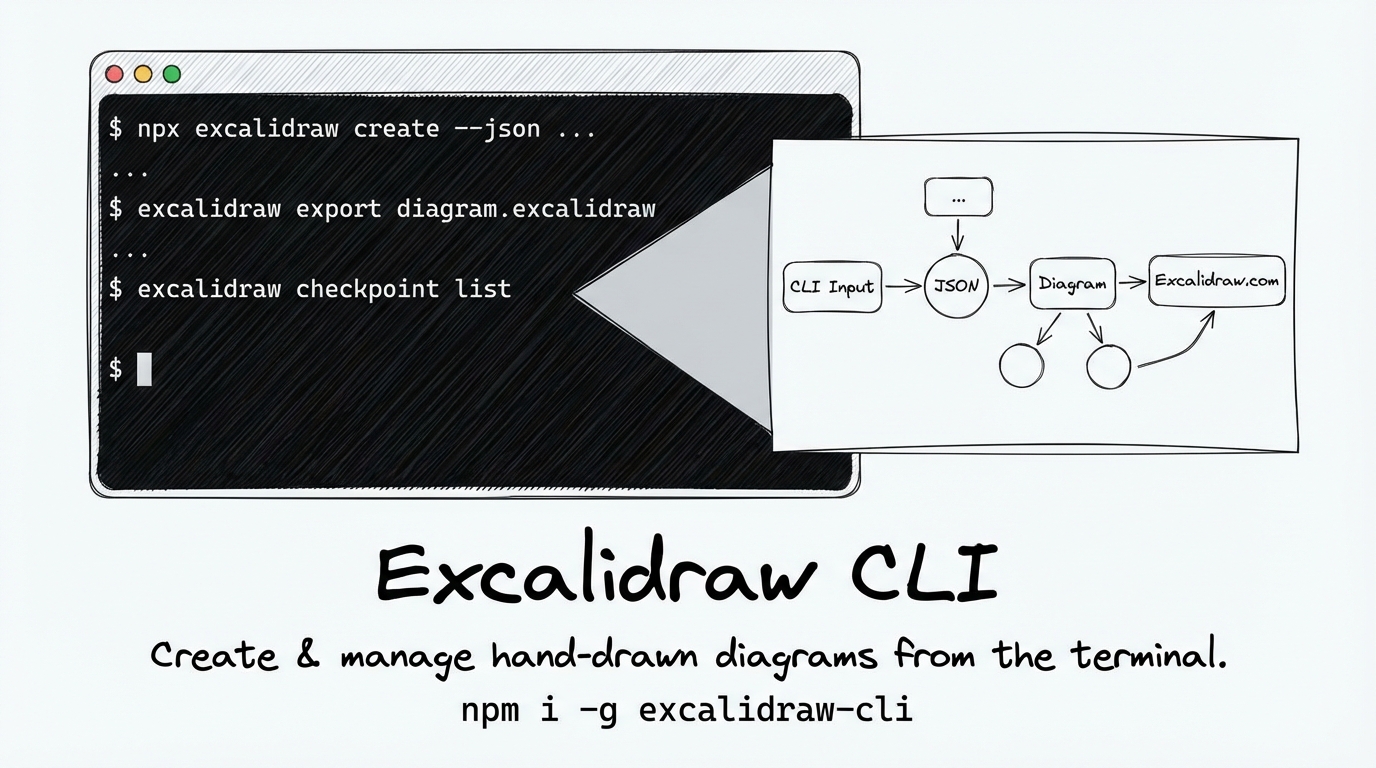
Excalidraw CLI
Create hand-drawn Excalidraw diagrams from the command line. Generate .excalidraw files, manage diagram checkpoints, export to excalidraw.com, and reference the complete element format — all without leaving your terminal.
Install
npm i -g excalidraw-cliOr run directly:
npx excalidraw-cli create --json '[...]'Add as an Agent Skill
npx skills add ahmadawais/excalidraw-cliUsage
For global install you can use excalidraw command, or npx excalidraw-cli without installing.
excalidraw [command] [options]Commands
create — Create a diagram
# From inline JSON
excalidraw create --json '[...]' -o diagram.excalidraw

# From a JSON file
excalidraw create elements.json -o diagram.excalidraw

# From stdin
cat elements.json | excalidraw create -o output.excalidraw

# From an existing .excalidraw file (re-process)
excalidraw create existing.excalidraw -o new.excalidraw

# Skip checkpoint saving
excalidraw create elements.json --no-checkpoint
export — Upload to excalidraw.com
excalidraw export diagram.excalidraw
# → https://excalidraw.com/#json=abc123,key
reference (alias: ref) — Element format cheat sheet
excalidraw reference       # Colorized output
excalidraw ref --raw       # Raw markdown
checkpoint (alias: cp) — Manage diagram state
excalidraw checkpoint list                      # List all checkpoints
excalidraw checkpoint save mydiagram file.excalidraw  # Save as named checkpoint
excalidraw checkpoint load mydiagram -o out.excalidraw  # Restore from checkpoint
excalidraw checkpoint remove mydiagram          # Delete a checkpoint
Options
-v, --version    Output version number
-h, --help       Display help
--no-banner      Suppress ASCII art banner
Built-in Defaults
The CLI auto-applies hand-drawn styling so you write less JSON:
| Property | Default | Applies To |
|----------|---------|------------|
| roughness | 2 (sloppy/hand-drawn) | Shapes, arrows |
| roundness | { "type": 3 } (rounded corners) | Shapes |
| fontFamily | 1 (Excalifont/Virgil handwritten) | Text |
All overridable by setting them explicitly.
Examples
Simple Flow — 3 Connected Boxes

excalidraw create --json '[
  { "type": "cameraUpdate", "width": 1200, "height": 900, "x": 0, "y": 100 },
  { "type": "rectangle", "id": "darkbg", "x": -4000, "y": -3000, "width": 10000, "height": 7500, "backgroundColor": "#1e1e2e", "fillStyle": "solid", "strokeColor": "transparent", "strokeWidth": 0 },
  { "type": "rectangle", "id": "b1", "x": 60, "y": 350, "width": 220, "height": 90, "backgroundColor": "#1e3a5f", "fillStyle": "solid", "strokeColor": "#4a9eed", "label": { "text": "Request", "strokeColor": "#e5e5e5" }, "boundElements": [{ "id": "a1", "type": "arrow" }] },
  { "type": "arrow", "id": "a1", "x": 280, "y": 395, "width": 200, "height": 0, "points": [[0,0],[200,0]], "endArrowhead": "arrow", "strokeColor": "#4a9eed", "startBinding": { "elementId": "b1", "fixedPoint": [1, 0.5] }, "endBinding": { "elementId": "b2", "fixedPoint": [0, 0.5] }, "label": { "text": "process", "strokeColor": "#a0a0a0" } },
  { "type": "rectangle", "id": "b2", "x": 500, "y": 350, "width": 220, "height": 90, "backgroundColor": "#5c3d1a", "fillStyle": "solid", "strokeColor": "#f59e0b", "label": { "text": "Server", "strokeColor": "#e5e5e5" }, "boundElements": [{ "id": "a1", "type": "arrow" }, { "id": "a2", "type": "arrow" }] },
  { "type": "arrow", "id": "a2", "x": 720, "y": 395, "width": 200, "height": 0, "points": [[0,0],[200,0]], "endArrowhead": "arrow", "strokeColor": "#22c55e", "startBinding": { "elementId": "b2", "fixedPoint": [1, 0.5] }, "endBinding": { "elementId": "b3", "fixedPoint": [0, 0.5] }, "label": { "text": "respond", "strokeColor": "#a0a0a0" } },
  { "type": "rectangle", "id": "b3", "x": 940, "y": 350, "width": 220, "height": 90, "backgroundColor": "#1a4d2e", "fillStyle": "solid", "strokeColor": "#22c55e", "label": { "text": "Response", "strokeColor": "#e5e5e5" }, "boundElements": [{ "id": "a2", "type": "arrow" }] }
]' -o flow.excalidraw
Decision Flowchart — with Diamond
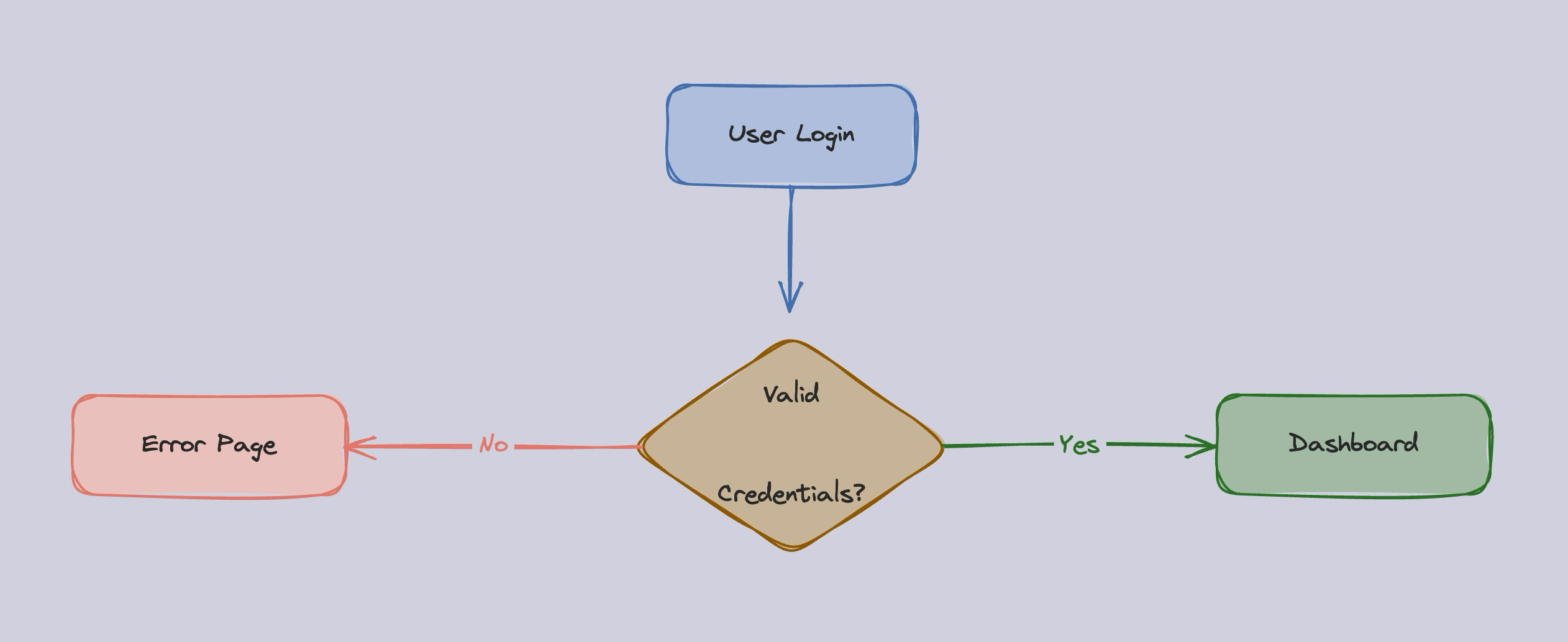
excalidraw create --json '[
  { "type": "cameraUpdate", "width": 1200, "height": 900, "x": -20, "y": 0 },
  { "type": "rectangle", "id": "darkbg", "x": -4000, "y": -3000, "width": 10000, "height": 7500, "backgroundColor": "#1e1e2e", "fillStyle": "solid", "strokeColor": "transparent", "strokeWidth": 0 },
  { "type": "rectangle", "id": "start", "x": 430, "y": 60, "width": 200, "height": 80, "backgroundColor": "#1e3a5f", "fillStyle": "solid", "strokeColor": "#4a9eed", "label": { "text": "User Login", "strokeColor": "#e5e5e5" }, "boundElements": [{ "id": "a1", "type": "arrow" }] },
  { "type": "arrow", "id": "a1", "x": 530, "y": 140, "width": 0, "height": 100, "points": [[0,0],[0,100]], "endArrowhead": "arrow", "strokeColor": "#4a9eed", "startBinding": { "elementId": "start", "fixedPoint": [0.5, 1] }, "endBinding": { "elementId": "check", "fixedPoint": [0.5, 0] } },
  { "type": "diamond", "id": "check", "x": 400, "y": 260, "width": 260, "height": 180, "backgroundColor": "#5c3d1a", "fillStyle": "solid", "strokeColor": "#f59e0b", "label": { "text": "Valid\nCredentials?", "strokeColor": "#e5e5e5" }, "boundElements": [{ "id": "a1", "type": "arrow" }, { "id": "a2", "type": "arrow" }, { "id": "a3", "type": "arrow" }] },
  { "type": "arrow", "id": "a2", "x": 660, "y": 350, "width": 180, "height": 0, "points": [[0,0],[180,0]], "endArrowhead": "arrow", "strokeColor": "#22c55e", "startBinding": { "elementId": "check", "fixedPoint": [1, 0.5] }, "endBinding": { "elementId": "yes", "fixedPoint": [0, 0.5] }, "label": { "text": "Yes", "strokeColor": "#22c55e" } },
  { "type": "rectangle", "id": "yes", "x": 860, "y": 310, "width": 220, "height": 80, "backgroundColor": "#1a4d2e", "fillStyle": "solid", "strokeColor": "#22c55e", "label": { "text": "Dashboard", "strokeColor": "#e5e5e5" }, "boundElements": [{ "id": "a2", "type": "arrow" }] },
  { "type": "arrow", "id": "a3", "x": 400, "y": 350, "width": 180, "height": 0, "points": [[0,0],[-180,0]], "endArrowhead": "arrow", "strokeColor": "#ef4444", "startBinding": { "elementId": "check", "fixedPoint": [0, 0.5] }, "endBinding": { "elementId": "no", "fixedPoint": [1, 0.5] }, "label": { "text": "No", "strokeColor": "#ef4444" } },
  { "type": "rectangle", "id": "no", "x": 0, "y": 310, "width": 220, "height": 80, "backgroundColor": "#5c1a1a", "fillStyle": "solid", "strokeColor": "#ef4444", "label": { "text": "Error Page", "strokeColor": "#e5e5e5" }, "boundElements": [{ "id": "a3", "type": "arrow" }] }
]' -o flowchart.excalidraw
Kitchen Sink — Every Feature (Dark Mode)
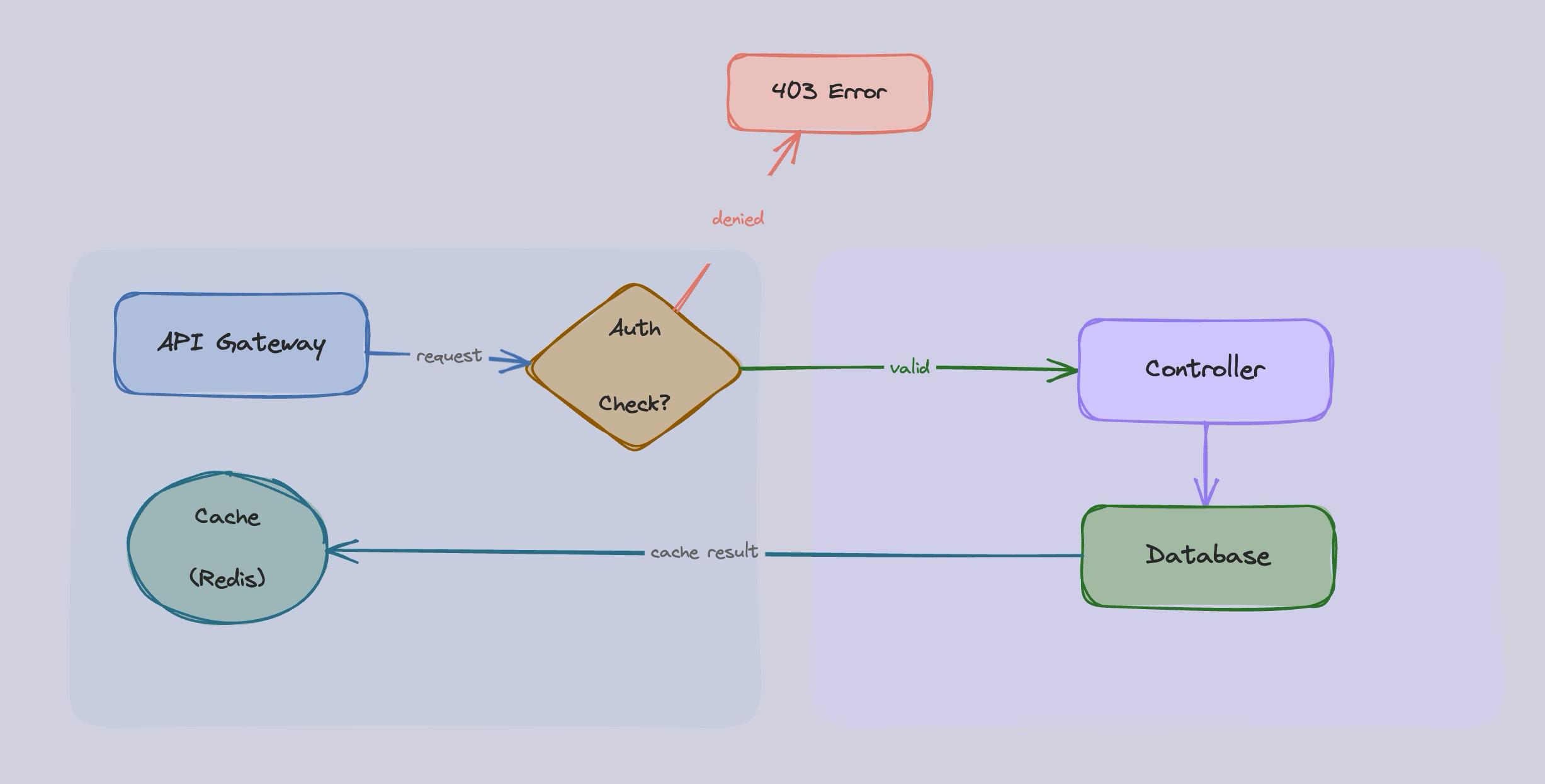
All shape types, label shorthand, arrow bindings + labels, standalone text, background zones, colors, opacity, dark mode.
excalidraw create --json '[
  { "type": "cameraUpdate", "width": 1200, "height": 900, "x": -60, "y": -40 },
  { "type": "rectangle", "id": "darkbg", "x": -4000, "y": -3000, "width": 10000, "height": 7500, "backgroundColor": "#1e1e2e", "fillStyle": "solid", "strokeColor": "transparent", "strokeWidth": 0 },
  { "type": "text", "id": "title", "x": 280, "y": -20, "text": "Kitchen Sink: All Features", "fontSize": 28, "strokeColor": "#e5e5e5" },
  { "type": "rectangle", "id": "zone1", "x": -30, "y": 30, "width": 550, "height": 380, "backgroundColor": "#1e3a5f", "fillStyle": "solid", "opacity": 30, "strokeColor": "transparent" },
  { "type": "text", "id": "zone1_t", "x": -10, "y": 40, "text": "Input Layer", "fontSize": 16, "strokeColor": "#4a9eed" },
  { "type": "rectangle", "id": "zone2", "x": 560, "y": 30, "width": 550, "height": 380, "backgroundColor": "#2d1b69", "fillStyle": "solid", "opacity": 30, "strokeColor": "transparent" },
  { "type": "text", "id": "zone2_t", "x": 580, "y": 40, "text": "Processing Layer", "fontSize": 16, "strokeColor": "#8b5cf6" },
  { "type": "rectangle", "id": "b1", "x": 50, "y": 90, "width": 200, "height": 80, "backgroundColor": "#1e3a5f", "fillStyle": "solid", "strokeColor": "#4a9eed", "label": { "text": "API Gateway", "strokeColor": "#e5e5e5" }, "boundElements": [{ "id": "a1", "type": "arrow" }] },
  { "type": "ellipse", "id": "e1", "x": 80, "y": 230, "width": 160, "height": 120, "backgroundColor": "#1a4d4d", "fillStyle": "solid", "strokeColor": "#06b6d4", "label": { "text": "Cache\n(Redis)", "fontSize": 18, "strokeColor": "#e5e5e5" }, "boundElements": [{ "id": "a3", "type": "arrow" }] },
  { "type": "diamond", "id": "d1", "x": 330, "y": 120, "width": 180, "height": 140, "backgroundColor": "#5c3d1a", "fillStyle": "solid", "strokeColor": "#f59e0b", "label": { "text": "Auth\nCheck?", "fontSize": 18, "strokeColor": "#e5e5e5" }, "boundElements": [{ "id": "a1", "type": "arrow" }, { "id": "a2", "type": "arrow" }, { "id": "a4", "type": "arrow" }] },
  { "type": "arrow", "id": "a1", "x": 250, "y": 130, "width": 80, "height": 60, "points": [[0,0],[80,60]], "endArrowhead": "arrow", "strokeColor": "#4a9eed", "startBinding": { "elementId": "b1", "fixedPoint": [1, 0.5] }, "endBinding": { "elementId": "d1", "fixedPoint": [0, 0.5] }, "label": { "text": "request", "fontSize": 14, "strokeColor": "#a0a0a0" } },
  { "type": "arrow", "id": "a2", "x": 510, "y": 190, "width": 130, "height": 0, "points": [[0,0],[130,0]], "endArrowhead": "arrow", "strokeColor": "#22c55e", "startBinding": { "elementId": "d1", "fixedPoint": [1, 0.5] }, "endBinding": { "elementId": "b2", "fixedPoint": [0, 0.5] }, "label": { "text": "valid", "fontSize": 14, "strokeColor": "#22c55e" } },
  { "type": "arrow", "id": "a4", "x": 420, "y": 260, "width": 0, "height": 80, "points": [[0,0],[0,80]], "endArrowhead": "arrow", "strokeColor": "#ef4444", "startBinding": { "elementId": "d1", "fixedPoint": [0.5, 1] }, "endBinding": { "elementId": "err", "fixedPoint": [0.5, 0] }, "label": { "text": "denied", "fontSize": 14, "strokeColor": "#ef4444" } },
  { "type": "rectangle", "id": "err", "x": 340, "y": 340, "width": 160, "height": 60, "backgroundColor": "#5c1a1a", "fillStyle": "solid", "strokeColor": "#ef4444", "label": { "text": "403 Error", "fontSize": 18, "strokeColor": "#e5e5e5" }, "boundElements": [{ "id": "a4", "type": "arrow" }] },
  { "type": "rectangle", "id": "b2", "x": 660, "y": 150, "width": 200, "height": 80, "backgroundColor": "#2d1b69", "fillStyle": "solid", "strokeColor": "#8b5cf6", "label": { "text": "Controller", "strokeColor": "#e5e5e5" }, "boundElements": [{ "id": "a2", "type": "arrow" }, { "id": "a5", "type": "arrow" }] },
  { "type": "arrow", "id": "a5", "x": 760, "y": 230, "width": 0, "height": 100, "points": [[0,0],[0,100]], "endArrowhead": "arrow", "strokeColor": "#8b5cf6", "startBinding": { "elementId": "b2", "fixedPoint": [0.5, 1] }, "endBinding": { "elementId": "b3", "fixedPoint": [0.5, 0] } },
  { "type": "rectangle", "id": "b3", "x": 660, "y": 340, "width": 200, "height": 80, "backgroundColor": "#1a4d2e", "fillStyle": "solid", "strokeColor": "#22c55e", "label": { "text": "Database", "strokeColor": "#e5e5e5" }, "boundElements": [{ "id": "a5", "type": "arrow" }, { "id": "a3", "type": "arrow" }] },
  { "type": "arrow", "id": "a3", "x": 660, "y": 380, "width": 420, "height": 0, "points": [[0,0],[-420,0]], "endArrowhead": "arrow", "strokeColor": "#06b6d4", "startBinding": { "elementId": "b3", "fixedPoint": [0, 0.5] }, "endBinding": { "elementId": "e1", "fixedPoint": [1, 0.5] }, "label": { "text": "cache result", "fontSize": 14, "strokeColor": "#a0a0a0" } },
  { "type": "text", "id": "note", "x": 600, "y": 460, "text": "All shapes, arrows, zones, and dark mode", "fontSize": 16, "strokeColor": "#a0a0a0" }
]' -o kitchen-sink.excalidraw
Key Concepts
Labels (text inside shapes & arrows)
Use the label shorthand — the CLI auto-expands it into proper bound text elements:
{ "type": "rectangle", "id": "b1", "x": 100, "y": 100, "width": 200, "height": 80,
  "backgroundColor": "#a5d8ff", "fillStyle": "solid",
  "label": { "text": "My Label", "fontSize": 20 } }
Works on rectangle, ellipse, diamond, and arrow. Optional label properties: fontSize (default 20), fontFamily, strokeColor.
Arrow Bindings
Connect shapes with startBinding/endBinding using fixedPoint for edge position:
{ "type": "arrow", "id": "a1", "x": 300, "y": 140, "width": 150, "height": 0,
  "points": [[0,0],[150,0]], "endArrowhead": "arrow",
  "startBinding": { "elementId": "b1", "fixedPoint": [1, 0.5] },
"endBinding": { "elementId": "b2", "fixedPoint": [0, 0.5] } }fixedPoint: right=[1,0.5], left=[0,0.5], top=[0.5,0], bottom=[0.5,1]
Camera (viewport)
Must be 4:3 ratio. Sizes: 400×300 (S), 600×450 (M), 800×600 (L), 1200×900 (XL), 1600×1200 (XXL).
{ "type": "cameraUpdate", "width": 800, "height": 600, "x": 50, "y": 50 }Programmatic API
import {
  createDiagram,
  parseElements,
  buildExcalidrawFile,
  filterDrawElements,
  resolveElements,
  generateCheckpointId,
  checkCameraAspectRatio,
} from "excalidraw";

import { FileCheckpointStore, MemoryCheckpointStore } from "excalidraw";
import { exportToUrl } from "excalidraw";
import { REFERENCE } from "excalidraw";
Create a diagram
const store = new MemoryCheckpointStore();
const result = await createDiagram(
  JSON.stringify([
    { type: "rectangle", id: "r1", x: 100, y: 100, width: 200, height: 100 },
  ]),
  store,
);

// result.file — complete .excalidraw file object
// result.checkpointId — unique ID for this diagram state
// result.warnings — any validation warnings
Export to excalidraw.com
const url = await exportToUrl(JSON.stringify(excalidrawFileData));
console.log(url); // https://excalidraw.com/#json=...
Checkpoint management
const store = new FileCheckpointStore(); // ~/.excalidraw/checkpoints/
await store.save("my-diagram", { elements: [...] });
const data = await store.load("my-diagram");
const ids = await store.list();
await store.remove("my-diagram");
Element Format
Run excalidraw reference for the complete element format reference, including:
- Color palettes — primary colors, pastel fills, background zones, dark mode
- Element types — rectangle, ellipse, diamond, text, arrow with all properties
- Bound text — text inside shapes via
containerId+boundElements - Arrow bindings — connect shapes with
startBinding/endBinding - Camera sizing — 4:3 aspect ratio presets (S/M/L/XL/XXL)
- Drawing order — progressive element ordering for streaming
- Dark mode — colors and setup for dark theme diagrams
Agent Skill
See skills/skill.md for a comprehensive guide for AI agents to create diagrams with this CLI, including copy-paste templates and all features documented.
Development
pnpm install
pnpm run build    # Build with tsup
pnpm run dev      # Watch mode
pnpm run test     # Run tests with vitest
pnpm run lint     # Type check with tsc
License
MIT