
excalisketch
v1.6.2
Published
Local Excalidraw editor for a single file — edit in your browser while an AI agent (or any tool) edits the same file on disk, with live two-way sync.

Maintainers
 kirill89
Readme
excalisketch
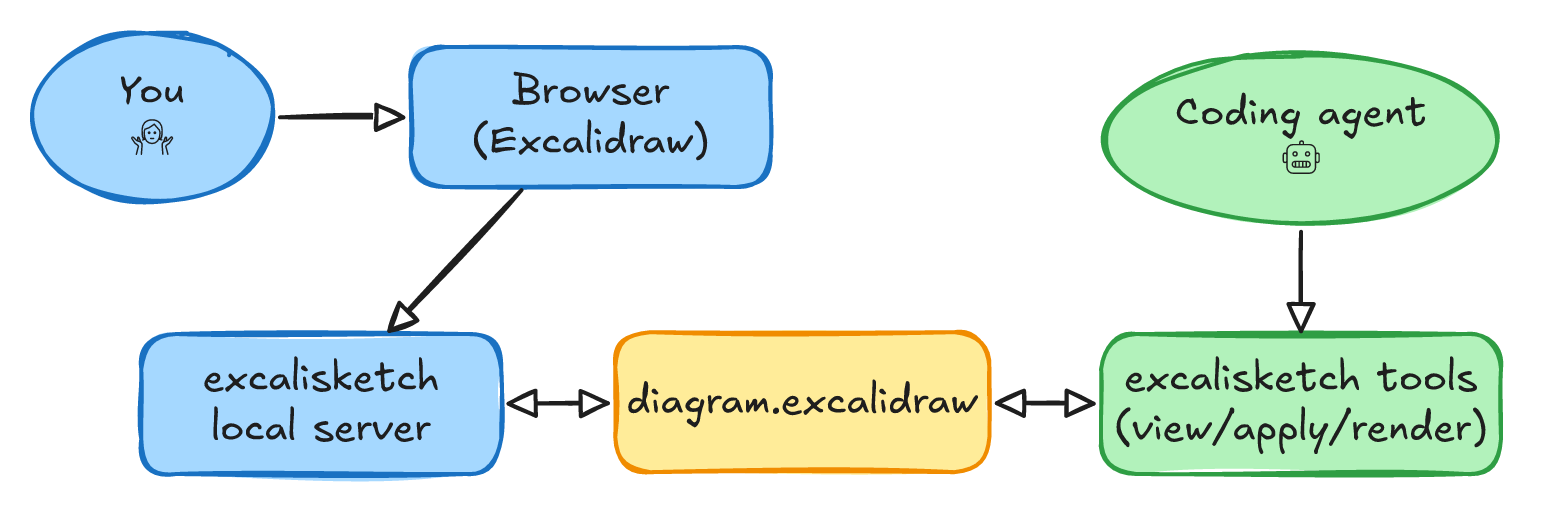
A local, single-file Excalidraw editor. Open a
.excalidraw file in your browser and edit it — while an AI agent (or any
other tool) edits the same file on disk. Changes sync live both ways.
Usage
npx excalisketch path/to/file.excalidrawThis starts a local server, opens your browser, and renders the file.
- Save — the
Savemenu item or Cmd/Ctrl+S writes the file in place. - Unsaved indicator — the top-right corner shows
● Unsaved/✓ Saved. - Live sync — if the file changes on disk (e.g. your agent edited it) it reloads automatically. If you have unsaved edits at the same time, a banner asks before discarding them (saving keeps your local version).
- Auto-shutdown — close the browser tab and the local server stops itself (after ~90s of no activity), so it doesn't linger in the background.
Working with an AI agent
Point your agent at the same .excalidraw path. As it writes the file,
excalisketch reloads the canvas so you see the agent's changes instantly; as you
draw and save, the agent reads your version. One file, two editors.
File format. A .excalidraw file is plain JSON:
{
  "type": "excalidraw",
  "version": 2,
  "source": "https://github.com/Kirill89/excalisketch",
  "elements": [/* the drawing — one object per shape */],
  "appState": { "viewBackgroundColor": "#ffffff" },
  "files": {/* embedded images, keyed by id */},
}
To change the drawing, edit the elements array. Each element is a shape
(rectangle, ellipse, diamond, arrow, line, text, freedraw, …) with
geometry (x, y, width, height, angle) and style (strokeColor,
backgroundColor, strokeWidth, …). Text can be bound to a container via
containerId / boundElements. The canonical element types live in the
Excalidraw source.
When excalisketch saves, it adds two fields to the file:
source— pinned to this project's URL.hintForAIAgent— a one-line pointer back to this section.
Both are ignored by Excalidraw and safe to remove.
Tools for AI agents
A .excalidraw file is large and verbose. These headless tools let an agent
read and edit it compactly, without loading the whole JSON or hand-managing ids,
indices, and arrow bindings. They print to stdout and exit.
npx excalisketch tool                       # list the tools
npx excalisketch tool new <file>            # create a blank diagram to start from
npx excalisketch tool view <file>           # whole diagram as compact JSONL (id/type/coords/text/edges)
npx excalisketch tool get  <file> <id...>   # full element(s), incl. styles
npx excalisketch tool apply <file> <patch.jsonl | '<inline json>'... | ->  # write edits back by id
npx excalisketch tool arrange <file>        # auto-layout the graph (Graphviz, bundled)
npx excalisketch tool render <file> --out out.png [--scale 2]  # render the real Excalidraw image (PNG/SVG); PNG defaults to 2x
npx excalisketch tool validate <file>       # check bindings/indices/refs (nonzero exit on problems)
The core loop is view → edit → apply:
viewprojects each element to one compact line — style dropped, coordinates kept, a shape's label folded into itstext. On a real diagram this is ~8% of the raw file, so it fits in context cheaply.- Edit those lines (or pass records inline as arguments): change a field, add a
new element, or remove one with
{"id":"X","delete":true}. For a connector, give an arrow onlyfrom/toand omit geometry — the tool positions it; addpoints(3+) only for custom routing. applymerges the patch back by id, preserving every field you didn't touch (styles, frames, images stay intact), then re-derives all arrow bindings and refuses to write if the result is inconsistent.
Start a fresh drawing with new. Set colors by adding strokeColor /
backgroundColor (hex) to any record — they pass through verbatim. Use get
when you need an element's full detail (e.g. to copy a style), and arrange
when you have topology but no positions. render produces the real Excalidraw
image (hand-drawn strokes, fonts, edge-to-edge arrows) as PNG or SVG, so you can
see exactly what the diagram looks like; it renders headlessly and
deterministically on any platform, with emoji drawn as monochrome line-art
(bundled OpenMoji, CC BY-SA 4.0). Direct JSON edits are
fine too — just run validate afterward.
Development
npm install
npm run ui -- sample.excalidraw   # build + serve
npm run build                     # build only (outputs to public/)
The UI is a small React app (src/) bundled with esbuild into public/. The
Node server (server.js) is Express plus a couple of file endpoints.