
expo-electric-border
v0.1.0
Published
Animated electric border for React Native and Expo. A crackling lightning outline around any view, drawn on the UI thread with Skia and Reanimated.

Maintainers
 mahdidavoodi7
Readme
⚡ expo-electric-border
An animated electric border for React Native and Expo.





expo-electric-border wraps any React Native view in a live lightning arc that
crawls around its edge. It's one drop-in <ElectricBorder> component with no
native code to link, rendered entirely on the UI thread with
React Native Skia and
Reanimated — so the arc
keeps moving through a busy render or a blocked JS thread.
Works in Expo and bare React Native, on iOS and Android. There's a longer write-up of the technique in the React Native electric border guide.
This is a React Native port of the Electric Border component from React Bits (MIT). The look is theirs; the implementation had to be rebuilt from scratch — see how it differs.
🎬 Preview
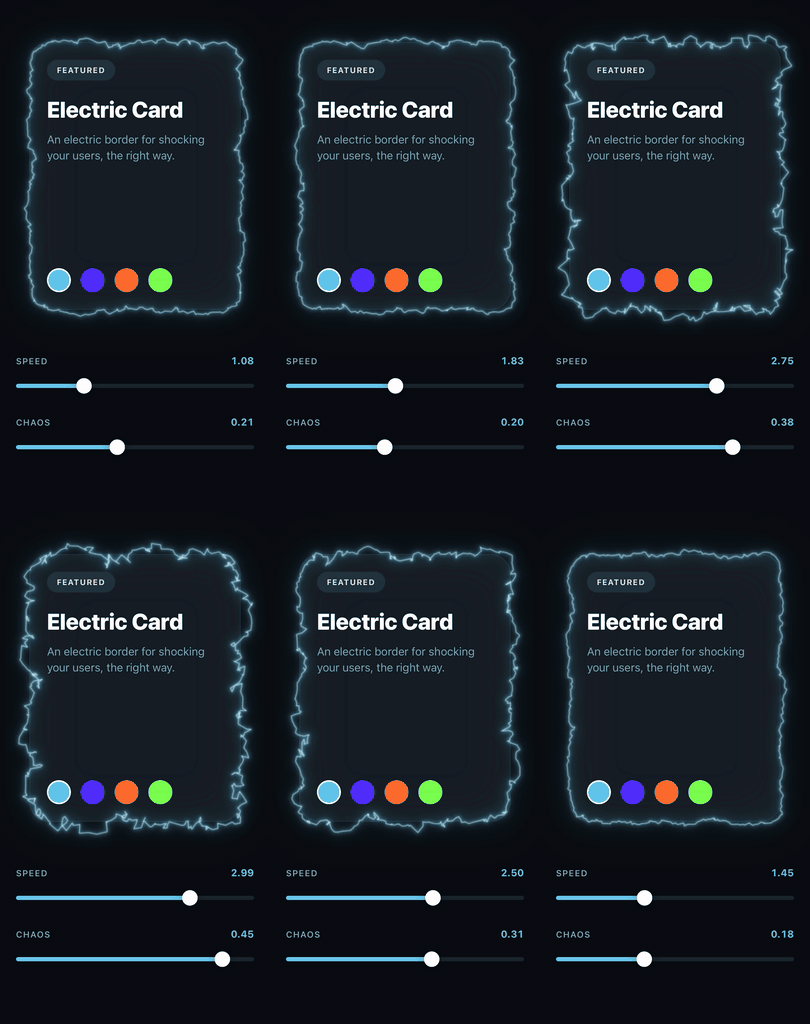
speed and chaos are shared values here, so the sliders retune the border
without a single React render.
Contents
- Installation
- Usage
- Props
- How it works
- Performance
- Accessibility
- FAQ
- How it differs from the React Bits web component
📦 Installation
npx expo install expo-electric-border @shopify/react-native-skia react-native-reanimated react-native-workletsThe package is JavaScript only — the three peers do the work. In a bare React
Native project install the same packages with your package manager and follow
the Skia and Reanimated setup guides (Reanimated needs its Babel plugin;
babel-preset-expo adds it for you).
Skia isn't bundled into Expo Go, so you'll need a development build.
| package | version |
| --- | --- |
| react | >= 19 |
| react-native | >= 0.79 |
| @shopify/react-native-skia | >= 2.6.0 |
| react-native-reanimated | >= 4.0.0 |
| react-native-worklets | >= 0.7.0 |
Skia 2.6 is the floor because that is where Skia.PathBuilder arrived. It's
what lets the outline be rebuilt inside a worklet by mutating one long-lived
builder, instead of allocating a Skia object on the UI thread every frame.
Note: Reanimated 4 requires the New Architecture — the default since React Native 0.76 / Expo SDK 52.
🚀 Usage
import { ElectricBorder } from 'expo-electric-border';

<ElectricBorder style={styles.card} color="#5CC8F2" borderRadius={28}>
  <Text style={styles.title}>Electric Card</Text>
</ElectricBorder>;
ElectricBorder measures itself, so give it a size — either put a width and
height on style, or let the children provide one. The arc is painted over the
children and never intercepts touches.
Freezing it
speed={0} stops the animation and, with it, all per-frame work — see
Performance. A border that's scrolled away or sitting behind a
modal costs essentially nothing:
<ElectricBorder speed={isVisible ? 1 : 0}>…</ElectricBorder>Driving it from the UI thread
speed and chaos also take a Reanimated shared value. The border reads it
inside its own per-frame worklet, so a gesture or an animation can drive the
effect without a React render anywhere in the loop:
const speed = useSharedValue(1);
const chaos = useSharedValue(0.18);

// A pan gesture writing straight to the shared value — no setState, no render.
const pan = Gesture.Pan().onChange((e) => {
  chaos.value = clamp(chaos.value + e.changeX / 200, 0, 1);
});

<ElectricBorder speed={speed} chaos={chaos}>…</ElectricBorder>;
The example app wires both to sliders; see
example/src/Slider.tsx.
One thing to know: an animated chaos can't be read during layout, so the
canvas gets sized for the whole 0–1 range up front. That costs some fill rate,
so pass a plain number when you don't need the range.
The remaining props stay on the JS thread by design. thickness and glow
determine how much canvas to allocate, and resizing a canvas mid-gesture would
cost more than it saves.
Corner radius
borderRadius defaults to whatever style.borderRadius is, so you only write
it once:
// The arc follows the 28pt corners without being told twice.
<ElectricBorder style={{ borderRadius: 28, width: 320, height: 430 }}>…</ElectricBorder>
🎛 Props
| prop | type | default | |
| --- | --- | --- | --- |
| children | ReactNode | — | What the border wraps. Drawn under the arc. |
| color | string | '#5227FF' | The arc and its glow. |
| coreColor | string | '#EAFEFF' | The filament down the middle of the arc. |
| speed | number \| SharedValue<number> | 1 | Multiplier on how fast the arc crawls. A literal 0 freezes it and unregisters the frame loop. |
| chaos | number \| SharedValue<number> | 0.18 | How far the arc strays from the border, on a 0–1 scale. Clamped. |
| thickness | number | 2 | Width of the core filament in px. The glow layers scale off it. |
| glow | number | 1 | Multiplier on the halo. 0 leaves a bare arc; above 1 the bloom saturates. |
| borderRadius | number | style.borderRadius | Corners the arc follows. Clamped to half the shorter side. |
| style | StyleProp<ViewStyle> | — | The sizing box. Keep overflow visible. |
chaos is the one to reach for. Around 0.1 gives a nervous hairline; 0.3
starts throwing real forks; past 0.5 the arc breaks away from the box and
reads more like a plasma field than a border. 1 is the ceiling.
Coming from the web component? Its
chaosruns on a different scale —1there is roughly0.18here.
🔍 How it works
The border is a rounded rectangle walked by arc length, a few hundred samples per lap, with every sample shoved off the outline by fractal noise. That displaced polyline is stroked four times — a wide box-shaped haze, two additive glow passes, and a bright filament — and rebuilt from scratch on every frame.
All of it happens inside a Reanimated worklet. A single Skia.PathBuilder is
created once on the JS thread and parked in a shared value; the worklet only
resets and re-fills it, then builds the path the <Path> elements read. Nothing
crosses the bridge per frame, and no Skia object is allocated on the UI thread —
constructing one there crashes, since the Skia global isn't installed on the
worklet runtime.
Three details do most of the work:
- The lowest noise octave is dropped. It is the slow, wide one, and leaving it in drags the whole outline off the box in lazy arcs. Starting an octave in keeps the arc welded to the border so only the fast detail moves — which is what reads as electricity instead of a wobble.
- The hash stays signed. GLSL's
fractwould fold it into[0, 1), and every sample would then push the same way, bowing the outline outward instead of weaving it back and forth across the border. - The lap is stitched shut. Noise is sampled over an open interval, so the two ends of the lap know nothing about each other. The last few percent of the lap crossfades into the displacement the start is using — the difference between a closed loop and a ~15px snap at the seam.
Canvas padding is derived from chaos, thickness, and glow rather than
being a fixed constant, so cranking any of them can't clip the arc at the canvas
edge.
⚡ Performance
While it's moving, the outline is rebuilt on the UI thread once per frame — a few hundred samples, each summing seven noise octaves. Comfortably real-time for a handful of borders, but not free.
A still border is genuinely still. The rebuild is driven by
useAnimatedReaction, whose only inputs are the clock and an animated chaos,
so when neither moves nothing is scheduled at all — no path, no noise, no frame
callback. Freezing a border in the example app takes it from roughly 45% CPU to
1% on an iOS simulator.
This is also why the component doesn't use Skia's usePathValue, which is the
obvious tool for the job. That hook builds on useDerivedValue, whose mapper
takes its inputs from the whole worklet closure — including the path it writes
to. Writing the result re-triggers the mapper, so the outline gets rebuilt every
frame forever, frozen or not.
Beyond that:
- Prefer a few large borders over many small ones. Cost scales with perimeter.
chaos,thickness, andglowall widen the canvas, which costs fill rate.- An animated
chaossizes the canvas for the full 0–1 range. Pass a plain number when you don't need the range.
♿ Accessibility
The animation stops on its own when the OS asks for reduced motion — the border still draws, it just holds still. Nothing to wire up, but worth knowing if you test with the setting on and wonder why it isn't moving.
❓ FAQ
Does it work in Expo Go?
No. React Native Skia isn't bundled into Expo Go, so you need a
development build
(npx expo run:ios / run:android, or an EAS dev build). Nothing about this
package needs a custom native module — the requirement comes from Skia.
Do I need the New Architecture?
Yes, in practice. Reanimated 4 is New Architecture only, and it's a peer dependency. The New Architecture has been the default since React Native 0.76 and Expo SDK 52, so most projects already have it.
Is there any native code to link?
None. The package ships JavaScript only. All three peers are libraries you very likely already have in an animated React Native app.
Does it work on React Native Web?
Untested. Nothing in the component is platform-specific, but Skia on web needs CanvasKit loaded and the effect is fill-rate heavy, so treat web as unsupported until you've tried it on your own setup. The badge claims iOS and Android only.
How do I stop it animating when it's off-screen?
Pass speed={0}. That unregisters the frame loop entirely rather than just
setting the rate to zero — see Performance. Pair it with a
FlatList viewability callback or a navigation focus hook.
Why is the glow cut off?
The glow is drawn outside the box's bounds, so a parent with
overflow: 'hidden' will clip it. Keep overflow visible on the
ElectricBorder and on whatever wraps it.
Can I animate the colour?
Not yet. color and coreColor are plain strings and stay on the JS thread.
speed and chaos are the two props that accept shared values.
🙏 How it differs from the React Bits web component
The look comes from
Electric Border by
React Bits, which is MIT licensed. The web original
gets its effect from an SVG feTurbulence + feDisplacementMap filter. React
Native has no equivalent filter primitive, so this package reproduces the same
result from fractal noise and Skia strokes instead.
| | React Bits (web) | expo-electric-border |
| --- | --- | --- |
| platform | React DOM | React Native — iOS, Android |
| technique | SVG feTurbulence + feDisplacementMap | fractal noise displacing a Skia path |
| runs on | browser compositor | UI thread, via a Reanimated worklet |
| animating props | CSS / React state | speed and chaos accept shared values |
| chaos scale | 1 ≈ default | 0.18 ≈ default (see Props) |
If you're building for web, use React Bits directly — this port exists because the SVG filter approach has nowhere to land in React Native.
🧑💻 Development
yarn                    # install
yarn example ios        # run the example app
yarn typecheck
yarn lint
yarn prepare            # build the package
See CONTRIBUTING.md for the full workflow.
More React Native components
I build animated React Native and Expo components at motionary.dev — this one is free and MIT, and the rest of the catalog is there.
- React Native component reference — free
- Browse the catalog
- React Native electric border guide — the longer write-up behind this package
Author
Made by @mehdi_made · motionary.dev
If this saved you an afternoon, a ⭐ on the repo helps more people find it.
License
MIT © Mehdi Davoodi