
expo-leaflet-navigation-map
v1.0.2
Published
A component for integrating LeafletJS map via web view to your react-native application on Expo projects.

Maintainers
 karkangelo
Readme
expo-leaflet-navigation-map
A lightweight React Native component for Expo projects that integrates LeafletJS, OpenStreetMap, and Leaflet Routing Machine through a WebView. With this component, you can add interactive map to your application with ease.
✅ Display maps
✅ Add markers
✅ Draw routes between two points using free OSM data
✅ Show a built-in directions panel (optional)
Getting started
Install via npx expo installation
npx expo install expo-leaflet-navigation-mapUsage
Import expo-leaflet-navigation-map:
import { LeafletMap } from 'expo-leaflet-navigation-map';Then you can use it as is:
import {View} from 'react-native';
import { LeafletMap } from 'expo-leaflet-navigation-map';

const App = () => {
    return (
        <View style={{flex:1}}>
            <LeafletMap/>
        </View>
    );
}

export default App;
By default, it points to Manila, the capital city of the Philippines, and has no marker. You can pass coordinates and markers props to the component:
import {View} from 'react-native';
import { LeafletMap } from 'expo-leaflet-navigation-map';

const App = () => {
    const lat = /* latitude value here*/;
    const long = /*longitude value here*/
    return (
        <View style={{flex:1}}>
            <LeafletMap coordinates = {[lat, long]} markers = {[{ id:1, lat: lat, long: long, title: "My Location"}]}/>
        </View>
    );
}
export default App;
You can also adjust the zoom by passing a zoom value:
import {View} from 'react-native';
import { LeafletMap } from 'expo-leaflet-navigation-map';

const App = () => {
    const lat = /* latitude value here*/;
    const long = /*longitude value here*/
    return (
        <View style={{flex:1}}>
            <LeafletMap coordinates = {[lat, long]} markers = {[{ id:1, lat: lat, long: long, title: "My Location"}]} zoom={13}/>
        </View>
    );

}

export default App;
If you're working with navigations and want to display it on the map, you can pass route prop and toggling ShowDirectionPanel to true. You may also need to toggle onFocus to true or false depends on your usage. When onFocus is true, it will automatically refocus your map view if you are not scrolling around and after the 5 secs mark. You can also change the route color however you like by passing value in the route.routeColor. If you haven't pass any color, it will automatically sets to red.
import {View} from 'react-native';
import { LeafletMap } from 'expo-leaflet-navigation-map';

const App = () => {
    const lat = /* latitude value here*/;
    const long = /*longitude value here*/;
    const target_lat: /*target latitude here*/;
    const target_long: /*target longitude here*/
    return (
        <View style={{flex:1}}>
            <LeafletMap
                coordinates = {[lat, long]}
                markers = {[
                    { id:1, lat: lat, lng: long, title: "My Location" },
                    { id:2, lat: target_lat, lng: target_long, title: 'target location' }
                ]}
                zoom={13}
                route={{start:[lat, log], end:[target_lat, target_long], routeColor:'#6874fcff', onFocuse:true/*or false, depends on your use case*/}}
                ShowDirectionPanel = {true}
            />
        </View>
    );
}

export default App;
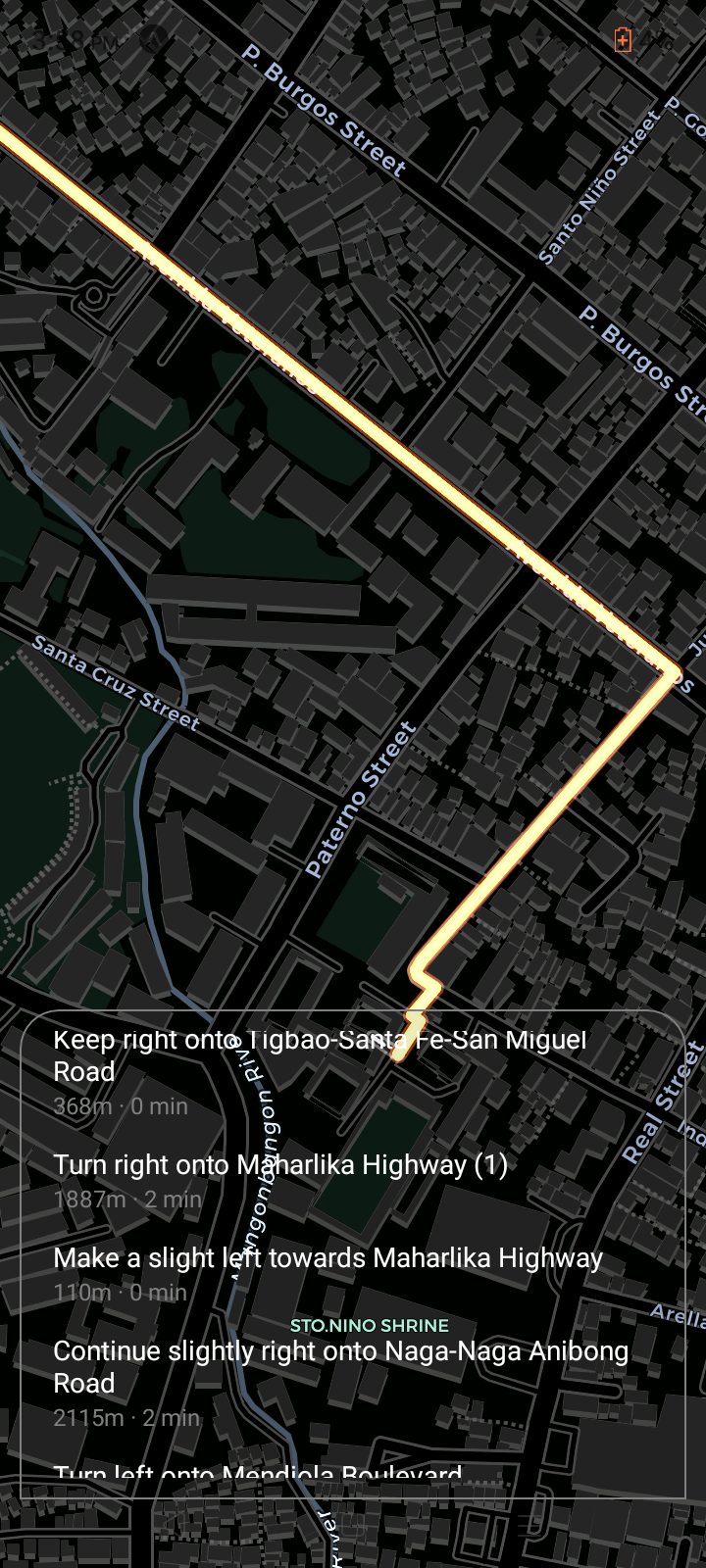
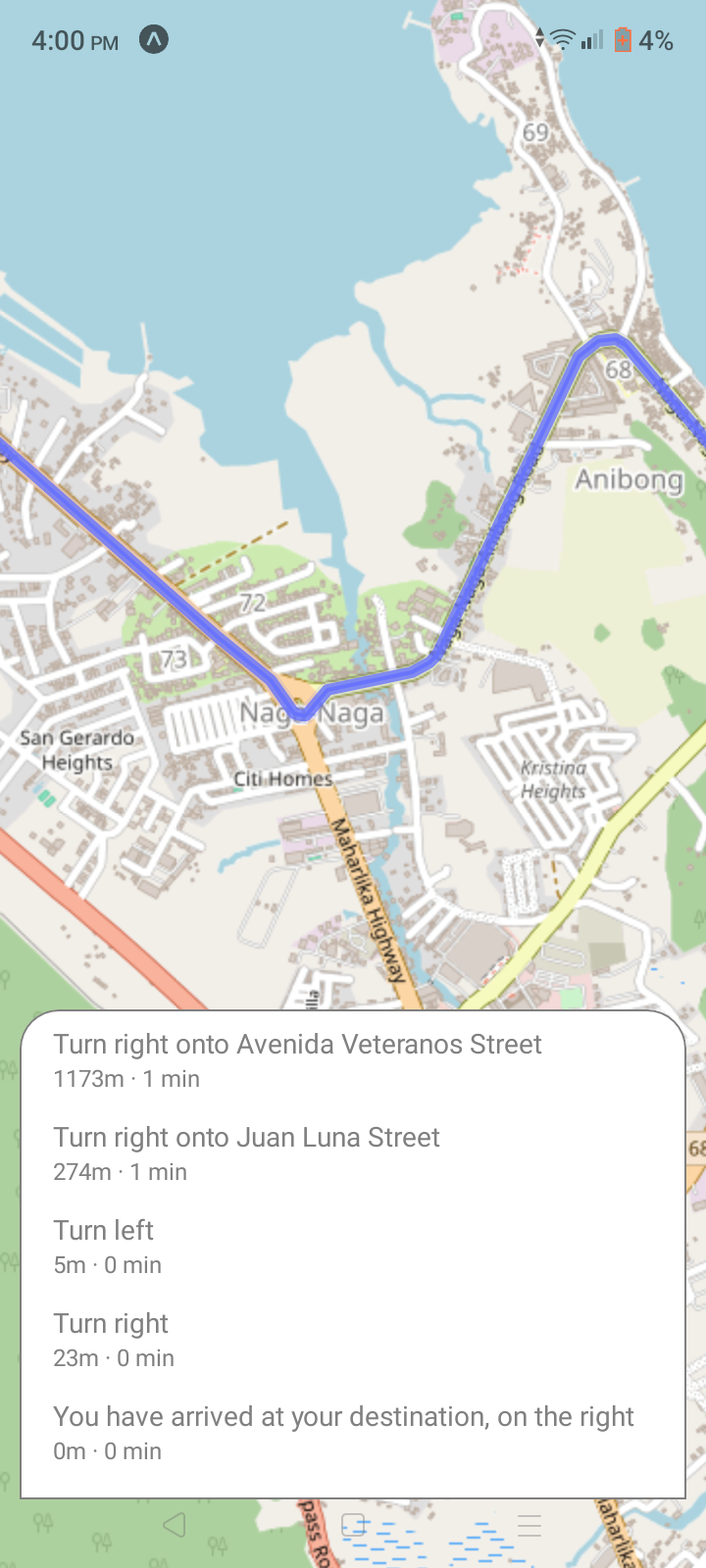
You can also pass themes props in the component. This will change the appearance of your map by passing 'light' or 'dark' values in the prop.
import {View} from 'react-native';
import { LeafletMap } from 'expo-leaflet-navigation-map';

const App = () => {
    const lat = /* latitude value here*/;
    const long = /*longitude value here*/;
    const target_lat: /*target latitude here*/;
    const target_long: /*target longitude here*/
    return (
        <View style={{flex:1}}>
            <LeafletMap
                themes = {'dark'} // or 'light'
                coordinates = {[lat, long]}
                markers = {[
                    { id:1, lat: lat, lng: long, title: "My Location" },
                    { id:2, lat: target_lat, lng: target_long, title: 'target location' }
                ]}
                zoom={13}
                route={{start:[lat, log], end:[target_lat, target_long], routeColor:'#e30000ff', onFocuse:true/*or false, depends on your use case*/}}
                ShowDirectionPanel = {true}
            />
        </View>
    );
}

export default App;
This is what it looks like if you use dark theme:
And this is What it looks like if you use 'light' theme:
You can also use the SearchByPlace() built-in function if you need to get geolocation data. It uses Nominatim API/openstreetmap to get the geolocation data through the process called geocoding.
import {View} from 'react-native';
import { LeafletMap, SearchByPlace } from 'expo-leaflet-navigation-map';
import { useEffect, useState } from 'react'

const App = () => {
    const [targetLocation, setTargetLocation] = useState([]);
    useEffect(() => {
        getTargetLocation();
    },[]);

    const getTargetLocation = async () => {
        const {StatusCode, responseData, message} = await SearchByPlace('Manila, Philippines');

        if (StatusCode === 200) {
            setTargetLocation([parseFloat(responseData[0].lat), parseFloat(responseData[0].lon), responseData[0].display_name]);
        }
        else {
            console.log(message)
        }
    }

    const lat = /* latitude value here*/;
    const long = /*longitude value here*/;


    return (
        <View style={{flex:1}}>
            <LeafletMap
                themes = {'dark'} // or 'light'
                coordinates = {[lat, long]}
                markers = {[
                    { id:1, lat: lat, lng: long, title: "My Location" },
                    { id:2, lat: targetLocation[0], lng: targetLocation[1], title: targetLocation[1] }
                ]}
                zoom={13}
                route={{start:[lat, log], end:[targetLocation[0], targetLocation[1]], routeColor:'#e30000ff', onFocuse:true/*or false, depends on your use case*/}}
                ShowDirectionPanel = {true}
            />
        </View>
    );
}

export default App;
You have to be watchful what does the SearchByPlace() returns. Always log the responseData and check for the StatusCode and message for debugging.
⭐ Did my project help you a lot 😁? Please give a star to this repo ⭐
And don't forget to share this to your friends, classmates, or co-developers!!! 😁