
expo-screen-corners
v0.2.1
Published
Get the physical screen corner radius

Maintainers
 rbayuokt
Readme

expo-screen-corners
Get the physical corner radius of a device's screen, read natively. No lookup tables, no guessing from the model name.
import { getScreenCornerRadius } from 'expo-screen-corners';

const radius = getScreenCornerRadius(); // e.g. 55 on an iPhone 15 Pro
Why I built this
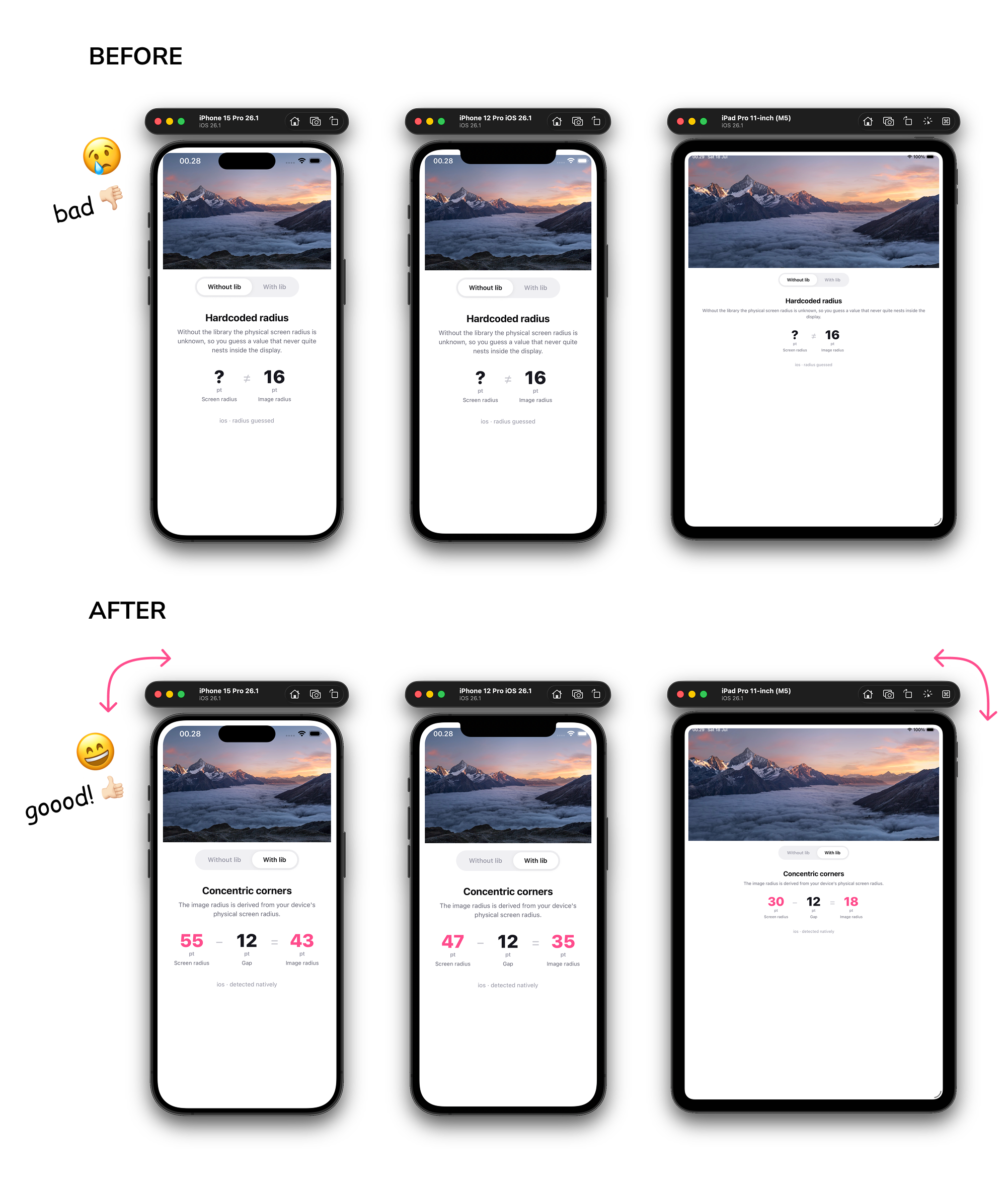
Modern phones have rounded display corners, and the radius is different on almost every device. If you want a view to sit flush against the edge of the screen (a bottom sheet, a full-bleed card, a camera preview, a video call PiP), its corners should follow the same curve as the screen. When the inner radius doesn't match the outer one, the corners look slightly off, even if most people can't say why. Apple's own UI is built around this idea of concentric corners.
The usual workaround is to hardcode a number, or keep a table of "iPhone 15 Pro = 55, iPhone SE = 0, …" and try to keep it up to date forever. That breaks the moment a new device ships. iOS actually knows the real value; it just doesn't expose it publicly. This library reads it at the native level so you always get the correct radius for whatever device the app is running on.
It's a small, niche thing. Most apps will never need it. But if you're the kind of person who cares about a UI lining up perfectly with the hardware, or you're building something where that detail matters, this saves you from maintaining a device list by hand. I'd rather it exist and sit unused than have someone reinvent it later.
Installation
npx expo install expo-screen-cornersThis is a native module, so it needs a development build. It won't work in Expo Go. Run a prebuild first (npx expo prebuild) or use a dev client / expo run:ios.
Usage
import { getScreenCornerRadius } from 'expo-screen-corners';
import { View } from 'react-native';

const radius = getScreenCornerRadius();

function Card() {
  return <View style={{ borderRadius: radius }}>{/* ... */}</View>;
}
getScreenCornerRadius() is synchronous and returns the radius in React Native units (points on iOS, dp on Android). The value doesn't change while the app is running, so you can read it once.
API
getScreenCornerRadius(): number
Returns the display corner radius. iOS reports points, Android reports dp, and both match React Native's style units so you can pass the value straight to borderRadius. Returns 0 when it can't be determined: devices with square corners, Android 11 and older, and web.
Platform support
| Platform | Support |
| --- | --- |
| iOS | Yes, reads the real display radius |
| iPadOS | Yes, same as iOS. Real value on rounded-corner iPads, 0 on older square-cornered models |
| Android | Yes on Android 12 (API 31) and up. 0 on older versions |
| Web | Returns 0 |
How it works
On iOS the display corner radius lives in a private UIScreen property, _displayCornerRadius. This library reads it through key-value coding. To keep the private key out of the compiled binary, the string is assembled at runtime from reversed pieces rather than written as a literal. The approach comes from kylebshr/ScreenCorners.
Because it relies on a private property, there's a chance a future iOS version renames or removes it. If that happens, the call returns 0 instead of crashing, so it fails safely.
On Android it uses the official RoundedCorner API (WindowInsets.getRoundedCorner), added in Android 12 (API 31). It reads the four corners and returns the largest radius, converted from pixels to dp so the value lines up with React Native's units. On Android 11 and older the API doesn't exist, so it returns 0.
Requirements
- A development build (not Expo Go)
- iOS 15.1+
- Android 12 (API 31)+ for a real value (older versions return
0)
License
MIT
Made by @rbayuokt with 🎵 and ❤️