
expo-splitkit
v0.2.1
Published
Deterministic A/B testing and feature flagging module for Expo & React Native
Downloads
67

Maintainers
 swapnil_codes
Readme
splitkit
Deterministic A/B testing and feature flagging for Expo & React Native — no backend, no network calls, no SDK keys.
Splitkit buckets users locally using a MurmurHash3 hash of userId:experimentKey. The same user always lands in the same variant, on every launch and on every device that reports the same ID, without ever asking a server.
- Deterministic — pure hash-based bucketing, no randomness, no persisted assignment state.
- Offline-first — assignments resolve synchronously at render time. Works on a plane.
- Zero runtime dependencies — the whole engine is a hash function and a weighted range check.
- Native device IDs — iOS
identifierForVendor, AndroidANDROID_ID,localStorageUUID on web. - Typed payloads — attach arbitrary config to each variant and get it back type-safe.
- Exposure tracking — deduplicated callbacks you can wire to any analytics tool.
Demo
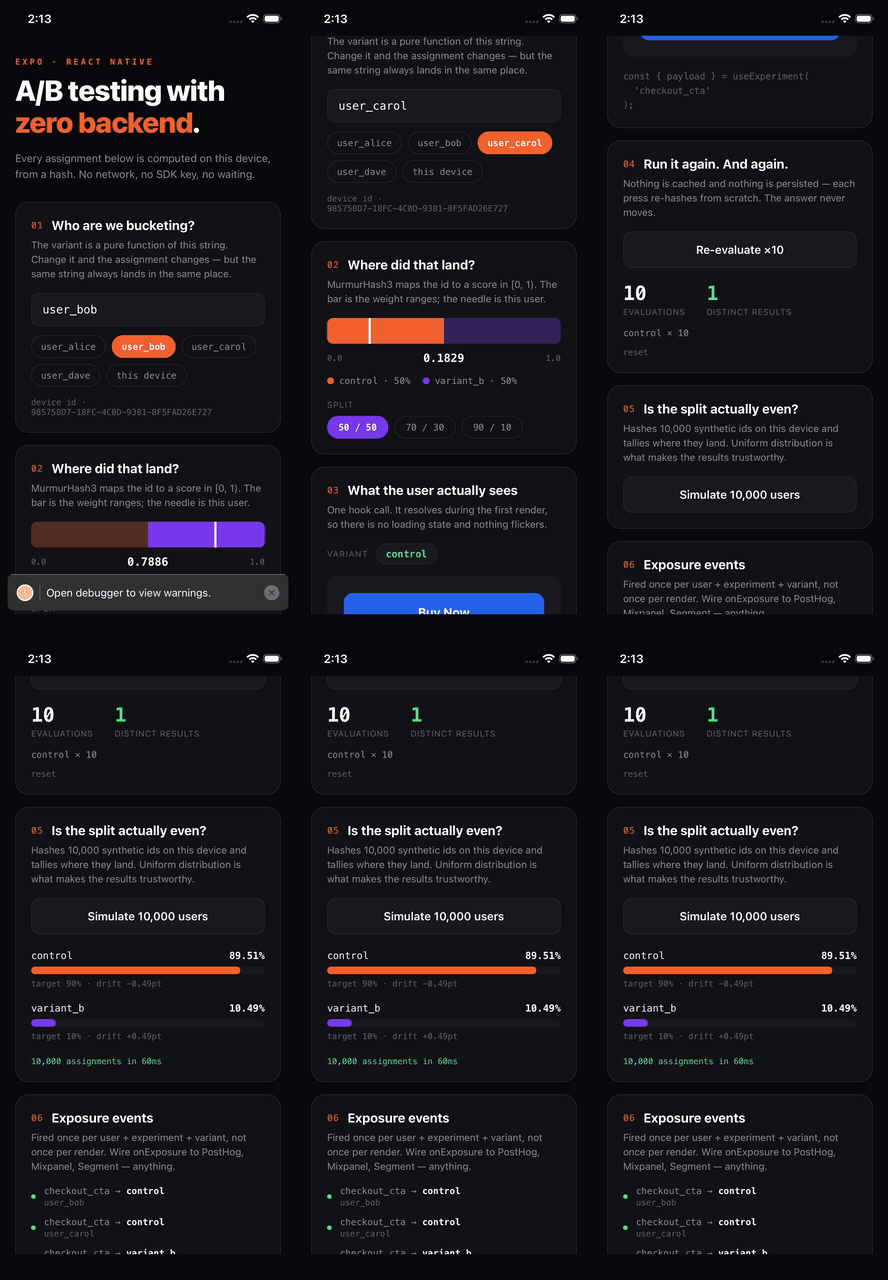
Change the user id, watch the bucket score move, and see the variant flip — then re-run it ten times and watch nothing change. Everything in the clip is computed on-device with the network off.
Installation
npx expo install expo-splitkitThen rebuild your native project (this is a native module, so Expo Go won't pick it up):
npx expo prebuild
npx expo run:ios     # or: npx expo run:android
Supported platforms: iOS, Android, and Web.
Quick start
Wrap your app in a provider, declare your experiments, and read the assigned variant with a hook.
// App.tsx
import { SplitKitTestingProvider, getDeviceId } from 'expo-splitkit';
import OnboardingScreen from './OnboardingScreen';

const EXPERIMENTS = {
  onboarding_v2: {
    key: 'onboarding_v2',
    variants: [
      { name: 'video_intro', weight: 0.5, payload: { title: 'Watch Intro Video' } },
      { name: 'quick_swipe', weight: 0.5, payload: { title: '3-Step Swipe Walkthrough' } },
    ],
    fallback: 'video_intro',
  },
};

export default function App() {
  return (
    <SplitKitTestingProvider
      user={{ id: getDeviceId() }}
      experiments={EXPERIMENTS}
      onExposure={(event) => {
        analytics.track('experiment_exposure', event);
      }}>
      <OnboardingScreen />
    </SplitKitTestingProvider>
  );
}
// OnboardingScreen.tsx
import { useExperiment } from 'expo-splitkit';
type Payload = { title: string };
export default function OnboardingScreen() {
const { variant, payload } = useExperiment<Payload>('onboarding_v2');
if (variant === 'quick_swipe') {
return <SwipeWalkthrough title={payload?.title} />;
}
return <VideoIntro title={payload?.title} />;
}API
<SplitKitTestingProvider />
| Prop | Type | Required | Description |
| --- | --- | --- | --- |
| user | UserContext | yes | The subject being bucketed. If user.id is falsy, the native device ID is used instead. |
| experiments | Record<string, Experiment> | yes | Experiment config, keyed by experiment key. |
| onExposure | ExposureCallback | no | Fired the first time a user is exposed to a given experiment/variant pair. |
| children | ReactNode | yes | |
useExperiment<T>(experimentKey, fallbackVariant?)
Returns { variant: string; payload?: T; deviceId: string }.
const { variant, payload, deviceId } = useExperiment<MyPayload>('checkout_button', 'control');fallbackVariantdefaults to'control'and is only used when the hook is called outside a provider or the key isn't inexperiments.- Calling the hook logs an exposure (once per
userId:experimentKey:variant) viaonExposure. - Used outside a provider it degrades gracefully: returns the fallback variant and an empty
deviceIdrather than throwing.
getDeviceId(): string
Synchronously returns a stable per-install device identifier.
| Platform | Source |
| --- | --- |
| iOS | UIDevice.identifierForVendor, falling back to a UUID in UserDefaults |
| Android | Settings.Secure.ANDROID_ID, falling back to a UUID in SharedPreferences |
| Web | UUID stored in localStorage |
evaluateExperiment<T>(experiment, user)
The pure bucketing function behind the hook — useful in tests, scripts, or non-React code.
import { evaluateExperiment } from 'expo-splitkit';

evaluateExperiment(EXPERIMENTS.onboarding_v2, { id: 'user-123' });
// => { variant: 'quick_swipe', payload: { title: '3-Step Swipe Walkthrough' } }
murmur3_32(key, seed?) / getBucketScore(userId, experimentKey)
The hashing primitives are exported too. getBucketScore returns a stable float in [0, 1) for a user/experiment pair — handy for verifying your split distribution offline.
Strings are hashed as UTF-8 bytes, and the implementation matches the canonical MurmurHash3 (x86, 32-bit) reference. That means a backend in any language can recompute the exact same bucket for a user without calling the app.
getBucketScore('user-123', 'onboarding_v2'); // => 0.7213…Types
interface Variant<T = any> {
  name: string;
  weight: number;          // 0.0–1.0; weights should sum to 1.0 per experiment
  payload?: T;
}

interface Experiment<T = any> {
  key: string;
  variants: Variant<T>[];
  fallback: string;                                        // variant name used when disabled/untargeted
  enabled?: boolean;                                       // set false to force the fallback
  targetingRules?: (attributes: Record<string, any>) => boolean;
}

interface UserContext {
  id: string;
  attributes?: Record<string, any>;
}

type ExposureCallback = (event: {
  experimentKey: string;
  variant: string;
  userId: string;
  timestamp: number;
}) => void;
How bucketing works
- Compute
murmur3_32("<userId>:<experimentKey>")and normalize it to a score in[0, 1). - Walk the
variantsarray, accumulatingweight. - The first variant whose cumulative weight exceeds the score wins.
Consequences worth knowing:
- Assignments are stable as long as
userIdandkeydon't change. Nothing is persisted, so there's no cache to invalidate. - Order matters. Reordering
variantsreshuffles who lands where. Append new variants at the end when you can. - Changing
keyreshuffles everyone. That's the mechanism for a clean re-randomization. - Weights should sum to 1.0. If they don't, the split is skewed — SplitKit warns about it in development. Users above the total land in the last variant rather than
fallback, so floating-point rounding never drops anyone out of an experiment. - Each experiment is independent because the key is part of the hash input — a user in
variant_aof one test isn't biased toward any variant of another.
Feature flags
A flag is just a two-variant experiment. Use enabled or targetingRules for hard gating.
const EXPERIMENTS = {
  new_checkout: {
    key: 'new_checkout',
    variants: [
      { name: 'off', weight: 0.9 },
      { name: 'on', weight: 0.1 },   // 10% rollout
    ],
    fallback: 'off',
    targetingRules: (attrs) => attrs.plan === 'pro',
  },
};
Users who fail targetingRules — or any experiment with enabled: false — receive fallback and are never bucketed.
Exposure tracking
onExposure fires once per unique userId:experimentKey:variant for the lifetime of the provider, so you can point it straight at an analytics sink without worrying about duplicate events on re-render.
<SplitKitTestingProvider
  user={{ id: userId }}
  experiments={EXPERIMENTS}
  onExposure={({ experimentKey, variant, userId, timestamp }) => {
    amplitude.track('$exposure', { experiment: experimentKey, variant, userId, timestamp });
  }}>
Dedupe state lives in a ref, so it resets when the provider unmounts (typically an app restart).
Example app
A runnable Expo app lives in example/:
cd example
npm install
npx expo run:ios     # or: npx expo run:android
It's a six-panel walkthrough of a checkout_cta experiment, built to make determinism visible rather than just assert it:
| Panel | Shows |
|---|---|
| Who are we bucketing? | Edit the user id or tap a preset — the assignment is a pure function of this string |
| Where did that land? | The [0, 1) bucket score on a weighted meter, with adjustable 50/50, 70/30, 90/10 splits |
| What the user sees | The real CTA rendered from the variant payload, resolved on the first frame |
| Run it again | Re-evaluates ×10 per press and counts distinct results — always 1 |
| Is the split even? | Hashes 10,000 synthetic ids on-device and charts the actual distribution and drift |
| Exposure events | Live onExposure feed, demonstrating per-user/experiment/variant deduplication |
Turn on airplane mode while it runs — nothing changes, because nothing was ever fetched.
Development
npm run build     # compile src/ to build/
npm run clean
npm run lint
npm test
npm run open:ios      # open the example iOS project in Xcode
npm run open:android  # open the example Android project in Android Studio
Contributing
Issues and PRs welcome at github.com/swapnil20711/splitkit.
License
MIT © swapnil20711