
express-post-task-scheduler
v1.0.13
Published
A lightweight npm package to create and manage scheduled tasks using Express middleware. Configure tasks via POST requests and execute them at specified times seamlessly.

Maintainers
 sliu9412
Readme
Express-Post-Task-Scheduler
A lightweight npm package to create and manage scheduled tasks using Express middleware. Configure tasks via POST requests and execute them at specified times seamlessly.
The task and its schedule time and data will be store in SQLite (Prisma ORM) database embedded, and the executing records can be fetched by apis.
Latest Update Date
2025-01-07
Getting Started
Environment
Node.js >= v20.15.0
Installing
npm i express-post-task-scheduler
Basic Usage
Postman will be used for calling the apis.
- Importing postTaskScheduler and setTasks from the npm package.
- Registering the middleware
- Preparing each task and its executor, the param of executor is the item of in the post body
- The example below print the index from post data
const { postTaskScheduler, setTasks } = require("express-post-task-scheduler");
const express = require("express");

const app = express();
app.use(postTaskScheduler()); // register the middleware

// perpare the tasks and the executors
setTasks([
  {
    taskName: "Count", // each taskName should be unique
    executor: async (index) => console.log(`Count: ${index}`),
  },
]);

app.listen(3000, () => {
  console.log(`Server is running at http://localhost:3000`);
});- Creating an variable in .env file, it will be used in the request header for validation, for example
SCEDULER_SECRET="QlEgDY'2{h=NG!Tme^$K:n=S_7HJC'NY]SG0OA*Y%;~`K'VGDC%ol'M@~R1.PUR"- Setting up the secret in request header
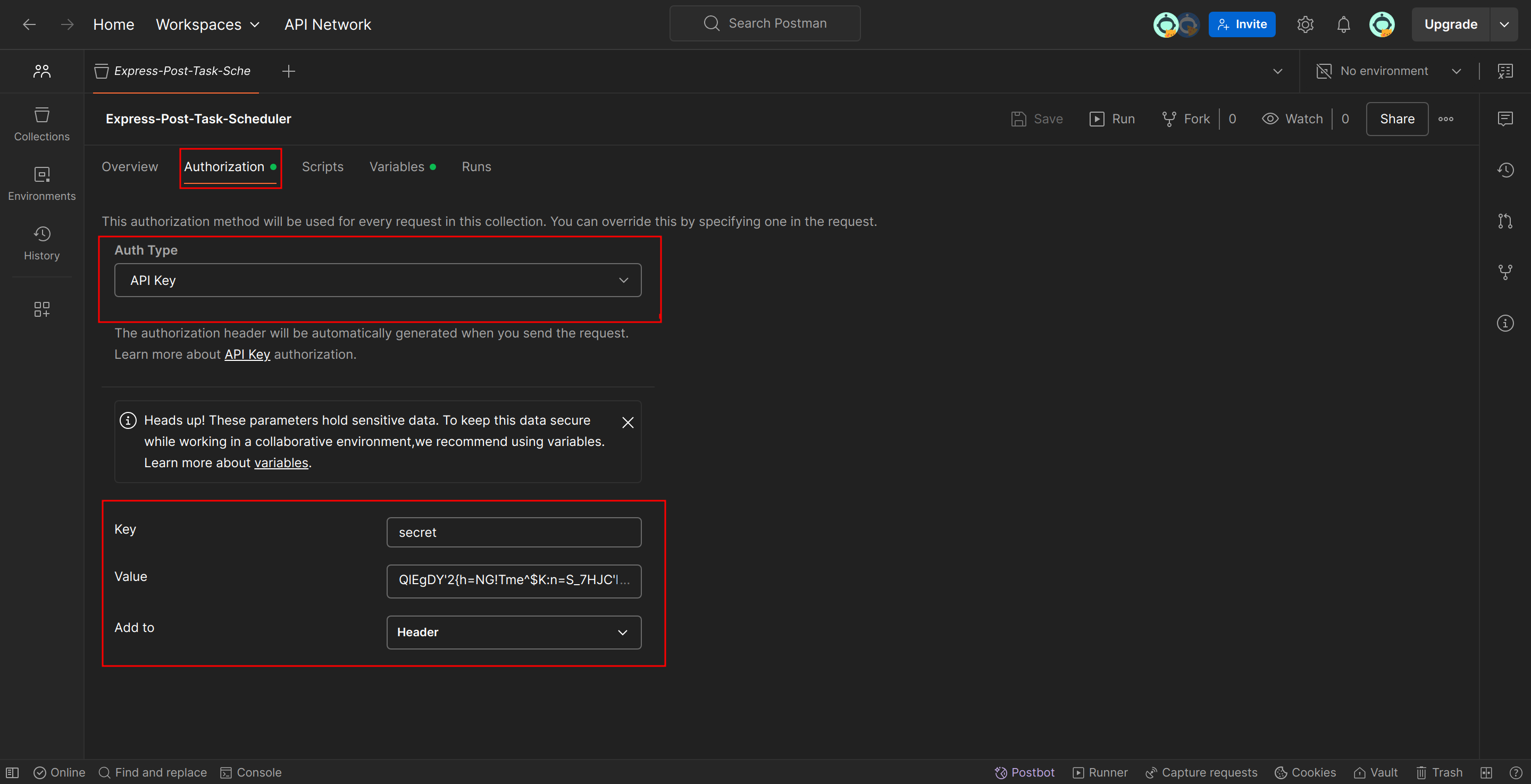
- Call route
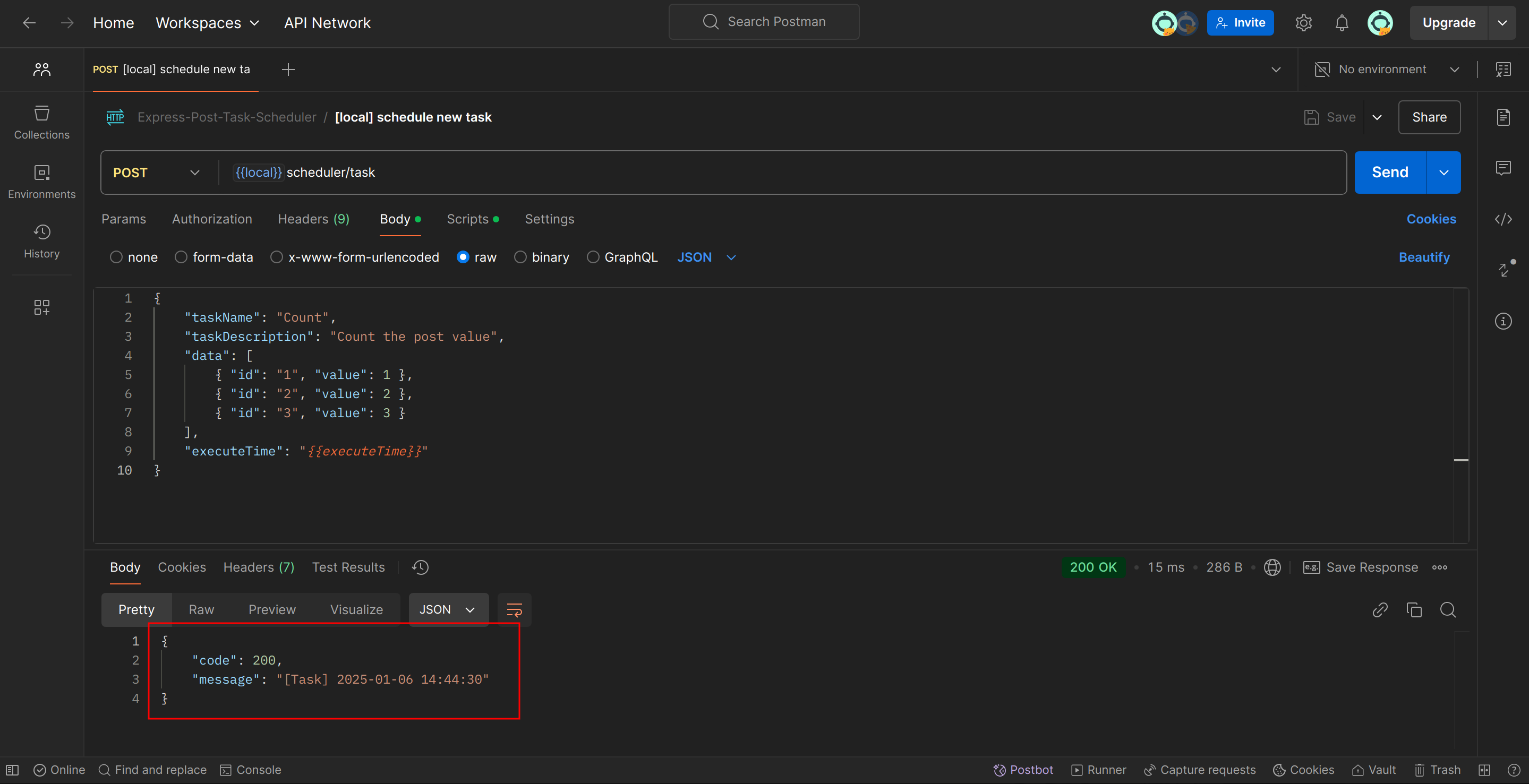
/scheduler/taskwith the data below to trigger the prepared task. The request data consists of four fixed fields:- taskName: it should be the same as the object key prepared in setTasks's array
- taskDescription: the purpose of the task, it can be used to filter tasks by api
- data: the JSON array to store two fields id and value:
- id: unique string
- value: any data JSON supports, it will be used as the param of matched executor
- executeTime: time string day.js can parse, for example:
2025-01-06 14:00
{
    "taskName": "Count",
    "taskDescription": "Count the post value",
    "data": [
        { "id": "1", "value": 1 },
        { "id": "2", "value": 2 },
        { "id": "3", "value": 3 }
    ],
    "executeTime": "2025-01-06 14:44:30"
}
API and Filters
Schedule task with data
route:
/scheduler/taskmethod: POST
request body example:
{
    "taskName": "Count",
    "taskDescription": "Count the post value",
    "data": [
        { "id": "1", "value": 1 },
        { "id": "2", "value": 2 },
        { "id": "3", "value": 3 }
    ],
    "executeTime": "2025-01-06 14:44:30"
}
List scheduled tasks
route:
/scheduler/taskmethod: GET
response example:
{
    "code": 200,
    "data": [
        {
            "id": 3,
            "taskName": "Count",
            "taskDescription": "Count the post value",
            "executeTime": "2025-01-06 14:44:30",
            "startTime": "2025-01-06 14:44:30",
            "finishTime": "2025-01-06 14:44:30"
        }
    ]
}
List tasks by conditions
route:
/scheduler/taskexample filter query:
?filter={"status": "finished", "start": {"after": "2025-01-03 14:56", "before": "2025-01-03 14:57"}, "finish": {"before": "2025-01-03 14:57:00"}}method: GET
filter conditions fields:
- status:
- waiting: the tasks wait for being executed at their executed time
- executing: the tasks is executing and have not finished yet
- finished: the finished tasks
- taskName and taskDescription: the sub string included in the tasks's taskName and taskDescription field
- execute, start, finish: The time info of a task status, each includes after, before and at
- status:
filter's data structure:
export type ITaskFilter = {
  status?: "waiting" | "executing" | "finished";
  taskName?: string;
  taskDescription?: string;
  execute?: ITimeRange;
  start?: ITimeRange;
  finish?: ITimeRange;
};

export type ITimeRange = {
  after: string | undefined;
  before: string | undefined;
  at: string | undefined;
};
Reschedule waiting task
route:
/scheduler/taskmethod: PUT
request example:
{
    "taskId": 4,
    "executeTime": "2025-01-03 16:41:10"
}
response exmaple:
{
    "code": 200,
    "message": "Rescheduled task 4",
    "data": {
        "isSuccessful": true,
        "updatedTask": {
            "id": 4,
            "taskName": "Count",
            "taskDescription": "Count the post value",
            "executeTime": "2025-01-06T20:17:10.000Z",
            "startTime": null,
            "finishTime": null
        }
    }
}
Delete finished task or cancel waiting task, the task records will also be removed from database
route:
/scheduler/task/:idmethod: DELETE
response example (The response code may be 200, but if the data.count is 0, there's no task removed):
{
    "code": 200,
    "data": {
        "count": 1
    }
}
List Records (The executor's implement result)
route:
/scheduler/recordmethod: GET
example filter query:
?filter={"finish": {"after": "2025-01-03 14:50"}, "status": "failed", "taskId": 1}filter conditions fields:
- taskName: the sub string included in the tasks's taskName and taskDescription field
- taskId: the primary key of the task
- status: two options, successful and failed. If there's any exception raised by executor, the response's object error field will store the error message
- finishTime: the record's finished time, also includes after, before and at
filter's data structure:
export type IRecordFilter = {
  taskName?: string;
  taskId?: number;
  status?: "successful" | "failed";
  finish?: ITimeRange;
};

export type ITimeRange = {
  after: string | undefined;
  before: string | undefined;
  at: string | undefined;
};
example response:
{
    "code": 200,
    "data": [
        {
            "id": 10,
            "error": null,
            "finishTime": "2025-01-06 15:17:10",
            "task": {
                "id": 4,
                "taskName": "Count",
                "taskDescription": "Count the post value"
            }
        },
        {
            "id": 11,
            "error": null,
            "finishTime": "2025-01-06 15:17:10",
            "task": {
                "id": 4,
                "taskName": "Count",
                "taskDescription": "Count the post value"
            }
        },
        {
            "id": 12,
            "error": null,
            "finishTime": "2025-01-06 15:17:10",
            "task": {
                "id": 4,
                "taskName": "Count",
                "taskDescription": "Count the post value"
            }
        }
    ]
}