
expressmark
v0.6.0
Published
Parse and write Expressive Markdown with its document AST.


Readme
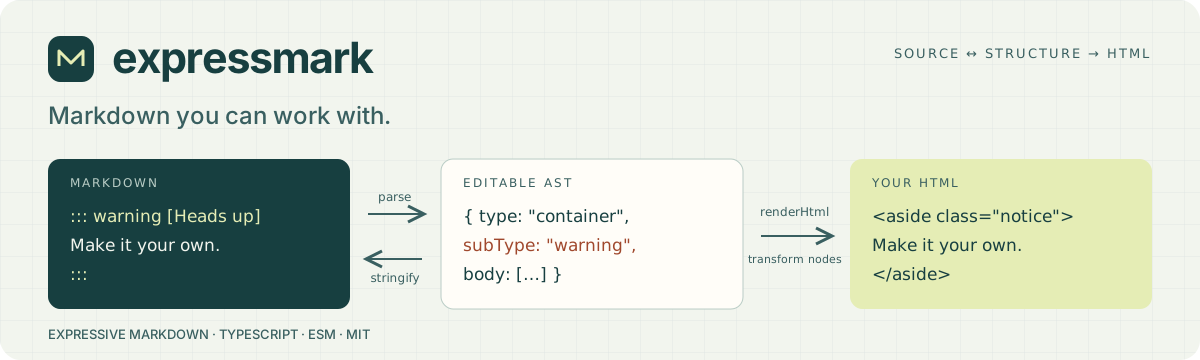
expressmark
Capture rich document metadata and formatting without sacrificing Markdown readability. Parse Expressive Markdown into an editable JSON document, change the data, and write Markdown again.
Build rich editor → Markdown → rich editor workflows with explicit containers, attributes and YAML frontmatter. Supported block types, titles, metadata and formatting stay expressible in the text, so tools can restore that context when opening the document again.
Quick start · HTML transformers · Layout · Supported syntax · Benchmarks · Future exploration
Quick start
By default, Expressmark reads the Expressive Markdown standard (the documented
draft subset). Use { syntax: "compatible" } with both parse and stringify
for CommonMark/GFM conventions plus Expressive Markdown extensions. Since 0.2.0,
the explicit standard-mode option is { syntax: "standard" }; the former
modern name is removed. See syntax for the differences.
pnpm add expressmarkimport { parse, stringify, type Document } from "expressmark";
const document: Document = parse(`::: warning [Before deploying]
Back up the database first.
:::`);
document.body[0]!.title = { type: "title", value: "Check the backup" };
console.log(stringify(document));::: warning [Check the backup]
Back up the database first.
:::| You write | Expressmark gives you |
| --- | --- |
| Ordinary Markdown | Editable paragraphs, lists, links, code and tables |
| ::: warning [Title] | A semantic container with a designated title and body |
| :chip[Ready]{tone=green} | An inline semantic node with authored attributes |
| @[Ada]#maintainer | A mention with an entity reference separate from its occurrence ID |
| Native rich HTML | Structured nodes where supported, filtered through a shared safe profile |
Make the HTML your own
Available from 0.1.2. Import the separate renderer and override only the node types you need:
import { parse } from "expressmark";
import { renderHtml } from "expressmark/render";

const html = renderHtml(parse("::: warning\nBack up first.\n:::"), {
  transformers: {
    "container:warning": (_node, context) =>
      `<aside class="notice">${context.renderChildren()}</aside>`,
  },
});
// <aside class="notice"><p>Back up first.</p></aside>
Use context.renderDefault() to wrap a node's normal output, keeping custom
renderers on its children. Use context.escape(text) when inserting authored
strings into HTML. Custom output passes through the same safe HTML profile as
default output. See the transformer guide for lookup
order, titles, omission, defaults and output-policy limits.
Render options add heading anchor IDs, leave out the designated title's <h1>,
and pass every text run through a host escaping hook. A site whose pages only
its own authors write can keep raw HTML and admit its components with
trusted host content; the default
stays the strict safe profile.
Open semantic types and attributes cover most application customization without new grammar. The Markdown reader is internal; Expressmark exposes no supported parser-plugin or reader-configuration API.
Align and float content
Use a layout container to center a group of blocks and their text:
::: layout {align=center}
{width=320 responsive}
Services communicate through a shared queue.
:::align=start|center|end controls alignment inside the group.
float=start|end floats the whole group so surrounding text can flow around it.
Both work with any block content, including quotations, figures and code.
Directions follow the document's writing direction; set dir=rtl for an RTL
group or inherit it from the surrounding HTML. lang alone does not set direction.
parse and stringify preserve layout data; renderHtml supplies native logical
CSS. Layout examples and browser verification
cover Arabic, Hebrew, nested direction changes and child overrides. This built-in
rendering is available from 0.1.2.
What you can write
- Two syntaxes:
standard, the default, follows the Expressive Markdown standard (the documented draft subset), with Markdown inside HTML elements and no indented code. Choosecompatibleexplicitly for CommonMark 0.31.2 and GFM conventions, including tables, tasks, strikethrough and autolinks, plus Expressive Markdown extensions. Thesyntaxoption chooses, and a document'smarkdownSyntaxfrontmatter overrides it; see syntax. - Lint warnings for spellings other than the preferred form, and a writer option that writes the preferred form; see lint.
- YAML frontmatter, a designated document title/ID, and JSON-compatible custom metadata.
- Nested colon containers, typeless generic containers, inline/leaf directives, open semantic types and shared string/flag attributes, including
#idand.classshorthand. - Bracketed spans,
[text]{.note}, for inline text with attributes. The longhand{class="note" id="x"}works the same as{.note #x}. - Alerts,
> [!note] Title, as a supported second spelling of a callout, written back as authored. - Unbracketed container titles,
::: warning Before you upgrade, written back as authored. - Mention shorthand, chips and authored TOC placeholders.
- Footnotes:
[^label]references and[^label]:definitions, kept where they were written and rendered as one numbered, back-linked notes section. - Reference-style links and images with their
[label]: urldefinitions, kept in their authored form and resolved when rendering. - Definition lists: a one-line term, then
:descriptions holding blocks, rendered as<dl>,<dt>and<dd>. - Adjacent tab grouping and explicit tabs settings, including shared selection names.
- Leading-pipe line blocks, code captions and presentation attributes.
- Named and positional list tables, including rich cells, headers, alignment, transpose and rectangular merges.
- Safe native HTML for supported rich text, wrappers, figures, disclosures and rich table cells.
This implements a changing Stage 0 proposal. It does not claim complete
conformance. The normative syntax,
AST and
parser/writer rules live in
nextwebwg/specs.
Converter contract
parse(markdown, options?) synchronously returns a version-1 Document.
stringify(document, options?) synchronously returns Markdown. An unedited
parse writes back byte for byte, in both syntaxes, spacing and line endings
included: the document records its source text and each top-level block's
range in source, and an edited or new block is written in canonical form with
the source's spacing kept around its unedited neighbours. A top-level list
writes back item by item, and a pipe table cell by cell: an edit rewrites the
items or cells it changed and the rest keep their source. A document built
without a source is written in canonical form with a terminal newline, or ""
when empty. In the safe profile, a block holding HTML is written through the
profile. Neither executes code, loads
assets, resolves mentions, generates a TOC, or renders HTML. renderHtml is a
separate operation.
const document = parse(source, {
  onDiagnostic(diagnostic) {
    console.warn(diagnostic.code, diagnostic.message);
  },
});
const markdown = stringify(document, { onDiagnostic: console.warn });
parseDoc(markdown, options?) parses for editing. Its document is what
parse returns, and edit(from, to, replacement) returns the document for the
edited text: it re-reads from the top-level block before the edit until the
blocks after it start where they started before, and reuses every other
block's nodes. An edit that changes the frontmatter or touches a link or
footnote definition re-reads the whole document, as does every edit with lint
or onDiagnostic, whose findings span the document, and every edit of text
holding a carriage return. In standard syntax, an edit touching an HTML tag
re-reads the whole document, since an element reads through its end tag. A
definition list directly before the edited block is re-read too, since the
block may become its next term. Re-reading stops where a block starts as before
and no re-read list or definition list continues onto it. In stringify, an
unedited block whose source would read as part of an edited block before it
is written canonically.
Treat a document as read-only while you edit it.
let doc = parseDoc(source);
doc = doc.edit(offset, offset, "x"); // one keystroke
const html = renderHtml(doc.document);
Recoverable source errors become literal nodes with optional warnings. Duplicate
attributes and YAML keys use the final value; duplicate authored IDs stay
unchanged. Invalid ASTs, unsupported versions, unknown structural nodes, and
unsupported source mappings throw ConversionError with a code. Unknown
semantic subtypes remain valid. Content stays where it was written, and writers
keep the author's spelling: parse records each choice between accepted forms
in the node's source, such as _ emphasis, * bullets, setext headings,
tilde fences, pipe tables or an attribute list's separators, and stringify
writes it back while it still reads as the node. New or edited content uses the
preferred form. Whitespace inside a construct and character escapes follow the
writer's canonical form.
Exported JSON types include Document, Node, Attributes, Json, Position,
Point, Diagnostic, ConversionOptions and Syntax. Content uses exclusive body,
children, or value slots; title is a separate designated slot. The writer
validates child contexts and merged table grids. Source positions are not
currently generated.
The safe HTML profile applies while parsing, writing, and rendering. Scripts and their contents are discarded; literal code containing HTML stays code. Filtering can remove presentation and produces a warning. Omitting the diagnostic callback does not disable the policy.
Rich wrappers can use inert data-attributes data to retain scalar types HTML
cannot express, such as a custom false flag. That payload never stores content
nodes or restores executable fields. Unsupported structures fail explicitly;
unrecognized safe HTML may remain opaque with its accepted markup preserved.
Performance you can reproduce
The comparison suite measures parsing, Markdown writing, round trips and reference HTML pipelines against pinned implementations. Results include workload sizes, versions, runtime, hardware and individual samples. Expressmark does additional AST conversion, extension handling and validation; raw tokenization timings are a different output contract.
There is no blanket “fastest parser” claim. Use the recorded workloads to assess your use case. The agent exploration backlog explains how to investigate a complete Parseman grammar and broader speed comparisons.
Development
Use Corepack, the committed pnpm 12 version, and a supported Node LTS release:
corepack enable
corepack pnpm install --frozen-lockfile
corepack pnpm verify:pr
In Conductor, add this repository with Open project. The checked-in settings install dependencies and provide verification, watch and benchmark commands. Shared settings take effect locally after merging them to the default branch.
TypeScript 7 builds strict ESM declarations. Parseman grammars recognize Markdown's
constructs, the extension tokens and bare URLs; the reader in src/markdown
applies CommonMark's block and emphasis algorithms to what they recognize, and
reads block quotes and list items as Parseman line runs. YAML handles metadata,
and sanitize-html with htmlparser2 handles the safe native profile. Oxlint and Vitest check conversions,
unsafe input, malformed data, round trips and a fresh packed-package consumer.
The manual Release workflow publishes reviewed main through the protected
npm environment using trusted publishing with provenance. The requested version
must match package.json. Foundation owns policy files listed in
threadlabs.config.json.
MIT licensed. See LICENSE.