fashionclock
v1.2.6
Published
炫酷时钟js


Readme
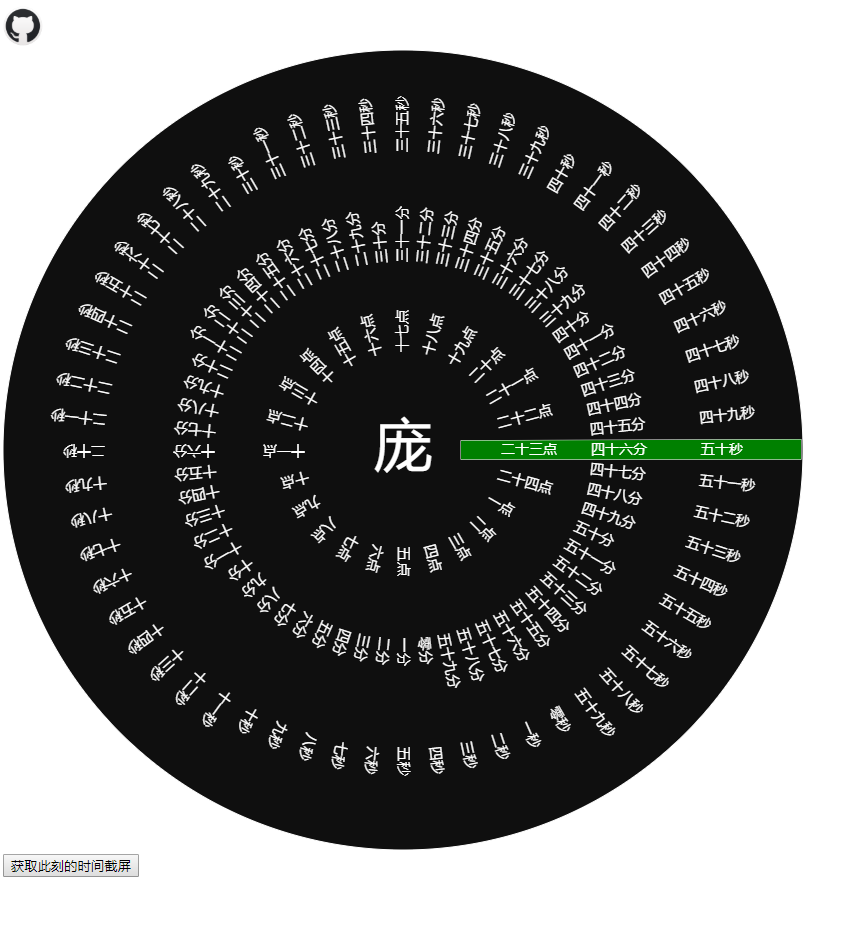
借鉴最近抖音平台及华为应用主题里流行的 炫酷时钟做的一个H5
线上地址:http://www.ooo0o.com/2019/fashion_clock/
JS包已经发布到npm上去(https://www.npmjs.com/package/fashionclock)
        npm i fashionclock


        // vue项目引入方式一:
        // const fashionclock = require('fashionclock')
        // Vue.prototype.fashionclock =fashionclock

        // vue项目引入方式二:
        import fashionclock from 'fashionclock'
        Vue.prototype.fashionclock =fashionclock


        // 调用此方法需要传的的params的值应为 下边cvsparams的结构
        //在组件中使用前 定义好data里的自定义变量,如下的 cvsparams 即可
        ..................
        data(){
            return{
                cvsparams : {
                    // 选择器==画布宽高值==中间的字==中间字大小==时间字体大小==圆盘背景色==背景图片==中间字颜色==时间字体颜色==画布背景色(默认透明)==圆盘的outline色
                    selectdom:'div>#clockcvs',      //选择器
                    cvswh:viewwidth,      //画布宽高值
                    word:'庞',      //中间的字
                    wordsize:'',      //中间字大小
                    timesize:'',      //时间字体大小
                    bgclolr:'',      //圆盘背景色
                    bgpic:'',      //画布canvas标签父级的背景图片
                    wordcolor:'',      //中间字颜色
                    timecolor:'',      //时间字体颜色
                    boxbgclolr:'',      //画布背景色(默认透明)
                    outlinecolor:'',      //圆盘的outline色
                    currentboxcolor:''      //当前时间框的填充色
                }
            }
        )

        ..................
        mounted(){
            this.fashionclock(this.cvsparams)
        }

        ..................
        script引入方式
        // 调用此方法需要传的的params的值应为 下边cvsparams的结构 若项目用在移动端时,需要使用css3的scale 根据当前宽度与最小宽度716的比值去设置缩放,可参考例子index.html进行动态设置
        例子:   项目页面index.html中
        let cvsparams = {
            // 选择器==画布宽高值==中间的字==中间字大小==时间字体大小==圆盘背景色==背景图片==中间字颜色==时间字体颜色==画布背景色(默认透明)==圆盘的outline色
            selectdom:'div>#clockcvs',      //选择器
            cvswh:viewwidth,      //画布宽高值
            word:'庞',      //中间的字
            wordsize:'',      //中间字大小
            timesize:'',      //时间字体大小
            bgclolr:'',      //圆盘背景色
            bgpic:'',      //画布canvas标签父级的背景图片
            wordcolor:'',      //中间字颜色
            timecolor:'',      //时间字体颜色
            boxbgclolr:'',      //画布背景色(默认透明)
            outlinecolor:'',      //圆盘的outline色
            currentboxcolor:''      //当前时间框的填充色
        }
        fashionclock(cvsparams)
项目介绍:       基于canvas做的实时时间显示,动态将时间显示在绿色(颜色可自定义)块处.在前面的参数设置处可以自行配置多种颜色及字体的设置

github: https://github.com/Chinegoodman/fashion_clock

项目发起缘由:     在一次电话面试中,面试官问我之前做的大转盘抽奖活动,可不可以通过canvas画布的形式来实现并让我提供一下思路.画布个人在前端开发过程中,研究学习过.但是工作中接触的少,深层次的就不太了解了,
                所以面试官问的时候个人还是有些懵的,因为我接触过的都是静态的,而抽奖是有一个动效显示的.


项目过程:       初期,我个人没有头绪,就在网上找寻demo,看了两个demo的实现效果,就是根据奖品数据,通过canas做一个底部的轮盘,在轮盘上边放一个箭头图片,来控制箭头的指向,同时给箭头的旋转添加transition属性,来过度动画
                看完两个demo后我觉得实在没有太多的技术含量,又联想起前些天看到过的这个炫酷时钟,我就想基于canvas做这样一个项目,算是对canvas的复习与学习吧!