
fb-pricing
v1.1.0
Published
legacy edible pricing


Readme
fb-pricing
Table of Contents
Installation
npm install fb-pricing --saveGetting Started
- Run:
npm installinside your project to install dependencies. - Run:
npm install typings -g(If typings is not installed before run this command) - Run:
npm install gulp -gto install Gulp globally - Run:
npm install rimraf -gto install globally
How to Use (FIX)
Here is the list of tasks available out of the box and run these via npm run <task>
  build             Perform lib build
  clean             Cleans artifacts and regenerate
  test              Run spec tests
  debug             FIX
Publishing Your Code (FIX)
Once your tests are passing (ideally with a Travis CI green run), you might be ready to publish your code to npm.
Bumping version number and tagging the repository with it can be done as mentioned below. For more details read http://semver.org/
Available options to update version
npm run patch     # makes v0.1.0 → v0.1.1
npm run feature   # makes v0.1.1 → v0.2.0
npm run release   # makes v0.2.1 → v1.0.0
Publishing updated version can be done via,
npm run <release | feature | patch>
npm publish
Contributing
This project follows the standard "git-flow" workflow.
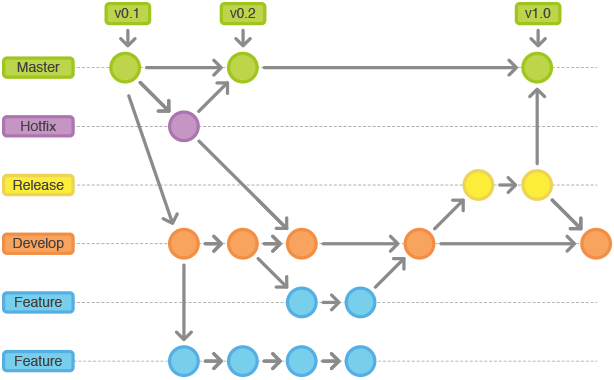
Branches and functions
- Master - Release branch. History of master product release history. Sacred branch, All code in this branch has been qualified.
- Staging A.K.A Release - Qualification Branch.
- Develop - CI branch, this is the primary branch developers branch from and merge to.
- Feature branches - Work branches
- Hotfix branches - Same as feature branch but they are cut from and merged back to master. Also require merging to Develop
Developer Workflow
- Clone repository
$ git clone https://<USERNAME>@bitbucket.org/sss_freshbyte/ediblestore.git - Create and checkout "feature" branch
- Manually:
$(develop) git checkout -b FEATURE_BRANCH_NAME - Via Jira: Create Branch then checkout
$> git fetch && git checkout FEATURE_BRANCH_NAME
- Manually:
- Code
- Commit
- Stage Files
$(FEATURE_BRANCH_NAME) git add . - Commit Files
$(FEATURE_BRANCH_NAME) git commit -m "short descriptive message, can be changed later"
- Stage Files
- Repeat steps 3,4 until feature is ready for code review
- Upon approved Pull Request squash and rebase rather than merging via BitBucket
- Interactive Rebase -
$(FEATURE_BRANCH_NAME) git rebase -i develop 
- Update line actions

- Edit Message

- Now merge feature branch into develop

- You can see that develop's history is now linear
- Interactive Rebase -
- Additional Information
- Why Rebase?
- If you feel your commit message should include additional information please keep it properly formatted
- Separate subject from body with a blank line
- Limit the subject line to 50 characters
- Capitalize the subject line
- Do not end the subject line with a period
- Use the imperative mood in the subject line
- Wrap the body at 72 characters
- Use the body to explain what and why vs. how
Changelog
Recent changes can be viewed on the CHANGELOG.md
License
Copyright (c) Marc Means. This source code is licensed under the license.