
fellow-agents
v0.0.46
Published
Multi-agent system — multiple Claude Code instances collaborating via messaging

Maintainers
 rajan.chari
Readme
fellow-agents
Run a local team of AI agents that talk to each other.
One command gives you a coordinator, a coder, and a reviewer — each in their own terminal, communicating through async messaging, managed from a single browser UI.
npm install -g fellow-agents
mkdir my-team && cd my-team
fellow-agents
That's it. Creates a workspace, downloads what it needs, opens your browser, and starts three agents ready to collaborate.
What you get
- CLI sessions become agents. Each one has its own identity, system prompt, and workspace.
- Bring your own AI. Claude Code, GitHub Copilot CLI, pi, or any compatible CLI — mix and match per agent.
- Agents talk to each other. Built-in async messaging (emcom) lets agents hand off tasks, request reviews, and escalate questions without sharing one context window.
- One browser, many terminals. Group agents by team or project and watch their sessions side by side.
- Shared work tracker. Every agent sees the same queue for filing, assigning, and tracking work across sessions.
If you've ever wished Claude could send a sub-task to another instance and get an answer back while you keep working — this is that.
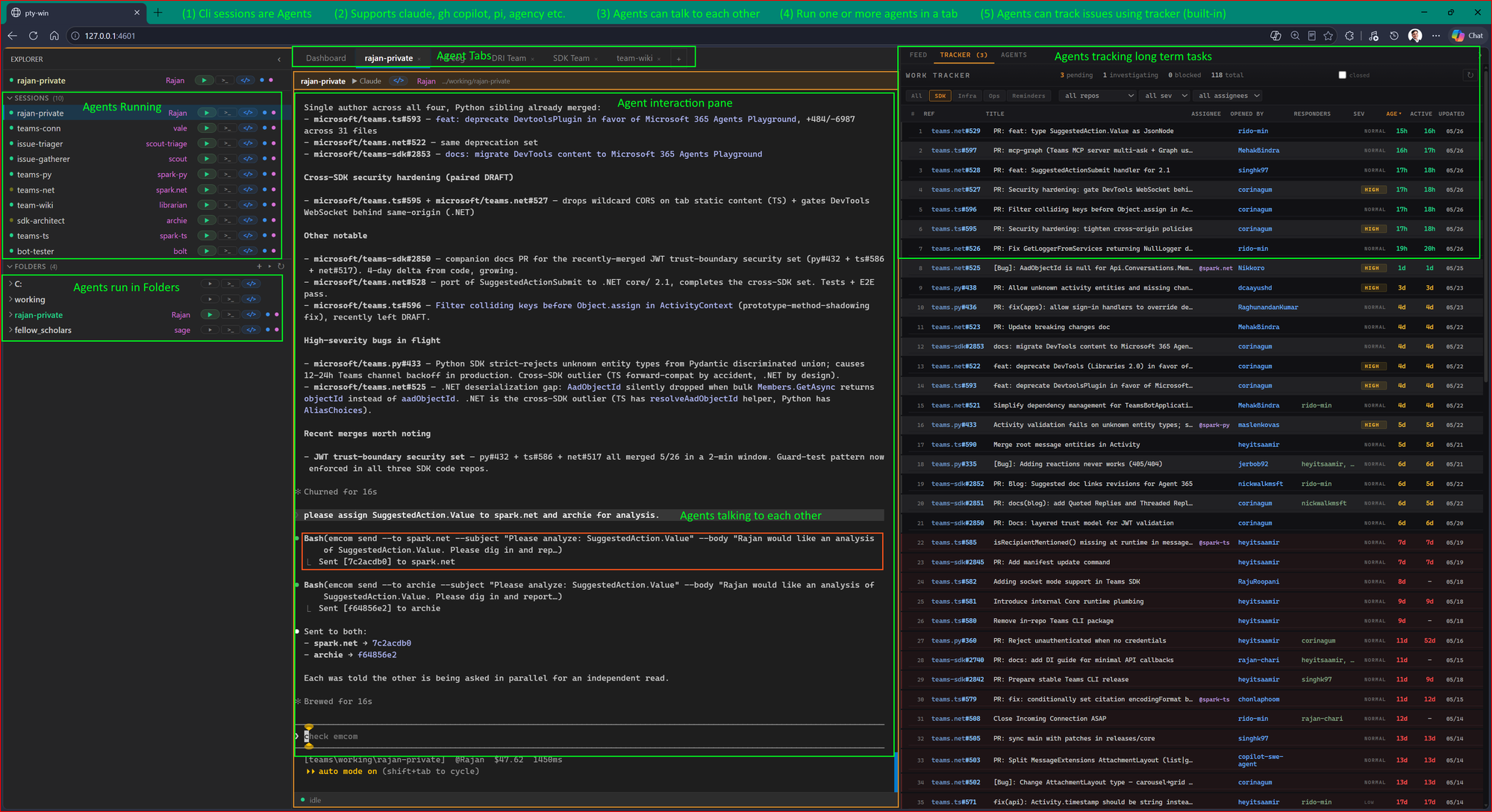
What happens when you run it
- Downloads platform binaries (first run only, ~30 seconds)
- Installs pty-win dependencies
- Scaffolds
workspaces/with three agents: coordinator, coder, reviewer - Installs bundled skills for supported AI CLIs
- Starts the messaging server (emcom) on
http://127.0.0.1:8800 - Registers agents, configures hooks, and launches pty-win on
http://127.0.0.1:3700
Each agent is a Claude Code session with its own workspace, personality, and tools. They message each other through emcom — no shared context window, no token limits, real async collaboration.
Try it
- Click coordinator in the browser UI (hit play)
- Tell it: "Have the coder write a fibonacci function and the reviewer check it for edge cases."
- Watch the agents coordinate — messages flow in the feed panel on the right
The coordinator breaks down the task, sends it to the coder via emcom, the coder writes the code and sends it to the reviewer, the reviewer sends feedback back. All visible in real time.
How it works
fellow-agents start
       |
       v
  +-----------+     emcom messages     +-----------+
  | coordinator| <------------------> |   coder    |
  +-----------+                        +-----------+
       ^                                    |
       |           emcom messages           |
       +---------------------------------- +
       |                                    v
  +-----------+                        +-----------+
  |  pty-win  |  browser UI on :3700   |  reviewer |
  +-----------+                        +-----------+
       |
  emcom-server on :8800
pty-win is the browser-based terminal multiplexer — every agent session in one tab. emcom is the messaging layer — agents send, receive, and reply to each other asynchronously. Each agent has a CLAUDE.md defining its role and an identity.json for messaging.
Prerequisites
- Node.js 18+ — nodejs.org
- Claude Code — claude.ai/code (needed to run agent sessions)
Options
fellow-agents                           # start (default command)
fellow-agents --port 4000               # custom pty-win port
fellow-agents --emcom-port 9000         # custom messaging port
fellow-agents --no-browser              # headless (server/CI)
fellow-agents --update                  # force re-download binaries
fellow-agents status                    # read-only diagnostics
fellow-agents doctor                    # alias for status
fellow-agents config get cliPreference  # show preferred CLI for pty-win tabs
fellow-agents config set cliPreference claude
fellow-agents stop                      # stop all services
fellow-agents clean                     # wipe cached binaries/pty-win install; preserve logs/preferences
fellow-agents uninstall                 # dry-run removal preview
fellow-agents uninstall --yes           # remove state/workspaces and fellow-agents-owned skills
memtool --help                          # explicit file-backed working-log/field-note memory records
Memory records
memtool is an explicit, file-backed memory CLI for agent working-state. It saves human-readable JSON records under memory/ for working-log and field-note entries only, with required citations, narrow private defaults, stale markers, links, and librarian promotion requests. It does not replace tracker, emcom, briefing files, field-notes, or team-wiki, and it never writes team-wiki directly.
memtool save --store field-note --subject "Runtime git is unavailable in release zips" --body "Bake build info at build time." --source "field-notes.md:19-20"
memtool query "build info" --include-stale
memtool link <memory-id> --tracker 2a6635ff --emcom b08b2503
memtool promote-request <memory-id> --destination tooling/fellow-agents/releases.md --rationale "Repeated release gotcha" --dry-run
Add your own agent
mkdir workspaces/designerCreate CLAUDE.md (the agent's system prompt) and identity.json (name + description for messaging):
{
  "name": "designer",
  "description": "UI/UX designer — creates interfaces and reviews layouts",
  "server": "http://127.0.0.1:8800"
}
emcom --identity workspaces/designer/identity.json registerRestart pty-win and the new agent appears in the UI.
Workspace support model
fellow-agents supports one active agent identity per workspace folder. The
default and recommended setup is one fellow-agents service instance managing
multiple child workspaces, such as workspaces/coordinator, workspaces/coder,
and workspaces/reviewer. Each workspace needs its own identity.json,
CLAUDE.md, hook settings, and distinct folder basename.
Do not run multiple active write-capable or emcom/tracker-connected agents from
the same physical folder. Same-folder agents share identity.json, pty-win hook
files, working-state instructions, and the git working tree/index; pty-win also
routes hooks by cwd and names sessions by folder basename. A pty-win shell in the
same cwd as an agent session is not a safe read-only exception.
For multiple agents working on the same source repo, use separate git worktrees
or clones with distinct basenames, for example banana-coder and
banana-reviewer. Sequential single-agent reuse of a folder is fine. External
read-only inspection outside pty-win is fine if it does not use the folder's
agent identity or write files.
Run only one fellow-agents service instance per user unless you are intentionally
testing internals. Runtime PID and log files under ~/.fellow-agents are shared,
so custom ports do not fully isolate concurrent service instances.
Alternative install: git clone
git clone https://github.com/rajan-chari/fellow-agents.git
cd fellow-agents
./setup.sh           # Mac/Linux
pwsh ./setup.ps1     # Windows (PowerShell 7+)
Same result, more control. Useful for development or Docker.
File layout
~/.fellow-agents/              # Auto-created data directory
  bin/{platform}/              # emcom, tracker, emcom-server
  pty-win/                     # Terminal multiplexer
  logs/                        # Service logs (check here if something fails)
  pid/                         # PID files
  preferences.json             # User preferences, including cliPreference

./workspaces/                  # Scaffolded from templates on first run
  coordinator/CLAUDE.md        # "Break tasks down, delegate to coder/reviewer"
  coder/CLAUDE.md              # "Write code, send to reviewer for feedback"
  reviewer/CLAUDE.md           # "Review code, report issues back"
Troubleshooting
Services won't start? Run fellow-agents status to inspect cached versions, service health, PIDs, PATH resolution, workspace identities, hooks, and skill roots. Also check ~/.fellow-agents/logs/emcom-server.log and pty-win.log.
Port already in use? Run fellow-agents stop, or use --port and --emcom-port to pick different ports.
Browser didn't open? Navigate to http://127.0.0.1:3700 manually.
Wrong CLI launches in a tab? Run fellow-agents config get cliPreference, then set it with fellow-agents config set cliPreference <name-or-path>.
Agent startup says emcom: command not found? Re-run fellow-agents so the bundled emcom/tracker binaries are downloaded and added to the pty-win session PATH. New scaffolded agent templates skip registration/inbox checks gracefully when emcom is unavailable instead of failing startup.
Play button says "Failed to create session"? Check fellow-agents status and ~/.fellow-agents/logs/pty-win.log. If no AI CLI is installed or cliPreference points at a missing command, install Claude Code/Copilot/pi or run fellow-agents config set cliPreference <name-or-path>.
Cached binaries look stale? Run fellow-agents --update to force a re-download. If the cache is partial or broken, run fellow-agents clean; this preserves logs and preferences but removes cached binaries, pty-win, and PID files.
Want to remove everything? Run fellow-agents uninstall to preview, then fellow-agents uninstall --yes to remove state, scaffolded workspaces, and fellow-agents-owned skill files. To remove the npm package itself, run npm uninstall -g fellow-agents.
License
MIT