
file-icons-vue
v1.3.5
Published
A file icons package for Vue3 projects


Readme
file-icons-vue
A file icons package for Vue3 projects
Author: zyyzyykk
Source Code: https://github.com/zyyzyykk/file-icons-vue
Npm Address: https://www.npmjs.com/package/file-icons-vue
Update Time: 2026-06-20
⚡ Quick Usage
- Install the latest version package
# all icons
npm i file-icons-vue
# common icons
npm i file-icons-vue-min- Import the component in your Vue3 project
<template>
  <FileIcons
     name="text.txt" :width="30" :height="30"
     :isFolder="false" :isMulti="false" :isLink="false"
     :itemStyle="{display: 'flex', alignItems: 'center'}"
     :iconStyle="{opacity: 0.5}"
  />
</template>

<script>
// import file icon component
import FileIcons from 'file-icons-vue';

export default {
  name: 'App',
  components: {
    FileIcons
  }
}
</script>

<style>
</style>
👀 Preview
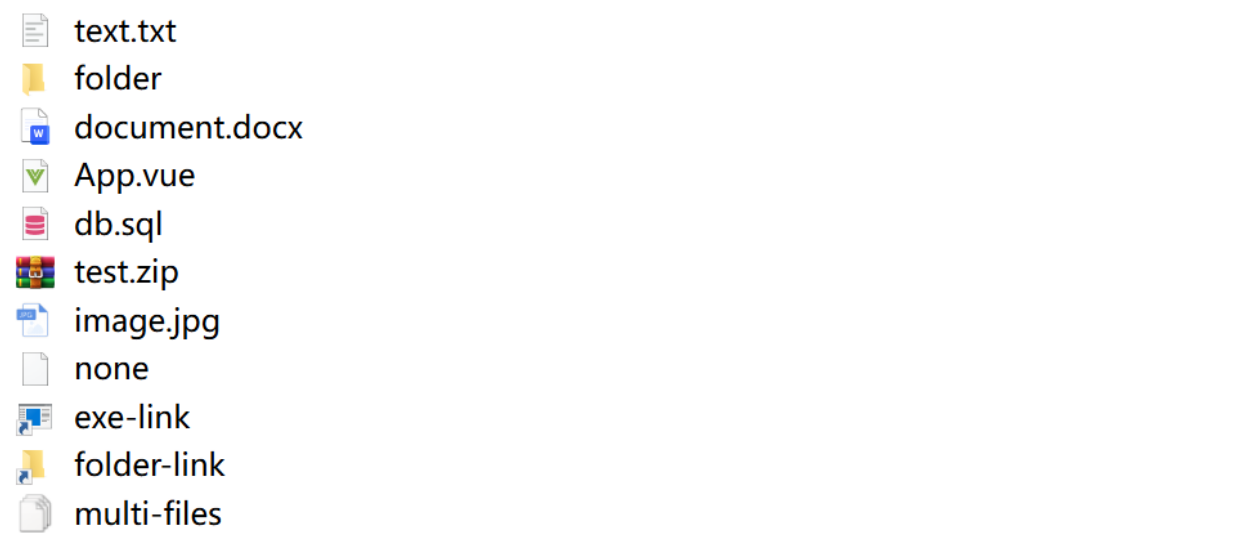
💡 Parameter Description
| Parameter | Type | Description | Remark | | --------- | ------- | -------------------------------- | ------------------------------------------------------------ | | name | String | Full file name | Must be transmitted | | width | Number | Icon width (px) | Default value is 20 (px) | | height | Number | Icon height (px) | Default value is 20 (px) | | iconStyle | Object | File Icon custom style | The width and height attributes in the object do not take effect | | linkStyle | Object | File Iink custom style | The width and height attributes in the object do not take effect | | itemStyle | Object | Icon parent element custom style | The width and height attributes in the object do not take effect | | isFolder | Boolean | Is it a folder | Default value is false | | isMulti | Boolean | Is it multiple files | Default value is false | | isLink | Boolean | Is it linked file | Default value is false |
👨💻 Update Records
[email protected]: latest
- Optimize the code logic and documentation
[email protected]:
- Add
itemStyleattribute instead ofstyleattribute - Add
.hh、.xaml、.xsd、.xslticons, Modify.xslicon
[email protected]:
- Add
iconStyle、linkStyleattribute, Modify the meaning ofstyleattribute
[email protected]:
- Add
isLinkattribute, supports displaying reference type files - Remove duplicate icons and reduce packaging volume
- Modify
.htmlicon