
filter-buddy
v1.1.4
Published
A Web Component for conveniently displaying filtering options.

Maintainers
 dulce-engineering
Readme
Filter Buddy
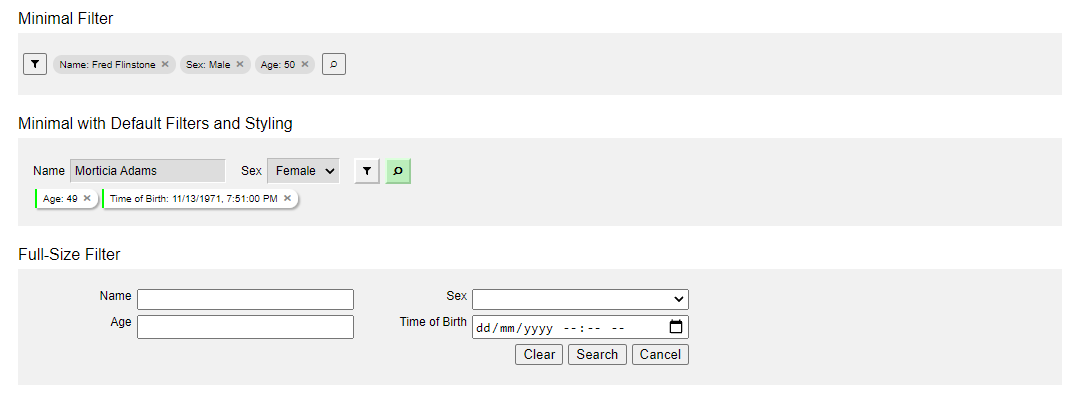
Filter Buddy allows me to easily define filter options for frontend components, like tables. Three display modes allow me to display filter options as a single filter button, a set of visible filters with additional hidden, or all filters immediately visible. When a user clicks "search", Filter Buddy returns a single object with all filter values which can be passed to a backend or client-side table component.
Minimal View
- Shows a filter button through which a user may add filters.
- Shows tags indicating which filters are currently in effect.
- Shows a search button to initiate the search process.
- When the filter button is clicked, switches to the full-size view so that users may enter filter values.
Minimal with Default Filters
- Shows all features of the minimal view.
- Some filters can be tagged for immediate display.
Full-Size View
- Shows every filter a user may set.
Sample Image
Filter Types
Filter Buddy currently supports the following filter types but custom filters are possible:
- Text
- Select: A list of mutually-exclusive options
- Number
- Date & Time
Attributes
- view
Properties
- filters
- view
- mid_filter_defs
- srch_btn_html