
firestore-schema-viewer
v0.3.1
Published
FireSchema — Interactive schema viewer for Firestore databases. Like SwaggerUI, but for NoSQL.

Maintainers
 juanisidoro
Readme
FireSchema
Interactive schema viewer for Firestore databases. Like SwaggerUI, but for NoSQL.
Document your Firestore database structure using JSON Schema — the official standard for defining object structures — and visualize it with a beautiful dark-themed UI.
Why FireSchema?
- Firestore has no built-in schema documentation. FireSchema fills that gap.
- JSON Schema is an open standard — not a proprietary format. Your schemas are portable and IDE-compatible.
- Zero backend required — it's a static SPA. Drop the files and open in a browser.
- One file per collection — folder structure mirrors your Firestore hierarchy 1:1.
Quick Start
1. Create your schema files
Create a schemas/ folder in your project. Each .schema.json file represents one Firestore collection:
schemas/
├── users.schema.json                → /users/{userId}
├── users/
│   └── orders.schema.json           → /users/{userId}/orders/{orderId}
└── products.schema.json             → /products/{productId}
The folder structure mirrors Firestore. Subcollections go inside a folder named after the parent collection. Firestore paths are inferred automatically — you never write them manually.
Example schemas/users.schema.json:
{
  "$schema": "https://raw.githubusercontent.com/juanisidoro/firestore-schema-viewer/main/schema/collection.schema.json",
  "collection": "users",
  "description": "Application users",
  "schema": {
    "$schema": "https://json-schema.org/draft/2020-12/schema",
    "type": "object",
    "properties": {
      "email": { "type": "string", "format": "email" },
      "displayName": { "type": "string" },
      "role": { "type": "string", "enum": ["admin", "editor", "viewer"] },
      "createdAt": { "type": "string", "format": "date-time" }
    },
    "required": ["email", "displayName", "role"]
  }
}
Tip: The
$schemaline at the top gives you autocomplete and validation in VS Code.
2. Create the viewer page
Create an index.html next to your schemas/ folder. Pick one of the setup options below:
Setup Options
Option A: CDN (recommended — zero install)
No dependencies, no node_modules. Just 1 HTML file + your schema files.
Step by step:
Create a folder for your docs (e.g.
docs/firestore/):your-project/ └── docs/firestore/ ├── index.html └── schemas/ ├── users.schema.json └── users/ └── orders.schema.jsonCreate
index.html:<!DOCTYPE html> <html lang="en" class="dark"> <head> <meta charset="UTF-8"> <meta name="viewport" content="width=device-width, initial-scale=1.0"> <title>My Project - Firestore Schemas</title> <link rel="preconnect" href="https://fonts.googleapis.com"> <link rel="preconnect" href="https://fonts.gstatic.com" crossorigin> <link href="https://fonts.googleapis.com/css2?family=Inter:wght@400;500;600;700&family=JetBrains+Mono:wght@400;500;600;700&display=swap" rel="stylesheet"> <link rel="stylesheet" href="https://cdn.jsdelivr.net/npm/[email protected]/style.css"> </head> <body> <div id="schema-viewer"></div> <script src="https://cdn.jsdelivr.net/npm/[email protected]/fsv.umd.js"></script> <script> FirestoreSchemaViewer.render('#schema-viewer', { title: 'My Project', schemasDir: './schemas/' }) </script> </body> </html>Add your
.schema.jsonfiles toschemas/and serve:cd docs/firestore npx serve . # Open http://localhost:3000Custom port:
npx serve . -l 8080
That's it. The viewer auto-discovers all .schema.json files in the schemas/ folder (including subdirectories). Add new schemas, refresh the browser — no need to touch index.html.
How it works: When served with
npx serve,python3 -m http.server, or any server with directory listing enabled, the viewer parses the directory listing to find all schema files automatically. If your server doesn't support directory listing (GitHub Pages, Netlify, Vercel), create aschemas/index.jsonmanifest — see Hosting without directory listing below.
Full quicksheet: QUICKSHEET-CDN.md — schema templates, field patterns, checklist.
Option B: Static files via npm (no dependency tree)
Install the dist-only package — 1 package, ~335 KB total, zero sub-dependencies:
npm install --save-dev firestore-schema-viewer-distStep by step:
Create your docs folder and install:
mkdir -p docs/database/firebase/schemas
cd docs/database/firebase
npm init -y
npm install --save-dev firestore-schema-viewer-dist
echo "node_modules/" > .gitignore
Create
index.html:<!DOCTYPE html> <html lang="en" class="dark"> <head> <meta charset="UTF-8"> <meta name="viewport" content="width=device-width, initial-scale=1.0"> <title>My Project - Firestore Schemas</title> <link rel="preconnect" href="https://fonts.googleapis.com"> <link rel="preconnect" href="https://fonts.gstatic.com" crossorigin> <link href="https://fonts.googleapis.com/css2?family=Inter:wght@400;500;600;700&family=JetBrains+Mono:wght@400;500;600;700&display=swap" rel="stylesheet"> <link rel="stylesheet" href="./node_modules/firestore-schema-viewer-dist/style.css"> </head> <body> <div id="schema-viewer"></div> <script src="./node_modules/firestore-schema-viewer-dist/fsv.umd.js"></script> <script> FirestoreSchemaViewer.render('#schema-viewer', { title: 'My Project', schemasDir: './schemas/' }) </script> </body> </html>Add your
.schema.jsonfiles toschemas/and serve:npx serve . # Open http://localhost:3000Custom port:
npx serve . -l 8080
Full quicksheet: QUICKSHEET-NPM-DIST.md — complete setup, schema templates, field patterns, checklist.
Option C: Full package (for bundler projects)
If your project uses a bundler (Vite, Webpack, etc.):
npm install firestore-schema-viewerimport { render } from 'firestore-schema-viewer'
import 'firestore-schema-viewer/dist/style.css'
render('#schema-viewer', {
title: 'My App',
schemasDir: './schemas/'
})Full quicksheet: QUICKSHEET-BUNDLER.md — complete setup for bundler projects, schema templates, field patterns.
Hosting without directory listing
If your server doesn't support directory listing (GitHub Pages, Netlify, Vercel), create a schemas/index.json file listing all your schema paths:
[
  "users.schema.json",
  "users/orders.schema.json",
  "products.schema.json"
]
Generate it automatically:
find schemas -name "*.schema.json" | sed 's|^schemas/||' | sort > schemas/index.jsonThe viewer will automatically look for this file if directory listing is not available.
Schema File Format
Each .schema.json file has this structure:
| Field | Required | Description |
|---|---|---|
| collection | Yes | Collection name (e.g. "users") |
| schema | Yes | Standard JSON Schema object |
| description | No | What this collection stores |
| documentCount | No | Approximate number of documents (hidden in UI if omitted) |
The schema field is plain JSON Schema draft 2020-12. You can use all standard features: type, properties, required, enum, format, pattern, minimum, maximum, nested object and array types, etc.
How Paths Are Inferred
You never write Firestore paths manually. They're inferred from the file location:
| File path | Inferred Firestore path |
|---|---|
| users.schema.json | /users/{userId} |
| users/orders.schema.json | /users/{userId}/orders/{orderId} |
| frontend-shops/products.schema.json | /frontend-shops/{frontend_shopId}/products/{productId} |
API
FirestoreSchemaViewer.render(selector, config)
| Parameter | Type | Description |
|---|---|---|
| selector | string | CSS selector for the container element |
| config.title | string (optional) | Title shown in the sidebar header |
| config.schemasDir | string (recommended) | Path to schemas folder — auto-discovers all .schema.json files |
| config.schemas | string[] or object[] | Explicit URLs to .schema.json files, or inline collection objects |
Use one of schemasDir or schemas:
// Option 1: Auto-discovery (recommended) — finds all .schema.json files automatically
FirestoreSchemaViewer.render('#viewer', {
  schemasDir: './schemas/'
})

// Option 2: Explicit list — useful if you need to control which schemas are loaded
FirestoreSchemaViewer.render('#viewer', {
  schemas: [
    './schemas/users.schema.json',
    './schemas/users/orders.schema.json',
    './schemas/products.schema.json'
  ]
})
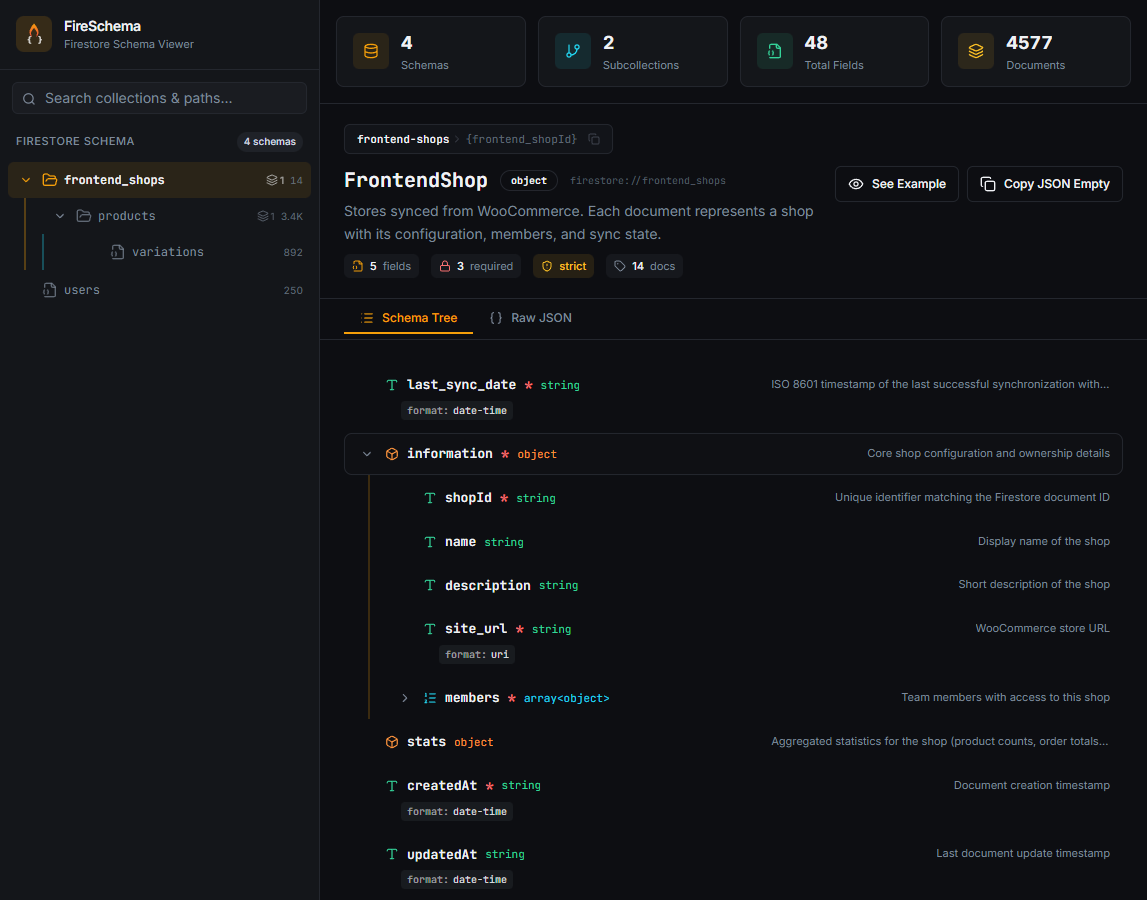
What You See
- Sidebar — navigable tree of all collections and subcollections
- Stats bar — total schemas, subcollections, fields, and documents
- Schema tree — expandable view of all fields with types, constraints, and descriptions
- Raw JSON tab — full JSON Schema source
- Example generator — auto-generated example documents from the schema
- Copy buttons — one-click copy for paths, empty objects, and examples
Packages
| Package | What it includes | Dependencies |
|---|---|---|
| firestore-schema-viewer | Full library (UMD + ES + CSS + source) | React, Radix, etc. |
| firestore-schema-viewer-dist | Static files only (UMD + CSS) | None |
Generate Schemas with AI
Use this prompt with Claude Code, ChatGPT, Copilot, or any LLM to auto-generate your schema files. Copy the prompt below and adapt the collection list to your project:
Generate Firestore schema files for the FireSchema viewer (https://github.com/juanisidoro/firestore-schema-viewer).

Rules:
- One .schema.json file per collection
- Folder structure mirrors Firestore hierarchy: subcollections go inside a folder named after the parent collection
- If a subcollection exists, the parent .schema.json MUST also exist
- Every field must have "type" and "description"
- Use standard JSON Schema features: type, enum, format, required, minimum, maximum, etc.
- Use "format": "date-time" for timestamps, "format": "email" for emails, "format": "uri" for URLs
- Do NOT include "path" or "subcollections" fields — they are inferred from folder structure

Each file must follow this format:
{
  "$schema": "https://raw.githubusercontent.com/juanisidoro/firestore-schema-viewer/main/schema/collection.schema.json",
  "collection": "<collection-name>",
  "description": "<what this collection stores>",
  "schema": {
    "type": "object",
    "required": [...],
    "properties": { ... }
  }
}

Generate the schema files for the following collections:

- users (email, displayName, role: admin/editor/viewer, createdAt)
- users/orders (total, status: pending/paid/shipped, items array, createdAt)
- products (name, price, category, inStock boolean)

Output each file with its path (e.g. schemas/users.schema.json) so I can create them directly.

After generating the files, follow the setup instructions at:
https://github.com/juanisidoro/firestore-schema-viewer#setup-options
Replace the collections list at the bottom with your own. The LLM will generate ready-to-use .schema.json files with the correct format and folder structure.
Roadmap
- v0.3 (current): Static viewer, dark theme, CDN support, auto-discovery
- Future (based on demand): CLI tool, hot reload, schema validation, light theme, CI/CD integration
Want a feature? Open an issue.
License
MIT