
first-take
v0.3.0
Published
AI-first video editor: React scenes, JSON timeline, preview studio, and CLI

Maintainers
 levi-putna
Readme
Install and quick start below. Detailed documents, the
video.jsonschema, authoring guides, and playable examples live in the GitHub repository — see.doc/andexamples/.
First Take is not an AI. It does not generate footage, write your script, or pick a model for you. It is the toolchain that makes video editable with the agents you already use: Cursor, Claude Code, Codex, Copilot, or anything else that can edit files and run a CLI.
You give a brief. Your agent writes React scenes and a JSON timeline. You review stills and the preview studio, then ask for another pass. The output is an MP4 you can actually revise, because every shot is code and every cut is data.
npx first-take --helpBring your own agents
Generative video gives you a clip. First Take gives you a project: scene components, a declarative video.json timeline, and a closed CLI loop (validate → still → preview → render). Continuity comes from shared components and props, not from hoping a model keeps the same desk in every shot. Motion is a function of the current frame, so the same files always produce the same pixels.
Point your agent at AGENT-README.md before it scaffolds a project, writes a scene, or edits video.json. That file is the contract: component rules, timeline ownership, motion APIs, and which example to copy.
| What your agent gets | Why it matters |
|----------------------|----------------|
| Declarative video.json | Order, duration, tracks, formats, and props are data. Agents edit JSON instead of a hidden edit decision list. |
| Pure React scenes | Each scene is a default-exported component with JSON-serialisable props. Motion is f(frame, props). |
| Deterministic pixels | The same files always produce the same frames, so iterate-and-diff actually works. |
| A closed CLI loop | create → write → validate → still → preview → render. Broken motion shows up in stills before you wait on an encode. |
| Copyable examples | Motion patterns, overlays, clips, audio mix, dual format, Three.js / WebGL. Start from the closest example; do not invent from scratch. |
A track holds clips. A clip is a component or a scene. A scene is a nested timeline (tracks of clips) you can step into. Double-click a scene to edit its tracks; double-click a component to isolate it.
| Layer | Owns | Lives in |
|-------|------|----------|
| Video | Order, timing, formats, tracks | video.json |
| Track | One stacked lane | tracks[] |
| Clip | Duration, gap, props; type | tracks[].clips[] |
| Component | Frame-driven pixels from props | Default-exported .tsx (type: "component") |
| Scene | Nested timeline you step into | JSON nest (type: "scene" + tracks) |
You stay the director. Revisions are code edits, not "regenerate and hope".
Produce a full explainer
For brief → script → scenes → narration sync → render → critic, use the video-generate-explainer skill with your own agent. Instructional design (what to teach, beat structure) is designing-training-videos.
Typical loop once a project exists:
npx first-take validate video.json
npx first-take still video.json --frame=0 --out=out/still.png
npx first-take preview video.json
npx first-take render video.json --format=16x9
Requirements
You need Node.js 22+. FFmpeg and ffprobe ship with the renderer. Override with --ffmpeg-path / --ffprobe-path, or STORYBOARD_FFMPEG / STORYBOARD_FFPROBE, if you want a system binary.
Install
Run the CLI with npx. No install required:
npx first-take create my-feature
npx first-take render video.json
To pin it in a project:
pnpm add -D first-take
npx first-take render video.json
Scene files import that same package: first-take (frame clock and layout), first-take/media, first-take/schema, and first-take/transitions.
Quick start
If an agent is doing this, read AGENT-README.md first, then run the loop below.
npx first-take create my-feature
cd my-feature
pnpm install

npx first-take validate video.json
npx first-take preview video.json
npx first-take render video.json
create writes video.json (schemaVersion 4, tracks[].clips), two component clips on overlapping visual tracks, package.json, and assets/audio/. Pass --with-audio for a looping bed track with in-scene <Audio>; --force overwrites a non-empty folder.
Rendered files land in out/ (for example out/my-feature-16x9.mp4). Use --format=16x9 and --out=out/hello.mp4 to pin a single format and path.
Then:
- Edit component modules under
src/scenes/. - Adjust tracks, clips, formats, and props in
video.json. Spec:.doc/06-video-json-schema.md. - Optional: drop MP3s into
assets/audio/and play them with<Audio>inside a component.
Drive all motion from useCurrentFrame(). Do not use CSS transitions or animations. Component clips are pure React modules with props; scene nests are JSON; video.json owns the timeline.
Authoring detail: .doc/07-authoring-guide.md.
Component contract: .doc/10-component-requirements.md.
Real footage (trim, PIP, overlays): .doc/09-video-clips.md.
Three.js / WebGL (frame-seeked mixer, not a wall-clock loop): examples/three-robot.
Preview
preview opens a local studio in the browser. It plays the same React scenes and video.json timeline as render, so the stage matches the MP4. Scrub, trim, and tweak props here; the files stay the source of truth for the next agent pass.
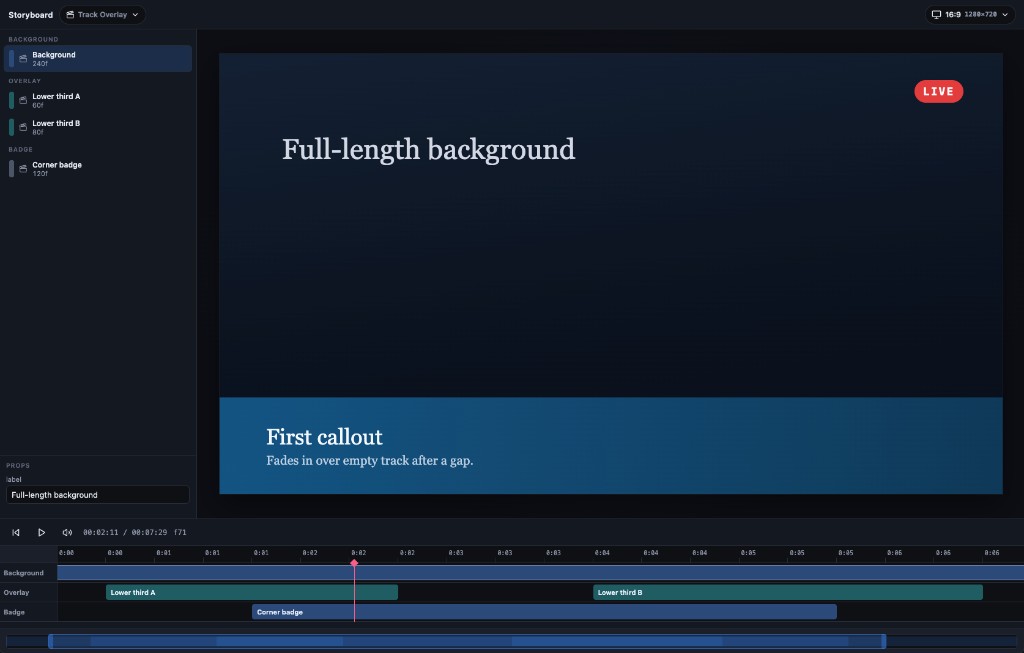
The screenshot is track-overlay: a full-length background, two lower thirds with a gap between them, and a corner badge on its own track.
The studio is split into three panes:
- Stage — the composition at the current format (switch, add, or remove a format from the toolbar; at least one format must remain)
- Details — the in-focus clip (title, duration, and props), or the video when nothing is in focus. A focused track shows that lane's title, description, and order.
- Timeline — play / pause, mute, timecode, and one lane per track
Focus a clip or track on the timeline; details follows that focus. Scene clips use a blue nest colour on the parent timeline.
While authoring:
- Play and scrub the playhead. Mute lives in the dock. Preview audio is audible but not sample-accurate.
- Double-click a scene to step into its nested tracks. Double-click a component to isolate that leaf on a local clock (other tracks unmount, including their audio). Back / Escape leave isolate, then step out of the nest.
- Drag clips to reposition or trim their end; drop onto another track. Add tracks from the timeline. Edit track title, description, and order from details when that track is in focus.
- Undo and Redo (buttons on the timeline header, or ⌘Z / ⌘⇧Z / Ctrl+Z / Ctrl+Shift+Z / Ctrl+Y) step through timeline and prop edits.
- Details prop edits are live overrides. Committed changes auto-save to
video.jsonby default (toggle Auto in the details header). ⌘S / Ctrl+S always saves immediately.
npx first-take preview video.json
npx first-take preview video.json --port=3333 --no-open
CLI
| Command | Purpose |
|---------|---------|
| create <slug> | Scaffold a project. --dir, --title, --with-audio, --force |
| validate <video.json> | Check the manifest and assets. --no-assets skips file existence |
| preview <video.json> | Studio in the browser. --port, --no-open |
| still <video.json> --frame=N | Capture one PNG. --format, --out |
| render <video.json> | Encode MP4(s). --format=16x9\|all, --out, --concurrency, --keep-frames |
--silent and --no-audio mute audio in the encode. They do not quiet logs.
Global --verbose prints FFmpeg output and phase detail. Without it, the CLI prints progress and errors only.
npx first-take render video.json --format=16x9 --out=out/hello.mp4
npx first-take still video.json --frame=0 --out=out/still.png
npx first-take render video.json --verbose
Package
One public package: first-take. The git repo still has folders under packages/ (core, media, schema, transitions, renderer, preview, cli); npm gets a single tarball.
| Import | Role |
|--------|------|
| first-take | Frame context, Sequence, interpolate, spring, composition; CLI binary first-take |
| first-take/media | Img, Audio, Video, staticFile |
| first-take/schema | video.json Zod schema and duration helpers |
| first-take/transitions | Fade TransitionSeries, CompositionFromManifest |
Renderer and preview stay inside that tarball. Scene authors do not import them. Older @levi-putna/storyboard* names on npm are deprecated.
Develop
This repository is a pnpm workspaces monorepo. Clone it when you want to change the engine, not when you only want to make a video.
git clone https://github.com/levi-putna/first-take.git
cd first-take
pnpm install
pnpm build
Examples
Compositions in examples/ are workspaces. Each example README embeds a playable preview.mp4 (16:9, plus 9:16 where the composition has both). After install and build, preview or render any of them:
npx first-take validate examples/hello-explainer/video.json
npx first-take preview examples/hello-explainer/video.json
npx first-take still examples/hello-explainer/video.json --frame=0 --out=out/still.png
npx first-take render examples/hello-explainer/video.json
npx first-take create <slug> from the repo root writes into examples/<slug>/. After scaffolding, run pnpm install so the new workspace is linked, then validate, preview, and render as above.
| Example | What it does |
|---------|----------------|
| hello-explainer | Dual-format explainer: visual track + spanning mix (jingle, bed, narration) |
| track-overlay | Long background, gapped transparent overlays, corner badge for z-order |
| many-tracks | Thirty stacked tracks for timeline scroll and multi-lane UI testing |
| first-take-kit | TitleCard scene used by the First Take macOS editor |
| motion-basics | Frame-driven interpolate and spring on a simple block |
| motion-lab | Catalogue of patterns (typewriter, float, pulse, slide, stagger, spring, progress, rotate) plus a frame timeline |
| solid-frames | Solid colour hold (deterministic paint fixture) |
| fade-overlap | Two tracks with a 10-frame in-scene crossfade (50 frames total) |
| circle-wipe | Iris wipe on a higher track between two colour holds |
| multi-format | Same composition rendered in 16:9 and 9:16 |
| audio-mix | Visual track plus in-scene jingle / looping bed / narration |
| audio-volume-fade | Looped bed with a V-shaped volume envelope (fade out, then back in) |
| clip-trim-fullscreen | Full-screen clip trimmed with startFrom / endAt |
| clip-pip-presenter | Presenter picture-in-picture in the corner over motion graphics |
| clip-overlay-shapes | Full-screen clip with animated shapes on top |
| clip-zoom-presenter | Ken Burns zoom in, hold, then zoom out on presenter footage |
| clip-hard-cut | Two clips back-to-back with no transition |
| clip-sound-move | Sound-on clip that drifts around the frame |
| timeline-alignment | 5-minute fixture: colour holds every 10s plus a per-second counter overlay |
| three-robot | Three.js / WebGL: RobotExpressive walk, seeked from useCurrentFrame(); camera pull-out in the second half |
| nested-scene | Schema v4 nest: Welcome scene (step-in) with background, logo, and timed SFX; then a Hold component |
Tests
Full strategy, fixture catalogue, and accuracy contract: .doc/08-testing-strategy.md.
| Command | What it runs |
|---------|----------------|
| pnpm test | Unit + component + golden stills |
| pnpm test:unit | Package unit and component tests |
| pnpm test:integration | Golden still pixel diffs |
| pnpm test:render | Short fixture MP4s + ffprobe |
| pnpm test:smoke | Full hello-explainer dual-format render |
| pnpm test:update-goldens | Regenerate examples/*/expected/still-frame-*.png |
| pnpm test:coverage | Unit coverage report |
After intentional visual changes, run pnpm test:update-goldens, inspect the PNGs under examples/*/expected/, and commit them with the code.
Golden stills and render fixtures live under examples/. motion-lab also re-renders sampled frames twice and pixel-compares them for determinism. Regenerate synthetic audio for audio-mix with pnpm generate:fixture-audio.
Documentation
Architecture, requirements, and the timing model live in .doc/. Playable examples: examples/README.md. Agent playbook: AGENT-README.md. Explainer production skill: .claude/skills/video-generate-explainer/SKILL.md. Changelog: CHANGELOG.md.
Issues and pull requests: github.com/levi-putna/first-take.
Licence
MIT. Independent clean-room implementation. Do not copy Remotion source into this repository.
About
First Take is an open-source, AI-first video editor: React scenes, a JSON timeline, a preview studio, and a CLI. Use it with whatever agents you already run. Install today with npx first-take.
There is also a macOS First Take editor that speaks the same scene files and video.json timeline.
Built by Levi Putna. More writing, tools, and agent skills at Twisted Brackets.