
flash-notif
v1.0.5
Published
## About @flash-notif/vue-component

Maintainers
 geekyadams
Readme
flash-notif
About @flash-notif/vue-component
flash-notif is a vue component that let's you show flash notifications (including vibration) across your entire app, depending on user processes, actions and even system processes.
You can pass neutral messages, warnings, notify of successful processes and failures .e.t.c
This version is dependent on and uses Vuex store. Hence, you need to have setup Vuex store in your Vue project (majority of people create their vue projects with vuex by default for state management).
Warning
Note: This is a Vue component plugin and should be used in Vue/Nuxt projects only. Also, make sure to have vuex enabled in your project.
Step 1: Installation
npm i flash-notifStep 2: Setup and Import in your project
Add these lines to your main.js file
import flashNotif from 'flash-notif'
import '../node_modules/flash-notif/dist/flash-notif.css'

Vue.use(flashNotif, { store })
Step 3: Usage
Add the component anywhere in your App.vue template
<flash-Notif />Step 4: How to show notification to user
Method 1:
When an event occurs and you want to show notification to the user, just use the following inside that event handler/method/fuction...
this.$store.dispatch('flashNotif', {
        message: {
        title: 'Your notification title',
        text: 'Your notification text body'
        },
        type: 'notification type e.g. warning, error, success, neutral',
        pos: 'notification position e.g. top, bottom',
        duration: 'how long you want the notification to stay on the screen in milliseconds e.g 7000 for 7 seconds',
        vibrate: true
    })
Method 2:
import Vuex mapActions into the script that of any component you want to use flash-notif in.
import { mapActions } from 'vuex'Then, add the following to your "methods" property
...mapActions(['flashNotif'])When an event occurs and you want to show notification to the user, just use the following inside that event handler/method/fuction...
flashNotif({
        message: {
        title: 'Your notification title',
        text: 'Your notification text body'
        },
        type: 'notification type e.g. warning, error, success, neutral',
        pos: 'notification position e.g. top, bottom',
        duration: 'how long you want the notification to stay on the screen in milliseconds e.g 7000 for 7 seconds',
        vibrate: true
    })
Customize configuration
type
Notification type can be warning, error, success, neutral. It is important to specify type. e.g
type: 'success'pos
pos property defines where the notification should be displayed on the screen. You can pass either 'top' or 'bottom'. If nothing is passed, the notification automatically displaced at the top right. e.g
pos: 'bottom'duration
The 'duration' property defines how long the notification stays on the screen before disappearing if the user doesnt manually close it. Its value is in millimeter e.g. to show notification for 5 seconds
duration: 5000Note: It is ok to pass the value as string or integer, anyone works.
vibrate
In other to shift user attention to notifications when they pop up, the 'vibrate' property allows vibrates user device in a flash when they are on mobile.
This property can either take true or false as value depending if you want a notification to vibrate user's device or not. Notifications vibrate by default or when vibrate property is not defined.
vibrate: trueNote: It is ok to pass the value as string or integer, anyone works.
Examples
Success Notification:

if (appSuccess) {

    flashNotif({
            message: {
            title: 'Application Successful',
            text: 'Your application details has been sent to your mail. Please proceed from there.'
            },
            type: 'success',
            pos: 'top',
            duration: 7000,
            vibrate: false
        })

}
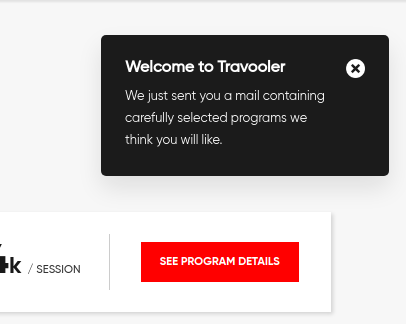
other example
Source Code
Visit Github Repo.
Feel free to star and follow.
Donate
Donate, become my patreon. Donate now.
Hire me
Crrenty available for Frontend roles. Hire Now.