
fleetlens
v1.0.22
Published
fleetlens — local-only dashboard and usage tracker for Claude Code sessions and agent fleets

Maintainers
 cowcow02
Readme
Fleetlens
Fleetlens is a local-first observability dashboard for coding-agent fleets. It reads the session history already written by your agents, normalizes it into a common model, and shows where agent time, tools, projects, concurrency, usage, and shipped work are accumulating.
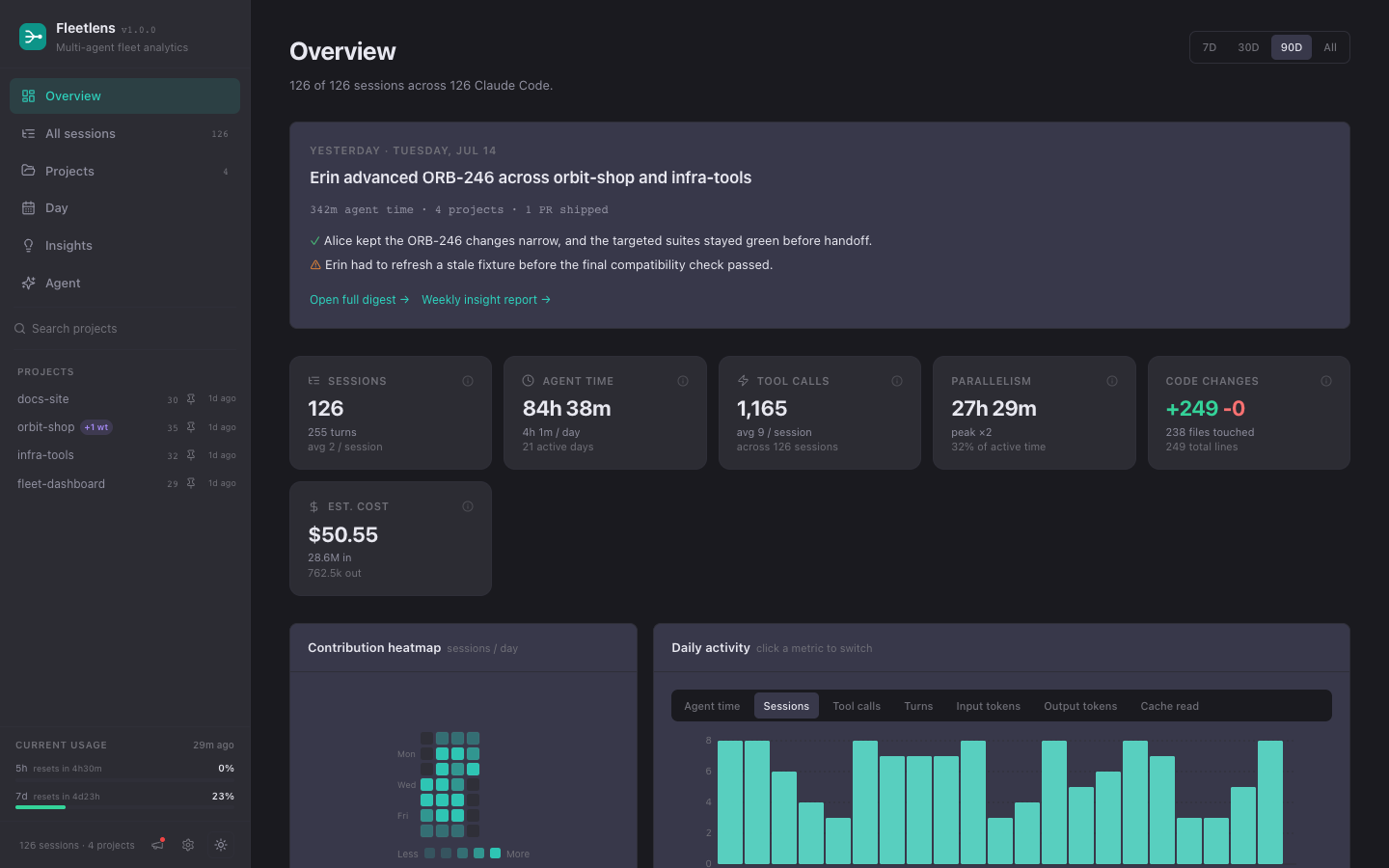
The published CLI and npm package are lowercase: fleetlens. The product name in the UI is Fleetlens.
Start locally
Requirements: Node.js 20 or newer.
npm install -g fleetlens
fleetlens start --open
Open http://localhost:3321 if the browser does not open automatically. fleetlens start launches the local dashboard and usage daemon together. While the dashboard is open, its live connection also revives a stopped daemon. Use fleetlens start --no-daemon when you only want the web server.
For product documentation, see the public Fleetlens documentation. The customer setup guide is distributed separately.
What the local edition does
- Reads local session history from Claude Code, Codex, GitHub Copilot CLI, Gemini CLI, Antigravity, Cowork, and Grok Build adapters.
- Presents a common session model across agent sources: sessions, transcript detail, turns, tool calls, tokens, models, and projects.
- Computes agent time from active event segments rather than treating every wall-clock gap as work.
- Rolls worktrees into canonical projects while retaining worktree context.
- Shows daily activity, project rollups, estimated cost, PR signals, code changes, and concurrency bursts.
- Stores usage snapshots, entries, digests, and daemon state under
~/.cclens. - Tracks provider-native quota windows, including GitHub Copilot's monthly AI-credit allowance, in the dashboard and optional macOS menu-bar widget.
- Provides local Insights and Agent surfaces when optional AI features are enabled.
Raw transcripts stay on the machine in the local edition. No Fleetlens account or database is required.
Dashboard map
| Surface | Route | Answers |
|---|---|---|
| Overview | / | How much happened, and where? |
| All sessions | /sessions | What did a particular run do? |
| Projects | /projects | Which repositories are consuming attention? |
| Day | /day | When did work overlap or go idle? |
| Insights | /insights | What patterns are emerging over a closed period? |
| Agent | /agent | What does my local session history say? |
| Usage | /usage | How is provider capacity changing over time? |
| Settings | /settings | How should local services and AI features behave? |
| Team | /team | What is this machine sharing? |
Team Edition
Team Edition is a self-hosted shared server with Postgres. An admin deploys it, creates a team and invite token, and each member pairs a local CLI:
fleetlens team join https://your-fleetlens.example <invite-token>
fleetlens team status
fleetlens team sync
Members select which projects sync. Team ingest receives derived rollups, usage snapshots, and optional enriched extras. Raw prompts, assistant responses, absolute paths, file contents, and excluded projects are not part of the sync contract.
Deployment paths:
For production image deploys, pin a released GHCR tag (ghcr.io/cowcow02/fleetlens-team-server:X.Y.Z from a server-vX.Y.Z release); :latest tracks master HEAD.
Architecture
This is a pnpm + Turborepo monorepo:
fleetlens/
├── packages/
│   ├── parser/        # agent adapters, types, analytics, filesystem readers
│   ├── entries/       # day-scoped work units and digest pipelines
│   ├── cli/           # published fleetlens binary and detached daemon
│   └── team-server/   # self-hosted Team Edition server + Postgres model
├── apps/
│   ├── web/           # local Next.js dashboard
│   └── menubar/       # native macOS usage widget
├── deploy/            # Railway, GCP, Compose, and AWS paths
├── site/              # static GitHub Pages documentation site
└── scripts/           # build, smoke, fixture, and release helpers
The local data path is:
agent transcript roots
        |
        v
parser adapters -> common session model -> analytics / entries
        |                                  |
        v                                  v
local dashboard                    local digests and Agent
        |
        +--> optional Team Edition sync (derived rollups only)
Local state and configuration
| Setting | Default | Purpose |
|---|---|---|
| CCLENS_PORT | 3321 | Default dashboard port |
| CCLENS_HOME | ~/.cclens | Local state directory |
| GROK_HOME | ~/.grok | Alternate Grok Build home |
| NEXT_OUTPUT | unset | standalone when building the bundled web app |
Important local state files include:
~/.cclens/pid          web PID, port, and version
~/.cclens/daemon.pid   usage daemon PID
~/.cclens/usage.jsonl  provider usage snapshots
~/.cclens/daemon.log   daemon, perception, update, and sync logs
~/.cclens/entries/     day-scoped entry artifacts
~/.cclens/digests/     saved day, week, and month digests
CLI reference
fleetlens start [--port N] [--open] [--no-daemon]
fleetlens stop
fleetlens status
fleetlens update
fleetlens web [page] [--open]
fleetlens usage [--save]
fleetlens usage --history [-s D] [--days N]
fleetlens entries [--day D|--session ID|--all] [--json]
fleetlens digest day|week|month ...
fleetlens daemon start|stop|status|logs
fleetlens team join|status|sync|backfill|logs|leave
fleetlens autostart install|uninstall|status
fleetlens menubar install|uninstall|open|status
Run fleetlens help for the installed build's exact flags.
Build and verify from source
pnpm install
pnpm typecheck
pnpm test
pnpm build
The normal verification flow uses an already-running local web server:
pnpm verifyFor a fresh bundled CLI build:
NEXT_OUTPUT=standalone pnpm build
node scripts/prepare-cli.mjs
node packages/cli/dist/index.js start
The root package.json is the version source of truth. Use npm version at the repository root when releasing; do not edit sub-package versions manually.
Public documentation site
The site/ directory is a static GitHub Pages site covering the platform, local setup, Team Edition, privacy boundary, and operations. .github/workflows/pages.yml deploys it on pushes to master once the repository's Pages source is set to GitHub Actions.
Local preview:
python3 -m http.server 4173 --directory siteContributing
See CONTRIBUTING.md. The repo is agent-ready: CLAUDE.md
(Claude Code) and AGENTS.md (Codex and others) carry the project context,
and committed skills in .claude/skills/ encode the dev
loop, the add-an-agent-source extension path, Team Edition workflows, and the
release runbook — so a coding agent can contribute productively from its
first session.
License
MIT. See LICENSE.