
flow-topology-vue3
v1.0.0
Published
flow-topology-vue3是一个用于创建流拓扑图的Vue 3组件库。它提供了一组可重用的组件和实用程序,以帮助您构建交互式的、具有视觉吸引力的流程图、流程图或表示数据流的任何其他类型的图

Maintainers
 jerry-mm
Readme
flow-topology-vue3 是一个用于创建流拓扑图的 Vue 3 组件库, 导出 Topology、TemplateWrapper、AnchorWrapper 组件。
示例图:
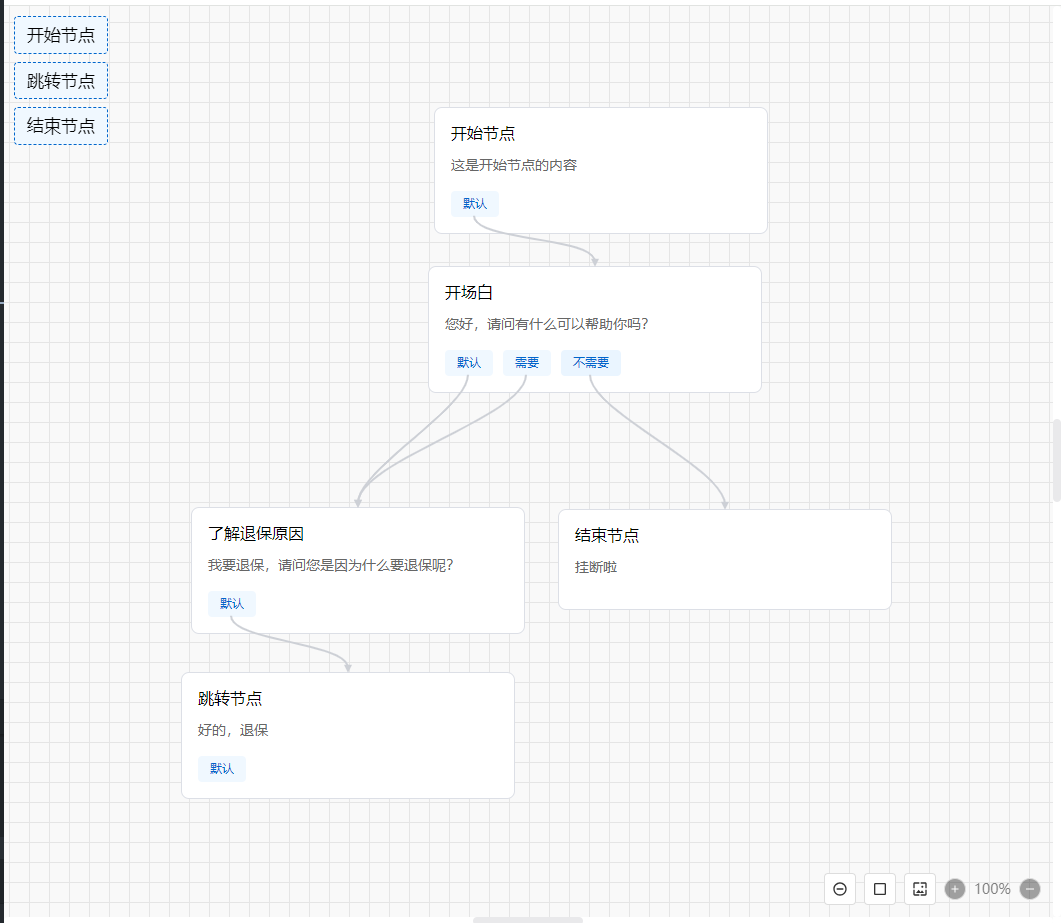
留言板:
特性
- 纯 div + svg 实现,无依赖。
- 支持拖拽节点、连线。
- 支持自定义节点样式和锚点(分支)样式。
- 模板化节点开发(通过 TemplateWrapper)。
- 支持全选、放大、缩小、截图。
- 支持锚点(分支)连接多个节点。
环境
- Vue3
- Node.js 18.x+(兼容更高版本)
安装
npm install flow-topology-vue3使用
- 全局引入
<!-- main.ts -->
import { createApp } from 'vue'
import App from './App.vue'
import FlowTopologyVue3 from 'flow-topology-vue3'
import 'flow-topology-vue3/dist/flow-topology-vue3.css'
const app = createApp(App)
app.use(FlowTopologyVue3)
app.mount('#app')- 按需引入
<!-- page.vue -->
<template>
  <div class="contianer">
    <Topology v-model="nodes"></Topology>
    <div class="quick-elements">
      <TemplateWrapper v-for="item in templateNode" :key="item.id" :generator="item">
        <div class="quick-element">{{ item.title }}</div>
      </TemplateWrapper>
    </div>
  </div>
</template>
<script setup>
import { Topology, TemplateWrapper, AnchorWrapper } from 'flow-topology-vue3'
import 'flow-topology-vue3/dist/flow-topology-vue3.css'
const nodes = ref([])
</script>- 自动引入
npm install unplugin-vue-components -D// vite.config.js
import { defineConfig } from 'vite'
import Components from 'unplugin-vue-components/vite'
import { FlowTopologyVue3Resolver } from 'flow-topology-vue3/dist/flow-topology-vue3.es.js'
export default defineConfig({
plugins: [
Components({
resolvers: [FlowTopologyVue3Resolver()]
})
]
})
<!-- page.vue -->
<template>
<div class="contianer">
<Topology v-model="nodes"></Topology>
<div class="quick-elements">
<TemplateWrapper v-for="item in templateNode" :key="item.id" :generator="item">
<div class="quick-element">{{ item.title }}</div>
</TemplateWrapper>
</div>
</div>
</template>
<script setup>
import 'flow-topology-vue3/dist/flow-topology-vue3.css'
const nodes = ref([])
</script>数据据类型
import { Ftv3NodeVO, Ftv3BranchVO, Ftv3LineVO } from 'flow-topology-vue3'
组件
Topology
主流程图组件
- 属性
- 事件
插槽 默认插槽用于自定义渲染节点内容,可通过插槽参数获取到当前节点的数据;
使用方法
<Topology
  v-model="nodes"
>
  <!--
   1、 插槽用于自定义渲染节点内容,可通过插槽参数获取到当前节点的数据;
   2、 可通过renderItem渲染;
   3、 插槽优先级高于renderItem;
   4、 不使用插槽或者renderItem有节点内容渲染;
   <template #default="{ node }">
    <template v-if="node.branches && node.branches.length">
      <AnchorWrapper v-for="branch in node.branches" :key="branch.id" :node="node" :branch="branch">
        <span>{{ branch.label }}</span>
      </AnchorWrapper>
    </template>
  </template> -->
</Topology>

</>
TemplateWrapper
TemplateWrapper 组件用于包裹模板内容,并提供插槽供自定义渲染。
属性
插槽 默认插槽用于自定义渲染模板内容。
- 使用方法
- 模版中使用
<div class="quick-elements"> <TemplateWrapper v-for="item in templateNode" :key="item.id" :generator="item"> <div class="quick-element">{{ item.title }}</div> </TemplateWrapper> </div>- h 函数渲染
h(
  'div',
  {...你的属性...},
  templateNode.branches.map(t => {
    return h(
      TemplateWrapper,
      {
        generator: t,
        disabled: t.disabled,
      },
      [
        h('div', { class: 'quick-element' }, t.title)
      ]
    )
  })
)
AnchorWrapper
AnchorWrapper 组件用于包裹锚点内容,并提供插槽供自定义渲染。
- 属性
插槽 默认插槽用于自定义渲染锚点内容。
使用方法
- 模版中使用
<AnchorWrapper v-for="branch in node.branches" :key="branch.id" :node="node" :branch="branch"> <span>{{ branch.label }}</span> </AnchorWrapper>- h 函数渲染
h(
  'div',
  {...你的属性...},
  node.branches.map(branch => {
    return h(
      AnchorWrapper,
      {
        class: `topo-branch ${!branch.to ? 'free' : ''}`,
        node: toRaw(node),
        branch: toRaw(branch)
      },
      () => branch.label
    )
  })
)
组件实例的方法
使用示例
const handleDel = () => {
  topologyRef.value.deleteNode('48da386a-016a-4e49-a26f-f0dfec0d3880')
}

const handleDelAll = () => {
  topologyRef.value.deleteAllNode()
}

const handleSelect = () => {
  topologyRef.value.selectNode('500e4096-78a8-465b-b0f3-e748cf5716b3')
}
DEMO
<template>
  <div class="contianer">
    <Topology
      v-model="nodes"
      :beforeDeleteLine="beforeDeleteLine"
      :beforeDeleteAllNode="onBeforeDeleteAllNode"
      @capture="onCapture"
      ref="topologyRef"
    >
      <!-- <template #default="{ node }">
        {{ node }}
        <template v-if="node.branches && node.branches.length">
          <AnchorWrapper v-for="branch in node.branches" :node="node" :branch="branch">
            <span>{{ branch.label }}</span>
          </AnchorWrapper>
        </template>
      </template> -->
    </Topology>
    <div class="quick-elements">
      <TemplateWrapper v-for="item in templateNode" :key="item.id" :generator="item">
        <div class="quick-element">{{ item.title }}</div>
      </TemplateWrapper>
    </div>
    <div style="position: fixed; top: 0; left: 50%; transform: translateX(-50%); z-index: 1000">
      <button @click="handleDel">删除节点</button>

      <button @click="handleDelAll">删除全部节点</button>

      <button @click="handleSelect">选中节点</button>
    </div>
  </div>
</template>
<script setup lang="ts">
import { ref, h, toRaw } from 'vue'
import { Topology, TemplateWrapper, AnchorWrapper } from 'flow-topology-vue3'
import 'flow-topology-vue3/dist/flow-topology-vue3.css'
import { Ftv3NodeVO, Ftv3BranchVO, Ftv3LineVO } from 'flow-topology-vue3'
const topologyRef = ref(null)
const nodes = ref<Ftv3NodeVO[]>([
  {
    id: 'bb80fa18-6a4a-49fd-9d33-a7f414a58b6a',
    title: '开始节点',
    score: 0,
    status: '待录音',
    content: '这是开始节点的内容',
    type: 1,
    position: { x: 4905, y: 4645 },
    canDrag: false,
    branches: [
      { id: '2c3602cc-609b-4246-a2c6-d7f19a418368', label: '默认', to: ['46ca30d5-b9cd-48e3-9814-497aab383e0d'] }
    ]
  },
  {
    id: '46ca30d5-b9cd-48e3-9814-497aab383e0d',
    title: '开场白',
    score: 0,
    status: '待录音',
    content: '您好,请问有什么可以帮助你吗?',
    type: 1,
    position: { x: 4899, y: 4804 },
    canDrag: true,
    branches: [
      { id: '53419a2f-5141-4fb2-9134-0a0986e88268', label: '默认', to: ['500e4096-78a8-465b-b0f3-e748cf5716b3'] },
      { id: 'cc9bd42c-11b0-46be-9910-5e121c6bf18c', label: '需要', to: ['500e4096-78a8-465b-b0f3-e748cf5716b3'] },
      { id: '07aead90-fd4f-4a4b-a889-d191819aef9b', label: '不需要', to: ['82009f5b-28fd-4514-a52e-41293823ca0d'] }
    ]
  },
  {
    id: '500e4096-78a8-465b-b0f3-e748cf5716b3',
    title: '了解退保原因',
    score: 0,
    status: '待录音',
    content: '我要退保,请问您是因为什么要退保呢?',
    type: 1,
    position: { x: 4662, y: 5045 },
    canDrag: true,
    branches: [
      { id: 'e1b45c8c-6d7c-4b2c-b90c-3a1e155b4b82', label: '默认', to: ['48da386a-016a-4e49-a26f-f0dfec0d3880'] }
    ]
  },
  {
    id: '48da386a-016a-4e49-a26f-f0dfec0d3880',
    title: '跳转节点',
    score: 0,
    status: '待录音',
    content: '好的,退保',
    type: 1,
    position: { x: 4652, y: 5210 },
    canDrag: true,
    branches: [{ id: '82009f5b-28fd-4514-a52e-41293823ca0d', label: '默认' }]
  },
  {
    id: '82009f5b-28fd-4514-a52e-41293823ca0d',
    title: '结束节点',
    score: 0,
    status: '待录音',
    content: '挂断啦',
    type: 1,
    position: { x: 5029, y: 5047 },
    canDrag: true,
    branches: null
  }
])

const templateNode: Array<Ftv3NodeVO> = [
  {
    id: '',
    title: '开始节点',
    score: 0,
    status: '待录音',
    content: 'sdfasfasfasdfasdfasdfasdfasdfsadf',
    type: 1,
    position: {
      x: 0,
      y: 0
    },
    canDrag: true,
    branches: [{ id: '', label: '默认' }]
  },
  {
    id: '',
    title: '跳转节点',
    score: 0,
    status: '待录音',
    content: '',
    type: 1,
    position: {
      x: 0,
      y: 0
    },
    canDrag: true,
    branches: [
      { id: '', label: '默认' },
      { id: '', label: '分支1' },
      { id: '', label: '分支2' }
    ]
  },
  {
    id: '',
    title: '结束节点',
    score: 0,
    status: '待录音',
    content: 'sdfasfasfasdfasdfasdfasdfasdfsadf',
    type: 1,
    position: {
      x: 0,
      y: 0
    },
    canDrag: true,
    branches: null
  }
]

const beforeDeleteLine = (line: Ftv3LineVO) => {
  return new Promise((resolve, reject) => {
    resolve(confirm('你确定要删除这条线吗?'))
  })
}

const beforeDeleteNode = (node: Ftv3NodeVO) => {
  return Promise.resolve(confirm('你确定要删除这个节点吗?'))
}

const onBeforeDeleteAllNode = () => {
  return Promise.resolve(confirm('你确定要删除所有节点吗?'))
}

const renderItem = (node: Ftv3NodeVO) => {
  return h('div', { style: 'color: red;' }, [
    h('div', {}, node.title),
    h('div', {}, node.content),
    h(
      'div',
      {},
      node.branches.map(branch => {
        return h(
          AnchorWrapper,
          {
            class: `topo-branch ${!branch.to ? 'free' : ''}`,
            node: toRaw(node),
            branch: toRaw(branch)
          },
          () => branch.label
        )
      })
    )
  ])
}

const handleDel = () => {
  topologyRef.value.deleteNode('48da386a-016a-4e49-a26f-f0dfec0d3880')
}

const handleDelAll = () => {
  topologyRef.value.deleteAllNode()
}

const handleSelect = () => {
  topologyRef.value.selectNode('500e4096-78a8-465b-b0f3-e748cf5716b3')
}

const onCapture = img => {}
</script>
<style>
body {
  overflow: hidden;
}
</style>
<style scoped>
.contianer {
  overflow: hidden;
}

.quick-elements {
  position: fixed;
  top: 10px;
  left: 10px;
  z-index: 10;
  display: flex;
  flex-direction: column;
  gap: 8px;
  font-size: 17px;
}

.quick-element {
  padding: 8px 12px;
  background-color: #f0f8ff;
  border: 1px dashed #0066cc;
  border-radius: 4px;
  cursor: grab;
  user-select: none;
}

.quick-element:active {
  cursor: grabbing;
}
</style>