
flowengine-n8n-workflow-builder
v4.4.4
Published
Build n8n workflows from text using AI. Connect to Claude, Cursor, or any LLM to generate and validate n8n workflows with expert knowledge and intelligent auto-fixing. Built by FlowEngine. Now with real node parameter schemas from n8n packages!

Maintainers
 flowengine.cloud
Readme


n8n Workflow Builder MCP Server
Build n8n workflows from text using AI - Built by FlowEngine
Turn natural language into production-ready, validated n8n workflows. This isn't just another n8n context provider, it's a complete workflow generation engine with built-in validation, auto-fixing, and architectural intelligence.
this MCP is built to provide validated n8n workflows — not just context.
- 13-Point Validation Engine - Catches errors before you import
- Auto-Fix Malformed Workflows — Automatically repairs common issues
- Architecture Recommendations — Suggests optimal workflow patterns
- Security Scanning — Detects credential leaks and vulnerabilities
- Performance Analysis — Identifies bottlenecks and optimization opportunities
- Real Parameter Schemas — Loaded directly from n8n packages for accuracy
- 600+ Registered Node Types — Only real nodes, no hallucinations
Result: Workflows that actually import and run on first try.
Quick Start
Local Install | Remote Server (no install)
Video Demo
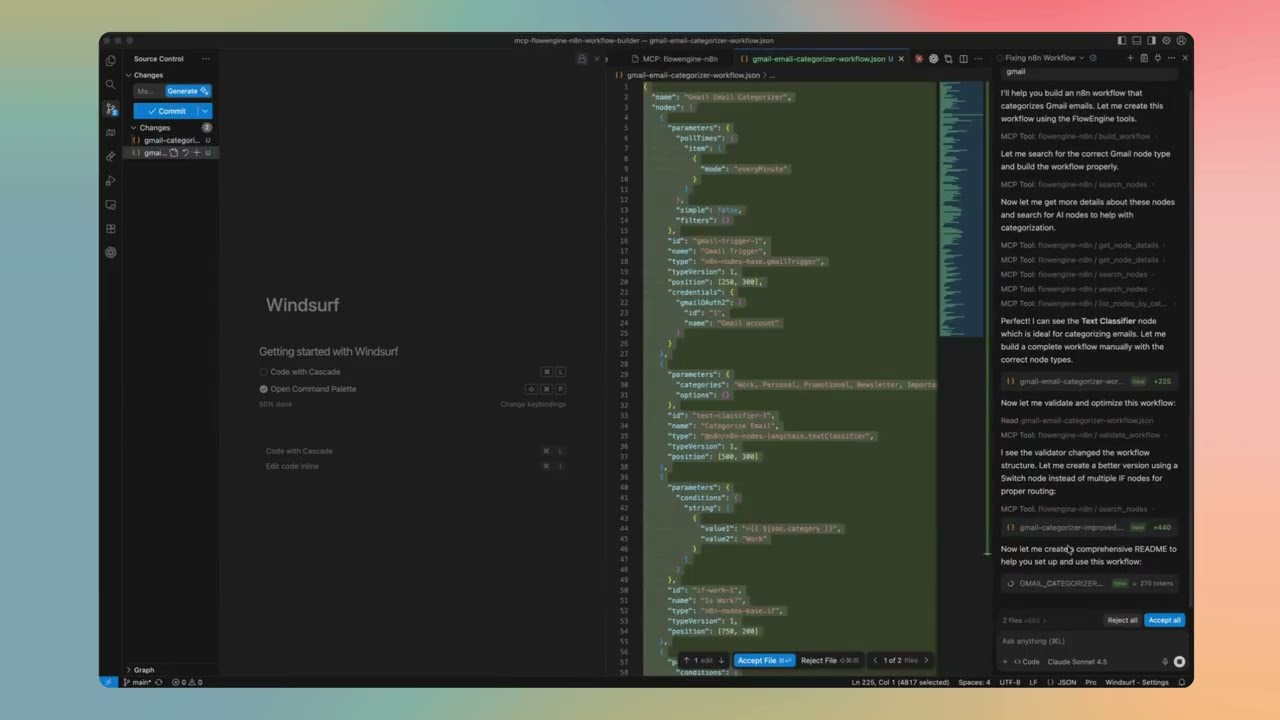
Feature Details
13-Point Validation Engine
Every workflow passes through 13 validation checks before output:
- Node Type Validation — Verifies every node type exists in n8n
- Connection Integrity — Ensures all connections reference existing nodes
- Parameter Type Checking — Validates parameter types match node schemas
- Required Fields — Checks all required parameters are present
- Credential References — Validates credential configurations
- Expression Syntax — Checks n8n expression syntax (
={{ }}) - Position Validation — Ensures nodes have valid canvas positions
- Duplicate Detection — Catches duplicate node names
- Orphan Node Detection — Finds disconnected nodes
- Trigger Validation — Ensures workflows have proper entry points
- Loop Detection — Identifies potential infinite loops
- Output Mapping — Validates data flow between nodes
- Version Compatibility — Checks node version compatibility
Auto-Fix Malformed Workflows
When validation finds issues, the engine automatically repairs them:
- Missing positions → Auto-calculates layout on canvas
- Invalid node names → Generates unique, valid names
- Missing connections array → Initializes proper structure
- Incorrect typeVersion → Updates to current supported version
- Malformed parameters → Applies sensible defaults
- Broken JSON structure → Attempts recovery and repair
Architecture Recommendations
Based on your task description, the engine analyzes keywords and intent to suggest the optimal pattern. Here's when each is recommended:
Regular Workflows (Deterministic)
Linear Pipeline
- When: Simple, predictable data transformations
- Example: "Get data from API → Transform → Save to database"
- Best for: ETL, data sync, scheduled reports
- Why not AI: No decision-making needed, faster execution, lower cost
Conditional Branching
- When: Known decision points with clear rules
- Example: "If order > $100, send to manager; else auto-approve"
- Best for: Approval flows, routing, rule-based automation
- Why not AI: Rules are explicit, no reasoning required
Parallel Processing
- When: Independent operations that can run simultaneously
- Example: "Send email AND update CRM AND log to Slack"
- Best for: Notifications, multi-system updates, batch processing
- Why not AI: No dependencies between branches
Event-Driven
- When: Reacting to external triggers
- Example: "When webhook received → process → respond"
- Best for: API endpoints, real-time integrations, chatbots
- Why not AI: Response is formulaic, not conversational
AI Agent Workflows (Autonomous)
When to use AI Agents instead of regular workflows:
| Use AI Agent When... | Use Regular Workflow When... | |---------------------|------------------------------| | Task requires reasoning | Steps are predictable | | Input is unstructured (natural language) | Input is structured (JSON, forms) | | Multiple tools might be needed dynamically | Tool sequence is known | | Conversation/context matters | Stateless processing | | Decision logic is complex or fuzzy | Rules are explicit |
Single AI Agent
- When: One autonomous entity with access to tools
- Example: "Customer support bot that can search docs, create tickets, and escalate"
- Architecture: Chat Trigger → AI Agent (with tools) → Response
- Tools: Calculator, Code, HTTP Request, custom tools
- Memory: Optional conversation memory for context
AI Agent with Memory
- When: Conversation context matters across messages
- Example: "Personal assistant that remembers user preferences"
- Architecture: Chat Trigger → Memory Load → AI Agent → Memory Save → Response
- Memory types: Buffer (recent), Window (last N), Summary (compressed)
Multi-Agent Workflows
For complex tasks, multiple specialized agents can collaborate:
Sequential Multi-Agent
- When: Task has distinct phases requiring different expertise
- Example: "Research Agent → Analysis Agent → Writing Agent"
- Flow: Agent 1 output becomes Agent 2 input
- Best for: Content pipelines, multi-step reasoning
Supervisor Pattern
- When: Need coordination between specialist agents
- Example: "Supervisor routes to: Sales Agent, Support Agent, or Technical Agent"
- Flow: Supervisor Agent decides which specialist handles the task
- Best for: Customer service, complex routing
Parallel Agents
- When: Multiple perspectives needed simultaneously
- Example: "Analyst Agent AND Risk Agent AND Compliance Agent all review"
- Flow: Split → Multiple Agents → Merge results
- Best for: Review processes, multi-criteria evaluation
Hierarchical Agents
- When: Complex orchestration with sub-tasks
- Example: "Manager Agent delegates to Team Agents who use Tool Agents"
- Flow: Top-level agent breaks down task, delegates, aggregates
- Best for: Large-scale automation, enterprise workflows
How the Engine Decides
The recommendation engine analyzes your description for:
- AI keywords: "chat", "conversation", "understand", "decide", "reason" → suggests AI Agent
- Automation keywords: "sync", "transform", "schedule", "trigger" → suggests Regular Workflow
- Complexity signals: Multiple conditions, dynamic routing → suggests Conditional or Agent
- Tool mentions: "search", "calculate", "call API" → adds appropriate tools to Agent
- Memory signals: "remember", "context", "history" → adds memory to Agent
Security Scanning
Detects vulnerabilities before deployment:
- Hardcoded credentials — API keys, passwords, tokens in plain text
- Insecure protocols — HTTP instead of HTTPS
- Missing authentication — API calls without auth headers
- Sensitive data exposure — PII in logs or outputs
- Code injection risks — Unsafe code node patterns
Performance Analysis
Identifies bottlenecks and optimization opportunities:
- Execution time estimates — Per-node and total workflow
- Parallel path detection — Opportunities for concurrent execution
- API call optimization — Batch vs. individual requests
- Memory usage patterns — Large data handling concerns
- Rate limiting risks — High-frequency API calls
Real Parameter Schemas
Parameters are loaded directly from n8n packages, not guessed:
- Accurate defaults — Real default values from node definitions
- Correct types — String, number, boolean, options validated
- Required vs optional — Knows which fields are mandatory
- Nested structures — Complex parameter objects handled correctly
600+ Registered Node Types
No hallucinations. The AI can only use nodes that actually exist:
- Every node type is loaded from the official
n8n-nodes-basepackage - LangChain nodes from
@n8n/n8n-nodes-langchainincluded - Node registry is generated directly from n8n source code
- If a node doesn't exist in the registry, it won't be used
- Prevents the common AI problem of inventing fake node types
Quick Start
Installation Methods
Choose the method that works best for you:
1. Smithery (One-Click Install)
Easy local installation for Claude Desktop. View on Smithery
npx @smithery/cli install @Ami3466/mcp-flowengine-n8n-workflow-builder --client claudeNote: Smithery has a 50 uses/day limit. For unlimited access, use the remote server below.
2. Remote Server (More Stable - Unlimited) ⭐
Connect to our hosted server - no installation required!
Add this to your Claude Desktop config:
Mac: ~/Library/Application Support/Claude/claude_desktop_config.json
Windows: %APPDATA%/Claude/claude_desktop_config.json
{
  "mcpServers": {
    "flowengine-n8n": {
      "url": "https://mcp-flowengine-n8n-workflow-builder.onrender.com/mcp",
      "transport": "http"
    }
  }
}
Benefits:
- ✅ More stable - Dedicated hosting infrastructure
- ✅ Unlimited usage - No daily limits
- ✅ Always up-to-date - Automatically updated
- ✅ Zero installation - Just add config and restart Claude
- ✅ Free - Community hosted
3. npm (Manual Install)
For all other MCP clients:
npm install -g flowengine-n8n-workflow-builderSetup by Platform
Claude Desktop
Option A: Smithery (Local Install)
npx @smithery/cli install @Ami3466/mcp-flowengine-n8n-workflow-builder --client claudeRestart Claude Desktop after installation.
Note: Limited to 50 uses/day. For unlimited access, use the remote server below.
Option B: Remote Server (More Stable - Unlimited) ⭐
No installation required! Just add config and restart.
Edit Claude Desktop config:
- Mac:
~/Library/Application Support/Claude/claude_desktop_config.json - Windows:
%APPDATA%/Claude/claude_desktop_config.json
- Mac:
Add this configuration:
{
  "mcpServers": {
    "flowengine-n8n": {
      "url": "https://mcp-flowengine-n8n-workflow-builder.onrender.com/mcp",
      "transport": "http"
    }
  }
}
Restart Claude Desktop (fully quit and reopen)
Verify connection:
- Look for the 🔌 MCP icon in Claude Desktop
- You should see "flowengine-n8n" listed with green status
Benefits: More stable, unlimited usage, no local installation, always updated.
Option C: Manual Local Install
Install the package:
npm install -g flowengine-n8n-workflow-builderEdit Claude Desktop config:
- Mac:
~/Library/Application Support/Claude/claude_desktop_config.json - Windows:
%APPDATA%/Claude/claude_desktop_config.json
- Mac:
Add this configuration:
{
  "mcpServers": {
    "flowengine-n8n": {
      "command": "flowengine-n8n"
    }
  }
}
Restart Claude Desktop (fully quit and reopen)
Claude Code (VS Code Extension)
Install the package globally:
npm install -g flowengine-n8n-workflow-builderOpen VS Code Settings (Cmd/Ctrl + ,)
Search for "MCP"
Add MCP Server:
- Click "Edit in settings.json"
- Add to
claude.mcpServers:
{
  "claude.mcpServers": {
    "flowengine-n8n": {
      "command": "flowengine-n8n"
    }
  }
}
Reload VS Code (Cmd/Ctrl + Shift + P → "Developer: Reload Window")
Start using:
- Open Claude Code panel
- Ask Claude to build n8n workflows
- The MCP server will be automatically available
Cursor
Install the package:
npm install -g flowengine-n8n-workflow-builderOpen Cursor Settings:
- Mac: Cursor → Settings → Features
- Windows/Linux: File → Preferences → Features
Navigate to MCP Settings:
- Scroll to "Model Context Protocol"
- Click "Edit Config"
Add configuration:
{
  "mcpServers": {
    "flowengine-n8n": {
      "command": "flowengine-n8n"
    }
  }
}
Restart Cursor
Verify:
- Open Cursor's AI chat
- The MCP server should be available
- Try: "Create an n8n workflow for me"
Cline (VS Code)
Install the package:
npm install -g flowengine-n8n-workflow-builderOpen Cline Settings in VS Code:
- Open Command Palette (Cmd/Ctrl + Shift + P)
- Type "Cline: Open Settings"
Add MCP Server:
- In Cline settings, find "MCP Servers"
- Add new server:
{
  "flowengine-n8n": {
    "command": "flowengine-n8n"
  }
}
Reload VS Code
Continue.dev
Install the package:
npm install -g flowengine-n8n-workflow-builderOpen Continue config:
- Open Command Palette (Cmd/Ctrl + Shift + P)
- Type "Continue: Open config.json"
Add MCP server to config:
{
  "mcpServers": {
    "flowengine-n8n": {
      "command": "flowengine-n8n"
    }
  }
}
Reload Continue extension
What This Does
🤖 Turns Text into Workflows
Describe what you want in plain language:
- "Monitor my email and notify me on Slack"
- "Build an AI chatbot with memory and tools"
- "Sync data between Google Sheets and my database"
- "Create a customer support automation workflow"
Your AI assistant generates complete, working n8n workflows.
🧠 Expert n8n Knowledge
Your AI gets access to:
- 600+ Node Types - All n8n-nodes-base and LangChain nodes
- Real Parameter Schemas - Loaded directly from n8n packages
- Best Practices - Workflow design patterns and optimizations
- Intelligent Validation - Automatic error detection and fixing
✨ Powerful Features
Workflow Generation:
- Build workflows from natural language descriptions
- Add, edit, and delete nodes programmatically
- Connect nodes and manage workflow structure
- Get detailed workflow analysis
Intelligence & Suggestions:
- Architecture recommendations (linear, conditional, AI agent, etc.)
- Node suggestions for specific tasks
- Workflow analysis and improvements
- Natural language explanations
Quality & Security:
- Comprehensive workflow validation
- Security vulnerability scanning
- Performance analysis and bottleneck detection
- Dry-run workflow testing
Templates & Search:
- Pre-built workflow templates
- Search 600+ nodes by keyword
- Browse nodes by category
- Get detailed node documentation
Usage Examples
Once installed, ask your AI assistant to help with workflows:
Create a New Workflow
"Create an n8n workflow that monitors Gmail for emails with 'urgent' in the subject and sends a Slack notification to #alerts"Analyze Existing Workflow
"Analyze this workflow and suggest improvements"
[paste your workflow JSON]
Get Node Recommendations
"What nodes should I use to build a customer onboarding automation?"Validate and Fix
"Validate this workflow and fix any errors"
[paste workflow JSON]
Security Scan
"Scan this workflow for security issues"
[paste workflow JSON]
Available Tools
Your AI assistant gets access to 23 powerful tools:
Workflow Building:
build_workflow- Generate workflows from descriptionsadd_node- Add nodes to existing workflowsedit_node- Modify node parametersdelete_node- Remove nodesadd_connection- Connect nodesget_workflow_details- Analyze workflow structure
Validation & Quality:
validate_workflow- Comprehensive validation with auto-fixtest_workflow- Dry-run simulationscan_security- Security vulnerability detectionanalyze_performance- Performance and bottleneck analysis
Intelligence:
suggest_architecture- Recommend workflow patternssuggest_nodes- Node recommendations for tasksanalyze_workflow- Deep workflow insightssuggest_improvements- Optimization suggestionsexplain_workflow- Natural language explanations
Node Library:
search_nodes- Search 600+ nodeslist_nodes_by_category- Browse by categoryget_node_details- Detailed node documentation
Templates:
list_templates- Browse workflow templatesget_template- Get specific templatessearch_templates- Search templates
Utilities:
extract_workflow_json- Extract JSON from textfix_json- Repair malformed JSON
Deploy Your Workflows
Option 1: FlowEngine.cloud (Recommended)
Build for free, deploy instantly:
- Generate workflow using this MCP server
- Visit flowengine.cloud
- Import your workflow JSON
- Test and deploy - no infrastructure needed
Why FlowEngine.cloud?
- ✅ No server setup or management
- ✅ Built-in monitoring and logs
- ✅ Automatic scaling
- ✅ Visual workflow editor
- ✅ Free tier available
Option 2: Self-Hosted n8n
- Generate workflow using this MCP server
- Open your n8n instance
- Import JSON (
...→Import from File) - Configure credentials and activate
Troubleshooting
MCP Server Not Showing Up?
Verify installation:
which flowengine-n8n
# Should show: /usr/local/bin/flowengine-n8n (or similar)
Test the server manually:
flowengine-n8n
# Should start the MCP server
Check Claude Desktop logs:
- Mac:
~/Library/Logs/Claude/mcp*.log - Windows:
%APPDATA%/Claude/logs/mcp*.log
- Mac:
Restart your AI client completely (fully quit and reopen)
Package Not Found?
# Update npm
npm install -g npm@latest

# Reinstall the package
npm uninstall -g flowengine-n8n-workflow-builder
npm install -g flowengine-n8n-workflow-builder
Permission Issues?
Mac/Linux:
sudo npm install -g flowengine-n8n-workflow-builderWindows: Run PowerShell/CMD as Administrator
Smithery Installation Issues?
# Clear npm cache
npm cache clean --force

# Try manual installation instead
npm install -g flowengine-n8n-workflow-builder
How It Works
This MCP server connects your AI assistant to expert n8n knowledge:
You describe what you want
         ↓
Your AI Tool (Claude/Cursor/etc.)
         ↓
   MCP Protocol
         ↓
FlowEngine n8n Builder
         ↓
Expert n8n Knowledge + Validation
         ↓
Complete, Working Workflow
What Your AI Gets:
- Deep n8n expertise
- 600+ node definitions with real schemas
- Workflow patterns and best practices
- Validation and auto-fixing capabilities
- Security and performance analysis
What You Get:
- Production-ready workflows
- Properly validated JSON
- Working configurations
- Best practice implementations
Features
✅ Build workflows from text - Natural language to working n8n workflows ✅ 600+ Node Types - Full n8n-nodes-base and LangChain support ✅ Real Parameter Schemas - Loaded directly from n8n packages ✅ Intelligent validation - Automatic error detection and fixing ✅ Security scanning - Detect vulnerabilities and sensitive data ✅ Performance analysis - Find bottlenecks and optimize ✅ Works with any LLM - Universal MCP protocol support ✅ No API keys needed - Works completely offline ✅ Built by FlowEngine - Production-tested technology ✅ Deploy anywhere - FlowEngine.cloud or self-hosted
About FlowEngine
FlowEngine is a platform for building and deploying n8n workflows with AI:
- 🎨 Visual Builder - Drag-and-drop editor at flowengine.cloud
- 🤖 AI-Powered - Generate workflows with natural language
- ☁️ Managed Hosting - Deploy instantly, no DevOps needed
- 📈 Production Ready - Monitoring, logs, and scaling included
- 🆓 Free Tier - Try and build workflows for free
This MCP server brings FlowEngine's workflow generation technology to your local development environment.
Use Cases
For Developers:
- Generate boilerplate workflows quickly
- Prototype automation ideas fast
- Learn n8n patterns and best practices
- Build complex workflows with AI assistance
For Teams:
- Accelerate workflow development
- Standardize workflow patterns
- Reduce learning curve for n8n
- Scale automation initiatives
For Businesses:
- Automate repetitive tasks
- Connect systems and tools
- Build custom integrations
- Deploy AI-powered workflows
Support & Resources
- FlowEngine Platform: flowengine.cloud
- Documentation: docs.flowengine.cloud
- npm Package: View on npm
- Smithery Registry: Install via Smithery
- GitHub Repository: View Source
- Report Issues: Contact FlowEngine support
License
MIT License with Commons Clause
✅ You CAN:
- Use for personal projects (free forever)
- View and study the source code
- Modify for your own personal use
- Contribute improvements back
❌ You CANNOT:
- Sell this software
- Offer as a commercial/paid service
- Build competing products using this code
- Use in any commercial product or service
For commercial licensing: flowengine.cloud
Full license: LICENSE
Built by FlowEngine - Enterprise-grade n8n workflow automation platform
Website • Documentation • npm • Smithery