
fluxus-sdk
v1.0.1
Published
Typescript SDK for Fluxus


Readme
Fluxus
Devnet Address - 4XvNtZ1Z9GZ5YyZDJaAxC5TSFGHx1McbL5G2YphGQ1EG
Overview:
Fluxus is a decentralized finance (DeFi) protocol built on the Solana blockchain. It enables users to create and participate in token streams, where tokens can be gradually released over time to a recipient(s). These streams can be used for a variety of purposes, such as salary payments, crowdfunding, or regular payments for services.
Users can interact with the protocol using the Fluxus SDK or can perform CPIs to the Fluxus Program or Frontend which provides an easy-to-use interface for creating, managing, and participating in token streams.
Getting Started:
- Fluxus SDK
Install the Fluxus SDK from NPM
or from GitHub
using npm:
npm i fluxus-sdkusing yarn
yarn install fluxus-sdkCreating fluxus with FluxusWithWallet Class on Node Environment using Keypair.
const connection = new Connection("http://localhost:8899");
const wallet = new Wallet(payer); // payer: Keypair
const fluxus = new FluxusWithWallet(connection, payer);
Creating fluxus with Fluxus Class on Browser Environment using Wallet Adapter
const fluxus = new Fluxus(connection as Connection);API References:
- Constant Flux
- Provides a steady stream of funds over a specified period.
- Offers flexibility to both payers and payees.
- Reduces the need for manual transaction processing.
- Ensures consistent cash flow.
- There are 3 functions
create,claimandcancel.
Create Constant Flux
// with wallet: makes sure the transaction is send to network and returns signature.
const { signature } = await fluxus.createConstantFluxWithWallet(
  authority: PublicKey,  // sender
  mint: PublicKey,       // SPL Token Mint
  receiver: PublicKey,   // recipient
  fluxId: string,        // unique identifier per user
  amount: number,        // amount to stream
  decimals: number,      // decimals of SPL Mint
  days: number           // number of days to stream
);
// with adapter: returns transaction
const { transaction } = await fluxus.createConstantFlux(
authority: PublicKey, // sender
mint: PublicKey, // SPL Token Mint
receiver: PublicKey, // recipient
fluxId: string, // unique identifier per user
amount: number, // amount to stream
decimals: number, // decimals of SPL Mint
days: number // number of days to stream
);Note: You can send the transaction to the network using wallet adapter as shown below
const sig = await walletAdapter.sendTransaction(transaction, connection, {
  signers: [],
});
Claim Constant Flux
// with wallet
const { signature } = await fluxus.claimConstantFluxWithWallet(
  mint: PublicKey,                  // SPL Token Mint
  authority: PublicKey,             // sender
  receiver: PublicKey,              // recipient
  fluxId: string,                   // unique identifier used to create constant flux
  receiverTokenAccount: PublicKey   // recipient mint token account
);
// with adapter
const { transaction } = await fluxus.claimConstantFlux(
mint: PublicKey, // SPL Token Mint
authority: PublicKey, // sender
receiver: PublicKey, // recipient
fluxId: string, // unique identifier used to create constant flux
receiverTokenAccount: PublicKey // recipient mint token account
);Cancel Constant Flux
// with wallet
const { signature } = await fluxus.cancelConstantFluxWithWallet(
  authority: PublicKey,     // sender
  mint: PublicKey,          // SPL Token Mint
  receiver: PublicKey,      // recipient
  fluxId: string            // unique identifier used to create constant flux
);
// with adapter
const { transaction } = await fluxus.cancelConstantFlux(
authority: PublicKey, // sender
mint: PublicKey, // SPL Token Mint
receiver: PublicKey, // recipient
fluxId: string // unique identifier used to create constant flux
);- Instant Distribution Flux
- Distributes funds instantly to multiple recipients.
- Eliminates the need for manual distribution.
- Offers real-time transparency on payments.
- Increases efficiency and reduces costs
// with wallet
const { signature } = await fluxus.instantDistributionFluxWithWallet(
  authority: PublicKey,      // sender
  mint: PublicKey,           // SPL Token Mint
  receivers: PublicKey[],    // receivers (max 5)
  amount: number,            // amount to distribute
  decimals: number,          // decimals of SPL Mint
  shares: number[]           // share of each recipient (equals to receivers)
);
// with adapter
const { transaction } = await fluxus.instantDistributionFlux(
authority: PublicKey, // sender
mint: PublicKey, // SPL Token Mint
receivers: PublicKey[], // receivers (max 5)
amount: number, // amount to distribute
decimals: number, // decimals of SPL Mint
shares: number[] // share of each recipient (equals to receivers)
);- Fluxus Program
- Fluxus Accounts
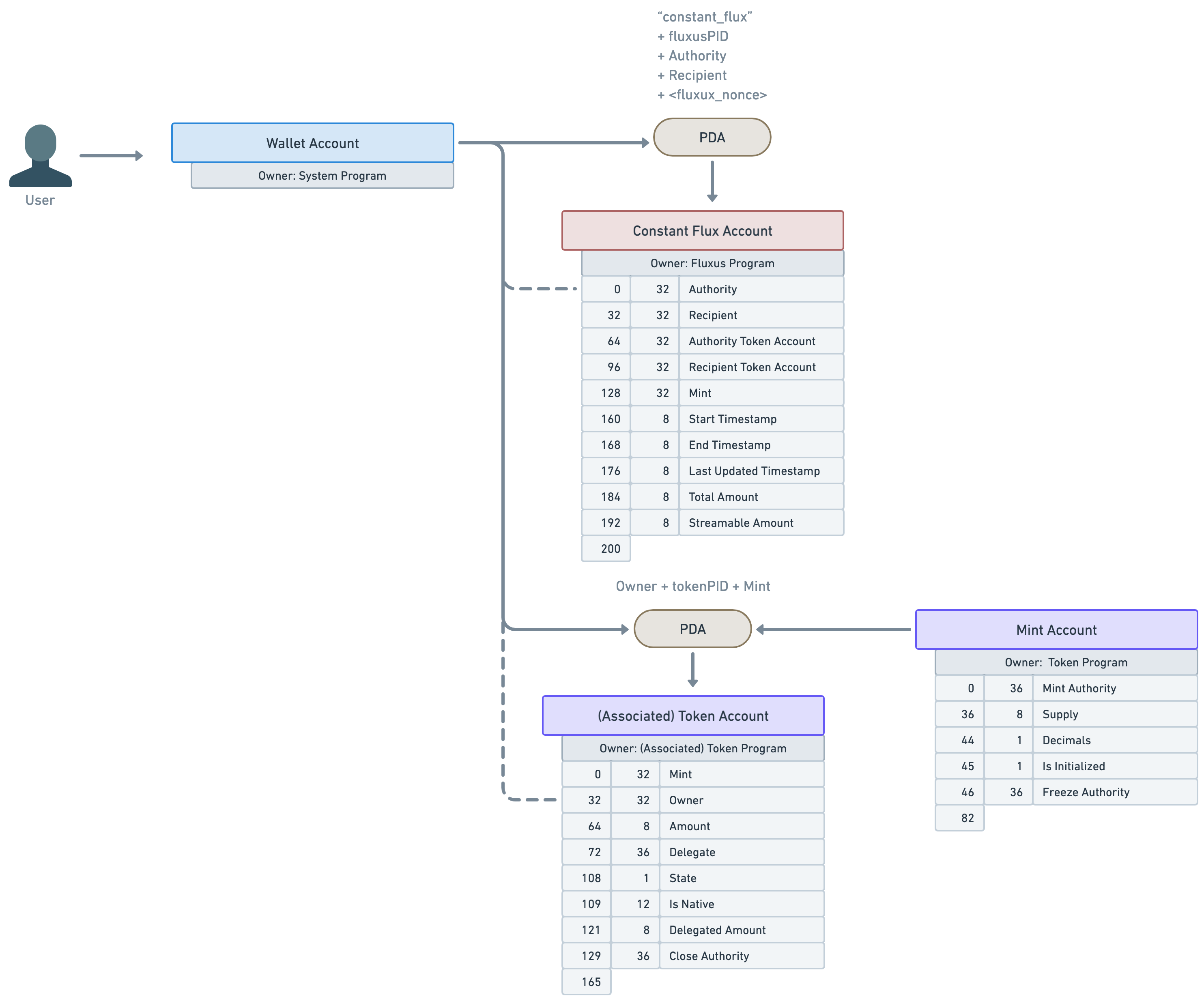
For more details check program