
folderplus
v0.1.4
Published
CLI utility for developers: trim code context, generate folder trees, and more
Downloads
499

Maintainers
 smoriginals.
Readme
📁folderplus
A powerful, customizable CLI tool to visualize your project structure with icons, filters, sorting, JSON output, and more.
Inspired by the classic tree command — but modern, colorful, and developer-friendly.
✨ Features
- 📁 Beautiful project tree with icons
- 🔍 Filter files or directories only
- 📦 Supports
.gitignoreautomatically - 🎯 Filter by file extensions
- 🚫 Exclude unwanted extensions
- 🧩 Sorting by name or type
- 🧾 JSON output (for tooling & automation)
- 📊 Optional project statistics
- ⚡ Fast and lightweight
- 🖥️ Cross-platform (Windows / Linux / macOS)
📦 Installation
npm i folderplus
npm install folderplus
npm install -g folderplus
✔ Verify installation:
folderplus version🚀 Usage
- Basic tree
folderplus tree- Files only
folderplus tree --files-only- Directories only
folderplus tree --dirs-only- Limit depth
folderplus tree --depth 2🎛️ Options & Flags
Flag Description
--allShow hidden files & folders
--no-iconsDisable icons
--files-onlyShow only files
--dirs-onlyShow only directories
--depth <n>Limit tree depth
--only js,tsSort by directory/file
--jsonOutput tree as JSON
folderplus tree --json > output.jsonOutput:
Json
{
  "name": "project",
  "type": "directory",
  "children": [
    { "name": "src", "type": "directory" },
    { "name": "index.js", "type": "file" }
  ]
}
🧠 How Ignore Works
folderplus automatically ignores:
node_modules
.git
Entries from .gitignore
You can add more using:
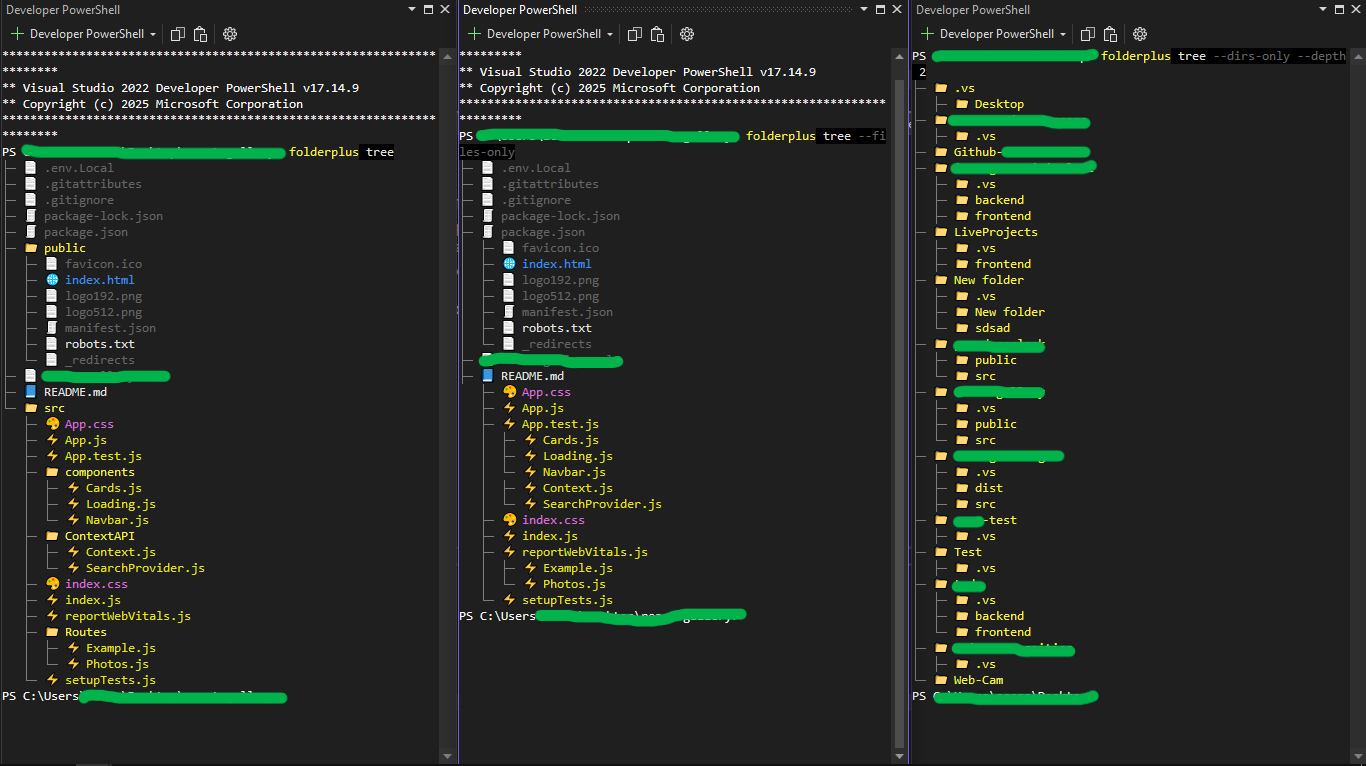
--ignore dist,build,temp📸 Screenshots
🛠️ Built With
- Node.js
- TypeScript
- Chalk
- Ora
🤝 Contributing
Contributions are welcome!
- Fork the repo
- Create a feature branch
- Commit your changes
- Open a Pull Request
📄 License
MIT License © 2026 smoriginals
⭐ Support
💫 If you find this tool useful:
- 📧 If any command is not work please report us.
- ⭐ Star the repo
- 📢 Share with others
Acknowledgements
Continuous improvement is crucial for maintaining engagement and user satisfaction. If you need any assistance or feedback on upcoming features, feel free to share!