
forge-openclaw-plugin
v0.3.69
Published
Curated OpenClaw adapter for the Forge collaboration API, UI entrypoint, and localhost auto-start runtime.
Downloads
3,219

Maintainers
 albertbuchard
Readme
Forge OpenClaw Plugin
forge-openclaw-plugin is the OpenClaw bridge for Forge.
For normal installs, start with the single-command Forge installer:
npx forge-memoryIt installs the Forge UI/runtime first, discovers OpenClaw, Hermes, and Codex in the background, lets you choose adapters from a guided checkbox flow, and keeps every selected surface pointed at the same real Forge data folder. Use the direct OpenClaw commands below only for plugin-specific debugging, source-linking, or manual recovery.
It gives OpenClaw a clear way to:
- start or reach the local Forge runtime
- open the Forge web app
- read the current operator overview
- create and update goals, projects, issues, tasks, notes, wiki pages, health records, preferences, and Psyche records
- run Forge Doctor when the local setup looks wrong
When the plugin targets localhost or 127.0.0.1, it can auto-start the bundled
Forge runtime and authenticate through Forge's verified per-user owner helper. It does
not store a reusable Forge API key for this local path. Current OpenClaw installers may
ask for explicit approval because the package includes local runtime startup helpers.
Open the UI
If you want the actual Forge app, not just the plugin tools, ask your OpenClaw agent:
Open the Forge UIGive me the Forge UI addressTake me to Forge
For a normal local install, the Forge UI address is usually:
http://127.0.0.1:4317/forge/That 4317 backend URL is the stable entrypoint for normal local plugin installs.
The repository development setup can expose /forge through the 4317 backend as
http://127.0.0.1:4317/forge/, while that backend is started locally with
FORGE_OPENCLAW_DEV=1 and proxies the Vite dev server at 127.0.0.1:3027. A correct
dev-mode response contains /forge/@vite/client and /forge/src/main.tsx.
That environment flag is only for the repo-local development machine. Normal plugin
installs on other machines use the packaged runtime by default and should not be forced
into source-backed dev mode. The restored automation also must not expose /forge-dev or
point /forge at bare http://127.0.0.1:3027.
You can also ask the agent to call the UI entry tool and return the exact current address.
If you want Forge to use a specific local data folder, set dataRoot in the plugin config. The local runtime will then store its database as forge.sqlite directly inside that folder instead of using the runtime working directory.
Default data path:
- local installs default to
~/.forge/forge.sqlite - the user can set
dataRootto use another folder - when
dataRootis set, Forge storesforge.sqlitedirectly inside that folder
If you want the data to live somewhere specific for persistence or backup reasons, set dataRoot explicitly in the plugin config and restart the gateway. When debugging storage, check the config and the live runtime path before moving or merging database files.
The Forge web app also exposes these controls in Settings -> Data. Use it to see the live data folder, move current data, adopt an existing Forge data folder, create a manual backup, enable automatic backups, and choose how many days of automatic backups Forge should keep. Automatic retention only cleans automatic backups; manual and safety backups stay in place.
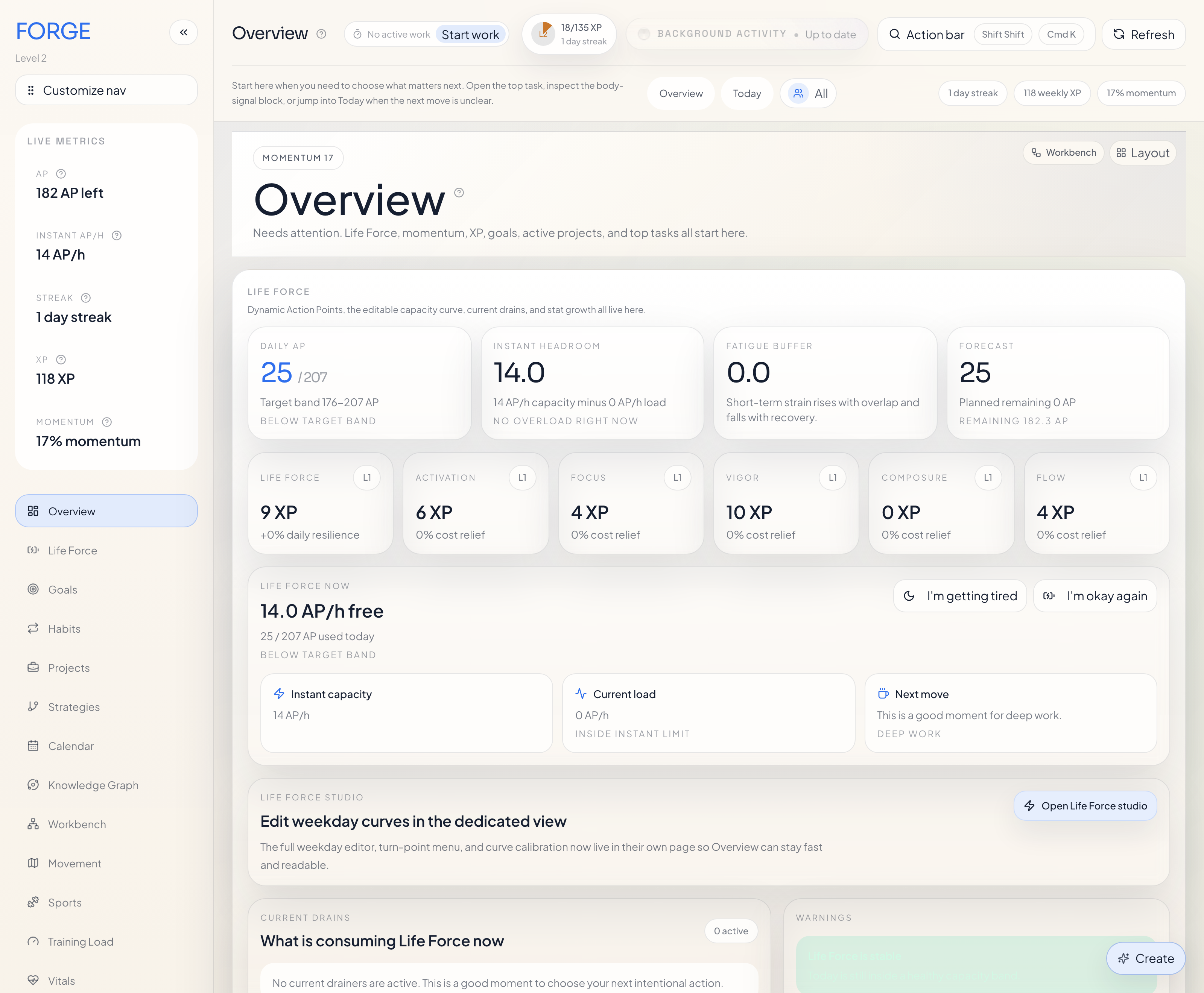
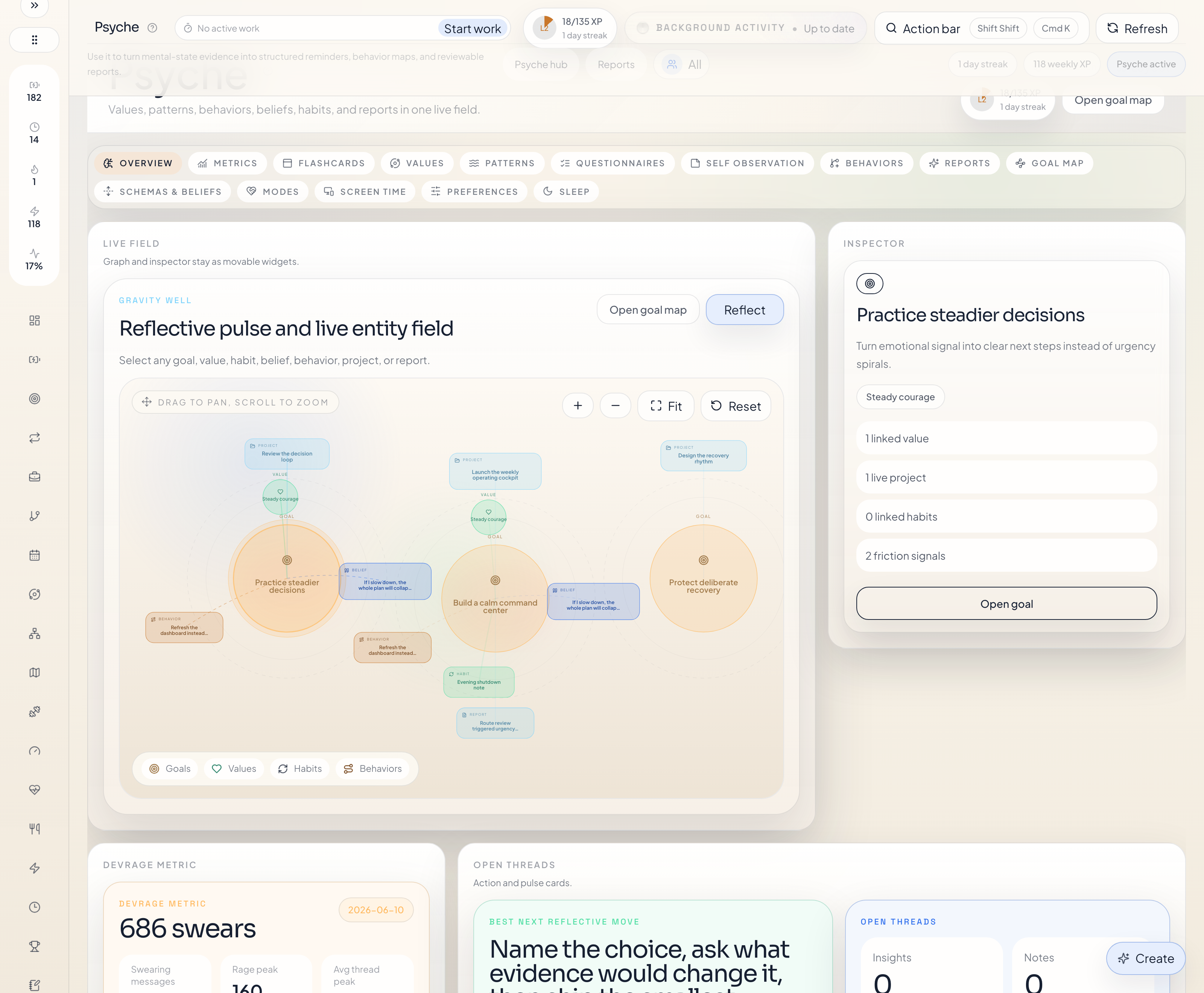
What Forge looks like
Overview dashboard:
Psyche graph:
What this plugin is
Forge is a personal system for:
- human and bot users with explicit ownership
- long-term goals
- active projects
- directed strategies across projects and tasks
- first-class preferences with a comparison game and editable concept libraries
- concrete tasks
- recurring habits
- truthful live work sessions
- weekly review and XP feedback
- SQLite-backed wiki memory with spaces, backlinks, ingest, and explicit Forge links
- first-class sleep and sports records imported from the iPhone companion or generated from habits
- structured Psyche records such as values, patterns, beliefs, modes, and trigger reports
Forge project management is explicit and repeated:
Goal -> Strategy -> Project -> Strategy -> Issue -> Task -> Subtask- one mixed board for
project | issue | task | subtask - one compact hierarchy view with shared search and filters
- hierarchy-aware linking flows that can select or create goals, projects, issues, and parent work items
- shared
executionMode+acceptanceCriteriasupport on issues and tasks - direct commits to
mainby default
This plugin gives OpenClaw the tools it needs to work with that system. It can read current state, search records, create and update records, control live work sessions, post insights, and hand the user off to the Forge UI when the visual workflow is easier.
It exposes forge_get_daily_briefing for one exact visible owner's evidence-backed day picture across work, schedule, current capacity, and recent activity, including explicit freshness, omission, and conflict states.
It can also grant an explicit audited XP bonus or penalty through the dedicated reward-bonus route when the normal automatic task or habit reward flows are not the right fit.
It can also add or remove tracked minutes on existing tasks or projects through a dedicated signed work-adjustment route without pretending that a live task run happened.
It also exposes forge_call_agent_messages_route for asynchronous Agent Messages. An addressed agent can poll, atomically claim with a lease, renew, add progress, acknowledge, read only the original voice Artifact authorized by that live message lease, forward, handle, or fail. Poll results never contain audio bytes, and the voice operation cannot be used as a generic Artifact download.
It also understands Forge note records, which are Markdown-based, searchable, and linkable across one or many entities.
It also exposes Forge's SQLite-backed wiki memory surface plus the first-class sleep and sports read models, so an agent can review recent nights, inspect workout context, update reflective metadata on health sessions, and work with wiki pages without touching raw storage.
The curated plugin route surface now includes the dedicated wiki, Life Events, and health APIs directly, including wiki settings, page reads and writes, search, health, sync, reindex, background ingest, Life Events timeline/calendar/ticket/status actions, sleep review, sports review, and reflective updates on individual sleep or workout sessions.
Notes support includes:
noteas the durable collaboration entity- notes surfaced directly in the Forge UI, including the global
/forge/notespage - nested
noteson goal, project, and task creation closeoutNoteon live-work endpoints when the summary should become a durable linked note
Examples:
- “Save this as a project in Forge.”
- “Show me the bot-owned strategies.”
- “Open Preferences and let me start the game.”
- “What does Forge already know about my food preferences?”
- “Show me my current work in Forge.”
- “Give me today's Forge briefing for Albert.”
- “Start a real work session on this task.”
- “Map this as a behavior pattern.”
- “Open the Forge UI.”
- “Poll my Agent Messages, claim the next one, and report progress.”
Agent Messages uses stable operation keys and client-generated lease secrets so an exact retry after response loss does not execute work twice. OpenClaw should retain a claimed message's operation key, lease secret, and claim generation until it reaches a terminal receipt. Voice is passed to the host only through the bounded route-specific audio response. Forge never silently sends it to a transcription provider; if the host cannot consume audio, leave the message pending or forward it to a capable connected agent.
Multi-user And Multi-agent Setup
Forge is built to support several humans and bots in one shared planning system. The key distinction is:
- ownership answers "whose record is this"
- linking answers "what does this record connect to"
That means this plugin should not flatten all work into the default operator.
When a task belongs to a bot, the write should set that bot userId. When a
read should compare several owners, it should pass repeated userIds.
Recommended shared setup:
- Run one shared Forge runtime.
- Point OpenClaw, Hermes, and the browser UI at that same runtime.
- Use one explicit shared
dataRootwhen several adapters must share the same database. - Create the human and bot users in
Settings -> Users. - Use
userIdon writes anduserIdson reads.
Current sharing behavior is intentionally clear:
- users are typed as
humanorbot - the runtime can list users directly
- reads are permissive when a route explicitly scopes to another user
- cross-user links are valid, so a human-owned project can reference bot-owned tasks, notes, or strategy nodes
If OpenClaw and Hermes are supposed to collaborate inside one Forge system, the
important thing is not only matching origin and port. Either leave every
adapter on the default ~/.forge root or set one explicit dataRoot, then
verify that each live runtime has opened that database.
Strategies And Alignment Metrics
Forge strategies are first-class planning records for work that unfolds through an ordered graph instead of a flat checklist.
A strategy includes:
- target goals and projects
- free-text overview and end-state description
- optional linked entities
- a directed acyclic graph of task and project nodes
The graph can branch, but it should not loop.
Current metrics are explicit:
- project nodes use project progress directly
- task nodes map status to progress:
done/completed/reviewed/integrated=100%in_progress/active=66%focus=50%blocked/paused=25%everything else =0% - active or next nodes are the incomplete nodes whose dependencies are already complete
- target progress comes from the linked goals or projects
alignmentScoreisround((average node progress * 0.7 + average target progress * 0.3) * 100)
This lets the user and the agent answer two concrete questions:
- What work is truly next in the plan?
- How aligned is current execution with the intended end state?
Preferences And Concept Libraries
Forge now has a dedicated Preferences workspace at /forge/preferences.
The main UX is intentionally simple:
- the landing view starts with what Forge already knows
- if the model is thin, the UI says that plainly and offers one visible
Start the gameaction - comparison happens in a modal with two simple cards instead of a crowded page
- Forge-native domains can pull from real Forge entities automatically
- broader taste domains can start from seeded concept libraries that the user can edit
The current seeded concept-library domains include:
foodactivitiesplacescountriesfashionpeoplemediatools
The runtime API for this surface lives under /api/v1/preferences/*.
OpenClaw should still use forge_get_agent_onboarding as the live contract
source when route-facing field names are uncertain, and it should prefer the UI
handoff when the user wants to play the comparison game visually.
Wiki, Sleep, And Sports
Forge now exposes three more agent-relevant surfaces directly:
- the Wiki: SQLite-backed Markdown memory with explicit spaces, backlinks, search, ingest, and maintenance health checks
- Sleep: recent nights, sleep score and regularity metrics, stage averages, and linked reflective context
- Sports: workout volume, effort, types, habit-generated sessions, and linked Forge context
OpenClaw tool coverage for those areas is explicit:
- the complete wiki lifecycle uses
forge_call_wiki_route, including slug reads and delete; theforge_get_wiki_*,forge_search_wiki,forge_upsert_wiki_page,forge_sync_wiki_vault,forge_reindex_wiki_embeddings, andforge_ingest_wiki_sourcetools remain focused helpers - sleep review uses
forge_get_sleep_overviewand record enrichment usesforge_update_sleep_session - sports review uses
forge_get_sports_overviewand record enrichment usesforge_update_workout_session
The sports UI route is /forge/sports, while the backend overview route remains
/api/v1/health/fitness. Sleep lives at /forge/sleep and /api/v1/health/sleep.
Advanced Install
Prefer npx forge-memory for normal installs. The direct commands in this
section are for OpenClaw-specific debugging, source-linking, and recovery.
Published Package
Use this path when you want the released Forge plugin from npm:
openclaw plugins install --dangerously-force-unsafe-install forge-openclaw-plugin
openclaw plugins enable forge-openclaw-plugin
openclaw gateway restart
openclaw forge health
openclaw forge ui
Tested on OpenClaw 2026.6.9: plain openclaw plugins install forge-openclaw-plugin is blocked by the plugin scanner because Forge contains local runtime startup helpers. The documented command uses OpenClaw's explicit approval flag and installs without the old config-edit workaround.
Check what OpenClaw loaded:
openclaw plugins inspect forge-openclaw-plugin --runtime
openclaw forge health
Local Development From This Repo
Use this path when you are editing Forge and want OpenClaw to load this checkout directly:
openclaw plugins install --link --dangerously-force-unsafe-install ./plugins/openclaw
openclaw plugins enable forge-openclaw-plugin
openclaw gateway restart
openclaw plugins inspect forge-openclaw-plugin --runtime
openclaw forge health
Use --link for active local development. Omit --link when you want to test the copied package layout that a normal install receives.
If you are running the command from the monorepo root instead of the Forge repo root, use:
openclaw plugins install --link --dangerously-force-unsafe-install ./projects/forge/plugins/openclawManual Fallback For Older OpenClaw Builds
Use this only if your OpenClaw installer does not support --dangerously-force-unsafe-install or still refuses to install Forge. It installs the npm package, adds the package folder to plugins.load.paths, enables the plugin, and keeps the default local Forge runtime on 127.0.0.1:4317.
npm install -g forge-openclaw-plugin
node <<'NODE'
const cp = require("node:child_process");
const fs = require("node:fs");
const path = require("node:path");

const configPath = path.join(process.env.HOME, ".openclaw", "openclaw.json");
const pluginPath = path.join(
  cp.execSync("npm root -g", { encoding: "utf8" }).trim(),
  "forge-openclaw-plugin"
);
const config = JSON.parse(fs.readFileSync(configPath, "utf8"));

config.plugins ??= {};
config.plugins.allow = Array.from(
  new Set([...(config.plugins.allow ?? []), "forge-openclaw-plugin"])
);
config.plugins.load ??= {};
config.plugins.load.paths = Array.from(
  new Set([...(config.plugins.load.paths ?? []), pluginPath])
);
config.plugins.entries ??= {};
config.plugins.entries["forge-openclaw-plugin"] = {
  enabled: true,
  config: {
    origin: "http://127.0.0.1",
    port: 4317,
    actorLabel: "",
    timeoutMs: 15000
  }
};

fs.writeFileSync(configPath, `${JSON.stringify(config, null, 2)}\n`);
console.log(`Configured ${pluginPath}`);
NODE
openclaw gateway restart
openclaw plugins inspect forge-openclaw-plugin --runtime
openclaw forge health
Equivalent config:
{
  plugins: {
    allow: ["forge-openclaw-plugin"],
    entries: {
      "forge-openclaw-plugin": {
        enabled: true,
        config: {
          dataRoot: "/absolute/path/to/forge-data",
          actorLabel: "",
          apiToken: ""
        }
      }
    }
  }
}
If you want to move the data folder, edit the same config entry and set:
{
  plugins: {
    entries: {
      "forge-openclaw-plugin": {
        config: {
          dataRoot: "/absolute/path/to/forge-data"
        }
      }
    }
  }
}
Recommended local behavior:
- leave
actorLabelblank so Forge can inherit the trusted local operator label automatically - leave
apiTokenblank only for direct localhost, where Forge uses the verified local-owner helper - configure a Forge-issued scoped credential for Tailscale or any other remote target; network reachability alone never authorizes the client
- keep
dataRootaligned across OpenClaw, Hermes, Codex, and the browser runtime when they should share data - before changing or merging data roots, back up every candidate Forge database and verify which database the live runtime is using
Doctor And Runtime Config
Forge now maintains a runtime settings mirror at <dataRoot>/forge.json.
This is separate from the OpenClaw plugin config in ~/.openclaw/openclaw.json.
The distinction is:
- OpenClaw plugin config decides how OpenClaw reaches Forge
forge.jsoninside the Forge data root decides what Forge's effective settings are
Operational behavior:
- if
forge.jsondoes not exist, Forge exports it on startup - UI and API settings changes update both the SQLite store and
forge.json - valid values in
forge.jsontake precedence over persisted DB values - the file is then rewritten as a full mirrored snapshot so the runtime converges again
Diagnostic entrypoints:
openclaw forge doctor
openclaw forge doctor --json
openclaw forge doctor --fix
npm run doctor --prefix ./projects/forge
The doctor output includes explicit runtime, settings, SQLite storage, entity-link, hierarchy, reward, and gamification checks. It also returns concrete issues and proposed fixes. Fixes are never applied by a normal read; openclaw forge doctor --fix applies only Doctor-marked safe fixes.
Then restart the gateway:
openclaw gateway restartThe OpenClaw plugin id is forge-openclaw-plugin, the product name is Forge, and the CLI namespace is forge.
Recommended usage
The main mental model is intentionally small:
forge_get_operator_overviewforge_get_operator_contextorforge_get_current_workfor live work and board stateforge_get_psyche_overview,forge_get_xp_metrics, andforge_get_weekly_reviewfor read-heavy guidanceforge_get_ui_entrypointwhen the user should continue in the visual Forge UIforge_search_entitiesforge_create_entitiesorforge_update_entitiesforge_delete_entitiesorforge_restore_entitieswhen neededforge_grant_reward_bonusfor explicit audited manual XP changesforge_adjust_work_minutesfor signed minute corrections on existing tasks or projectsforge_log_workfor completion-style retroactive workforge_start_task_run,forge_heartbeat_task_run,forge_focus_task_run,forge_complete_task_run, andforge_release_task_runfor real live workforge_get_calendar_overview,forge_call_calendar_connection_route,forge_connect_calendar_provider,forge_sync_calendar_connection,forge_create_work_block_template,forge_recommend_task_timeboxes, andforge_create_task_timeboxfor calendar-aware executionforge_post_insightfor recommendations
Use the UI entrypoint sparingly. Do not open the Forge UI or a browser just to create or update normal records that the tools already cover. If an entity is only implied in the discussion, help first and offer Forge lightly near the end; only write after explicit save intent.
The batch tools are array-first:
forge_search_entitiestakessearches: []forge_create_entitiestakesoperations: [], and each create operation must includeentityTypeand fulldata- goal, project, and task creates can include nested
notes, which Forge turns into linked note entities automatically - goal, project, task, strategy, habit, tag, and note writes can include
userIdto assign ownership to a human or bot user - scoped reads can use
userIdor repeateduserIdsquery parameters when the agent needs to focus on specific humans or bots forge_update_entitiestakesoperations: [], and each update operation must includeentityType,id, andpatch- official habit outcomes can stay on that same shared path: patch
entityType: "habit"withcheckIn: { status, dateKey?, note?, description? }to record the real habit outcome without leaving batch CRUD forge_delete_entitiesandforge_restore_entitiesalso takeoperations: []
Project lifecycle uses those same generic tools:
- suspend a project by patching
status: "paused"withforge_update_entities - finish a project by patching
status: "completed"withforge_update_entities - restart a project by patching
status: "active"withforge_update_entities - finishing a project auto-completes linked unfinished tasks
- delete stays soft by default unless
mode: "hard"is explicit onforge_delete_entities
Scheduling rules use those same generic updates:
- patch
project.schedulingRulesthroughforge_update_entitiesto define project-wide calendar defaults - patch
task.schedulingRulesandtask.plannedDurationSecondsthroughforge_update_entitiesfor task-specific overrides - use the calendar-specific tools only for provider connections, work blocks, overview reads, slot recommendations, and explicit timeboxes
Batch several related creates together in one request when the user is asking for multiple goals, projects, or tasks at once.
The live onboarding payload is the deep contract for agents. It now includes:
conceptModel: what the main Forge concepts meanpsycheSubmoduleModel: what the Psyche records and reference taxonomies are forpsycheCoachingPlaybooks: how to guide users through values work, functional analysis, behavior mapping, belief/schema intake, mode work, mode-guide sessions, and trigger reports with active listening instead of raw form promptsrelationshipModel: how goals, projects, tasks, task runs, Psyche entities, and insights connectentityCatalog: exact field-level definitions for real Forge entity payloadsentityRouteModel.specializedDomainSurfaces: the dedicated route families for Movement, Life Events, Life Force, and Workbench, including when not to use generic batch CRUDtoolInputCatalog: exact mutation and live-work input shapes with examples
That means the agent should use the real route-facing fields, for example:
strategyusestargetGoalIds,targetProjectIds,linkedEntities, and a directed acyclicgraphbelief_entryusesstatementandbeliefTypebehavior_patternusescueContexts,shortTermPayoff,longTermCost, andpreferredResponsemode_guide_sessioncreates requiresummaryandanswers;resultsis optional candidate interpretation outputevent_typeandemotion_definitionare reusable report vocabulariestrigger_reportuses nestedemotions,thoughts,behaviors, andconsequences
Live work is not just task status:
- use
forge_start_task_runto begin actual work - use
forge_release_task_runto stop without completing - use
forge_complete_task_runto finish and collect the real work reward path - if Forge reports a calendar block and the user still wants to start, retry
forge_start_task_runwith an explicitoverrideReason - include
closeoutNoteonforge_complete_task_run,forge_release_task_run, orforge_log_workwhen the summary should become a durable linked note - use
forge_log_workonly for completion-style retroactive work that already happened - use
forge_adjust_work_minuteswhen the task or project already exists and only tracked minutes need to move up or down - do not use
forge_adjust_work_minutesto fake a live session; it is for truthful retrospective minute corrections only
Calendar-aware execution tools:
forge_get_calendar_overviewreads provider state, mirrored events, work blocks, and timeboxes togetherforge_create_entities,forge_update_entities, andforge_delete_entitiesare the normal path forcalendar_event,work_block_template, andtask_timeboxforge_call_calendar_connection_routecovers the complete specialized lifecycle: list, provider discovery, macOS-local discovery, rediscovery, create, selected-calendar update, sync, and delete. Existing-record changes should start fromlist, usepathParams.id, and read the list back when verification matters.forge_connect_calendar_providercreates a Google, Apple, Exchange Online, Calendars On This Mac, or custom CalDAV connection once the mirrored calendars are chosen. Exchange Online normally relies on the interactive Settings sign-in flow first, after the local Microsoft client ID, tenant, and redirect URI are configured in Forge. The macOS-local path relies on EventKit and replaces overlapping remote account connections instead of keeping duplicate copies.forge_sync_calendar_connectionruns provider pull/push sync for one connectionforge_create_work_block_templatecreates recurring half-day, holiday, or custom work blocks- work-block templates accept optional
startsOn/endsOndate bounds and stay compact in Forge instead of expanding into one stored event per day - omit
endsOnto keep a block repeating indefinitely; usekind: "holiday"with all weekdays plus0-1440minutes for vacations or full-day leave forge_recommend_task_timeboxessuggests future slots that fit current rulesforge_create_task_timeboxconfirms a selected slot into a real Forge timebox
The skill is entity-format-driven. It teaches the agent how to:
- keep the conversation natural
- make only gentle end-of-message save suggestions
- lightly suggest the Forge UI when visual review or editing would be easier
- ask only for missing fields
- capture goals, projects, tasks, values, patterns, behaviors, beliefs, and trigger reports
For local use, set the plugin origin to http://127.0.0.1 or http://localhost and the plugin will bring Forge up automatically. If you leave the default localhost setup alone and 4317 is already taken, Forge now moves to the next free local port and remembers that choice for future runs.
If you want to manage that plugin-managed local runtime cleanly, use:
openclaw forge start
openclaw forge stop
openclaw forge restart
openclaw forge status
These commands only manage the runtime when it was auto-started by the OpenClaw plugin. If Forge was started manually some other way, they tell you that instead of killing unrelated processes.
If the local runtime fails to come up, check the plugin-managed runtime log at:
~/.openclaw/logs/forge-openclaw-plugin/<host>-<port>.logOn clean installs, the plugin now also repairs missing bundled runtime dependencies on first local start before it launches Forge.
The startup error now points at that log file when the child process exits before Forge becomes healthy.
Publishing and listing
The reliable publication path for the Forge plugin is:
- publish
forge-openclaw-pluginto npm - verify
openclaw plugins install --dangerously-force-unsafe-install forge-openclaw-plugin - add Forge to the OpenClaw community plugin listing with the npm package and GitHub repo
The repo now supports a tag-driven GitHub Actions release path for step 1. The normal
prep flow from a clean checkout on main is:
FORGE_RELEASE_MODE=prepare ./scripts/release/release-forge-openclaw-plugin.sh patchThat command bumps the aligned plugin versions, runs the verification suite, commits
the release, and pushes main plus a matching tag like v0.2.27. The
.github/workflows/release-plugins/openclaw.yml workflow then publishes the package
from that tag.
One-time npm setup for CI:
- configure npm Trusted Publishing for this GitHub repository and the
release-plugins/openclaw.ymlworkflow - keep using GitHub-hosted runners for the publish job, because npm Trusted Publishing does not support self-hosted runners yet
If you explicitly want the old laptop-driven publish path, run the same script without
FORGE_RELEASE_MODE=prepare and it will still publish directly after pushing.
For the exact prerequisites, tags, and GitHub secret names, use
docs/release/release-cheat-sheet.md.
ClawHub note:
- OpenClaw's public docs clearly position ClawHub as the skills registry.
- The community plugin listing requirements still ask for npm publication and a public GitHub repository.
- So the safe publish path for the Forge plugin itself is npm + GitHub + community listing.
- If you want Forge discoverability inside ClawHub as well, publish a companion Forge skill there separately. That is additive. It does not replace the npm plugin package.