
fostar
v1.0.4
Published
``` npm i -g fostar // 全局安装 ``` ``` npx fostar // npx安装 (推荐使用) ``` ``` fostar -h // 查看帮助 ```


Readme
安装
npm i -g fostar // 全局安装npx fostar // npx安装 (推荐使用)fostar -h // 查看帮助细节较多,熟悉后使用 1.1 、2.1 、3.1 的命令做多语言自动化
1 多语言配置初始化
1.1 使用
npx fostar lang-init得到多语言配置文件
module.exports = {
  lngs: [
    // 默认包含中文
    {
      lng: 'en',
      name: '英文',
    },
  ],
  ns: {
    // 命名空间
    home: {
      src: ['src/pages'],
    },
  },
  packFunction: '$t', // 用于包裹的函数,必须挂载在全局
  packReg: /[\u4e00-\u9fa5]+/, // 包裹的语言,中文
  extname: ['.js', '.jsx', '.ts', '.tsx'], // 需要检查的后缀文件
  translateFunction: ['t', 'i18n.t', '$t'], // 翻译的函数。默认扫<Trans>组件
};
2 多语言包裹
2.1 使用
npx fostar lang-packcli会读取上面的配置文件的ns.home.src,根据命名空间的src列表读取源码,然后在AST语法树上匹配到标记词条进行包裹
2.2 包裹的作用
使用i18next多语言插件,都需要使用使用i18next.t('词条key')进行包裹词条, 一般会进行封装成一个全局函数如下:
import i18next from 'i18next';
const $t = (key) => {
    i18next.t('词条key')
}
window.$t = $t;
这样全局代码就可以使用 $t('词条key') 包裹词条了。
2.3 fostar cli自动化包裹词条的作用
cli是为了给开发提效节省工作量,同时cli读取整个源码更加不会遗漏包裹词条。
2.4 包裹词条的用例(正则匹配配置文件的packReg属性值)
2.4.1 example1 普通字符串:
'中文3 中文3' => $t('中文3 中文3')匹配到配置文件的packReg的中文,使用配置文件中的packFunction包裹。
2.4.2 example2 模版字符串,需要映射到i18next插值:
2.4.2.1 模版只有字符串
`你好啊` => $t('你好啊')2.4.2.2 模版只有变量
这种情况正常是不要包裹的,只要变量名不是匹配的中文
2.4.2.3 模版有字符串和变量组合
const headStr = '1';
const tailStr = '2';
const nums = 4;
const count = '6';

const str = `${headStr}你好 ${nums}个国家, ${count}个苹果${tailStr}`;
包裹如下:
const str = $t('{{headStr}}你好 {{nums}}个国家, {{count}}个苹果{{tailStr}}', { headStr, nums, count, tailStr });i18next复数是根据count变量判断,只需要变量中有count就可以了
2.4.2.4 模版有字符串、变量、函数调用组合
const headStr = '1';
const tailStr = '2';
const nums = 4;
const count = '6';

function sayName(name) {
  return `hello, ${name}`;
}

const str = `${headStr}你好${sayName('lock')} ${nums}个国家, ${count}个苹果${tailStr}`;
包裹如下:
const str = $t('{{headStr}}你好{{sayName}} {{nums}}个国家, {{count}}个苹果{{tailStr}}', {
  headStr,
  sayName: sayName('lock'),
  nums,
  count,
  tailStr,
});
2.4.2.5 模版字符串类型控制!!!
目前模版字符串只支持"普通字符串"、"变量"、"函数调用"三种类型。其中函数调用的参数只支持字符串和变量传参,可能后续会不支持函数调用,慎重在模版里面函数调用。 所以模版字符串优先考虑只有普通字符串和变量。
2.4.3 example3 jsx组件的属性或者jsx内容文本:
function Hello() {
  return (
    <div attr="中文1">
        中文2
    </div>
  );
}
包裹如下:
function Hello() {
  return <div attr={$t('中文1')}>{$t('中文2')}</div>;
}
2.5 几种常见场景但不会包裹的情况
2.5.1 词条作为函数调用的参数,如: fun('中文')
2.5.2 作为对象的key或者value,如: const obj = {"你好": "世界"}
2.5.3 作为的子节点,如:中文
2.5.4 模版字符串除了字符串、变量、函数调用的其他类型,如:你好${[1,2,3]}啊,建议作为一个变量提到外面,再在模版中引入
3 多语言提取
3.1 使用
npx fostar lang-collect会扫描ns.home.src的源码中包含配置translateFunction中的包裹函数和Trans组件包裹的词条,如上面的示例$t包裹的词条会按照配置文件中的lngs,提取到根目录的i18n,以json文件后缀。
本地生成不同语言的json文件是为了不同语言单复数问题,如下图:
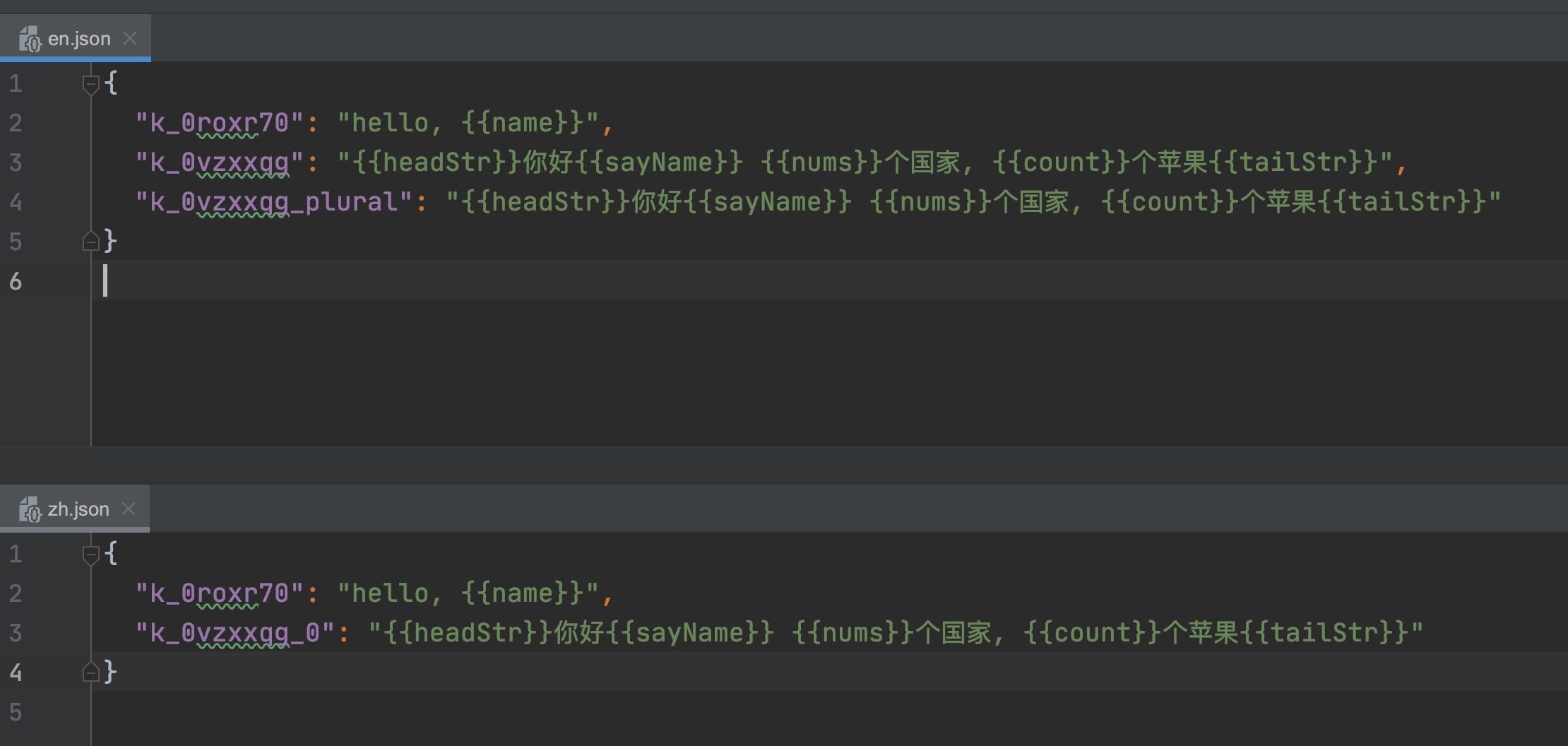 英文复数新增了一个"_plural"后缀。