
fovea
v0.2.0
Published
Fixation-point reading for any terminal AI agent. Wraps a command in a pty and emphasizes the leading stem of each word, or filters piped output.

Maintainers
 gamekiller69
Readme
fovea
Fixation-point reading for terminal output, built for the way AI agents actually print things: streamed a token at a time, wrapped in ANSI colour, and full of code that must not be touched.
fovea claude
fovea aider --model sonnet
git log | fovea --style dim-tail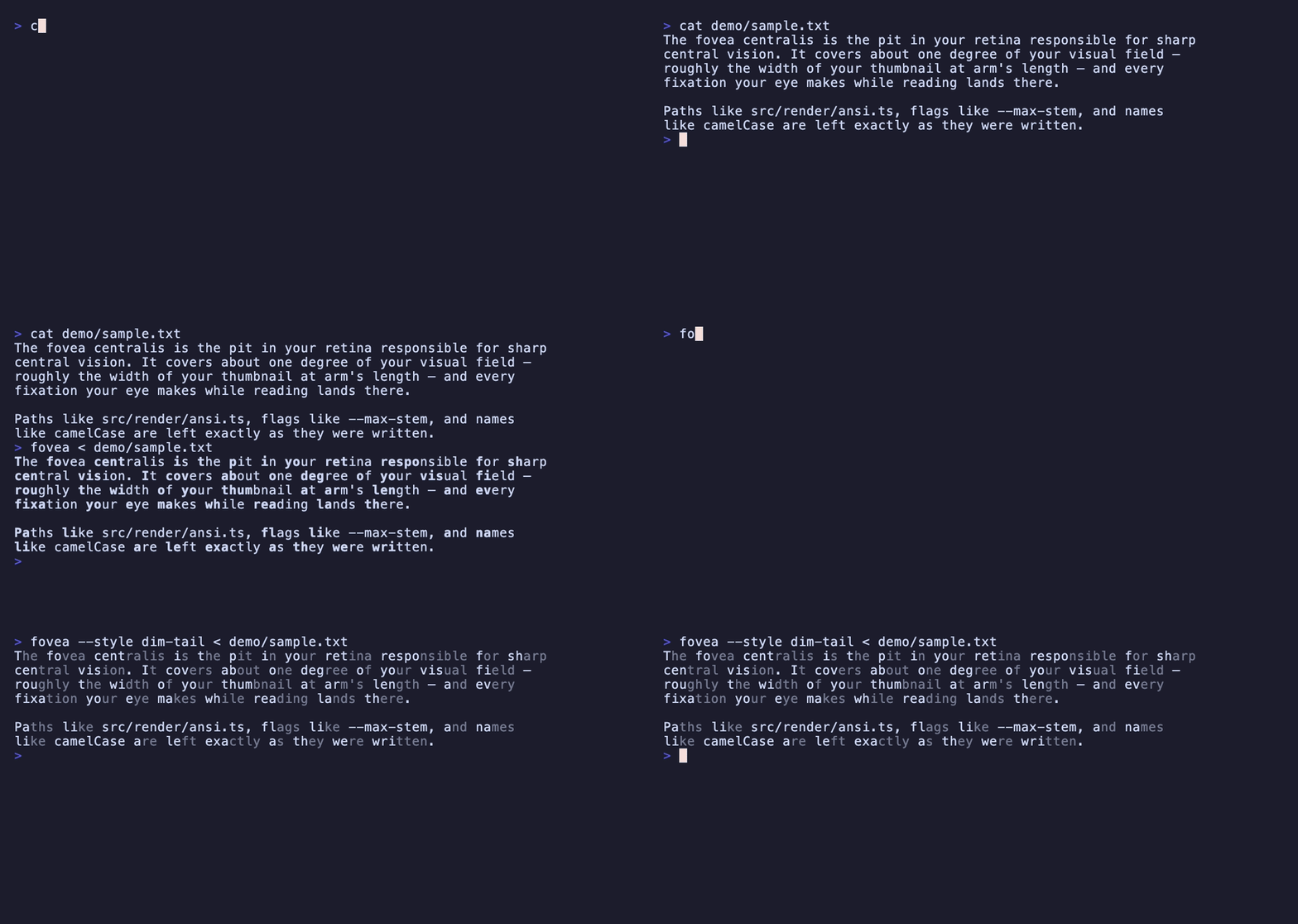
fovea runs a command inside a pseudo-terminal and emphasizes the leading stem
of each word on its way to your screen. The wrapped program keeps a real tty, so
full-screen agent interfaces behave exactly as they do unwrapped.
Why a wrapper
Every existing implementation of this technique assumes a finished string in a browser. Agent output breaks all three of those assumptions, and a wrapper is the only place to fix them once for every tool:
- It streams. Words arrive split across chunk boundaries.
foveaholds back an incomplete tail and emphasizes the word once it is whole. - It is already styled. SGR 22, which ends a bold stem, also clears dim.
Emphasizing one word inside dim text would silently un-dim the rest of the
line, so
foveatracks the active attributes and re-asserts them after every stem. - It is full of code.
src/index.ts,--max-stemandcamelCaseare left verbatim, and so are whole code blocks; emphasizing them is what makes naive implementations unreadable. See Code blocks.
Because emphasis is added with escape sequences, which occupy no columns, nothing the wrapped program printed changes width and its own layout arithmetic stays correct.
Working with a tool that just pipes to stdout? somecmd | fovea needs no
pseudo-terminal at all.
Install
npm install -g foveaNode 18 or newer. The pty wrapper pulls in node-pty; if it fails to build,
piped mode still works.
Options
| Flag | Default | Meaning |
| --- | --- | --- |
| -s, --style | bold | bold, dim-tail, or both |
| -r, --ratio | 0.4 | fraction of a word to emphasize |
| -m, --max-stem | 5 | cap on emphasized characters |
| --min-word | 2 | leave shorter words alone |
| --stopwords | off | skip common function words |
| --locale | en | locale for word segmentation |
| -c, --code | auto | leave code blocks alone: auto, fences, off |
dim-tail fades the back of each word instead of bolding the front. It reads as
less shouty on dense output, and on terminals whose bold is a brighter colour
rather than a heavier weight it is often the only one that works.
Everything after the first non-option argument goes to the wrapped command, so its own flags need no escaping.
Code blocks
Code is meant to be read carefully rather than skimmed, so fovea leaves whole
blocks alone. How it finds them depends on what the source gives it.
fences follows Markdown fences. They survive in piped output, so this is
exact wherever the source emits raw Markdown.
auto — the default — adds a second signal for the harder case. A terminal
agent has usually already rendered its Markdown to ANSI before fovea sees
anything, leaving no fences to find; there, a painted background is the most
reliable remaining evidence that a run is code. This is a heuristic, so it is
right most of the time rather than always.
off falls back to the per-word rules alone.
Classification needs only the first few characters of a line, so fovea holds
back a bounded prefix rather than buffering whole lines — waiting for a newline
would stall output mid-sentence, which is exactly what a reader of streaming
output would notice.
Library
The transform is published separately from the CLI.
import { toHtml, tokenize } from "fovea-core";

toHtml("Fixation points guide the eye");
// '<b class="fovea-stem">Fixa</b>tion <b class="fovea-stem">poi</b>nts …'
tokenize returns { text, kind, stem }[] rather than a string, so one pass
over the text can feed a terminal, a DOM, or a Markdown file. renderAnsi,
renderHtml and renderMarkdown ship with it; anything else is a fold over the
same tokens.
For streams, fovea-stream exposes the chunk-safe transform the CLI uses:
import { BionicTransform } from "fovea-stream";

const transform = new BionicTransform({ style: "dim-tail" });
process.stdout.write(transform.feed(chunk));
process.stdout.write(transform.flush());
Does it make you read faster
Probably not. Controlled studies have generally found no reliable gain in reading speed or comprehension against plain text, and the strongest honest claim is that some people — including some dyslexic and ADHD readers — find it more comfortable to stay with a long block of text.
That is worth building for on its own. It is not worth overselling, so this project doesn't.
Word segmentation
Word breaking goes through Intl.Segmenter, so accented and non-Latin
alphabetic scripts are handled properly rather than by an ASCII regex. Han,
Kana, Hangul and Thai are skipped deliberately: there is no leading stem to
emphasize in a logographic or abugida script, so the technique adds noise and
nothing else.
Status
Early. The pieces below work and are tested; the rest is planned.
- [x] Core transform, ANSI / HTML / Markdown renderers
- [x] Streaming transform with SGR tracking
- [x] pty wrapper and pipe filter
- [x] Code-block detection, by fence and by background colour
- [ ] Config file and per-agent profiles
- [ ] Browser extension
- [ ] React component
Name
The fovea centralis is the pit in the retina responsible for sharp central vision — the part of your eye a fixation actually lands on.
This project is not affiliated with, or derived from, any commercial product implementing a similar technique.
License
MIT