
front10-rating
v2.0.3
Published
React rating component

Maintainers
 belzee92
Readme
front10-rating is a simple and tiny Rating React Component
Installation
npm install front10-rating
or
yarn add front10-rating
Examples
Basic
import React from 'react';
import Rating from 'front10-rating';

const App = () => {
  return <Rating value={4.5} />;
};
Custom render
import React from 'react';
import Rating from 'front10-rating';
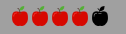
import apple from './apple.png';
import appleEmpty from './apple-empty.png';

const App = () => {
  return (
    <Rating
      value={4}
      renderFullItem={({ index }) => <img key={index} src={apple} />}
      renderEmptyItem={({ index }) => <img key={index} src={appleEmpty} />}
    />
  );
};
With some styles
import React from 'react';
import Rating from 'front10-rating';

const App = () => {
  return (
    <Rating
      value={3.5}
      width="60"
      height="60"
      color="indigo"
      emptyColor="yellow"
    />
  );
};
List of props
| Property | Type | Default | Description | | --------------- | -------- | --------- | -------------------------------------- | | allowRate | bool | false | Allow to rate | | showValue | bool | false | Define if show the value | | starsLength | number | 5 | Total of items to show | | value | number | 0 | Rating value | | width | string | '16' | width of the icon | | height | string | '16' | height of the icon | | color | string | '#ffc107' | color of the icon | | emptyColor | string | '#eceff1' | color of the empty icon | | renderItem | function | null | Function to render the Items | | renderFullItem | function | null | Function to render the marked items | | renderEmptyItem | function | null | Function to render the unmarked Items | | renderHalfItem | function | null | Function to render the half items | | onClick | function | null | Function to handle rate on click | | className | string | '' | className applied to the component | | style | object | null | inline styles applied to the component |