
fullbleed
v0.3.1
Published
Generate PDFs from HTML and CSS in Node.js or a browser worker with the Fullbleed Rust engine, bundled fonts, and optional PNG previews.

Maintainers
 krflol
Readme
Fullbleed for Node.js and browsers
Generate PDFs from static HTML and CSS in Node.js or a browser worker. The package includes the Fullbleed Rust engine compiled to WebAssembly and four font faces, so installing it does not require Python, Rust, a browser, or system fonts. MIT licensed.
Import fullbleed for Node.js or fullbleed/browser for a web application.
This is an optional integration around the published Fullbleed 2.5.10 engine. The package has its own version, 0.3.1. This patch fixes inline text overlap and spacing in wrapped paragraphs, and keeps tracked labels at their intended width. Affected PDFs can change line breaks, pagination, and hashes; review saved baselines when upgrading. The browser entry renders in a Web Worker, and the Node API supports worker and process isolation. See the browser guide, inline wrapping checks, process isolation guide, font-family checks, and embedded-font checks for the retained fixtures.
Install and render
Use Node.js 22 or newer. Install the npm package:
npm install fullbleedFor a version-pinned installation, use npm install --save-exact [email protected].
Package archives and retained PDF/PNG evidence are attached to each
GitHub release.
The installation verification records
retain published-package checks by version, including output hashes and failure
recovery. Use the record for the version you are evaluating.
Save this as invoice.mjs and run node invoice.mjs:
import { writeFile } from 'node:fs/promises';
import { renderPdf } from 'fullbleed';

const result = await renderPdf({
  html: '<h1>Invoice NS-1042</h1><p>Consulting: USD 1,200.00</p>',
  css: '@page { size: A4; margin: 20mm } h1 { color: #175c52 }',
  previewDpi: 96,
});

await writeFile('invoice.pdf', result.pdf);
await writeFile('invoice.png', result.previews[0]);
console.log(`${result.pages} page; engine ${result.engineVersion}`);
Inter is the default font. CommonJS also works:
const { renderPdf } = require('fullbleed'). TypeScript declarations are included.
Try the browser playground · Fullbleed documentation · CSS coverage · Python and Rust engine
A designed invoice
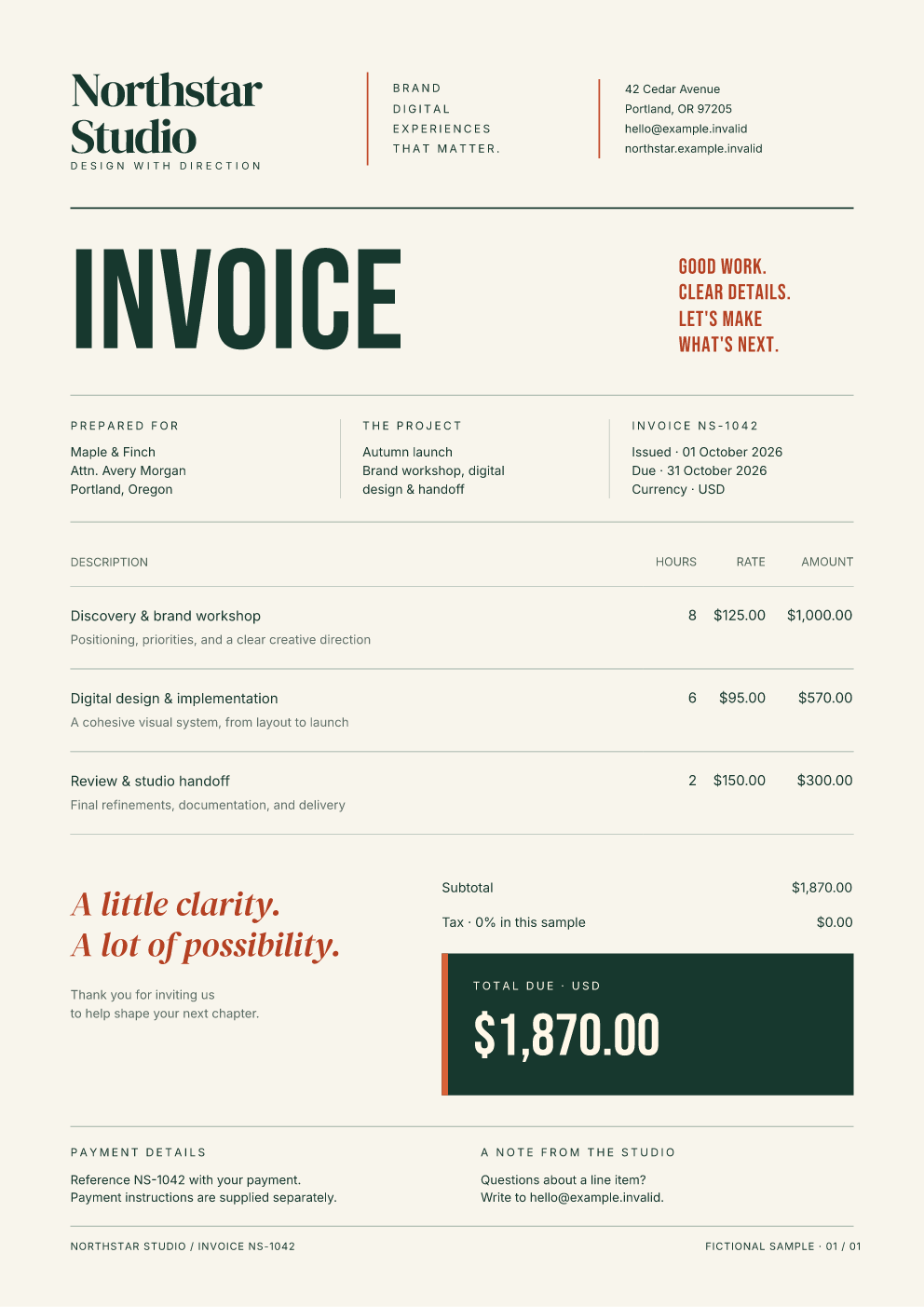
The runnable example uses these same invoice sources and the bundled Inter, DM Serif Display, and Bebas Neue families. It escapes the customer name before inserting it into HTML. The data is fictional.
From a source checkout, after the build steps below:
npm run exampleOpen output/invoice/invoice.pdf and page-1.png. The three-page report
sources demonstrate pagination, tables, and vector artwork.
Use it in Next.js
For a web application, start with the Next.js PDF download example. It includes a designed invoice, an App Router handler, production build settings for the worker and bundled assets, and a standalone-server verification script. The route bounds rendering and returns private PDF attachments from fictional data; connect your own authenticated record lookup when adapting it.
Use it in a browser
For React, use the React and TypeScript starter with automatic previews, editable templates, cancellation, and a reusable component-lifecycle hook.
Start with the complete browser application: editable HTML/CSS, invoice and report designs, previews, cancellation, and PDF downloads.
Copy the browser runtime into your application's static directory:
npx fullbleed-browser-assets public/fullbleedThen use the separate browser entry from a page served over HTTPS or localhost:
import { createRenderer } from 'fullbleed/browser';

const renderer = createRenderer({ assetBaseUrl: '/fullbleed/' });
const result = await renderer.renderPdf({
  html: '<h1>Your document</h1>',
  css: 'h1 { color: #175c52 }',
  maxPages: 20,
});
const pdf = new Blob([result.pdf], { type: 'application/pdf' });
The result uses browser byte arrays. The worker loads the shipped engine/fonts from your site and renders locally, with cancellation, deadlines and structured errors. See the browser API, download example and hosting requirements.
Fonts and assets
Supply file bytes explicitly. Additional fonts are registered alongside the
bundled fonts; use their actual family names in CSS. Asset names are relative to
the virtual assets/ directory:
import { readFile } from 'node:fs/promises';
import { renderPdf } from 'fullbleed';

const result = await renderPdf({
  html: '<img src="assets/brand/logo.svg"><h1>Quarterly report</h1>',
  css: "body { font-family: 'Your Font Family', Inter } img { width: 80pt }",
  fonts: [await readFile('your-font.ttf')],
  assets: { 'brand/logo.svg': await readFile('logo.svg') },
});
The WebAssembly engine sees an in-memory filesystem containing the supplied inputs and bundled fonts. It does not fetch remote URLs or read application files. Use the asset map or data URIs for document images. Render and review previews when adapting a template; unsupported CSS or an unavailable asset can affect output.
Use registered font families in CSS. The engine can substitute an unavailable family. Its missing-glyph report checks resolved fonts and is not an exhaustive font-substitution or visual-validation report.
Use bundled or explicitly registered fonts for PNG previews. PDFs using the unembedded built-in Helvetica or Times faces rely on PDF-reader fonts; the Fullbleed preview can omit their text. See the retained inline checks.
API
This section describes the Node entry. The browser entry returns browser byte arrays through a configured renderer; see its API guide.
await renderPdf(options) returns { pdf, previews, pages, missingGlyphs,
engineVersion }. PDF and PNG values are Node Buffer objects. Previews are
generated from the finalized PDF and are empty when disabled.
The report example uses gradient chart fills. Its finalized PDF previews and separate linear, translucent, and hard radial fixtures are checked against the native engine.
| Option | Behavior |
| --- | --- |
| html | Required nonempty HTML string. |
| css | CSS string; defaults to empty. The default Inter rule precedes it. |
| fonts | Additional TrueType font bytes as Uint8Array[] or Buffer[]. |
| assets | Map relative asset names to nonempty byte arrays. |
| previewDpi | 0 disables previews; otherwise an integer from 36 to 300. |
| maxPages | Reject larger documents. Default: 1000. |
| timeoutMs | Deadline including initial engine loading. Default: 30000 ms. |
| signal | An AbortSignal to cancel rendering. |
| isolation | 'worker' (default) or 'process' for a separate Node process per call. |
| allowMissingGlyphs | Default false: reject engine-reported missing glyphs. |
Rendering runs in a dedicated worker. Concurrent calls use separate workers and document state. The returned promise waits for that worker to exit on success, render failure, timeout, or cancellation. Awaiting jobs in sequence therefore does not overlap their worker lifetimes. A timeout or abort starts termination; settlement includes the time needed to stop the worker.
Use isolation: 'process' when a render-process failure should become a rejected
request while the calling application stays running. This mode runs the engine
and its worker in a fresh Node process, and waits for process exit and IPC
disconnection before settling. It requires a host that permits child processes
and adds startup and memory overhead. It does not pool processes or retry jobs.
See the guide and failure checks.
Bound concurrency in a server according to its available memory; each worker's WebAssembly memory has a 512 MiB ceiling. HTML and CSS together are limited to 4,000,000 UTF-8 bytes; supplied fonts and assets together to 64 MiB. Preview images can use substantially more memory than PDF-only rendering.
import { FullbleedError, renderPdf } from 'fullbleed';

try {
  const result = await renderPdf({
    html: '<h1>Monthly statement</h1>',
    maxPages: 20,
    timeoutMs: 10_000,
    isolation: 'process',
    signal: AbortSignal.timeout(8_000),
  });
  // Return result.pdf from your HTTP handler, or write it to your storage.
} catch (error) {
  if (error instanceof FullbleedError) console.error(error.code, error.message);
  else throw error;
}
Error codes include INVALID_INPUT, MISSING_GLYPHS, PAGE_LIMIT, TIMEOUT,
ABORTED, ENGINE_LOAD_FAILED, ENGINE_LIMIT, RENDER_FAILED,
PREVIEW_FAILED, WORKER_FAILED, and PROCESS_FAILED. Process failures may also
include exitCode and signal. Failed or cancelled calls do not return a partial
PDF. Caller-owned asset buffers are copied when a call starts.
This API covers ordinary document generation and previews. It does not expose PDF/A, PDF/UA, PDF/X, template overlays, or compiled VDP. Use the Python or Rust APIs for those workflows and their verification requirements. Unknown options are rejected. Fullbleed uses static HTML/CSS for print layout; it does not execute document JavaScript or reproduce arbitrary browser pages.
Build and verify from source
Contributors need Node.js 22+ and Rust 1.97.0 with the WASI target. The independent PDF checks also use Python with the test-only readers listed below. Package users do not need a compiler or Python. Dependencies are pinned in both lockfiles.
rustup target add wasm32-wasip1
npm ci --ignore-scripts
npm run build
npm test
npm run check:types
npm run verify:native
npm run verify:pack
python -m pip install pypdf==6.19.0 pypdfium2==5.14.0 fonttools==4.65.0 pillow==12.3.0
npm run verify:text
npm run render:fonts
npm run verify:fonts
npm run render:families
npm run verify:families
npm run verify:browser:prepare
python -m pip install -r tools/browser-requirements.txt
python -m playwright install chrome firefox webkit
python tools/check-browser.py --browser chrome --label local
python tools/check-browser.py --browser firefox --label local
python tools/check-browser.py --browser webkit --label local
The build records engine metadata, licenses, and artifact hashes in dist/.
The verification suite renders actual invoices, a three-page report, custom
fonts, and image assets; compares native and WebAssembly PDF/PNG bytes; checks
error recovery; and installs the packed tarball into a separate directory with
spaces in its path. CI exercises Node 22, 24, and 26 on Windows, Linux, and macOS.
Retained release evidence describes the verified fixtures and scope.
Browser CI uses the same packed artifact in Chrome, Firefox and Playwright WebKit,
including actual downloads, finalized previews, asset failures and recovery.
The font check reads PDFs from the isolated tarball installation, checks the
embedded TrueType programs against their source fonts, and compares two
independent text readers. CI also compares text and native/PDFium pixels with
the previous public npm release.
An intermittent process crash observed on Linux with Node 24.21.0 remains under investigation in issue #7. Version 0.1.3 fixes worker shutdown timing, but does not establish that this crash is resolved. Version 0.2.0 adds optional process fault containment; it does not claim to fix the native crash. See the runtime investigation and diagnostic for the observed scope, retained results, and a synthetic reproducer.
License and support
The adapter and Fullbleed engine are MIT licensed. Bundled fonts use SIL OFL 1.1.
The WASI shim is used under its MIT option. Complete notices ship with the package
in dist/THIRD_PARTY_NOTICES.txt and assets/fonts/.
Report reproducible integration bugs in this repository's issues. Include the package and Node versions, platform, minimal synthetic inputs, and error code. For engine behavior and general usage, use the Fullbleed discussion forum.