
gai
v0.5.0
Published
GDB Assembly Informant steps through your assembly code one instruction at a time and diffs register values.

Maintainers
 thlorenz
Readme
gai 
GDB Assembly Informant steps through your assembly code one instruction at a time and diffs register values.
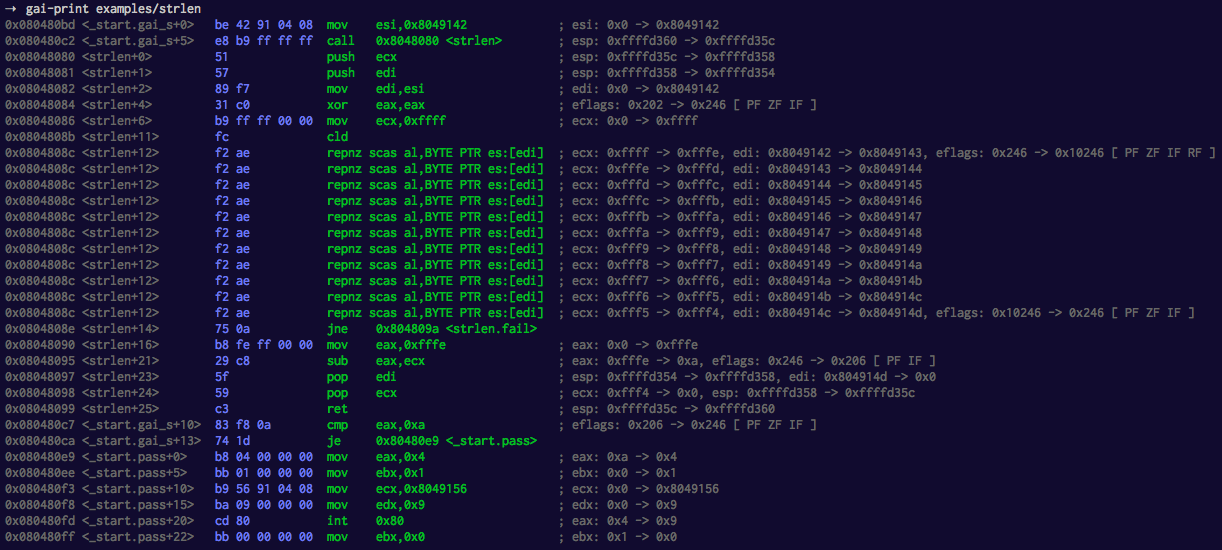
Table of Contents generated with DocToc
Installation
npm install -g gaiUsage
Preparation
Mark the sections of code you want to investigate with start .gai_s and end .gai_e labels.
Without these labels gai won't work.
As an example lets take examples/inc.asm:
global _start
_start:
  nop

.gai_s:                 ; gai instruction printing starts here
  inc eax
  inc eax

  mov eax, 0xffffffff
  inc eax
  inc eax

.gai_e:                 ; gai instruction printing ends here
  mov eax,1
  mov ebx,0
  int 80H
Then assemble the file, i.e. see examples/Makefile.
gai-print
Launch the following command which will batch debug the executable with gdb and then pipe the output through various scripts (see below) to generate the instructions including opcodes and information about modified registers.
gai-print examples/strlengai-json
Works exactly like gai-print except that it outputs the information in JSON format to be parsed by other tools.
This is useful in case you are writing an emulator or similar and want to check it against a real CPU. I'm using it for my visulator project.
gai-json examples/strlen > out.jsonOther scripts
Three more gai-* scripts are in your path, mainly so the main scripts can find them in the npm bin path. They are of
limited use by themselves so read through them to see if you want to run them directly.
Platforms
You need gdb and be able to generate assembly with debug symbols. I've tested on Linux only and know that it isn't working on OSX since it cannot generate the debug symbols.
Additionally ATM gai expects an x86 instruction set. However I'm open for PRs that add support for 64-bit.
Troubleshooting
If something goes wrong, i.e. you get no output, have a look inside the /tmp/gai__gdb_err.txt to see if somehow the
gdb batch debugging failed to complete properly
You can then manually debug or run the following command to just run the gdb batch debug script:
gdb -nx --batch -x gai-gdb -f <your-executable>Examples
In order to play with the examples make sure to have nasm installed and are running on a compatible platform.
Assuming you installed gai and cloned this repo, here is how you'd try the strlen example.
cd gai/examples
make strlen
gai-print strlen
License
GPL3