
game-world-painter-mcp
v0.3.1
Published
MCP server for GameWorld Painter, the layered game world map editor: AI agents (Claude Code, Codex, GitHub Copilot, VS Code, Cursor, Gemini CLI) read, analyze and edit the map open in the app.

Maintainers
 aserbin
Readme
GameWorld Painter MCP server

Lets AI agents — Claude Code, Codex, GitHub Copilot (CLI and VS Code), Cursor, Claude Desktop, Gemini CLI and any other Model Context Protocol client — read and edit the map open in GameWorld Painter. Node.js 18 or newer, no dependencies.
Agent (Claude Code, Codex, Copilot…) ── MCP over stdio or HTTP ──▶ MCP server, 127.0.0.1:38765
MCP server ── tool calls: Server-Sent Events ──▶ GameWorld Painter in the browser
GameWorld Painter ── results: HTTP POST ──▶ MCP server
GameWorld Painter ── autosave ──▶ the project folder (PNG and JSON)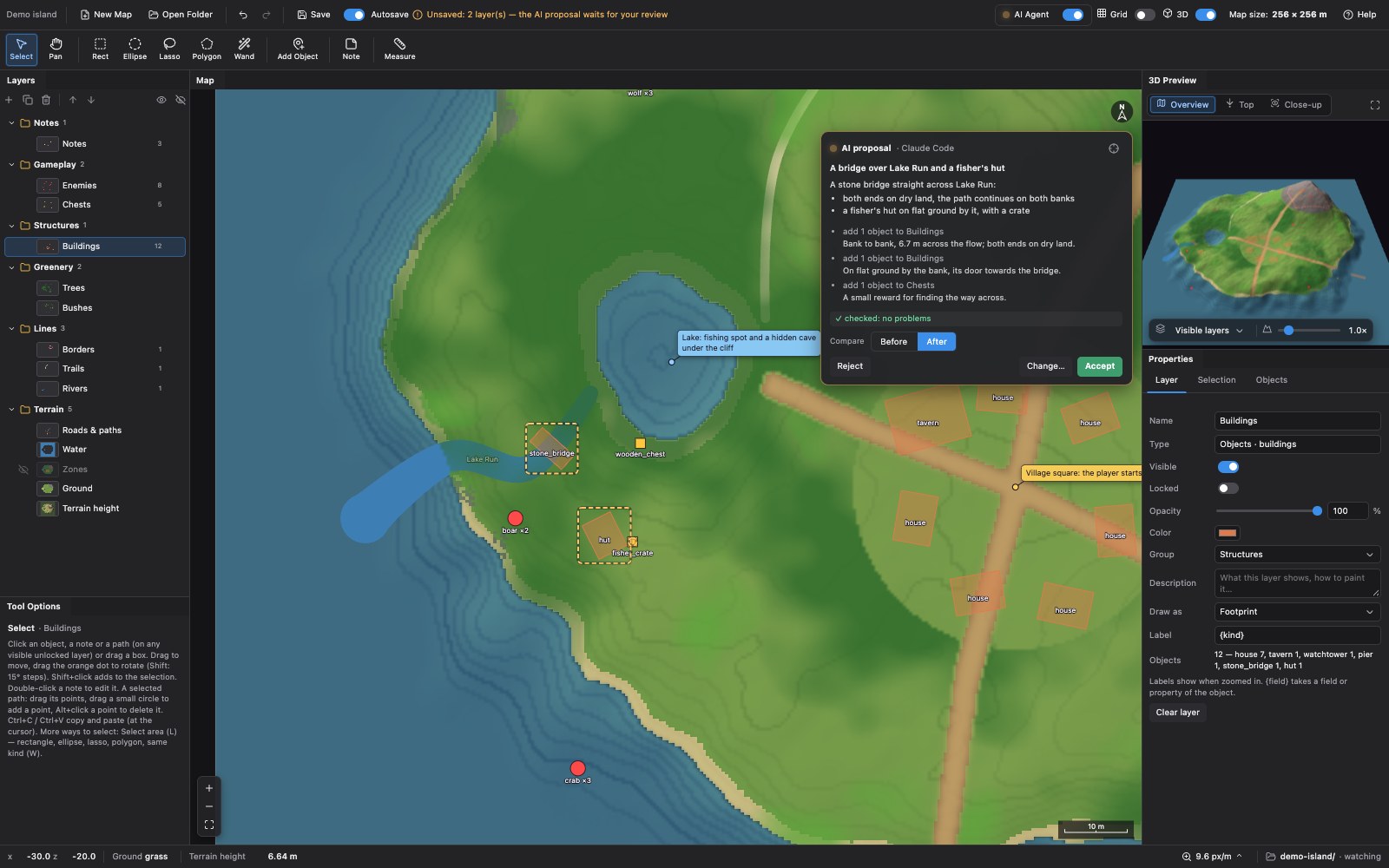
The agent starts the server; the app (with AI Agent turned on in its header) connects to it. The tools run in the page, on the open map: what the agent changes appears at once and is one step of the app's undo.
Set up
Add the server to your agent once — it is the npm package
game-world-painter-mcp: the agent starts it withnpx(Node.js 18 or newer, nothing else to install).npx -y game-world-painter-mcp setupprints these lines:| Agent | | |-------|-| | Claude Code |
claude mcp add --scope user game-world-painter -- npx -y game-world-painter-mcp| | Codex |codex mcp add game-world-painter -- npx -y game-world-painter-mcp| | GitHub Copilot CLI |copilot mcp add game-world-painter -- npx -y game-world-painter-mcp| | Gemini CLI |gemini mcp add --scope user game-world-painter -- npx -y game-world-painter-mcp| | VS Code |.vscode/mcp.json:{"servers": {"game-world-painter": {"type": "stdio", "command": "npx", "args": ["-y", "game-world-painter-mcp"]}}}| | Cursor, Claude Desktop, Windsurf… |{"mcpServers": {"game-world-painter": {"command": "npx", "args": ["-y", "game-world-painter-mcp"]}}}| | Clients configured by URL | runnpx -y game-world-painter-mcp --httpand usehttp://127.0.0.1:38765/mcp|On Windows, if a client cannot start
npx:"command": "cmd", "args": ["/c", "npx", "-y", "game-world-painter-mcp"]. From a clone of the repository:node /path/to/game-world-painter/mcp/server.mjsinstead ofnpx -y game-world-painter-mcp.Open the app, open your map and turn on AI Agent in the header. The LED is amber while the app waits for the server, green when an agent is connected, and pulses while the agent works. Click it for the same setup per agent, the skill, the activity log and the settings.
Optional, recommended: the skill, which teaches agents the workflow —
gh skill install aleserb/game-world-painter game-world-painter, download it from the app (AI Agent → Skill), or copyskills/game-world-painterinto~/.claude/skills/,~/.copilot/skills/,~/.codex/skills/or a repository's.github/skills/. The server also offers it as the MCP resourcegwp://skill.
What the agent can do
| Tool | |
|------|-|
| get_map_info | Start here: unit, bounds, every layer with what it holds, zones, what the user looks at |
| get_user_context | The selected area and items, the active layer, the view, the cursor |
| get_project_path | The full path of the map's folder on this computer and of every layer file, what the app has not saved |
| open_map, create_map | Open a map by its folder path, or make a new one there (bounds, unit, cell size, a set of layers); opens the app in the browser when none is connected |
| render_map | An image of the map (north up) with a coordinate grid; a highlight |
| describe_region | Everything in a region: size, mask coverage, class shares, heights and slopes, items by kind |
| read_layer | A coarse grid of a mask, categories or height layer |
| find_items | Objects, notes, paths with filters; distances to other layers, height, slope, zone |
| analyze_items | Spacing, too-close pairs, groups, the largest gaps |
| find_spots | Open (exposed), enclosed (hidden), high (viewpoints), low, flat, steep, empty, far from / near to layers |
| analyze_walkability | Walkable ground, isolated pockets, narrow passages, unreachable items |
| find_route | A walking route around obstacles, preferring roads, away from danger; can add it as a path |
| scatter_items | Many objects placed naturally: spacing, count, density from a mask, distances to keep, groups, random props |
| add_items, update_items, delete_items | Exact edits of objects, notes and paths (deletion can ask the user); objects by their center and yaw, by their two ends a, b, or towards a point |
| find_crossing | Where to cross water: the narrowest places, with the bank points a, b for a bridge straight across the flow |
| check_change | The agent sees its change before the user does: BEFORE / AFTER images, what changed, checks of every placed object |
| paint_layer | Masks (percent) and categories (classes) over a region, with a soft edge and noise |
| edit_terrain | Raise, lower, flatten, smooth, slope (from a place to another), noise |
| create_layer, update_layer | New layers; names, groups, colors, visibility, classes |
| show_on_map | Moves the user's view to something and outlines it, with a message; can select it |
| undo | Undoes the agent's latest changes (in review mode: withdraws its proposal) |
| begin_change, end_change | Group several calls into one change with a title and a summary: one undo step, or one proposal in review mode |
| wait_for_review | Review mode: wait for the user's decision on a proposal |
The changing tools take a comment: the agent's words on the change (what and why), shown to the user with it.
get_user_context tells what the user selected — objects (with Select or the Select area tools: rectangle, ellipse,
lasso, polygon, same kind) and areas — so "these" and "here" mean something.
Most tools take a region: {"area":"selection"}, {"items":"selection"}, {"zone":"village"}, {"layer":"trees","min":50},
{"near":"roads","distance":8}, {"rect":[x0,z0,x1,z1]}, {"slope":{"max":25}}, … combined with
{"all":[…]}, {"any":[…]}, {"not":…} — see the skill's reference.
The server also offers the skill and the project format as MCP resources
(gwp://skill, gwp://project-format).
How it works
- Agents start
server.mjsand speak MCP over stdio. One process owns the port (38765): the app connects there. When a second agent starts another process, it finds the port taken by a GameWorld Painter server and relays its calls through it; when the first one exits, the next takes the port over and the app reconnects. - The app holds a Server-Sent Events stream (
/app/events) and posts results (/app/result). One tab at a time (the latest). - Protocol: dual-era MCP. Legacy clients get the
initializehandshake (2024-11-05 to 2025-11-25). Modern requests carry_metaper request (2026-07-28, withserver/discover). Streamable HTTP at/mcpserves both: sessions for legacy clients, stateless with header checks for modern ones. JSON-RPC batches are accepted. - Maps by path (
open_map,create_map): browsers cannot open a folder from a path, so the app reads and writes such a map through this server (/fs/stat,/fs/read,/fs/write— atomic,/fs/remove). The server serves only folders the agent opened or created, only to the connected app tab (its session), never outside the folder (no.., no links out). When no app is connected it opens the default browser athttps://aleserb.github.io/game-world-painter/?mcp=<port>&map=<path>(the app on that link turns AI Agent on with this local server and waits for the map). After a reload the app opens the map again once the server is connected. - Self-check: the changing calls return
checksfor the objects they placed — overlaps, objects in water or on roads, uneven ground, bridges (both ends on dry land, over the water, about 90° to the flow) — andcheck_changeadds two images of the place (BEFORE and AFTER, the agent's objects outlined and labeled, problems in red).end_changeruns the checks and keeps the change open while problems are left (unless the agent givesignore_problemswith a reason); in review mode a single call with problems is not shown for review. The card shows the result of the self-check. Bridges and other crossings are walkable forfind_routeandanalyze_walkability. - Changes on a card:
begin_change…end_changegroups calls; a call alone is a change too. The card at the top right of the map (the user can drag it elsewhere) shows the agent's title, description or summary, and each step with itscomment(lines,-lists,**bold**,`code`). - Review mode (AI Agent → Settings → Review the agent's changes, on by default): a change is applied but held — shown on the map
with the card (title, what changed, Before / After), not saved, its layers locked for the user — until the user
clicks Accept (kept and saved), Change… (undone; their comment goes to the agent as
feedback) or Reject (undone). The changing call waits for the decision up to 45 s (agents such as Codex give up on a call after 60 s); after that it returnspendingand the agent callswait_for_review. An accepted proposal is one undo step. With review mode off, changes apply at once; a group is one undo step, and the card shows it with Undo for a while. - Undo: each tool call that changes the map is one step named “AI: …” in the app (a group: one step named after it). The agent's
undoonly undoes its own latest steps. - The folder on disk (
get_project_path): browsers do not reveal paths, so the app sends what identifies its folder (the name, a SHA-256 ofmetadata.json, the sizes and dates of the layer files) and the server finds it on disk. It looks in the path the app remembers, the agent's workspace roots (MCProots/list), its working directory, the folders inGWP_PROJECT_DIRS, then the home folder (GWP_SEARCH_HOME=0turns that off; on macOS Desktop, Documents and Downloads come last, as macOS may ask before they are read). Tool and system folders (node_modules,.git,Library…) are skipped; the search stops after 8 s. The app remembers the path and shows it (the folder in the bottom bar, AI Agent → Settings, where the user can also type it).
Security
- The server listens on 127.0.0.1 only, and refuses a
Hostthat is not a loopback name (DNS rebinding). - Browsers may connect only from allowed origins: the hosted app (
https://aleserb.github.io) and pages onlocalhost/127.0.0.1. Add others with--allow-origin <origin>(nullfor a page opened from the disk). The relay endpoints refuse browsers entirely. - In the app: AI Agent is off until the user turns it on. Settings let the agent only read, and ask the user before it deletes. Locked layers stay locked.
Options
npx -y game-world-painter-mcp [--port 38765] [--http | --stdio] [--allow-origin <origin>]… [--timeout 120] [--quiet]
npx -y game-world-painter-mcp setup        print the setup for each agent
| Option | |
|--------|-|
| --port | The port the app and the agents meet at (env GWP_MCP_PORT). Change it in the app too (Settings). |
| --http | Run alone, with the Streamable HTTP endpoint /mcp (the default when started in a terminal) |
| --stdio | MCP over stdin / stdout (the default when an agent starts it) |
| --allow-origin | Another web origin allowed to connect as the app (repeat) |
| --timeout | Seconds a tool call may take in the app (deletions that wait for the user: 10×) |
| --app-url | The app opened for open_map / create_map when none is connected (default the hosted one, or the last one that connected; env GWP_APP_URL) |
| --no-browser | Never open a browser: the tool returns the link instead (env GWP_OPEN_BROWSER=0) |
| --quiet | No log on stderr (the log never goes to stdout) |
Environment: GWP_MCP_PORT (the port), GWP_PROJECT_DIRS (folders to search for the map's folder, separated by
: or ; on Windows), GWP_SEARCH_HOME=0 (do not search the home folder).
Troubleshooting
- The LED stays amber: no server at the app's URL. Agents start it when they start; check that the agent lists
the server (
/mcpin Claude Code and Copilot CLI) or runnpx -y game-world-painter-mcpin a terminal. - Chrome asks to “access other apps and services on this device” (Local Network Access): allow it — the page talks to the server on this computer.
- “GameWorld Painter is not connected” in the agent: turn on AI Agent in the app and keep the tab open.
- Port in use by another program:
--port 38766in the agent's command and the same port in the app. - A page opened from the disk (
file://): start the server with--allow-origin null, or serve the app over HTTP. - An old version keeps starting:
npxcaches packages;npx -y game-world-painter-mcp@latest(or pin a version, e.g.[email protected]) in the agent's command.
Development
node --test mcp/test/*.test.mjs     the protocol, the bridge (with a fake app), origins, relays, HTTP, the folder search, the package
node tests/agent.mjs                the app in headless Chrome + the server + every tool (Node 22+, Chrome)
The tools are declared in lib/tools.mjs and implemented in the app (js/agent-*.js).
The package bundles the skill, the project format and the license when it is packed (scripts/bundle.mjs).
Releasing: raise the version in mcp/package.json and write the changelog, push to main — the npm workflow
tests the package, publishes it to npm with provenance (trusted publishing, no tokens), tags the commit and makes a
GitHub release.