
gantt-csv
v0.3.0
Published
Generate Gantt charts in SVG from simple CSV files instantly.


Readme
gantt-csv
Generate Gantt charts in SVG from simple CSV files instantly.
Installation & Quick Start
You can run gantt-csv either by installing it globally or directly using npx.
Option A: Install globally (Recommended for frequent use)
npm install -g gantt-csv
gantt-csv project01.csv
Option B: Run instantly via npx (No installation required)
npx gantt-csv project01.csvEither command processes your timeline and outputs the generated SVG file into the same directory as the source CSV file (e.g., project01.svg).
Usage Examples
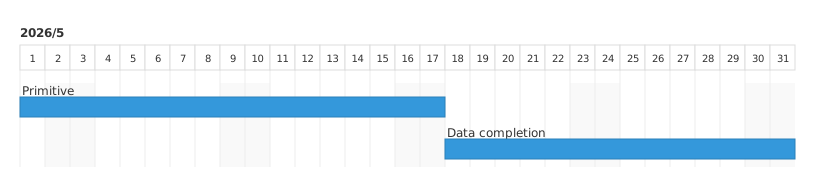
Example 1: Basic Gantt Chart
Create a simple CSV file with standard headers (title, start, end).
Input (project01.csv)
title,start,end
Primitive,2026-05-01,2026-05-17
Data completion,2026-05-18,2026-05-31
Run command
gantt-csv project01.csvThis outputs a standard blue-themed timeline chart named project01.svg in the same directory.
Preview
Example 2: Enhanced Chart with Row Attributes
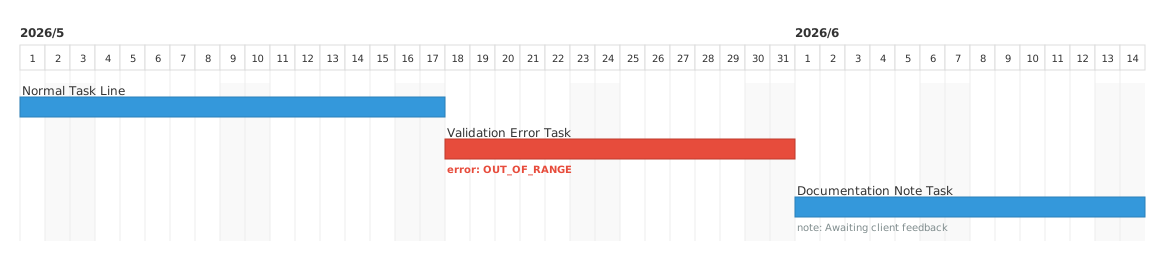
By adding gantt-csv as the very first column, you can include extra row attributes such as validation errors or summary notes directly in your chart.
Input (project02.csv)
gantt-csv,title,start,end
,Normal Task Line,2026-05-01,2026-05-17
error:[EXAMPLE_ERROR],Add task caption,2026-05-18,2026-05-31
note:* Current plan,Data completion,2026-06-01,2026-06-14
Run command
gantt-csv project02.csvThis generates project02.svg, dynamically rendering status indicators and text captions directly beneath the corresponding task lines.
Preview
Example 3: Configuration Area
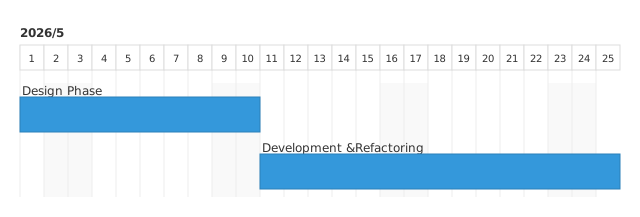
You can configure chart parameters (like bar-height and day-width) directly at the top of your CSV file before the task rows by using the gantt-csv: on block.
Input (project03.csv)
gantt-csv: on
bar-height: 35
day-width: 24
title,start,end
Design Phase,2026-05-01,2026-05-10
"Development &
Refactoring",2026-05-11,2026-05-25
**Preview**
## Row Attribute Indicators
When the `gantt-csv` column is included, the following row indicators are supported:
* **Normal Row (Leave Empty)**: Renders a standard task bar.
* **Error State (`error:CODE_NAME`)**: Highlights the timeline bar in red and appends your specific error code beneath the bar.
* **Note State (`note:Your text`)**: Appends a supplementary note text caption beneath the timeline bar and automatically extends the row height.
## Configuration & Customization
For advanced settings, customizing line heights, or embedding custom CSS classes, please refer to our documentation and examples.
## Feedback & Bug Reports
This application is developed as a personal project with limited maintenance time.
If you encounter any bugs, please report them to our official GitHub Issue tracker:
👉 [https://github.com/Rj40x40/gantt-csv/issues](https://github.com/Rj40x40/gantt-csv/issues)