
gantt-lib
v0.146.0
Published
React scheduling UI library for Gantt charts, resource planners, and table-matrix views


Readme
gantt-lib

gantt-lib is a React/Next.js library for planning interfaces. It covers classic Gantt timelines, resource planning screens, and period-based table-matrix views such as finance plans, budgets, and plan-vs-actual layouts.
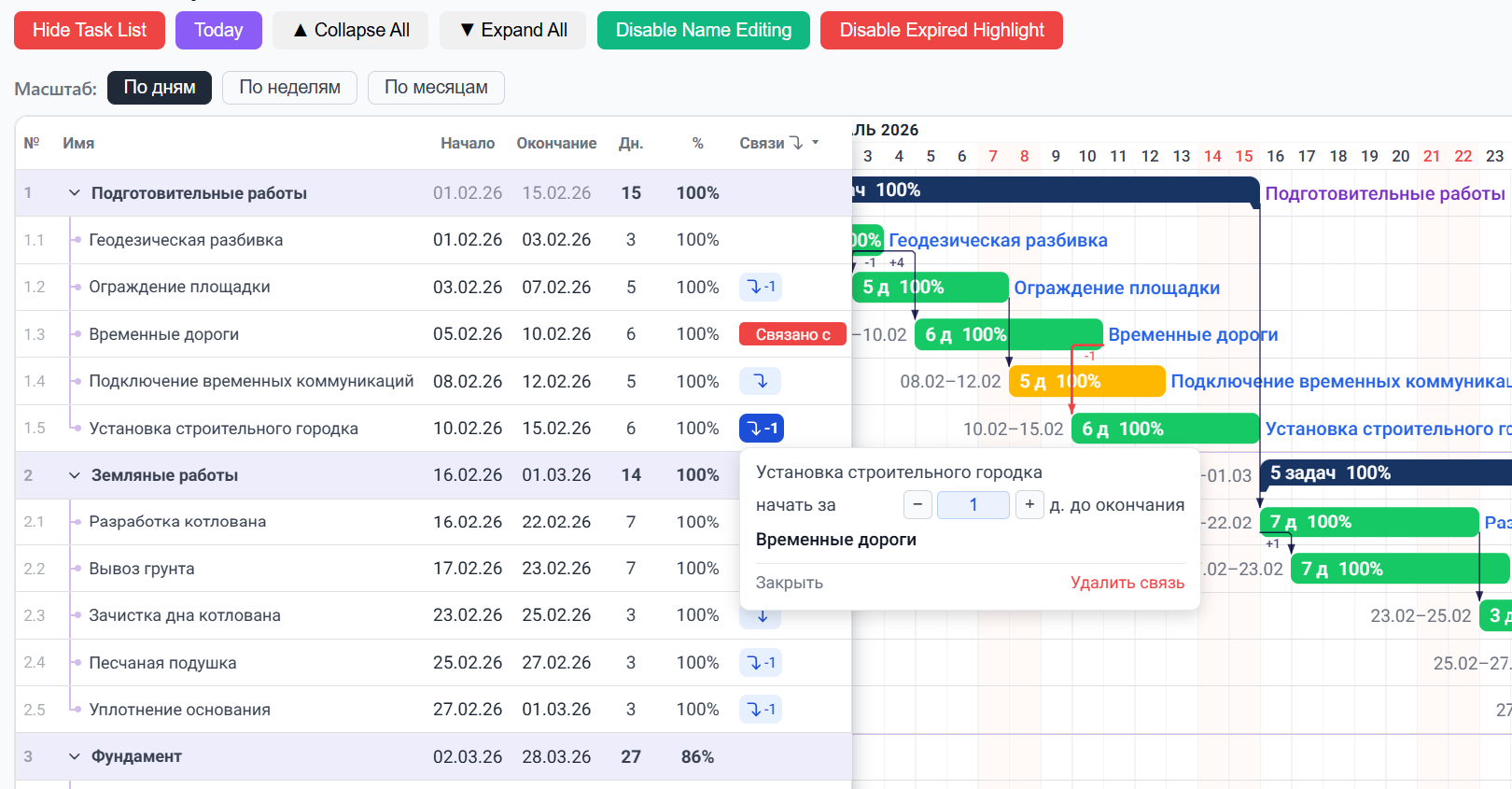
Project Timeline
Classic Gantt-style planning for phases, tasks, dates, and dependencies.
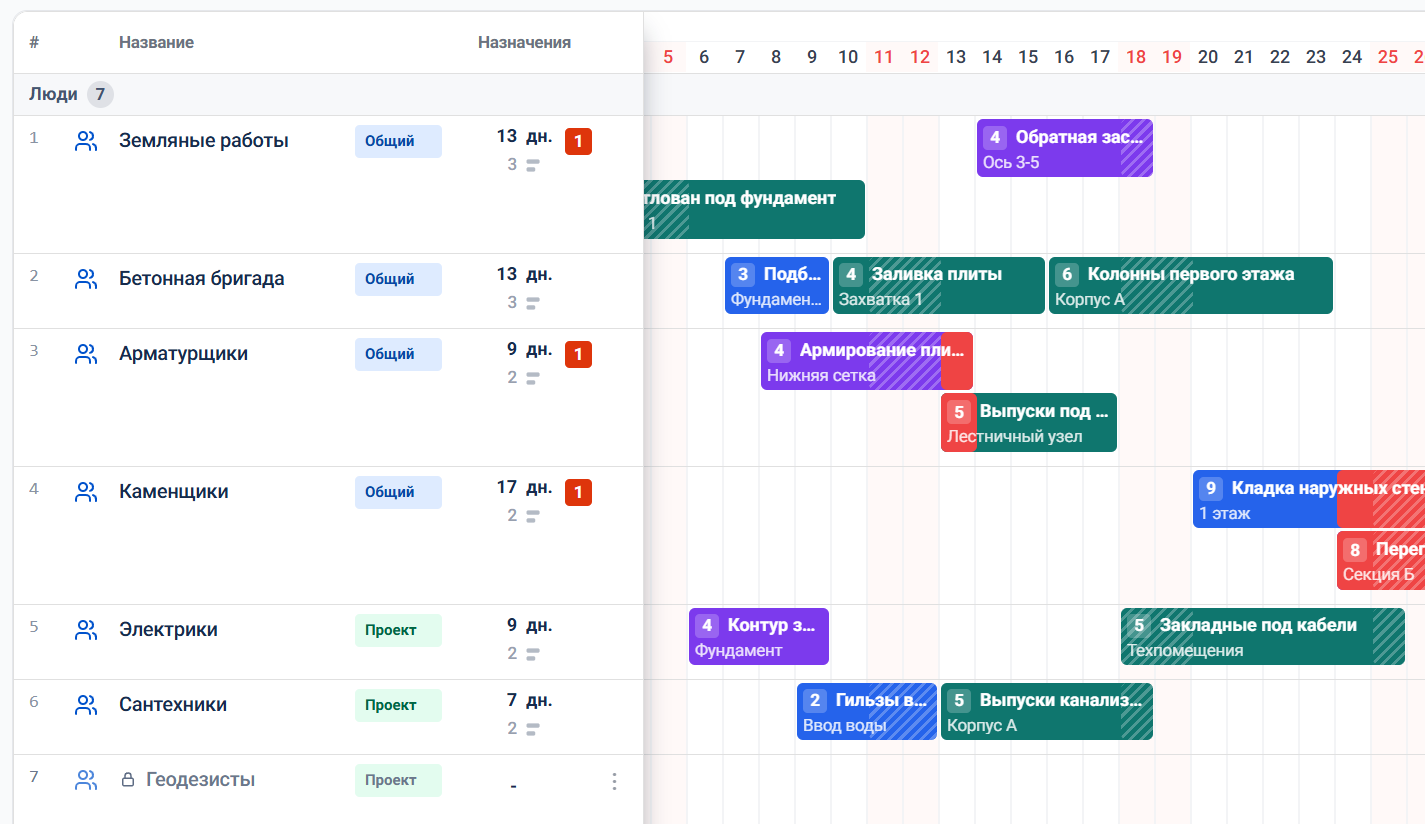
Resource Planner
Dedicated scheduling mode for people, equipment, materials, rooms, and other resources with load visibility and reassignment flows.
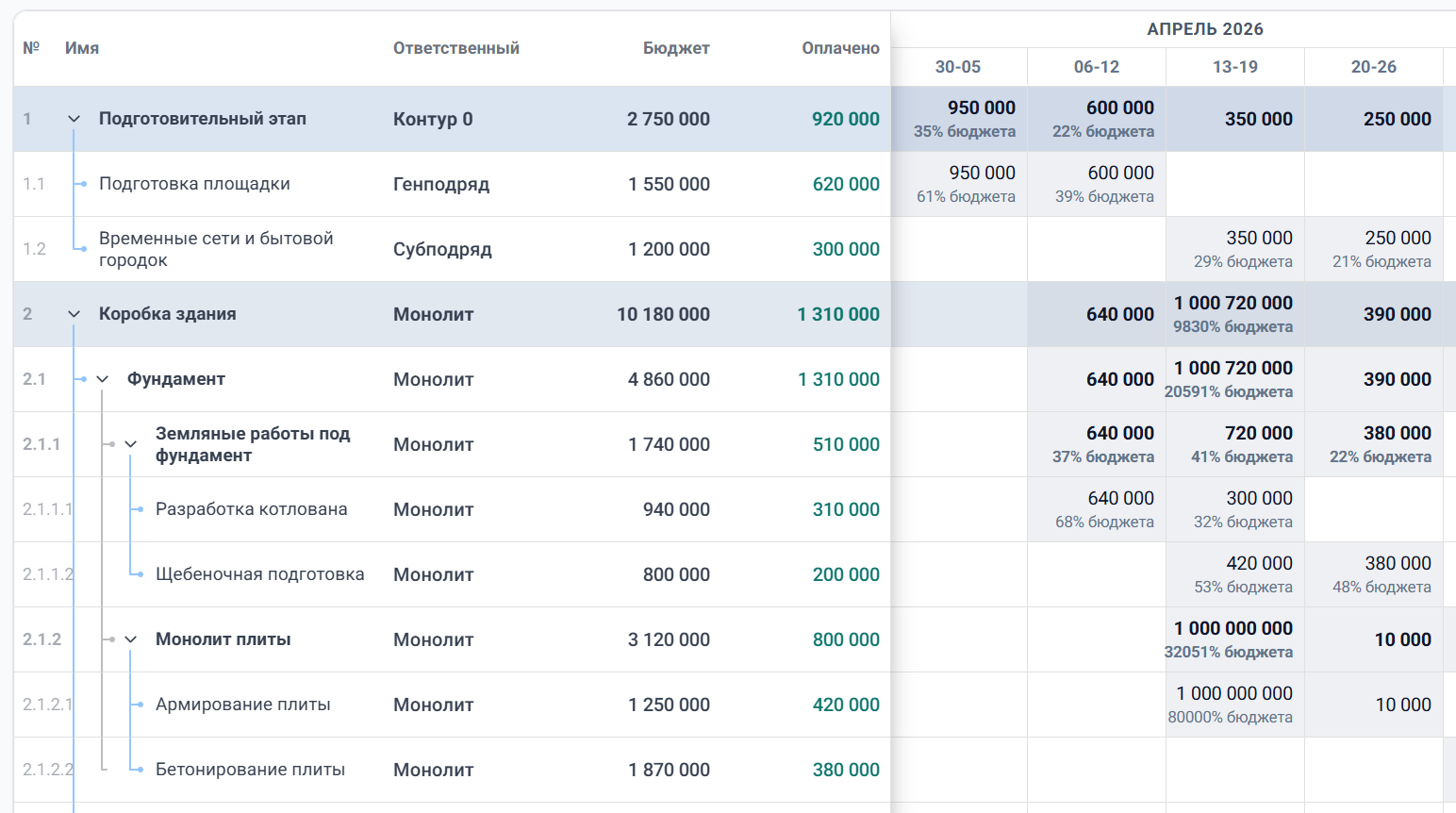
Finance Matrix
Period-based table view for budgets, plan-vs-actual, KPIs, and other data-matrix scenarios.
Use it for project timelines, delivery planning, resource allocation, capacity views, and spreadsheet-like matrices that stay aligned with the same left-side task list and time context.
Production-style example: ai.getgantt.ru
Features
- 📊 Classic Gantt chart mode with tasks, phases, hierarchy, and progress
- ✋ Drag-and-drop schedule editing for moving and resizing timeline bars
- 🔗 Task dependencies and cascade scheduling for linked plans
- 🗓️ Calendar and business-day modes with weekend and custom-day support
- 📋 Integrated left-side task list with configurable and hideable columns
- 🔎 Task filtering, search, and focus flows for large schedules
- 👥 Resource planner mode for people, equipment, rooms, crews, and assignments
- ↔️ Resource reassignment and date moves directly on the calendar
- ⚠️ Resource grouping and conflict-oriented workflows for capacity views
- 💰 Table matrix mode for finance plans, budgets, KPIs, and other period-based data views
- 🎨 Customizable styling via CSS variables
- 📦 Tree-shakeable ESM + CJS builds with TypeScript types included
Installation
npm install gantt-libQuick Start
import { GanttChart, type Task } from "gantt-lib";
import "gantt-lib/styles.css";
import { useState } from "react";

const initialTasks: Task[] = [
  {
    id: "1",
    name: "Project Kickoff",
    startDate: "2026-02-01",
    endDate: "2026-02-05",
    color: "#10b981",
  },
  {
    id: "2",
    name: "Development",
    startDate: "2026-02-06",
    endDate: "2026-02-20",
  },
];

export default function App() {
  const [tasks, setTasks] = useState(initialTasks);

  return (
    <GanttChart
      tasks={tasks}
      showTaskList
      dayWidth={30}
      rowHeight={36}
      onTasksChange={(changedTasks) => {
        setTasks((prev) => {
          const byId = new Map(prev.map((task) => [task.id, task]));
          for (const task of changedTasks) {
            byId.set(task.id, task);
          }
          return [...byId.values()];
        });
      }}
    />
  );
}
Composite Tasks (Gantt Accordion)
Set composite: true on a task and link its detail rows with parentId. The
composite bar spans the dates of its children. Hovering the bar previews their
mini-bars; clicking the bar or the dedicated disclosure button in the task list
expands compact detail rows in both the table and Gantt chart. Clicking the task
name keeps its normal select/scroll behavior. Preview mini-bars and subtle
detail-row fills use the composite task color, and row hover stays synchronized
between the table and chart. Dragging the composite task moves the group;
dragging a child edits that child schedule.
const tasks: Task[] = [
  { id: "flooring", name: "Flooring", composite: true, color: "#0f9caf", startDate: "2026-10-01", endDate: "2026-10-10" },
  { id: "floor-1", parentId: "flooring", name: "Floor 1", startDate: "2026-10-01", endDate: "2026-10-03" },
  { id: "floor-2", parentId: "flooring", name: "Floor 2", startDate: "2026-10-05", endDate: "2026-10-10" },
];
When using controlled collapsedParentIds, provide onToggleCollapse to update
the collapsed parent IDs in application state.
Row Activities (Flow Line)
Give a row activities to turn it into a multi-bar lane — several works inside
one row, packed into sub-lanes (e.g. finishing works on one floor). Sequential
works share a lane; concurrent ones stack below and the row grows to fit the
busiest day. Activities are plain bars: drag to move, drag an edge to resize,
both snap to days. The hover tooltip is a narrow one-liner pinned above the bar:
the row (floor) name, a middle dot, then the work name — e.g. Floor 12 ·
Wallpaper; there is no native title. No hierarchy, dependencies, or
per-activity progress — works in the default gantt mode only.
Set activityChain: true to enable the ОН-conveyor (finish-to-start chain):
inside the row every work follows the previous one, and identical works (same
id or name) of consecutive chained rows are linked as well, so dragging one
work pulls the whole conveyor below — live, while the pointer moves, like every
other bar in the chart — the classic line-of-balance flow.
Consecutive works of a lane are linked: a plain gap is drawn as a horizontal
arrow with the lag («+N») at its head, while overlapping works (or works in
different lanes) get the standard orthogonal Gantt connector, routed down when
the successor drops to a lower lane. Turn links and lag labels off with
showActivityLinks and showActivityLag.
Click-activation is opt-in via activityClickToDrag: the first click arms a
work (a plain drag pans the canvas) and only the armed work is dragged.
activityActivationMode picks the activation visual — 'none' (default),
'dim' (other work types fade) or 'highlight' (the chain of the same work,
matched by id or name across rows, is outlined). Appearance is tuned with
--gantt-activity-dim-opacity, --gantt-activity-active-outline,
--gantt-activity-chain-outline, --gantt-activity-tip-bg and
--gantt-activity-tip-color.
The tooltip header (row · work) is fixed; extend it with declarative
tooltipFields on the activity (label–value rows, any React node as the value)
and/or the activityTooltip(context) render prop, whose context carries
{ task, activity, startDate, endDate, durationDays } — use it to show dates,
duration, crew, anything.
Two conveyor modes are available via activityChain. true — rigid: dragging a
work translates the whole downstream chain by the same delta. 'push' —
выталкивание (ASAP): when a work moves earlier the downstream gaps fill in
immediately; when it moves later, successors stay put (the gap stretches) until
the predecessor's end crosses their start — then they get pushed. An activity's
lag (days) sets a constant gap before its start (e.g. technological curing):
both fill and push keep «predecessor end + lag» exactly. The lag belongs to the
same-floor sequence only — the vertical «same work on the floor above» link
carries no lag. Starts are clamped so
a dragged work cannot violate its own incoming links. Gaps wider than zero are
drawn as horizontal arrows between consecutive works of one lane.
In 'push' mode the clamp is live and visible: the bar physically stops at the
binding predecessor instead of snapping back on drop, the blocking work gets a
red outline, and the dragged bar shows a stop edge with a «Блок: … · зазор N д»
line in the tooltip. The binding gap is labelled «+N» at the arrow head in the
dependency-line colour, matching the dependency lag labels.
const tasks: Task[] = [
  {
    id: "floor-12",
    name: "Floor 12",
    startDate: "2026-03-24",
    endDate: "2026-04-02",
    activityChain: true,
    activities: [
      { id: "screed", name: "Screed", startDate: "2026-03-24", endDate: "2026-03-26", color: "#8b5cf6" },
      { id: "wallpaper", name: "Wallpaper", startDate: "2026-03-27", endDate: "2026-03-30", color: "#f59e0b" },
      {
        id: "doors", name: "Doors", startDate: "2026-03-31", endDate: "2026-04-01", color: "#10b981",
        lag: 1, // constant gap (days) before this work starts — same-row chain only
        tooltipFields: [{ label: "Contractor", value: "SK Stroy" }],
      },
    ],
  },
];
Resource Planner Mode
Use mode="resource-planner" when the primary rows are people, equipment, rooms, or other resources instead of tasks. Omitted mode still renders the default task Gantt chart.
import {
  GanttChart,
  ResourceTimelineChart,
  type ResourceTimelineResource,
} from "gantt-lib";
import "gantt-lib/styles.css";

const resources: ResourceTimelineResource[] = [
  {
    id: "designer",
    name: "Designer",
    items: [
      {
        id: "assignment-1",
        resourceId: "designer",
        title: "Landing page",
        subtitle: "Client A",
        startDate: "2026-04-01",
        endDate: "2026-04-03",
        color: "#2563eb",
      },
    ],
  },
];

export default function Planner() {
  return (
    <GanttChart
      mode="resource-planner"
      resources={resources}
      disableResourceReassignment
      onResourceItemMove={(move) => {
        // Validate authorization/conflicts, then update your resource state.
        console.log(move.itemId, move.fromResourceId, move.toResourceId);
      }}
    />
  );
}
ResourceTimelineChart is also exported for consumers who want the specialized renderer directly. Resource mode does not render task list editing, dependency lines, hierarchy/cascade scheduling, or task reorder behavior.
See the full guide: Resource Planner Mode.
API
GanttChart
Main component that renders the interactive Gantt chart.
| Prop | Type | Default | Description |
| --- | --- | --- | --- |
| tasks | Task[] | required | Array of task rows shown in gantt mode. |
| viewMode | 'day' \| 'week' \| 'month' | 'day' | Time scale mode. |
| dayWidth | number | 40 | Width of one day column in pixels. |
| rowHeight | number | 40 | Height of one task row. |
| skeletonRowCount | number | 0 | Display-only placeholder rows appended below the visible task rows. Useful for streamed generation previews. |
| headerHeight | number | 40 | Height of the time-scale header. |
| containerHeight | number \| string | undefined | Container height in px, %, vh, or auto. |
| showTaskList | boolean | false | Shows the left-side task list. |
| showChart | boolean | true | Hides the chart area when set to false. |
| showTaskDateLabels | boolean | true | Shows the task date range to the left of each task bar. |
| showTaskNames | boolean | true | Shows the task name to the right of each task bar. |
| showBaseline | boolean | false | Renders baselines for tasks with baselineStartDate and baselineEndDate. |
| taskListWidth | number | 660 | Requested width of the task list panel. |
| taskListColumnWidths | TaskListColumnWidthMap | undefined | Width overrides for built-in and custom TaskList columns. |
| businessDays | boolean | true | Uses working days instead of calendar days for duration and drag behavior. |
| disableTaskDrag | boolean | false | Disables drag and resize interactions. |
| onTasksChange | (tasks: Task[]) => void | undefined | Receives only changed tasks. Merge them into your state. |
| enableAutoSchedule | boolean | false | Enables dependency-aware cascade scheduling. |
| disableConstraints | boolean | false | Lets tasks move freely, ignoring dependency rules. |
| onCascade | (tasks: Task[]) => void | undefined | Fires with all shifted tasks after a hard cascade drag. |
| onValidateDependencies | (result: ValidationResult) => void | undefined | Receives cycles, missing references, and constraint violations. |
More props, mode-specific APIs, and examples:
Task
interface Task {
  id: string;
  name: string;
  startDate: string | Date;
  endDate: string | Date;
  baselineStartDate?: string | Date;
  baselineEndDate?: string | Date;
  type?: 'task' | 'milestone';
  color?: string; // Optional bar color (CSS color value)
  progress?: number;
  accepted?: boolean;
  dependencies?: TaskDependency[];
  locked?: boolean;
  divider?: 'top' | 'bottom';
  parentId?: string;
  activities?: TaskActivity[]; // multi-bar lane mode for the row
  activityChain?: boolean | 'push'; // ОН-conveyor: chained dragging; 'push' = ASAP с выталкиванием
  // Gantt props: activityClickToDrag, activityActivationMode, showActivityLinks, showActivityLag, activityTooltip
}
Tasks accept ISO strings or Date objects, but internal calculations are UTC-safe. Milestones use type: 'milestone'. Hierarchy uses parentId. Locked tasks cannot be dragged or edited.
Dependencies
Tasks can have dependencies on predecessor tasks using 4 link types following PM standards:
- FS (Finish-to-Start): Predecessor must finish before successor starts. This is the most common dependency type.
- SS (Start-to-Start): Predecessor and successor start simultaneously.
- FF (Finish-to-Finish): Predecessor and successor finish simultaneously.
- SF (Start-to-Finish): Predecessor must start before successor can finish.
TaskDependency Interface
interface TaskDependency {
  taskId: string;      // ID of predecessor task
  type: 'FS' | 'SS' | 'FF' | 'SF';
  lag?: number;        // Days delay (default: 0); FS lag is clamped to >= 0
}
Lag
- Positive lag: Delays the successor (e.g., lag: 2 means successor starts 2 days after constraint is satisfied)
- Negative lag: Allowed for SS/FF/SF links. FS negative lag is reset to 0 to prevent predecessor/successor overlap.
Example
const tasks: Task[] = [
  {
    id: "1",
    name: "Foundation",
    startDate: "2026-02-01",
    endDate: "2026-02-10",
  },
  {
    id: "2",
    name: "Construction",
    startDate: "2026-02-11",
    endDate: "2026-02-25",
    dependencies: [
      { taskId: "1", type: "FS" }  // Starts after Foundation finishes
    ],
  },
];
Cascade Scheduling
Cascade scheduling automatically shifts dependent tasks when a predecessor task is moved or resized. This ensures dependency relationships remain valid during editing.
- enableAutoSchedule: Enable cascade scheduling by setting this prop to
true - onCascade: Callback that receives all shifted tasks (including the dragged task) when cascade completes
- Hard mode: Dependency constraints are enforced during drag (default). Tasks cannot violate dependencies.
- Soft mode: Set
disableConstraintstotrueto allow violations during editing; lag values are recalculated on completion
Example with cascade scheduling enabled:
<GanttChart
  tasks={tasks}
  enableAutoSchedule={true}
  onCascade={(shiftedTasks) => {
    console.log(`${shiftedTasks.length} tasks were shifted`);
  }}
  onTasksChange={(changedTasks) => {
    // Keep your normal merge handler for non-cascade edits.
    console.log(changedTasks);
  }}
/>
Dependency Examples
Simple FS Dependency
The most common dependency type - successor starts after predecessor finishes:
{
  id: "framing",
  name: "Framing",
  startDate: "2026-02-01",
  endDate: "2026-02-10",
},
{
  id: "roofing",
  name: "Roofing",
  startDate: "2026-02-11",
  endDate: "2026-02-20",
  dependencies: [
    { taskId: "framing", type: "FS" }  // Starts after framing ends
  ],
}
SS with Negative Lag (Overlap)
Start-to-Start dependency allows tasks to overlap. Negative lag pulls the successor start earlier:
{
  id: "plumbing",
  name: "Plumbing",
  startDate: "2026-02-10",
  endDate: "2026-02-20",
  dependencies: [
    { taskId: "framing", type: "SS", lag: -3 }  // Start 3 days before framing ends
  ],
}
Multiple Dependencies
A task can wait for multiple predecessors to complete:
{
  id: "inspection",
  name: "Final Inspection",
  startDate: "2026-02-25",
  endDate: "2026-02-26",
  dependencies: [
    { taskId: "plumbing", type: "FS" },
    { taskId: "electrical", type: "FS" },
    { taskId: "roofing", type: "FF", lag: 2 },  // Finish 2 days after roofing
  ],
}
Mixed Link Types
Different relationship types for complex scheduling:
{
  id: "painting",
  name: "Painting",
  startDate: "2026-02-15",
  endDate: "2026-02-25",
  dependencies: [
    { taskId: "drywall", type: "SS", lag: 2 },      // Start 2 days after drywall starts
    { taskId: "priming", type: "FS" },              // Start after priming finishes
  ],
}
Dependency Validation
The library automatically validates dependencies and detects issues:
- Cycles: Circular dependencies (A -> B -> A) are detected and highlighted in red
- Missing tasks: References to non-existent task IDs are reported
- Constraint violations: When tasks violate their dependencies during drag
Use the onValidateDependencies callback to handle validation results:
<GanttChart
  tasks={tasks}
  onValidateDependencies={(result) => {
    if (!result.isValid) {
      result.errors.forEach(error => {
        console.error(`Task ${error.taskId}: ${error.message}`);
      });
    }
  }}
/>
ValidationResult Interface
interface ValidationResult {
  isValid: boolean;
  errors: DependencyError[];
}

interface DependencyError {
  type: 'cycle' | 'constraint' | 'missing-task';
  taskId: string;
  message: string;
  relatedTaskIds?: string[];
}
Customization
CSS Variables
Override these CSS variables to customize the appearance:
:root {
  /* Grid Colors */
  --gantt-grid-line-color: #e0e0e0;
  --gantt-cell-background: #ffffff;
  --gantt-row-hover-background: #f8f9fa;

  /* Dimensions */
  --gantt-row-height: 30px;
  --gantt-header-height: 40px;
  --gantt-day-width: 30px;

  /* Task Bar Styling */
  --gantt-task-bar-default-color: #3b82f6;
  --gantt-task-bar-text-color: #ffffff;
  --gantt-task-bar-border-radius: 4px;
  --gantt-task-bar-height: 24px;

  /* Progress Bar */
  --gantt-progress-color: rgba(0, 0, 0, 0.2); /* In-progress overlay */
  --gantt-progress-completed: #fbbf24; /* 100% but not accepted */
  --gantt-progress-accepted: #22c55e; /* 100% and accepted */

  /* Today Indicator */
  --gantt-today-indicator-color: rgba(255, 0, 0, 0.2);
  --gantt-today-indicator-width: 2px;

  /* Calendar Grid - Weekend */
  --gantt-weekend-background: #fff9f8;
  --gantt-weekend-border: #fca5a5;

  /* Calendar Grid - Separators */
  --gantt-month-separator-width: 2px;
  --gantt-month-separator-color: #a1a1a1;
  --gantt-week-separator-width: 1px;
  --gantt-week-separator-color: #f3f4f6;
  --gantt-day-line-width: 1px;
  --gantt-day-line-color: #f3f4f6;
}
Example: Dark Theme
:root {
  --gantt-cell-background: #1f2937;
  --gantt-grid-line-color: #374151;
  --gantt-task-bar-default-color: #3b82f6;
  --gantt-weekend-background: #374151;
}
Peer Dependencies
react>= 18react-dom>= 18
Dependencies
date-fns^4.1.0
License
MIT
GitHub
https://github.com/simon100500/gantt-lib
Explicit activity dependencies
activityDependencies defines the visual activity graph using host task IDs and activity IDs (activity IDs may repeat in different hosts). It uses the same native dependency renderer as ordinary Gantt tasks. Supplying a graph, including an empty array, replaces inferred links between consecutive activities. It does not change the scheduling policy; the host owns the activity dates.
<GanttChart
  tasks={floorRows}
  activityDependencies={[{
    predecessorTaskId: 'floor-1', predecessorActivityId: 'walls',
    successorTaskId: 'floor-2', successorActivityId: 'walls',
    type: 'FS', lag: 0,
  }]}
  showActivityLinks
  showActivityLag
/>
All four dependency types (FS, SS, FF, SF), signed lags, cross-row links, packed lanes and filtered/virtualized rows are supported. showActivityLinks={false} hides the graph; showActivityLag={false} hides its lag labels.
To control which links remain visible while a chain is active, pass activityDependencyHighlight. The selection uses host-scoped identities; mode is chain (default), chain-incoming, chain-outgoing, or chain-all. Omit the prop when deselecting to restore all links.
activityDependencyHighlight={{
  activities: [{taskId: 'floor-1', activityId: 'walls'}, {taskId: 'floor-2', activityId: 'walls'}],
  mode: 'chain-incoming',
}}
Hidden system dependencies
Set TaskDependency.hidden to true to omit its arrow, predecessor chip and print label. The full dependency remains available to validation, drag constraints and cascading; this is a presentation flag, not a scheduling switch.
Consumer-owned task controls (0.145.0)
Task callbacks no longer add implicit menu items or row buttons. taskListMenuCommands
continues to render explicitly configured commands (scope, visibility, disabled state,
icons, dividers and close behavior). An empty command list produces no menu trigger.
enableAddTask now defaults to false; set it to true with onAdd to show the footer.
Use renderTaskListActions(context) for arbitrary row buttons and
renderTaskListMenu(context, commands) to replace or compose the entire menu.
Return null to omit either surface for a row. hideTaskListRowActions suppresses
both slots and commands. Context contains task, isParent, canPromote,
canDemote, closeMenu, and optional insertAfter, promote, demote, duplicate,
delete, ungroup operations. Unsupported operations are undefined.
The library retains scheduling, hierarchy and inline-insert behavior; the consumer
owns labels, icons, colors, menu composition and business actions.
<GanttChart tasks={tasks} showTaskList onTasksChange={setChangedTasks}
  onAdd={addTask} onInsertAfter={insertTask} onDelete={deleteTask}
  enableAddTask
  renderTaskListActions={({ insertAfter, promote, demote }) => <>
    {insertAfter && <button onClick={insertAfter}>+</button>}
    {promote && <button onClick={promote}>Promote</button>}
    {demote && <button onClick={demote}>Demote</button>}
  </>}
  renderTaskListMenu={({ task, delete: remove, closeMenu }, commands) => <>
    {commands}
    {remove && <button onClick={() => { closeMenu(); remove(); }}>Delete {task.name}</button>}
  </>}
/>
Migrate color selection into the application, emitting changed task copies through
onTasksChange. To preserve the previous parent-color behavior, include descendants.
Do not mutate the context task. Use the optional operation callbacks to preserve the
library's descendant deletion, duplication and hierarchy scheduling semantics.