
gatsby-plugin-static-page-modal
v1.0.4
Published
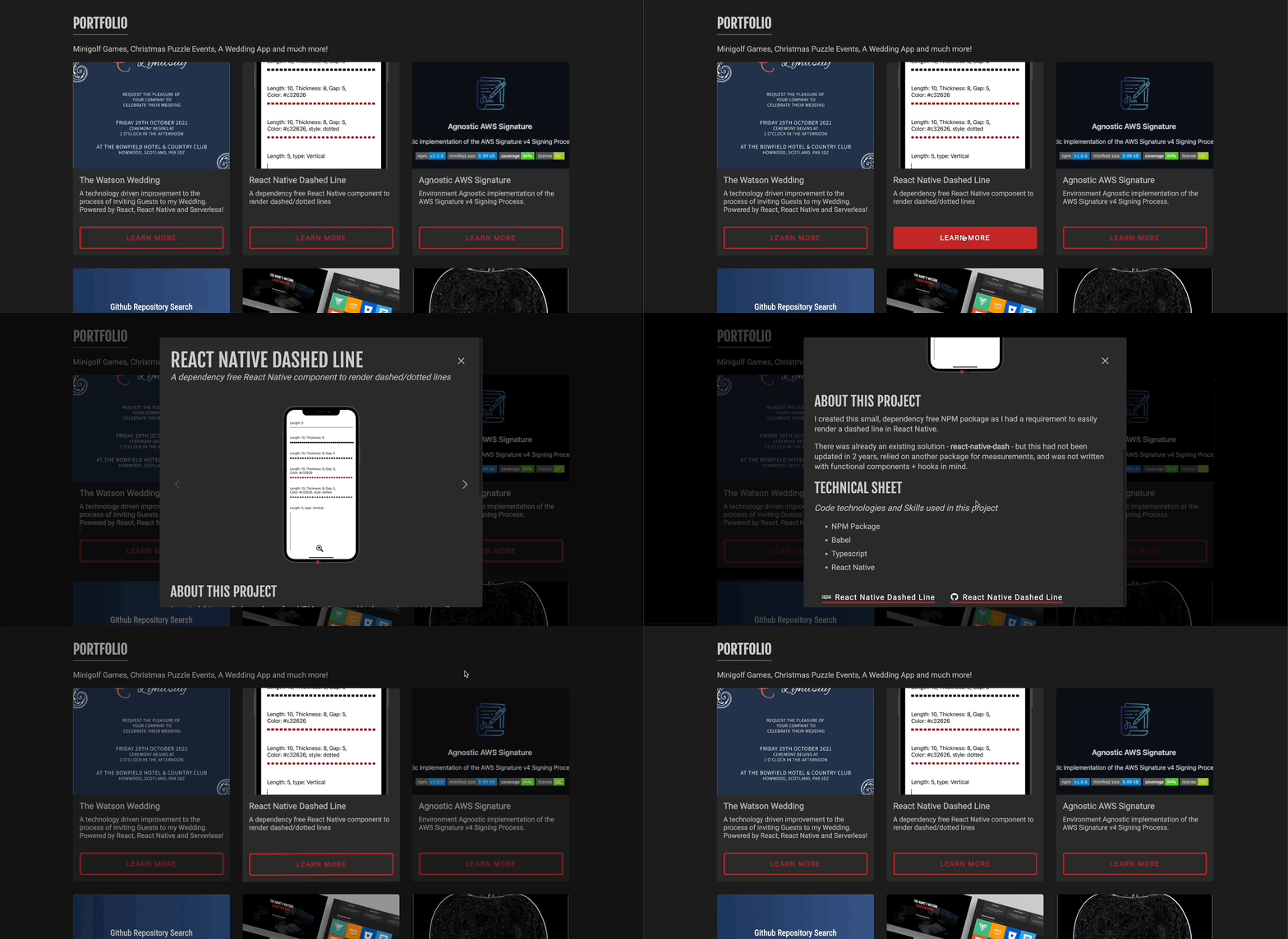
Render Gatsby SSG pages within a modal context

Maintainers
 rbrnx
rbrnxReadme
Contents
Installation
You can install via Yarn or npm
yarn add gatsby-plugin-static-page-modalnpm install gatsby-plugin-static-page-modalUsage Guide
There are a few steps to follow to get the plugin working as desired.
Gatsby Config
The first step is to add the plugin into your gatsby-config.js.
    {
      resolve: 'gatsby-plugin-static-page-modal',
      options: {
        pageRendererPath: `${__dirname}/src/library/components/PageRenderer.tsx`,
        routes: ['/portfolio/:slug/', '/blog/:slug/'],
      },
    },
Next we need to populate the options object with two pieces of information:
pageRendererPath - A path to a component which will be used to render the page behind the modal
routes - An array of paths that correspond to the routes we want the page renderer to support.
Parent Page Renderer
Let's now create our page renderer component which is required to allow us to render the parent page beneath the modal. If your pages use GraphQL queries then Gatsby will generate page-data.json files during the build process - these will be used to populate the parent page with the data its expecting.
import React from 'react';
import PortfolioPage from '../../pages/portfolio/index';
import PortfolioPageJSON from '../../../public/page-data/portfolio/page-data.json';
import BlogPage from '../../pages/blog/index';
import BlogPageJSON from '../../../public/page-data/blog/page-data.json';

interface PageRendererProps {
  match: {
    route: {
      path: string;
    };
    params: {
      [key: string]: string;
    };
    uri: string;
  };
}

const PageRenderer = ({ match }: PageRendererProps) => {
  switch (match.route.path) {
    case '/portfolio/:slug/':
      return <PortfolioPage data={PortfolioPageJSON?.result?.data} />;

    case '/blog/:slug/':
      return <BlogPage data={BlogPageJSON?.result?.data} />;

    default:
      return null;
  }
};

export default PageRenderer;
NOTE: gatsby develop or gatsby build may fail if the above page-data.json files do not exist. These can be generated with a simple bash script that can be run before the build process starts or during a CI Pipeline - "start": "./initialisePageData.sh && gatsby develop",
initialisePageData.sh
folderPaths=("public/page-data/portfolio/" "public/page-data/blog/")
for folder in ${folderPaths[@]};
do
  file="${folder}page-data.json"
  if [ ! -f "${file}" ]; then
    echo "Creating page data for $folder"
    mkdir -p $folder
    touch $file
    echo {} >> $file
  fi
done
Create Modal Component
Now you will need to create a new static page as you would normally do with Gatsby, which should contain the modal you want to display. Here is a simplified example of the portfolio/{portfolioItem.title}.tsx file
// Imports removed for simplicity

const PortfolioItem = ({ data }: PageProps<PortfolioItemQuery, null, NavigationState>) => {
  const [modalVisible, setModalVisible] = useState(false);

  useEffect(() => {
    setModalVisible(true);
  }, []);

  const onModalClose = () => {
    setModalVisible(false);
  };

  return (
    <>
      <CardModal
        show={modalVisible}
        onClose={onModalClose}
        onFlipFinish={onFlipFinish}
        cardFront={CardFrontComponent}
        cardBack={CardBackComponent}
        style={initialModalStyle}
      />
    </>
  );
};

// Page Query removed from simplicity

export default PortfolioItem;
Navigate to modal
The last step is to navigate to the modal page, which will trigger the PageRenderer component to build the underlying parent page, and then display the modal component on top.
navigate('/portfolio/myModal', { state: { ... } });Contributing
I am more than happy to accept any contributions anyone would like to make, whether that's raising an issue, suggesting an improvement or developing a new feature.
Local Development
It's easy to get up and running locally! Just clone the repo, install the node modules and away you go! 🚀
> git clone [email protected]:RBrNx/gatsby-plugin-static-page-modal.git

> cd gatsby-plugin-static-page-modal

> yarn install # Alternatively use `npm install`
Code Quality
To help keep the code styling consistent across the repo, I am using ESLint and Prettier, along with Git Hooks to ensure that any pull requests will meet the code quality standards.
While some of the hooks are specifically for code styling, there is a pre-push hook implemented that will run all of the Unit Tests before any commits are pushed. If any of the Unit Tests fail, or the overall Test Coverage drops below 95%, the push will fail