
gc-angular-intro
v3.4.0
Published
Copy of Angular directive to wrap intro.js - removing declare variables breaking build

Maintainers
 glendaecaine
Readme
angular-intro.js 
An angularjs directive that wraps intro.js functionality.
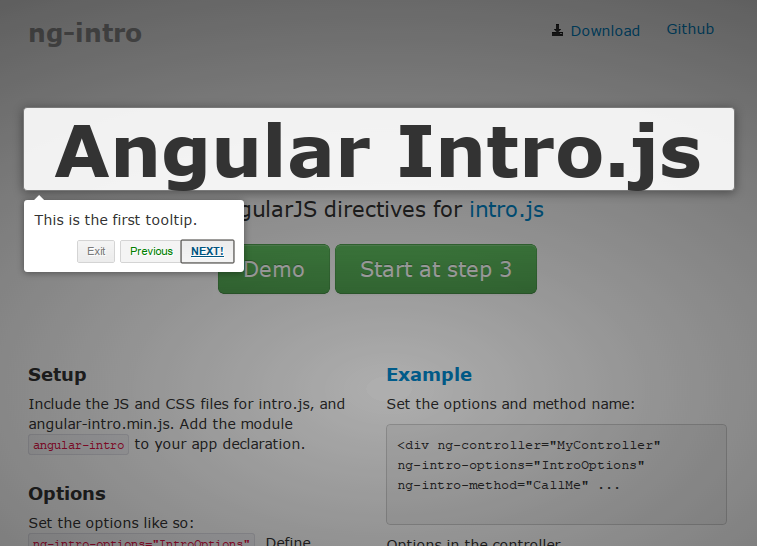
See the project page for an overview.
NPM
You can install this package through NPM by using the following command :
npm install angular-intro.js --saveWebpack
You can use this package in your webpack project, first by including intro.js and its css file. Next you need to require this package.
import ngIntro from 'angular-intro.js';
This project will return the whole angular module so if you want to use as a dependency in your own angular module you would need to reference the name ngIntro.name.
How to use
It's possible to include on your controller the service ngIntroService and customize as you need, or you may configure on your view the directives which are ng-intro-options, ng-intro-method and ng-intro-disable-button.
Setting Options
As a directive - ng-intro-options="IntroOptions"
As a service - ngIntroService.setOptions(IntroOptions)
You should create a $scope.IntroOptions in your controller which contains the intro.js options. The options are exactly the same as the original. This also allows you to modify the options as part of your controller behavior if necessary. You don't have to use IntroOptions, you can specify some other name.
Start method
As a directive - ng-intro-method="CallMe"
As a service - ngIntroService.start()
The directive will create a method on $scope.CallMe so that you can invoke it yourself later. Make sure the there isn't a method CallMe already in your controller. To use the method be sure to wrap it with $timeout. You don't have to use CallMe, you can specify some other name.
Call the start method
You can invoke it from an event such as click.
ng-click="CallMe();"
as long as you are still in the same controller scope. You can also specify a step number in the method call, CallMe(3);.
You can start the intro from code, either call $scope.CallMe();. If the $scope.CallMe(); doesn't work, it might be because your DOM isn't ready. Put it in a $timeout.
Autostart
If you set ng-intro-autostart="true", the intro will start as soon as the directive is ready.
Autorefresh
If an intro tour includes dynamic content, use ng-intro-autorefresh="true" to call Intro.js' refresh method.
Callbacks
Intro.js provides several callbacks. You can receive these callbacks in your controller. For example, for the onchange event, specify the function name in the directive.
As a directive
ng-intro-onchange="ChangeEvent"
In your controller, create ChangeEvent
    $scope.ChangeEvent = function (targetElement, scope) {
        console.log("Change Event called");
        console.log(targetElement); //The target element
        console.log(this); //The IntroJS object
    };
The other intro.js callbacks you can specify are ng-intro-oncomplete, ng-intro-onexit, ng-intro-onchange, ng-intro-onbeforechange, ng-intro-onafterchange, ng-intro-onhintsadded, ng-intro-onhintclick and ng-intro-onhintclose.
As a service
In your controller:
    ngIntroService.onComplete(function(){
        console.log('on complete callback!')
    });
the list of current callbacks are:
onCompleteonExitonBeforeChangeonChangeonAfterChangeonHintClickonHintCloseonHintsAdded
The current short Interface is: p.s. it's avaiable on build folder the .d.ts file
	intro: IntroJs;
	addListener(name: string, callback: Function): void;
	removeListener(name: string): void;
	setOptions: IntroJs.Options;
	start(stepId?: number): IntroJs;
	exit(): IntroJs;
	clear(callback: Function): IntroJs;
	goToStepNumber(stepId: number): IntroJs;
	addHints(): IntroJs;
	showHint(hintIdx: number): IntroJs;
	showHints(): IntroJs;
	hideHint(hintIdx: number): IntroJs;
	hideHints(): IntroJs;
	removeHint(stepid: number): IntroJs;
	removeHints(): IntroJs;
	previous(): IntroJs;
	next(): IntroJs;
	refresh(): IntroJs;
	onComplete(callback: Function): void;
	onExit(callback: Function): void;
	onBeforeChange(callback: Function): void;
	onAfterChange(callback: Function): void;
	onChange(callback: Function): void;
	onHintClick(callback: Function): void;
	onHintClose(callback: Function): void;
	onHintsAdded(callback: Function): void;
Exit Method
Directive - ng-intro-exit-method="ExitMe"
Callback - $scope.ExitMe(function() { //callback } );
You can also call $scope.ExitMe() from your controller.
Service - ngIntroService.exit()
Callback - ngIntroService.onExit(function(){
console.log('do something.');
});
Plunker
You may use as Directive standalone without injecting ngIntroService as shown here
or
alternatively as Service, as shown here i've added the directive, but it's not required, it's there to show the compatibility between both
How to build
If you want to build or contribute, first, get the node modules needed (grunt, etc)
npm install Then, get grunt to build the typescript into .js and the minified angular-intro.min.js
node_modules/.bin/grunt watch
p.s.: for faster build use `tsc --watch`, but you need run grunt after finish
Finally, view the demo page to make sure everything's working; start a web server:
./node_modules/.bin/grunt connect:serverAnd browse to http://localhost:8000/example/index.html
License
Same as intro.js, this is AGPL