
gd-gif
v1.1.0
Published
用于生成GIF文件,现阶段主要用于gif验证码的生成


Readme
V1.1版本更新
修正: 1.IOS不能显示的bug。 新增: 1.gif文件的压缩 2.取消setWidth,setHeight方法,宽高在初始化时候使用new gif(100,34) 3.增加addFrames方法,增加动画
关于此项目
在nodejs使用过程中发现nodejs对图形支持很差,要做一个简单的图形验证码需要复杂的安装,且现有的如node-canvas,node-gyp-ccap等,都需要安装对应的支持库(C或C++编写)。感觉大而臃肿。 只需要一个验证码不需要如此的复杂。 BAIDU解决方案查看到有无须组件的BMP版本的解决方案 https://cnodejs.org/topic/581b2502e90cfbec054d763f ,感觉非常好,没有直接用只是为了抱着以练手为目的,写了一个无须组件的GIF版本验证码
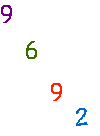
安装
npm install gd-gif使用范例
引用库
const gif=require("gd-gif");使用例子1
async getVerificationCodeImage(par){
    let g=new gif(100,34);
    let code="";
    //随机4位生成验证码
    for(let i=0;i<4;i++){
        code+=g.rand(0,9);
    }
//现在验证码直接是动画效果,不过不需要,可参考下边的例子
    g.setVerificationCode(code);
//得到二进制流
    return g.getImage();
}
使用例子2
async verificationCodeService(par){
    let g=new gif(100,34);
    g.pushColor("0055FF");
    g.pushColor("0066CC");
    g.pushColor("ff2100");
    g.pushColor("00a23d");
    g.addFrames(30);//添加一帧,等待0.3秒,如果只添加一帧,则没有动画效果
    g.drawText("0",3,3,"0055FF");//在坐标3,3的位置写入字符0
    g.addFrames(30);//不想要动画,注销该行
    g.drawText("1",23,3,"0066CC");
    g.addFrames(30);//不想要动画,注销该行
    g.drawText("2",43,5,"ff2100");
    g.addFrames(30);//不想要动画,注销该行
    g.drawText("9",63,5,"00a23d");
return g.getImage();
}
使用例子3(获取画布矩阵,自己处理)
async verificationCodeService(par){
    let g=new gif(100,34);
    g.pushColor("FF0000");
    g.addFrames(50);//添加帧 索引为0
    g.addFrames(50);//添加帧 索引为1
    g.selectFrames(0);//选择索引为0的帧
    let cav=g.getCanvas();//获得当前帧
    cav[0][0]=g.getColorIndex("FF0000");//在0,0的点画一个颜色为FF0000的点,以此类推
    g.selectFrames(1);//选择索引为0的帧
    cav[0][1]=g.getColorIndex("FF0000");//在0,1的点画一个颜色为FF0000的点,以此类推
    return g.getImage();
}
方法
addFrames//添加帧 参数:动画的停留时间,单位为0.01秒,如55等于0.55秒
selectFrames//选择帧,从0开始 参数:帧的索引,从0开始
setBackground//设备背景颜色 参数:16进制RGB色,如0066cc
pushColor//向GIF索引中添加颜色 参数:16进制RGB色,如0066cc
getColorIndex//返回指定颜色在索引表中的位置,如果不存在则直接添加到索引表 参数:16进制RGB色,如0066cc
drawText//添加文字到图片中 参数:单个文字,x坐标,y坐标,16进制RGB色
getCanvas//得到内部的画布,是一个二维数组,可直接操作内存对象使用 参数:无
getImage//获得最后的输出流 参数:无
setVerificationCode//生成验证码,参考示例1 参数:验证码字符
#gif文件格式
建议参考文章: https://www.jianshu.com/p/4fabac6b15b3
https://www.jianshu.com/p/62ad4f953660
http://www.alloyteam.com/2017/09/13121/
http://giflib.sourceforge.net/gif89.txt
http://giflib.sourceforge.net/whatsinagif/index.html
#坐标
本人坐标无锡,有坑可联系,联系方式,邮箱:[email protected]