
general-component
v1.0.3
Published
General Component(GC, from now) is a React component generation library which helps you prototype your service quickly.


Readme
General Component
General Component(GC, from now) is a React component generation library which helps you prototype your service quickly.
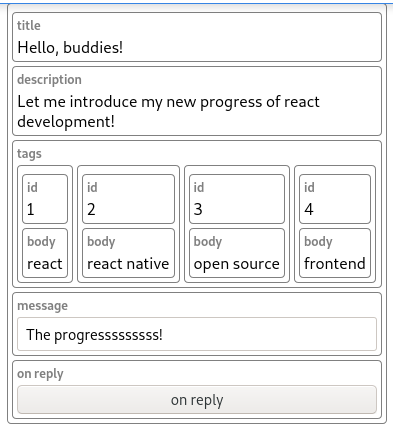
With using this library, you don't need to write your components to build prototype. You can just use components before you write them! See below. Pay attention that there's no declaration of CP.Greeting component.
한국어를 사용하시나요? 여기 한국어 번역본이 있습니다.
import CP from "general-component";

function App() {
  const [message, setMessage] = useState<string>("");

  return (
    <div className="App">
      <CP.Greeting
        style={{width: "370px"}}
        title={"Hello, buddies!"}
        description={"Let me introduce my new progress of react development!"}
        tags={[
          {id: "1", body: "react"},
          {id: "2", body: "react native"},
          {id: "3", body: "open source"},
          {id: "4", body: "frontend"}
        ]}
        message={message}
        onMessageChange={setMessage}
        onReply={()=>alert("Danke! You replied with: " + message)}
      />
    </div>
  );
}
Getting started
Install
The library is hosted on NPM repository. You can use the following commands to install GC.
npm i general-componentBasic usage
First, import CP, which is abbreviation of ComponentPool, to use this library. Use CP.YourComponentName pattern to pre-use your component.
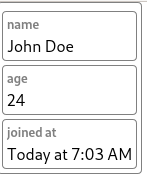
You can render string, number and Date by the following code. Feel free to add more properties with different names so that you know how it works!
import CP from "general-component";

<CP.UserCard
  name={"John Doe"}
	  age={24}
  joinedAt={new Date()}
/>
Creating button
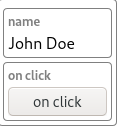
You can create a button with passing a parameterless function.
<CP.UserCard
  name={"John Doe"}
  onClick={()=>alert("Hi!")}
/>
Creating string and integer inputs
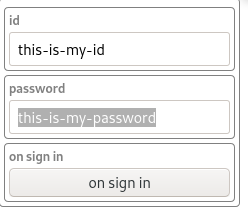
If you pass properties with onValueChange and value pair, they are combined into one editing component.
At this moment this behavior only works with string and integer types(not including float).
<CP.SignIn
  id={id}
  onIdChange={setId}
  password={password}
  onPasswordChange={setPassword}
  onSignIn={()=>alert("Signed in!")}
/>
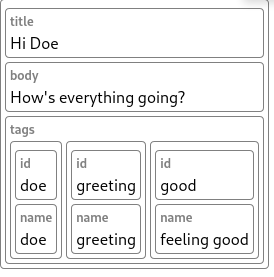
Handling array of data
You can insert sub-objects with the following code.
Remember, you are asked to pass key or id field. If you don't, React may complain about this.(Though it works)
<CP.SocialMediaFeed
  title={"Hi Doe"}
  body={"How's everything going?"}
  tags={[
    {id: "doe", name: "doe"},
    {id: "greeting", name: "greeting"},
    {id: "good", name: "feeling good"},
  ]}
/>
Embedding custom children
When you pass children, they will be displayed right after auto-generated properties.
<CP.SocialMediaFeed
  title={"Hi Doe"}
>
  <CustomFeedBody feed={feed}/>
</CP.SocialMediaFeed>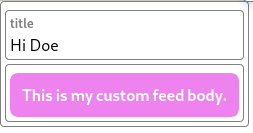
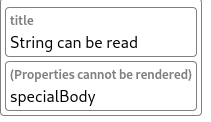
How unhandled properties are shown
When GC encounters with unexpected properties, it gives up to render it and renders only their names at the bottom.
<CP.HasUnknownProps
  title={"String can be read"}
  specialBody={{
    an_object: "zxcv",
    something: "asfd",
    special: "qwer",
  }}
/>
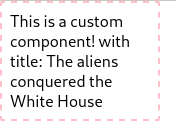
Replacing with custom component
Okay, you done your prototyping and actual components should be placed.
Then you can simply assign your custom components to CP.
You can insert this code anywhere, but it's recommended to do this at the top of App.js file.
const CustomComponent = (p: {title: string}) => {
  const {title} = p;

  const style: Record<string, any> = {
    width: "140px",
    border: "2px dashed pink",
    padding: "8px",
  };
  return <div style={style}>This is a custom component! with title: {title}</div>;
};

CP.Post = CustomComponent;

function App() {
  return <CP.Post
    title={"The aliens conquered the White House"}
  />;
};
Adding custom middleware
You can customize the library! You can let your special data types can be read by General Component.
There are three kinds of middlewares.
- Entry transformation middleware
- Field generation middleware
- Component generation middleware
They can be customized with the following code.
Do not forget to prepend the existing middleware, unless you intended it.
import {
    entryTransMiddlewares,
    fieldGenMiddlewares,
    componentGenMiddlewares,

    setEntryTransMiddlewares,
    setFieldGenMiddlewares,
    setComponentGenMiddlewares,
} from "general-component";

setEntryTransMiddlewares([...entryTransMiddlewares, yourCustomMiddleware]);
Caveats
style, innerStyle, children, innerClassName and className properties will not processed like other properties.
style and className will be passed to root container of General Component. innerStyle and innerClassName will be passed to property components wrapper(for example, you can set display: flex or flex-direction: row in here).
children is rendered directly below the auto-generated components.
When to use it
- When you want to concentrate on your logic. Just pass the whole data to General component, and leave implementing the actual components to others or you in the future.
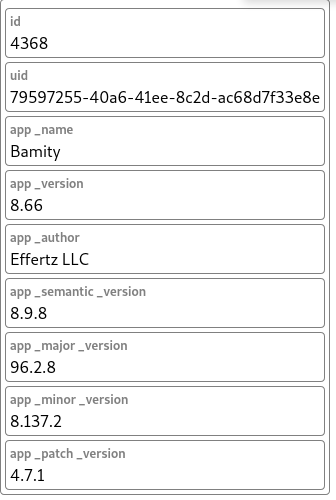
- When you have data API and don't know the schema. Just pass the whole JS object to General component! At least you can see which values are in there, and remove unnecessary fields.
function App() {
  const [callResult, setCallResult] = useState<any>();
  useEffect(
    ()=>{ axios("https://random-data-api.com/api/app/random_app").then(setCallResult); },
    []
  );

  // Just put your data! We'll handle extra!
  // You event don't need to know the data schema.
  return <CP.App {...callResult?.data}/>;
}
Documents
On progress!(May be ready by 2021-08)
Contribute
You can contribute to the project in various ways.
- Become a regular contributor and one of our team members
- Resolve issues and fix bugs
- GIve ideas, do feature requests and feedback
- Donation
Please do not hesitate to send email to [email protected] if you want to contribute!
License
Licensed under the MIT License, Copyright © 2021-present by REED