
geo-globe-map
v0.1.0
Published
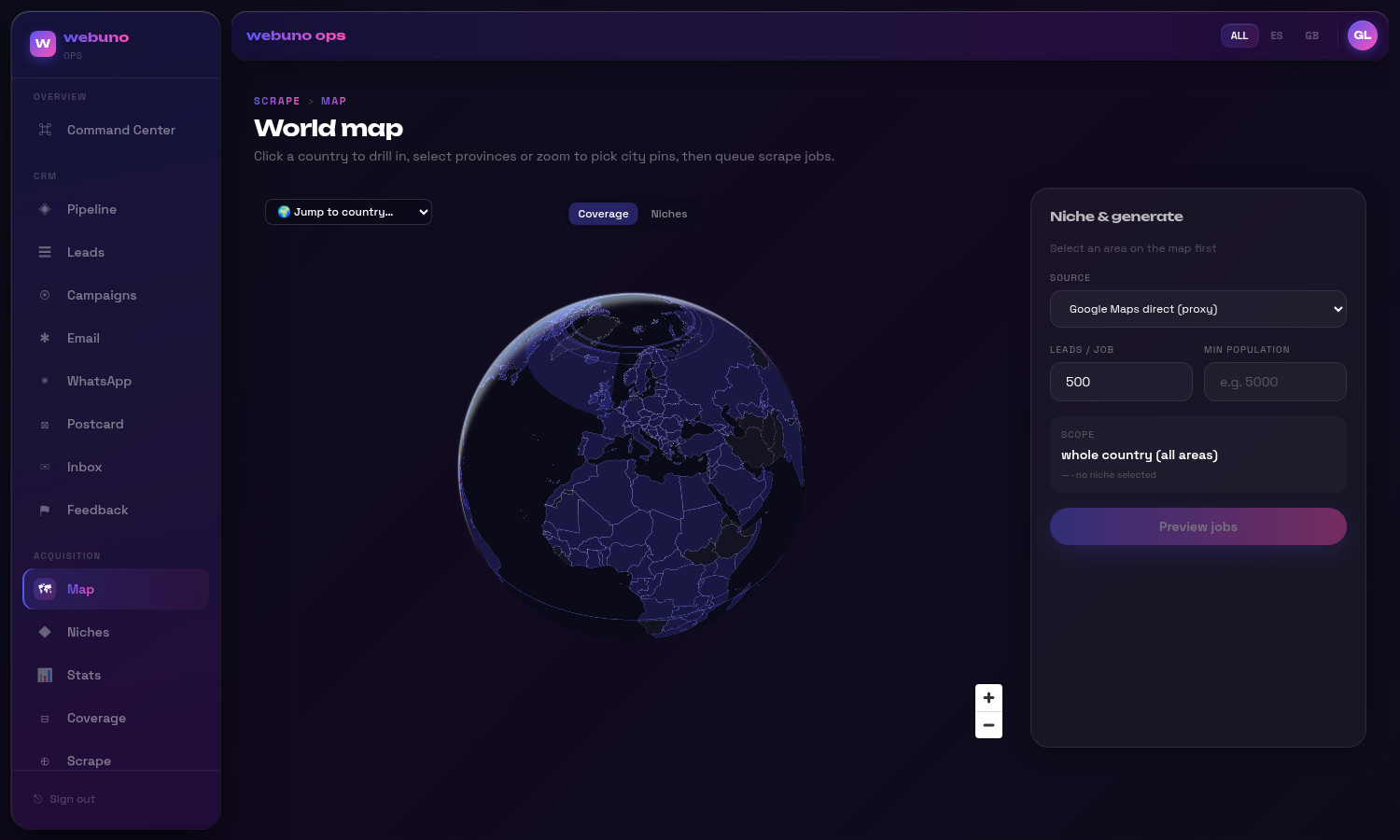
A spinnable MapLibre globe for drilling country → province → municipality, selecting admin boundaries, and choropleth-coloring them from your own data. Streams admin-boundary vector tiles (pmtiles); fully data-injected and headless-friendly.

Maintainers
 kobecuppens
Readme
geo-globe-map
A spinnable MapLibre globe for drilling country → province → municipality, selecting admin boundaries, and choropleth-coloring them from your own data. Streams admin-boundary vector tiles (PMTiles), and is fully data-injected — you supply the provinces, tiles, and per-region values through async adapters, so it stays decoupled from any particular backend.
Built for "pick a bunch of regions and do something with them" UIs: territory/coverage planning, sales/ops dashboards, scrape/crawl targeting, service-area selection.
Features
- 🌍 3D globe projection (MapLibre v5) — drag to spin; auto-flattens as you zoom into a country.
- 🗺️ Two tiers — Natural-Earth admin-1 province polygons (GeoJSON) + municipality boundaries (PMTiles vector tiles). Municipalities are grouped under provinces automatically by point-in-polygon, so clicking a province selects all its municipalities.
- 🎯 Rich selection — click, shift-drag box-select, "select all in view", whole-country.
Fully controlled (you own the
selectedMap). - 🎨 Choropleth from an injected
value(0..1) per region, plus override hooks (colorForFeature/renderTooltip) so app-specific coloring (e.g. categorical overlays) lives in your code, not the library. - 🔌 Bring your own data —
loadProvinces,municipalityTiles,loadCoverageadapters. - 📦 Ships a bundled world basemap + ISO lookups via
geo-globe-map/data(all optional/overridable).
Install
npm i geo-globe-map maplibre-glreact, react-dom, and maplibre-gl (v5+, required for the globe) are peer dependencies.
Quick start
"use client";
import { useState } from "react";
import { GeoGlobeMap, type SelectedArea } from "geo-globe-map";
import { countries50m, NUMERIC_TO_ALPHA2, DEFAULT_COUNTRY_FIT } from "geo-globe-map/data";

export function Map() {
  const [activeCountry, setActiveCountry] = useState<string | null>(null);
  const [selected, setSelected] = useState<Map<string, SelectedArea>>(new Map());

  return (
    <GeoGlobeMap
      activeCountry={activeCountry}
      onSelectCountry={setActiveCountry}
      selected={selected}
      onToggle={(a) => setSelected((p) => { const n = new Map(p); n.has(a.id) ? n.delete(a.id) : n.set(a.id, a); return n; })}
      onAddMany={(xs) => setSelected((p) => { const n = new Map(p); xs.forEach((a) => n.set(a.id, a)); return n; })}
      onRemoveMany={(xs) => setSelected((p) => { const n = new Map(p); xs.forEach((a) => n.delete(a.id)); return n; })}
      onClear={() => setSelected(new Map())}
      worldTopoJson={countries50m}
      numericToAlpha2={NUMERIC_TO_ALPHA2}
      countryFit={DEFAULT_COUNTRY_FIT}
      activeCountries={["ES", "FR", "DE", "US"]}
      loadProvinces={(cc) => fetch(`/geo/admin1-${cc}.geo.json`).then((r) => (r.ok ? r.json() : null))}
      municipalityTiles={(cc) => ({ url: `pmtiles://https://cdn.example.com/tiles/${cc.toLowerCase()}.pmtiles` })}
      loadCoverage={(cc) => fetch(`/api/coverage?country=${cc}`).then((r) => r.json())}
    />
  );
}
See examples/basic.tsx.
CSS: the component imports
maplibre-gl/dist/maplibre-gl.cssitself. With most bundlers (Next.js, Vite) that's all you need. If your setup doesn't bundle CSS from dependencies, import it once in your app.
Data adapters
All adapters are keyed by ISO 3166-1 alpha-2 country code.
| Prop | Signature | Purpose |
| --- | --- | --- |
| loadProvinces | (cc) => Promise<FeatureCollection \| null> | Admin-1 GeoJSON. Each feature needs an id property (provinceIdProp, default "adm1_code") and a name. |
| municipalityTiles | (cc) => { url, sourceLayer?, promoteId? } \| null | PMTiles vector source for municipalities. Return null for province-only countries. |
| loadCoverage | (cc) => Promise<CoverageRow[]> | Per-municipality rows. code must match the tile feature id; value (0..1) drives the choropleth; lat/lng enable province grouping. |
type CoverageRow = { code: string; id: string; name: string; lat?: number | null; lng?: number | null; value: number };
type SelectedArea = { id: string; name: string; level: "country" | "province" | "municipality" };
The component never calls your backend directly — it only calls these adapters, so auth, caching, and URL shape are entirely yours.
Custom coloring & tooltips
By default regions use the theme's value ramp. To color categorically (e.g. by segment) or build custom tooltips, pass the override hooks. The province context includes its member municipality rows so you can aggregate:
import { tintByValue } from "geo-globe-map";

<GeoGlobeMap
  /* … */
  colorForFeature={(ctx) =>
    ctx.level === "municipality"
      ? tintByValue(segmentColor(ctx.row.id), ctx.row.value)
      : tintByValue(dominantSegmentColor(ctx.members), avg(ctx.members))
  }
  renderTooltip={(ctx) => (ctx.level === "municipality" ? `${Math.round(ctx.row.value * 100)}% — ${label(ctx.row.id)}` : null)}
/>
Return null from either hook to fall back to the built-in behavior.
Producing the tiles
geo-globe-map renders any PMTiles archive whose features carry a stable code property (set
promoteId to match). Province polygons are plain admin-1 GeoJSON (e.g. Natural Earth 10m). Building
those datasets is out of scope for this package — see the README's docs/ for a pure-Node recipe
(mapshaper → geojson-vt → vt-pbf → PMTiles) if you need one.
API
GeoGlobeMap props (see src/types.ts for the full typed contract):
- Selection (controlled):
activeCountry,onSelectCountry,selected,onToggle,onAddMany,onRemoveMany,onClear. - Adapters:
loadProvinces,provinceIdProp,municipalityTiles,loadCoverage. - World:
worldTopoJson,worldObjectName,numericToAlpha2,activeCountries,countryFit. - Overrides:
colorForFeature,renderTooltip. - Cosmetics:
projection("globe" | "mercator"),theme,controls,height,className.
License
MIT © Kobe Cuppens