
gh-pulse
v0.4.1
Published
An interactive terminal dashboard for everything on GitHub that's waiting on you

Maintainers
 tpremprateek
Readme
pulse
An interactive terminal dashboard for everything on GitHub that's waiting on you.
Reviews you owe, PRs that need fixing, issues assigned to you, mentions and notifications, all in one keyboard-driven (and mouse-friendly) screen. It's built on the official gh CLI, so there's no extra GitHub login or token to manage. You can also bring any AI you already use (Claude, ChatGPT, Gemini, a local model, or a coding agent) to explain PRs, triage your day, or fix your PRs for you.


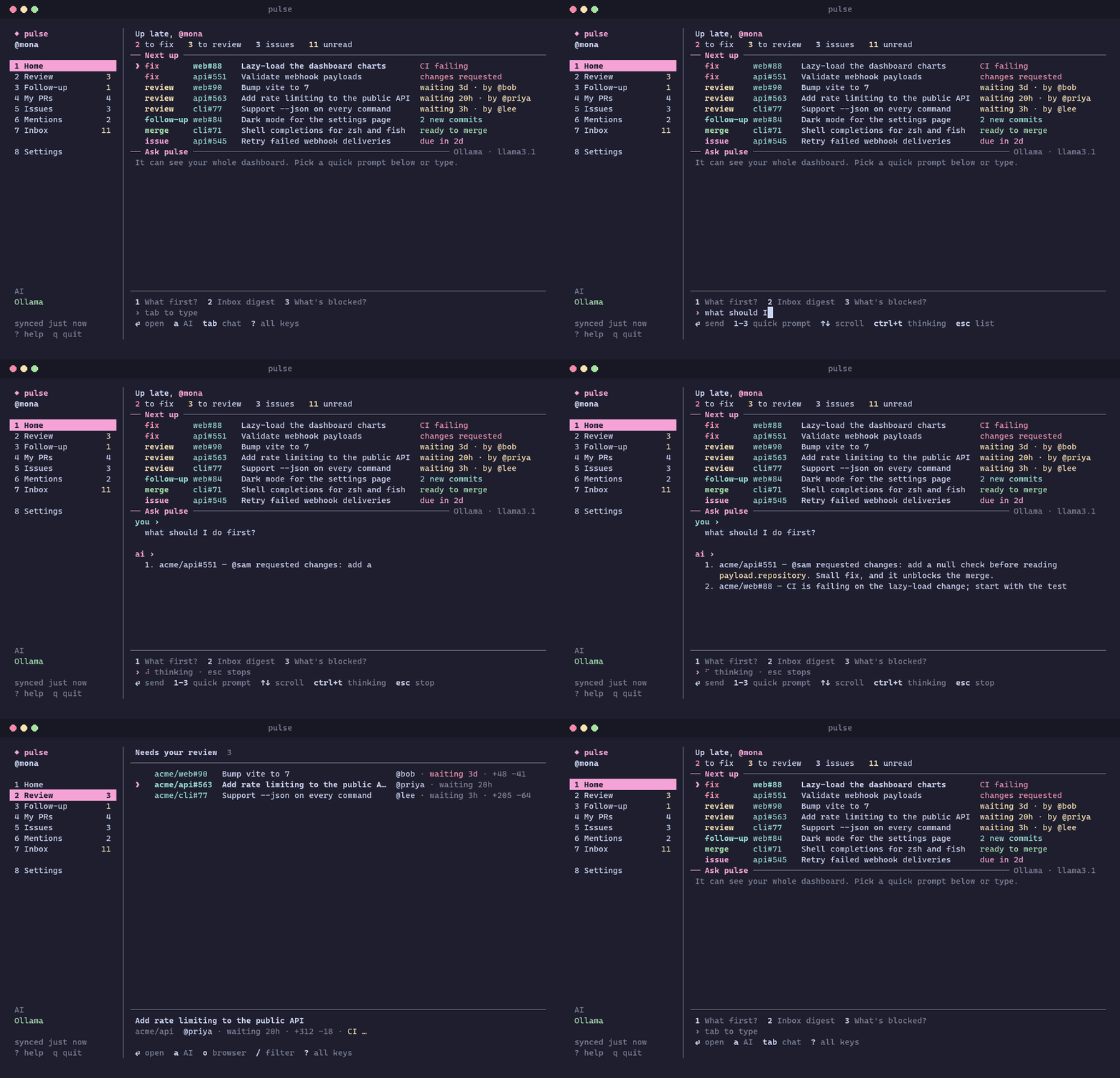
The demo uses made-up data for a fictional acme org.
Contents
- Features
- Requirements
- Install
- Quick start
- Sections
- Keys and mouse
- Theme
- Bring your own AI
- The AI menu (
a) - Scripting
- Configuration
- Where your data lives
- Troubleshooting
- Development
- Contributing
- License
Features
- One place for your GitHub to-dos: review requests, your PRs ranked by what's blocking them, assigned issues with due dates, mentions, and a grouped notification inbox.
- Knows what changed: PRs you reviewed that have new activity show up under Follow-up, and items you've already seen are marked as such.
- Act without leaving the terminal: open details, read diffs, check out branches, merge ready PRs (squash / merge / rebase, optionally deleting the branch), comment, request a re-review, convert to draft, close, archive and mark notifications read.
- AI that sees your dashboard: ask "what should I do first?" or "what's blocking my PRs?" and get answers grounded in your real data.
- Hand work to a coding agent: send "address the requested changes", "fix failing CI", "resolve conflicts" or "implement this issue" to Claude Code, Codex, Gemini CLI and others. The agent runs in your local clone, in your terminal, and commits without pushing, so you review before anything leaves your machine.
- Multiple GitHub accounts: switch between every account
ghis logged into. - Scriptable:
--print,--jsonand per-section commands for status bars, cron jobs and shell scripts. - Yours to tweak: accent colors, which sections show, what Home leads with, refresh interval, org/repo scope.
Requirements
| | |
| --- | --- |
| Node.js 22 or newer | check with node -v |
| GitHub CLI (gh), logged in | install it, then run gh auth login |
| A terminal with Unicode support | Windows Terminal, iTerm2, kitty, WezTerm, GNOME Terminal, the VS Code terminal, … |
| Optional: an AI | a coding agent CLI, an API key, or a local model server. See Bring your own AI. |
pulse works on macOS, Linux and Windows.
Install
Option 1: from npm (recommended)
npm install -g gh-pulse
pulse
This puts a pulse command on your PATH. To update, run npm update -g gh-pulse.
Want the latest unreleased changes? Install straight from GitHub instead: npm install -g github:tadiPro250/gh-pulse.
Option 2: from source
git clone https://github.com/tadiPro250/gh-pulse.git
cd gh-pulse
npm install        # installs dependencies and builds dist/
npm link           # adds a global `pulse` command
To update, run git pull && npm install.
Option 3: as a gh extension
After installing from source (option 2), run this from inside the clone:
gh extension install .
gh pulse
Uninstall
npm uninstall -g gh-pulse     # options 1 and 2 (`npm unlink -g gh-pulse` if you used npm link)
gh extension remove pulse     # option 3
Your settings live in ~/.gh-pulse/. Delete that folder to remove them as well.
Quick start
gh auth login    # once, if you haven't already
pulse            # opens the dashboard; the first run starts a short setup
The first time you run pulse, a short setup walks you through:
- GitHub: pick which
ghaccount to use, or sign in (gh auth loginruns right there). - AI: choose what you chat with and what does code work. Installed coding agents are detected for you, or you can link an API key or a local model. You can skip this step.
- Look: accent color (previewed live) and mouse support.
- Dashboard: which sections the sidebar shows and which numbers Home leads with, plus refresh and lookback windows.
- Workspace: optional org/repo filters and the folders where your clones live.
tab skips to the next step and esc goes back. Everything is saved as you go. Run it again any time with pulse setup or Settings → Run setup again.
Then try:
←→or1–8to move between sections,↑↓to pick an item⏎to open it,dfor the diff,oto open it in the browseraon any PR or issue to see what the AI can do with it?for every key
Sections
| | |
| --- | --- |
| Home | "Next up": PRs that need fixing, reviews waiting on you, ready-to-merge PRs, issues due soon. Below it is a chat that sees your whole dashboard: ask "what should I do first?" or "what's blocking my PRs?". |
| Review | PRs where your review is requested, oldest first. |
| Follow-up | PRs you reviewed that changed since. |
| My PRs | Your PRs, sorted by what's blocking them (conflicts, CI, requested changes, …). |
| Issues | Assigned to you, with milestone due dates. |
| Mentions | Threads that mention you, from the last 7 days. |
| Inbox | Notifications grouped by repo, then issues, then PRs. Big inboxes start folded, showing one summary line per repo. ⏎ unfolds a repo, m on a repo marks all of it read, and v turns grouping on or off in any list. |
| Settings | GitHub profiles (switch or add accounts), theme, AI linking, which sections and Home numbers to show, refresh and scope options, clone folders. Everything is saved to ~/.gh-pulse/config.json. |
Keys and mouse
Each screen's bottom bar shows only the keys that apply to what's highlighted. Press ? for all of them. The main ones:
| Key | Does |
| --- | --- |
| ← → / 1–8 | switch sections |
| ↑ ↓ | move |
| ⏎ | open details (or unfold an inbox group) |
| a | AI menu for the highlighted PR or issue |
| m | merge a ready PR / mark notifications read |
| o | open in the browser |
| d | show the diff |
| v | group / ungroup the list |
| ? | all keys |
| q | quit |
The mouse works too: click a tab or row to select it and click again to open it, scroll with the wheel, and click any key hint in the bottom bar to press it. Mouse mode takes over the terminal's own drag-to-select, so hold Shift while dragging to copy text, or turn it off in Settings → Dashboard → Mouse.
Theme
Settings → Theme sets the accent color. ←→ on Accent color cycles through the presets (Pink, Rose, Purple, Blue, Teal, Green, Orange, Mono) and the whole UI changes as you go. Custom hex takes any color, like #ff8800 or #f80. In config it's "theme": "teal" or "theme": "#ff8800". Pink and Mono use your terminal's own palette; the others are exact colors.
Bring your own AI
The AI features are optional. Without them pulse is still a full dashboard.
Link one or more in Settings → AI. Two separate choices are set there: which AI you chat with, and which one you send work to.
| Kind | Providers | How it's linked | Can edit code? |
| --- | --- | --- | --- |
| Coding agents | Claude Code, Codex (ChatGPT sign-in), Gemini CLI, Cursor Agent, GitHub Copilot CLI, any custom CLI | detected on your PATH; uses the tool's own login | ✅ runs in your local clone |
| APIs | Claude API, OpenAI API, Gemini API, OpenRouter, any OpenAI-compatible endpoint (Groq, Mistral, vLLM, …) | paste an API key, or set $ANTHROPIC_API_KEY / $OPENAI_API_KEY / … | chat only (agent tasks get a plan instead) |
| Local models | Ollama, LM Studio | start the server, pick a model | chat only |
| Agent IDEs | Antigravity, Cursor, VS Code | detected on your PATH | opens the repo and copies the task to your clipboard |
In each provider's panel you can add a key (k), pick a model from the live list (m), test the connection (t), and choose what it's used for (c / a). API keys are stored in ~/.gh-pulse/secrets.json, separate from the config.
Only Claude Code's flags have been verified by pulse. For the other CLIs, the defaults follow their documentation, and you can override them per provider:
"ai": { "providers": { "codex": { "chatArgs": ["exec", "-"], "agentArgs": ["{prompt}"] } } }What gets sent to the AI: only what you ask about. That's the PR or issue you opened the menu on (title, body, discussion, review threads, and the diff when relevant), or a summary of your dashboard for the Home chat, capped at ai.maxContextChars characters. Nothing is sent until you ask a question or start an agent.
The AI menu (a)
a on any PR or issue lists what fits its current state, with the best fit first. A status line at the top shows the state the suggestions are based on.
| Item | Suggestions |
| --- | --- |
| Your PR with problems | agent: resolve conflicts / work on the requested changes / fix failing checks · ask: what's blocking it, explain it, summarize the review |
| Your PR that's ready | merge (←→ picks squash / merge / rebase from what the repo allows, b also deletes the branch when that's safe, ⏎ twice to confirm) · ask: explain it |
| Someone else's PR | ask: review it, summarize the changes, draft a review comment |
| Issue | ask: explain it, what do I need to do, summarize the discussion, draft a reply · agent: work on it (listed higher when it's assigned to you) |
| Always | custom prompt: type your own (it wraps onto more lines as you type); tab chooses whether the chat answers it or an agent works on it |
ask opens the chat with that question already asked. agent opens the agent screen described below. m on a ready PR, in a list or the detail view, opens the menu on Merge.
Below the AI suggestions are things you do yourself:
| Action | When | What it does |
| --- | --- | --- |
| Leave a comment | any PR or issue | opens the comment composer |
| Request a re-review | your open PR | asks the people who already reviewed to look again (←→ picks one person or everyone; bots and apps are skipped) |
| Convert to draft / Mark ready for review | your open PR | gh pr ready --undo / gh pr ready |
| Close this PR | your open PR | closes without merging (⏎ twice); it can be reopened on GitHub |
| Delete the branch | a merged PR | only when it's safe: the branch is in the same repo (not a fork), isn't the default or protected, and no other open PR uses it. Only the branch on GitHub is deleted, and the PR page can restore it. |
| Archive | any PR or issue | hides it from pulse until there's new activity on it, like archiving mail. Settings → Dashboard → Archived items brings them all back. Nothing changes on GitHub. |
Comments
The composer is a multi-line editor (⏎ is a new line, markdown works, ctrl+p previews it, ctrl+s posts).
- Attach (
tabto the field): a path to a.mdor.txtfile adds its text; other text files (logs, diffs, code) go in as a code block; an image URL goes in as an image. Dragging a file into the terminal pastes its path. - Ask AI: say what the comment should say and
⏎. The AI sees the PR or issue (and the diff) and drafts it, or rewrites what you've written while keeping your points.ctrl+zputs your text back. - Local images: GitHub has no API for uploading images to a comment, so pulse can't post them. Use an image URL, or
ctrl+bto copy what you wrote and open the page in your browser, then paste it and drag the images in.
Agent
Picking an agent suggestion (or a custom prompt sent to an agent) opens a screen with these fields:
- Agent: Claude Code, Codex, … (
←→to change) - Task, picked automatically from the item's state:
- Address requested changes: review summaries and every unresolved inline thread (file, line, diff hunk)
- Fix failing checks: failing check names, log links and how to read them
- Resolve merge conflicts
- Implement this issue: issue body and discussion; the agent works on a
pulse/issue-<n>branch - Custom prompt: your own instructions, with the item attached as context
- Workspace: your local clone, found automatically in your clone folders.
Cclones the repo if you don't have it. - Notes: extra instructions (just type; long notes wrap).
A live preview shows the exact prompt. ⏎ checks out the PR branch (gh pr checkout) and starts the agent interactively in your terminal, inside the clone. You watch it work, approve its actions, and pulse comes back when it exits. The agent is told to commit but not push, so you always review before pushing.
Scripting
When stdout isn't a terminal, or with --print, pulse prints the dashboard once and exits:
pulse --print                 # the whole dashboard, once
pulse setup                   # the first-run walkthrough again
pulse reviews | prs | issues | mentions
pulse notifs [--clear]        # unread notifications (--clear marks them read)
pulse open|view|diff|co <n>   # n = number from the last printed list
pulse --json                  # raw data, for jq and friends
pulse --here | -R owner/repo | -o org
pulse config                  # print the config file path
| Option | |
| --- | --- |
| -R, --repo <owner/name> | limit to a repo (repeatable) |
| -o, --org <name> | limit to an org or user (repeatable) |
| --here | limit to the repo in the current directory |
| -w, --watch [seconds] | reprint continuously (with --print or a section) |
| -n, --limit <n> | max items per section (default 30) |
| --days <n> | mentions lookback window (default 7) |
| -a, --all | also show reviewed PRs with no new activity |
| --json | print raw data as JSON |
Some examples:
# how many reviews do I owe? (for a status bar)
pulse --json | jq '.review | length'

# keep a live review queue for one org in a side terminal
pulse reviews -o my-org --watch 120
--json returns one object with login, the section arrays review, reviewed, mine, assigned and mentions, plus totals, notifications and warnings.
Configuration
Everything in Settings is saved to ~/.gh-pulse/config.json (run pulse config to print the path). You can also edit it by hand, or use Settings → Edit config.json.
| Key | Default | What it does |
| --- | --- | --- |
| repos | [] | only show these repos ("owner/name") |
| orgs | [] | only show these orgs or users |
| excludeRepos | [] | never show these repos |
| limit | 30 | max items per section |
| mentionDays | 7 | how far back Mentions looks |
| staleReviewDays | 2 | highlight review requests older than this |
| refreshSeconds | 120 | auto-refresh interval in the dashboard (0 = off) |
| groupInbox | true | group notifications by repo, then issues / PRs |
| mouse | true | mouse support (off = the terminal's own text selection) |
| theme | "pink" | a preset (pink, rose, purple, blue, teal, green, orange, mono) or a hex code |
| hiddenSections | [] | sidebar sections to hide: review, reviewed, mine, assigned, mentions, inbox |
| homeStats | ["fix","review","assigned","inbox"] | the numbers under Home's greeting |
| workspaceRoots | [] | folders that contain your local clones, used to find a workspace for agents |
| clones | {} | remembered "owner/repo": "path" pairs |
| ai.chat | "" | provider id for chat (empty = the first one that works) |
| ai.agent | "" | provider id for agent tasks |
| ai.providers | {} | per-provider overrides: model, baseUrl, command, chatArgs, agentArgs |
| ai.maxContextChars | 24000 | how much of an issue / PR / diff to send to the AI |
Provider ids: claude-code, codex, gemini-cli, cursor-agent, copilot-cli, custom-cli, anthropic, openai, gemini, openrouter, ollama, lmstudio, custom-api, antigravity, cursor, vscode.
Example: a work-only dashboard that chats with a local Ollama model:
{
  "orgs": ["my-company"],
  "excludeRepos": ["my-company/legacy-monolith"],
  "theme": "teal",
  "workspaceRoots": ["/home/me/code"],
  "ai": { "chat": "ollama", "providers": { "ollama": { "model": "llama3.1" } } }
}
Set the GH_PULSE_HOME environment variable to keep config and state somewhere other than ~/.gh-pulse, for example a separate profile or a scratch folder for testing.
Where your data lives
pulse has no server and no telemetry. It talks only to GitHub (through your gh login) and to the AI provider you choose.
| File | Contents |
| --- | --- |
| ~/.gh-pulse/config.json | your settings |
| ~/.gh-pulse/state.json | which items you've seen, and the last printed list (for pulse open <n>) |
| ~/.gh-pulse/secrets.json | API keys you pasted into Settings → AI. Keep this file private. Environment variables like $ANTHROPIC_API_KEY work too, if you'd rather not store keys on disk. |
pulse never reads or stores your GitHub token. Every GitHub call goes through gh.
Troubleshooting
| Problem | Fix |
| --- | --- |
| gh: command not found or "not logged in" | Install the GitHub CLI and run gh auth login. Check with gh auth status. |
| SyntaxError or a crash on start | You need Node 22+. Check node -v. |
| Org repos are missing | The org may restrict OAuth apps. Run gh auth refresh -s read:org, and check the org's third-party access settings. |
| Boxes or odd characters instead of icons | Use a terminal and font with Unicode support (e.g. Windows Terminal with Cascadia Code). |
| Can't select text to copy | Hold Shift while dragging, or turn off Settings → Dashboard → Mouse. |
| An AI provider shows "not installed" | Make sure its CLI is on your PATH, then press R in Settings to rescan. |
| A CLI agent misbehaves | Its flags may have changed. Override chatArgs / agentArgs for it in config. |
| Something else | Open an issue with your OS, terminal, node -v and gh --version. |
Development
git clone https://github.com/tadiPro250/gh-pulse.git
cd gh-pulse
npm install
npm run dev     # rebuild dist/ on change; run it with `node bin/pulse.js`
npm test        # headless TUI tests: live gh data, mock AI server, fake agent in a temp clone
The tests run with GH_PULSE_HOME=test/.home, so they never touch your real config or keys. node test/actions.test.js runs just the unit tests, with no GitHub login needed.
pulse is plain JavaScript (ES modules) with an Ink (React for the terminal) UI, bundled with esbuild.
| Path | What it does |
| --- | --- |
| bin/pulse.js | the pulse command |
| gh-pulse | entry point for gh pulse |
| src/cli.js | argument parsing, print mode and scripting commands |
| src/gh.js, src/github.js | everything that talks to GitHub through gh |
| src/view.js, src/model.js | turns GitHub data into dashboard sections |
| src/ai/catalog.js | every supported AI and how to invoke it; add new ones here |
| src/ai/providers/ | anthropic.js (official SDK), openai.js (any OpenAI-compatible API), cli.js (agents: headless chat and interactive sessions) |
| src/ai/actions.js | what the AI menu suggests for each PR / issue state, when a PR can merge, and when its branch is safe to delete |
| src/ai/tasks.js | the agent task prompts and the Home chat |
| src/ai/context.js | the per-item chat context |
| src/comment.js | comment attachments (files, image URLs) and the AI draft prompt |
| src/clones.js | finds local clones from .git/config remotes |
| src/tui/ | Ink (React) screens: setup (first-run wizard), home, list, handoff, menu, compose, settings, chat, … |
Contributing
Contributions are welcome: bug fixes, new AI providers, UI polish, docs. See CONTRIBUTING.md for setup, tests and guidelines. For anything big, please open an issue first so we can agree on the approach.
License
MIT. Use it, fork it, ship it.