
gherkin-refine
v1.3.1
Published
Gherkin and Cucumber linter with gherkin-lint compatibility: all 31 gherkin-lint rules, safe autofix, plugins, and SARIF output.

Maintainers
 hamzahamidi
Readme
Gherkin Refine





A modern Gherkin and Cucumber linter, and a migration path from gherkin-lint.
Gherkin Refine supports all 31 rules of gherkin-lint 4.2.4, installs the same gherkin-lint command, and reads existing .gherkin-lintrc and .gherkin-lintignore files. It is built on the official Cucumber parser and adds safe autofixes, plugins, inline suppression, and JSON, NDJSON, and SARIF output.
Migrating from gherkin-lint
npm uninstall gherkin-lint
npm install --save-dev gherkin-refine
Scripts that call gherkin-lint keep working. The compatibility scope: every built-in gherkin-lint rule, its configuration and ignore files, and its CLI flags. It is not identical in every case: the parser is newer, a few gherkin-lint rule bugs are fixed, xunit output is not available, and custom --rulesdir rules need porting to a plugin. Read the migration guide before changing CI.
Starting a new project
npm install --save-dev gherkin-refine
npx gherkin-refine .
It targets Node.js 22.18 or later. The runtime is ESM and parses Feature, Rule, Scenario, Background, Examples, localized keywords, data tables, and doc strings through @cucumber/gherkin.
Documentation · Migration guide · Rules · Security policy
Documentation
The documentation site is hamidihamza.com/gherkin-refine, with one page per rule. In the repository, start with the documentation index, or jump to configuration, rules, plugins, migration, or AI agent integration. For a step by step introduction, see the getting started tutorial.
Install
The gherkinlint command remains available as a compatibility alias.
To use gherkinlint as the package import name in a project, install a local npm alias with npm install --save-dev gherkinlint@npm:gherkin-refine. This alias is specific to that project. The public package name remains gherkin-refine.
The CLI discovers *.feature files and ignores .git, node_modules, dist, and coverage while scanning directories. A directly named file is always linted. An explicitly named symlink to a file or directory is followed. Nested symlinked directories are not traversed.
GitHub Actions
After installing gherkin-refine as a development dependency, add this workflow to lint feature files on pushes and pull requests:
name: Gherkin

on:
  push:
  pull_request:

permissions:
  contents: read

jobs:
  lint:
    runs-on: ubuntu-latest
    steps:
      - uses: actions/checkout@v7
      - uses: actions/setup-node@v7
        with:
          node-version: 22.18.0
          cache: npm
      - run: npm ci
      - run: npx gherkin-refine .
Zero configuration
The recommended rules run without a configuration file:
gherkin-refine features/Recommended rules check duplicate tags, duplicate Feature and Scenario names, and unused or undeclared Scenario Outline variables. Subjective style rules are off by default.
See the rules reference for the full catalog and defaults.
Safe fix preview
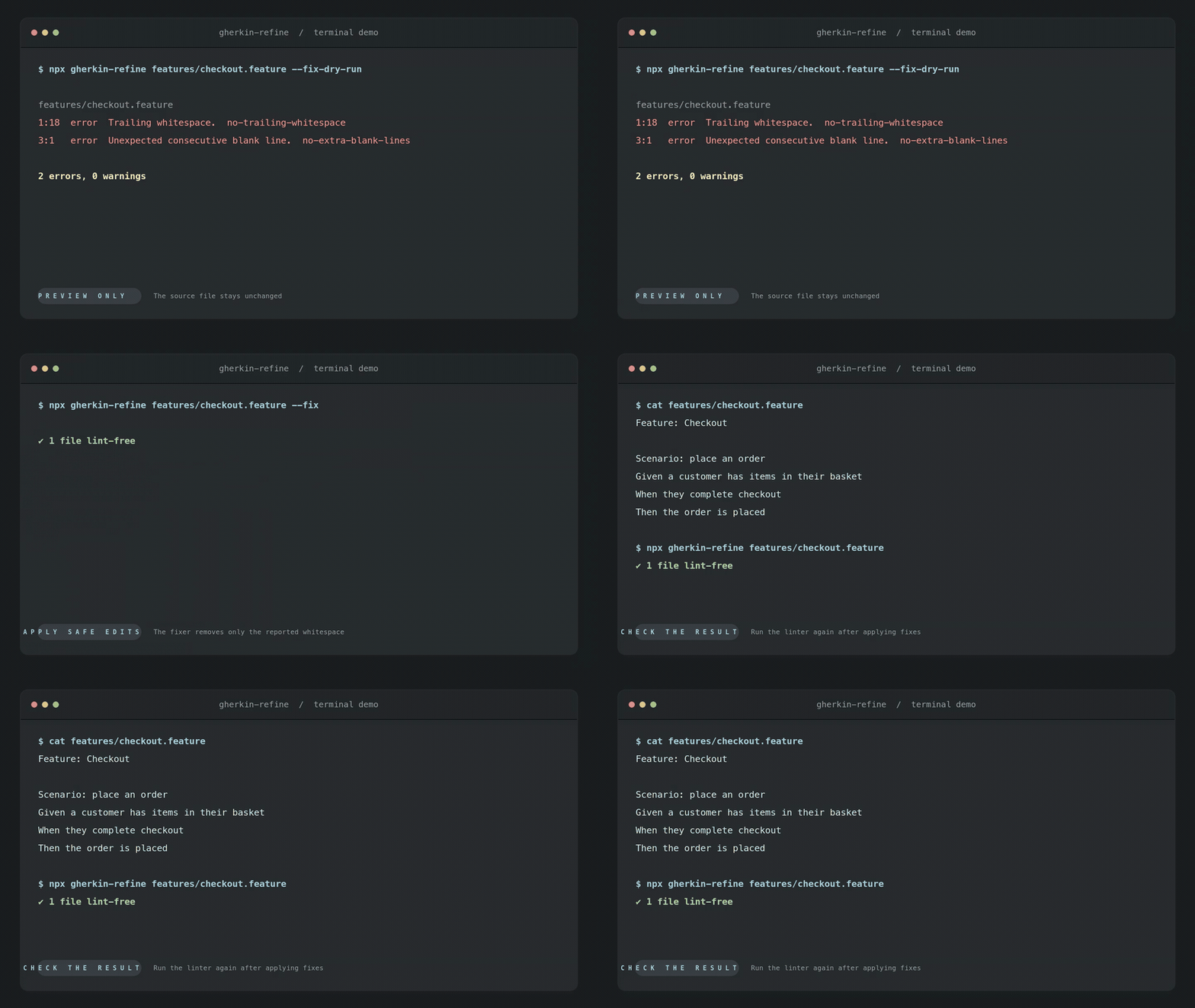
Whitespace cleanup rules are opt in. Enable no-extra-blank-lines in gherkin-refine.config.json. Use --fix-dry-run to preview a fix and --fix to apply it:
{
  "rules": {
    "no-extra-blank-lines": "error"
  }
}
Given features/checkout.feature:
Feature: Checkout


  Scenario: place an order
    Given a customer has items in their basket
    When they complete checkout
    Then the order is placed
Preview the safe fix without changing the file:
npx gherkin-refine features/checkout.feature --fix-dry-runfeatures/checkout.feature
3:1 error Unexpected consecutive blank line. no-extra-blank-lines
1 error, 0 warningsRun the same command with --fix to remove the extra blank line. The file then has one blank line between the Feature and Scenario.
Configuration
Create gherkin-refine.config.js, .mjs, .ts, or .json:
import { defineConfig } from "gherkin-refine";

export default defineConfig({
  extends: ["recommended"],
  rules: {
    "scenario-size": ["warn", { maxSteps: 12 }],
    "no-trailing-whitespace": "error",
    "name-length": "off"
  },
  overrides: [
    {
      files: ["legacy/**/*.feature"],
      rules: { "scenario-size": "off" }
    }
  ],
  ignores: ["generated/**/*.feature"]
});
Existing gherkinlint.config.* files are still discovered.
Severity accepts off, warn, error, 0, 1, or 2. Options are checked before linting begins. TypeScript configuration uses Node's built in type stripping. It must use erasable TypeScript syntax and cannot rely on tsconfig path aliases or compiler transforms. Configuration and plugin files execute as trusted project code.
See the configuration guide for configuration details and the plugin guide for custom rules.
CLI
gherkin-refine .
gherkin-refine "features/**/*.feature" --format json
gherkin-refine features/login.feature --fix
gherkin-refine features/login.feature --fix-dry-run --format json
cat generated.feature | gherkin-refine --stdin --stdin-filename features/generated.feature
gherkin-refine --list-rules --format json
gherkin-refine --explain no-duplicate-tags
gherkin-refine --print-config features/login.feature
gherkin-refine migrate .gherkin-lintrc --dry-run
Output formats are stylish, compact, json, ndjson, and sarif. JSON uses schema version 1. NDJSON emits one summary record followed by one record per file. --max-diagnostics limits emitted diagnostics and sets summary.truncated. --max-warnings sets the CI warning threshold. --quiet emits error diagnostics only. Use --absolute-paths when a machine consumer needs absolute result paths.
Exit codes are stable:
| Code | Meaning |
| --- | --- |
| 0 | Lint completed below the configured failure threshold |
| 1 | Lint completed with errors or too many warnings |
| 2 | Invalid configuration, CLI usage, plugin loading, or rule execution failure |
Gherkin syntax errors are lint diagnostics and return code 1.
API
import { lintFiles, lintText } from "gherkin-refine";

const textResult = await lintText(source, {
  filePath: "features/login.feature",
  config: { rules: { "scenario-size": ["warn", { maxSteps: 12 }] } }
});

const filesResult = await lintFiles(["features/**/*.feature"], {
  cwd: process.cwd(),
  concurrency: 8
});
The API returns the same diagnostics and summary used by the machine formatters. lintText accepts an AbortSignal, and async rules receive that signal. lintText with fix: true returns the updated text in the file result. lintFiles with fix: true writes each changed file atomically.
Custom rules can be published as ESM plugins. Plugins export rules, optional projectRules, and optional configs. Missing plugins are never installed automatically. Plugins are trusted executable JavaScript and are not sandboxed.
AI agent workflow
Use JSON output rather than parsing terminal prose:
gherkin-refine features/login.feature --format json --max-diagnostics 50
gherkin-refine features/login.feature --fix-dry-run --format json
The result schema is in schemas/result.schema.json. See docs/agent-integration.md for stdin, exit codes, truncation, rule introspection, and a remediation loop.
Migration
gherkin-refine migrate .gherkin-lintrc --dry-run reads the historical JSON format, including comments. It writes gherkin-refine.config.json when run without --dry-run. It never replaces an existing output unless --force is supplied. It keeps the recommended preset off, so only the legacy rules run. An existing .gherkin-lintignore keeps working. The command reports unsupported rules and changed behavior. See docs/migration.md.
Development
npm ci
npm run validate
npm run coverage
Coverage reports include lines, branches, functions, and statements for library modules. CLI behavior has separate process-level tests. CI checks minimum coverage of 98% for lines, 97% for functions, 97% for statements, and 90% for branches. Codecov also tracks partial coverage on lines with untested branches, so its percentage can be lower than the V8 line percentage. HTML and LCOV reports are attached to the CI run for 14 days.
The package is MIT licensed. It has no telemetry and core rules make no network requests. See docs/architecture.md and docs/rules.md.
See docs/performance.md for the benchmark method and one local measurement.
Maintenance and releases
Gherkin Refine is an independently maintained, MIT licensed project. It is not affiliated with Cucumber or gherkin-lint.
Every change runs unit, CLI, package smoke, and gherkin-lint comparison tests on Node.js 22.18, 24, and 26. Releases are published from GitHub Actions through npm trusted publishing with provenance, and every change is listed in CHANGELOG.md. Fixes ship in the latest release only.
Report bugs and request features in GitHub Issues, and ask questions in GitHub Discussions. Report vulnerabilities privately, as described in the security policy. See CONTRIBUTING.md to propose a change.
Sponsor
If Gherkin Refine saves your team time, you can sponsor its maintenance on GitHub.